
1. Киришүү
Thank you for choosing the KUIDAMOS P1 OCS-P1 Digital Hanging Crane Scale. This manual provides essential information for the safe and efficient operation, setup, and maintenance of your new weighing tool. This scale is designed for precise measurement in various industrial settings, including warehousing, textile, and metallurgy, with a maximum capacity of 1000KG (2000LB).

Сүрөт 1.1: Алдыңкы view of the KUIDAMOS P1 OCS-P1 Digital Hanging Crane Scale, displaying '500.0' on its digital screen, indicating its weighing capability.
2. Коопсуздук маалыматы
- Always ensure the scale is securely attached before loading any weight.
- Do not exceed the maximum weighing capacity of 1000KG (2000LB).
- Avoid dropping or subjecting the scale to severe impacts, as this may damage the internal sensor.
- Keep the scale away from strong electromagnetic fields, which can affect accuracy.
- Do not attempt to disassemble or repair the scale yourself. Contact qualified personnel for service.
- Жергиликтүү эрежелерге ылайык батареянын туура орнотулушун жана жок кылынышын камсыз кылыңыз.
3. Продукциянын компоненттери
The KUIDAMOS P1 OCS-P1 Digital Hanging Crane Scale package includes the following items:
- 1 x Digital Hanging Crane Scale (Main Unit)
- 1 x Алыстан башкаруу
3.1 Scale Features
- Санариптик дисплей: Clear LCD screen for weight readings.
- Strong Steel Hook: Durable hook for secure attachment of loads.
- Aluminium Alloy Casing: Robust and lightweight housing.
- Сезимтал сенсор: Ensures accurate and reliable measurements.
- Башкаруу баскычтары: Power, HOLD/UNIT, TARE/ZERO.

Сүрөт 3.1: Детальдуу view of the high-strength steel hook, designed for secure load handling.
3.2 Алыстан башкаруу
The remote control allows for convenient operation of the scale from a distance of approximately 30 to 50 meters (98.43 to 164.04 feet).
4. Техникалык шарттар
| Өзгөчөлүк | Description |
|---|---|
| Модел | OCS-P1 |
| Түс | Ачык күрөң |
| Материал | Алюминий эритмеси, дат баспас болот |
| Тараза диапазону | 1000KG (2000LB) |
| Минималдуу кубаттуулук | 500г |
| Scale Power Supply | 2 x AA 1.5V батарейкалар (киргизилген эмес) |
| Алыстан башкаруунун батареясы | 1 x 23A 12V battery (built-in, 50mAh capacity) |
| Scale Battery Usage Time | ≥ 65 саат |
| Алыстан башкаруу диапазону | Approx. 30 ~ 50m / 98.43 ~ 164.04ft |
| Тиркемелер | Warehousing, Textile, Metallurgy, etc. |
5. Орнотуу
5.1 Battery Installation (Scale)
- Таразанын арт жагындагы батарея отсегин табыңыз.
- Батареянын капкагын ачыңыз.
- Туура полярдуулукту (+/-) камсыз кылып, 2 даана AA 1.5V батарейкасын салыңыз.
- Батареянын капкагын бекем жабыңыз.
5.2 Алыстан башкаруунун батареясы
The remote control comes with a built-in 23A 12V battery. No user installation is required for this component.
5.3 Attaching the Scale
Securely attach the top shackle of the crane scale to a suitable, load-bearing lifting mechanism. Ensure the lower hook is free to receive the item to be weighed.
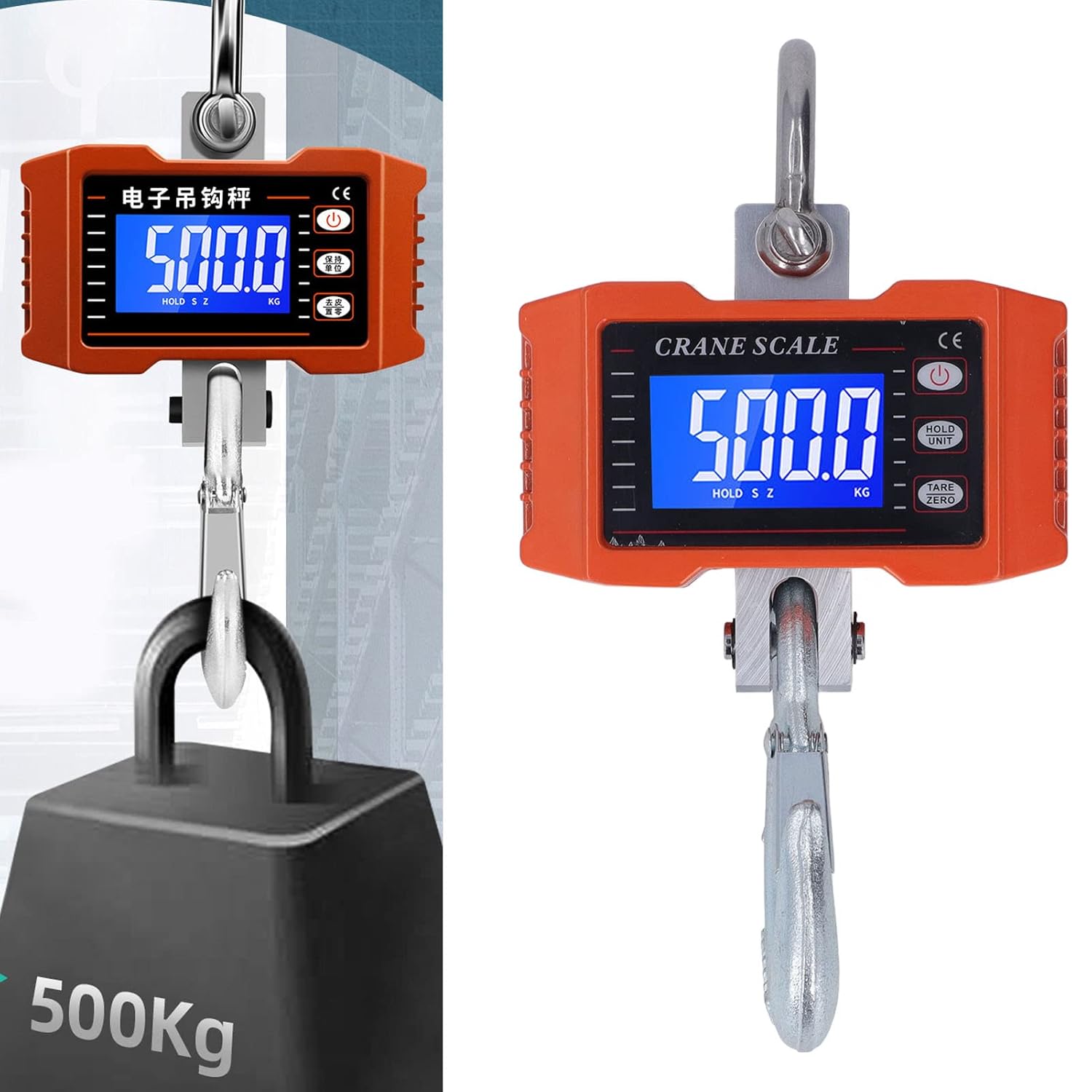
Image 5.1: The crane scale accurately weighing a 500KG load, demonstrating its application.
6. Иштөө нускамалары
6.1 Күйгүзүү/өчүрүү
- Күйгүзүү: басыңыз КҮЧ button on the scale or remote control. The display will light up.
- Өчүрүү: басып, кармап туруңуз КҮЧ баскычын дисплей өчмөйүнчө бир нече секунд басып туруңуз.
6.2 Таразалоо тартиби
- Ensure the scale is powered on and shows '0.0' or '0.00'. If not, press ТАР/НӨЛ.
- Carefully attach the item to be weighed to the lower hook.
- Wait for the reading on the digital display to stabilize. This is the weight of the item.
6.3 Бирдикти конверсиялоо
To switch between kilograms (KG) and pounds (LB):
- басыңыз КАРМАП/БИРДИК button briefly. The unit displayed will change.
6.4 Tare/Zero Function
The Tare function allows you to subtract the weight of a container or previous load:
- With an empty container or previous load on the hook, press the ТАР/НӨЛ баскычын басыңыз. Дисплей '0.0' абалына кайтарылат.
- Now, add the item you wish to weigh into the container; only the net weight of the item will be displayed.
6.5 кармап туруу функциясы
To hold the current weight reading on the display:
- While an item is being weighed, press and hold the КАРМАП/БИРДИК button until 'HOLD' appears on the display. The reading will be locked.
- Басыңыз КАРМАП/БИРДИК again to release the hold function.
6.6 Алыстан башкаруунун иштеши
The remote control mirrors the functions of the buttons on the scale:
- Use the corresponding buttons on the remote for Power On/Off, Unit Conversion, Tare/Zero, and Hold functions.
- Ensure you are within the effective range of 30-50 meters for reliable operation.
7. Техникалык тейлөө
7.1 Тазалоо
- Таразаны жумшак менен сүртүңүз, гamp кездеме. Абразивдүү тазалагычтарды колдонбоңуз же таразаны сууга салбаңыз.
- Ensure the display and buttons are free from dust and debris.
7.2 Сактоо
- Таразаны кургак, салкын жерде, күн нуру түз тийген жерден жана өтө жогорку температурадан алыс сактаңыз.
- If storing for an extended period, remove the AA batteries from the scale to prevent leakage.
7.3 Battery Replacement (Scale)
When the display indicates low battery, replace the 2 x AA 1.5V batteries following the installation steps in Section 5.1.
8. Кыйынчылыктарды
| Көйгөй | Мүмкүн себеп | Чечим |
|---|---|---|
| Scale does not power on. | Өлүк же туура эмес орнотулган батарейкалар. | Replace AA batteries, ensuring correct polarity. |
| Туура эмес окуулар. | Scale not zeroed, unstable environment, or overloaded. | Press TARE/ZERO. Ensure stable conditions. Do not exceed capacity. |
| Пульт иштебей жатат. | Out of range, or remote battery depleted. | Move closer to the scale. The remote control battery is built-in and has a long lifespan; if issues persist, contact support. |
| Display shows 'O-L' or 'ERR'. | Ашыкча жүктөө. | Remove the load immediately. Do not exceed 1000KG. |
9. Кепилдик жана колдоо
KUIDAMOS products are manufactured to high-quality standards. For warranty information, technical support, or service inquiries, please refer to the contact information provided at the point of purchase or visit the official KUIDAMOS webсайт. Кепилдик дооматтары үчүн сатып алганыңыздын далилин сактап коюңуз.