
1. Киришүү
This manual provides comprehensive instructions for setting up, operating, maintaining, and troubleshooting your Dell P2425H 24-inch Full HD (1920x1080) 100Hz IPS Monitor. Please read this manual thoroughly before using the monitor to ensure proper operation and to prevent damage.
The Dell P2425H monitor is designed to enhance your workspace with its 24-inch IPS panel, delivering crisp 1920x1080 resolution at a 100 Hz refresh rate. It features ComfortView Plus technology for reduced blue light emissions, promoting eye comfort during extended use. The monitor offers versatile connectivity options including HDMI, DisplayPort, and a built-in USB hub, along with an ergonomic stand for optimal viewсооронуч.

Image 1.1: Dell P2425H 24-inch monitor with included accessories.
2. Коопсуздук маалыматы
Observe the following safety precautions to ensure safe and optimal performance of your monitor:
- Мониторду жылуулук булактарынын жанына же түз күн нуруна койбоңуз.
- Монитордун айланасында туура желдетүүнү камсыз кылыңыз.
- Use only the power cord and cables provided or recommended by Dell.
- Мониторду өзүңүз тейлөөгө аракет кылбаңыз. Бардык тейлөөлөрдү квалификациялуу тейлөө кызматкерлерине тапшырыңыз.
- Мониторду суудан же ашыкча нымдан алыс кармаңыз.
- Position the monitor on a stable, flat surface to prevent it from falling.
3. Пакеттин мазмуну
Пакетте бардык буюмдар бар экенин текшериңиз:
- Dell P2425H 24-inch Monitor
- Монитор стенди (негизги жана көтөргүч)
- Электр кабели
- DisplayPort Cable (6 feet)
- HDMI Cable (6 feet)
- USB-A 3.2 Gen 1 to USB-B Upstream Cable (6 feet)
- USB-C Cable
- LCD Cleaning Kit
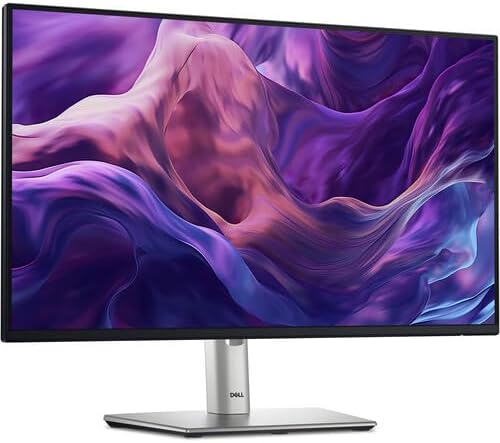
Image 3.1: Contents of the Dell P2425H monitor package, including cables and cleaning kit.
4. Орнотуу
4.1. Монитордун стендди чогултуу
- Place the monitor base on a flat, stable surface.
- Align the stand riser with the slot on the base and press down until it clicks into place.
- Attach the assembled stand to the back of the monitor panel. Align the tabs on the stand with the grooves on the monitor and push until it locks securely.
- Ensure the monitor is securely attached to the stand before placing it upright.

Image 4.1: Detail of the monitor stand base for assembly reference.
4.2. Мониторду туташтыруу
Туташуудан мурун, компьютериңиздин жана мониторуңуздун өчүрүлгөнүн текшериңиз.
- Кубат туташуу: Connect the power cord to the monitor's power port and then to a grounded electrical outlet.
- Видео туташуу: Choose one of the following video cables to connect your computer to the monitor:
- HDMI: HDMI кабелинин бир учун компьютериңиздеги HDMI портуна, экинчи учун монитордогу HDMI портуна туташтырыңыз.
- DisplayPort: Connect one end of the DisplayPort cable to the DisplayPort on your computer and the other end to the DisplayPort on the monitor.
- USB-C: If your computer supports video output over USB-C, connect the USB-C cable to the USB-C port on your computer and the USB-C port on the monitor.
- USB Upstream Connection (for USB Hub functionality): To enable the monitor's USB ports, connect the USB-A to USB-B upstream cable from your computer's USB port to the upstream USB-B port on the monitor.
- USB Downstream Connections: Connect your USB devices (e.g., keyboard, mouse, USB drive) to the USB-A downstream ports on the monitor.

Image 4.2: Rear panel of the Dell P2425H monitor, highlighting connectivity ports.
5. Мониторду иштетүү
5.1. Күйгүзүү/өчүрүү
Мониторду күйгүзүү же өчүрүү үчүн монитордо жайгашкан кубат баскычын басыңыз. Кубат индикатору монитордун абалын көрсөтөт.
5.2. Экрандагы дисплей (OSD) менюсу
The OSD menu allows you to adjust various monitor settings. Use the control buttons, typically located on the bottom or back of the monitor, to navigate the menu.
- Жарыктык/Контраст: Дисплейдин жарыктыгын жана контрастын тууралаңыз.
- Киргизүү булагы: Manually select the video input (HDMI, DisplayPort, USB-C).
- Түс жөндөөлөрү: Modify color temperature, gamma, and preset modes.
- Дисплейдин жөндөөлөрү: Adjust aspect ratio, sharpness, and response time.
- Меню орнотуулары: OSD тилин, тунуктугун жана тайм-аутту конфигурациялаңыз.
- Башкалар: Access factory reset, DDC/CI, and other advanced options.
5.3. Монитордун жөндөөлөрүн тууралоо
Оптималдуу үчүн viewing, adjust the monitor's physical position:
- Бийиктигин тууралоо: Gently push or pull the monitor panel up or down along the stand riser. The monitor can be adjusted up to 150mm.
- Россия: Hold both sides of the monitor panel and gently tilt it forwards or backwards to achieve your desired viewбурч.
- Айлануучу: Монитор панелин анын негизинде солго же оңго буруңуз.
- Пивот: Rotate the monitor panel 90 degrees clockwise or counter-clockwise for portrait or landscape orientation. Ensure the monitor is at its maximum height and tilted back before pivoting to avoid hitting the desk.

Сүрөт 5.1: Side profile of the Dell P2425H monitor demonstrating height and tilt adjustments.
6. Техникалык тейлөө
6.1. Мониторду тазалоо
Мониторуңузду тазалоо үчүн, төмөнкү кадамдарды аткарыңыз:
- Мониторду өчүрүп, электр зымдарын сууруп алыңыз.
- Жумшак, түксүз кездемени жеңил колдонуңуз dampened with water or a non-abrasive screen cleaner (like the included LCD Cleaning Kit).
- Экранды жана сырткы беттерди акырын сүртүңүз. Суюктукту экранга түз же кандайдыр бир тешиктерге чачпаңыз.
- Do not use benzene, thinner, ammonia-based cleaners, or abrasive cleaning agents.
6.2. Жалпы кам көрүү
- Монитор же анын кабелдерине оор нерселерди коюудан алыс болуңуз.
- Protect the monitor from extreme temperatures and humidity.
- When moving the monitor, hold it by the stand or base, not by the screen.
7. Кыйынчылыктарды
Мониторуңузда көйгөйлөргө туш болсоңуз, төмөнкү жалпы көйгөйлөрдү жана чечимдерди караңыз:
| Көйгөй | Мүмкүн чечим |
|---|---|
| Экранда сүрөт жок |
|
| Сүрөт бүдөмүк же бурмаланган |
|
| USB порттору иштебейт |
|
| Үн жок (эгер бар болсо) |
|
8. Техникалык шарттар
| Өзгөчөлүк | Деталь |
|---|---|
| Модель номери | P2425H |
| Screen Size | 24 дюйм |
| Панел түрү | IPS (тегиздикте которуу) |
| Native Resolution | 1920 x 1080 (Full HD) |
| Жаңыртуу ылдамдыгы | 100 Гц |
| Аспект катышы | 16:9 |
| Жооп убактысы | 5 ms (GtG - Gray-to-Gray) |
| Контраст катышы | 1500:1 (Статикалык) |
| Жарыктык | 250 нит |
| Түс колдоо | 16.7 миллион түс, 99% sRGB |
| Байланыш | 1x HDMI, 1x DisplayPort, 1x USB-C, 1x USB-B Upstream, 2x USB-A 3.2 Downstream |
| Эргономика | Height Adjustable (up to 150mm), Tilt, Swivel, Pivot |
| Өлчөмдөрү (стенд менен) | 21 x 16 x 7.1 дюйм (болжол менен) |
| Салмагы (стенд менен) | 14.78 фунт (болжол менен) |
| Сертификаттар | ENERGY STAR 8.0, EPEAT Gold, ComfortView Plus |
9. Кепилдик жана колдоо
For warranty information and technical support, please refer to the documentation included with your monitor or visit the official Dell support website. You can typically find detailed warranty terms, driver downloads, and contact information for customer service there.
Dell колдоо Webсайт: www.dell.com/support
10. Кайра иштетүү маалыматы
Please dispose of your monitor and its components responsibly. Electronic waste should not be disposed of with general household waste. Consult your local authorities or recycling centers for information on proper disposal methods for electronic products.