
1. Киришүү
Сатып алганыңыз үчүн рахматasing the RCA SP550BT Portable Speaker. This manual provides important information regarding the setup, operation, and maintenance of your new speaker. Please read it thoroughly before use and keep it for future reference.
The RCA SP550BT is a versatile portable speaker featuring 50W output, Bluetooth connectivity, USB playback, FM radio, AUX input, True Wireless Stereo (TWS) function, LED lights, and a microphone input for an enhanced audio experience.
2. Пакеттин мазмуну
Сураныч, пакетте төмөнкү нерселерди текшериңиз:
- RCA SP550BT Portable Speaker
- Алыстан башкаруу
- Электр кабели
- Колдонуучунун Колдонмосу (бул документ)
3. Продукт бүтүп калдыview
Familiarize yourself with the main components and features of your RCA SP550BT speaker.

3.1-сүрөт: Фронт view of the RCA SP550BT portable speaker. This image displays the speaker in an upright position, highlighting the top control panel and the three prominent speaker cones with red illumination.

3.2-сүрөт: Side view of the RCA SP550BT portable speaker. This perspective shows the depth of the speaker and the integrated handle for portability.

3.3-сүрөт: Горизонталдуу view of the RCA SP550BT portable speaker. This image illustrates the speaker's design when placed on its side, emphasizing the speaker grille and LED lighting.
3.1 Алыстан башкаруу
Кошулган алыстан башкаруу пульту динамикти алыстан ыңгайлуу башкарууга мүмкүндүк берет.
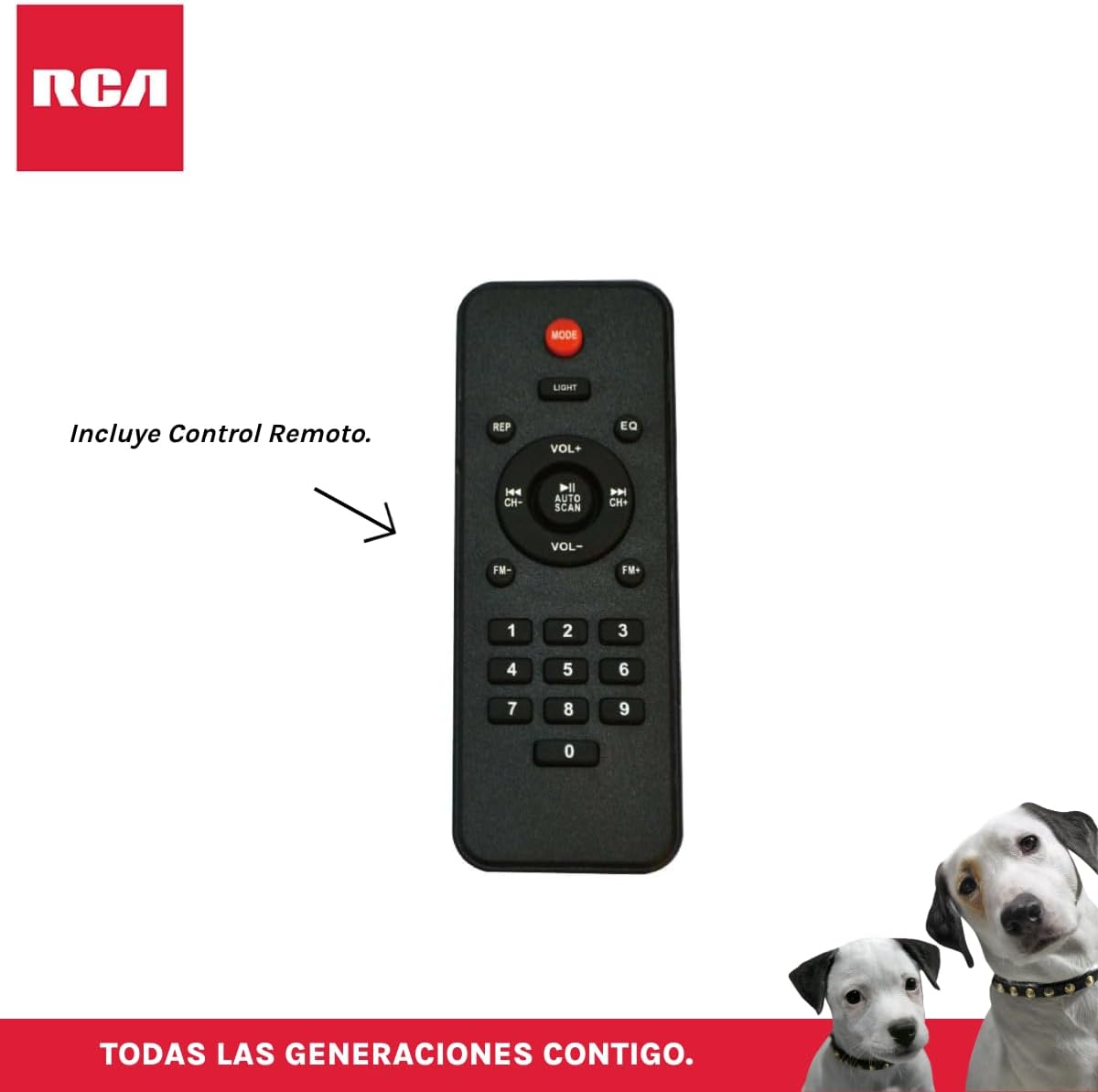
3.4-сүрөт: RCA SP550BT Remote Control. This image displays the full layout of the remote control, including buttons for power, mode selection, volume adjustment, track navigation, equalizer settings, and a numeric keypad.
4. Орнотуу
4.1 Кубат туташтыруу
- Ensure the speaker is placed on a stable, flat surface.
- Connect the power cable to the speaker's power input port.
- Plug the other end of the power cable into a standard electrical outlet (AC 100-240V, 50/60Hz).
- Press the power button on the speaker or remote control to turn it on.
5. Иштөө нускамалары
5.1 Күйгүзүү/өчүрүү
- Динамикти күйгүзүү үчүн, баскычын басыңыз КҮЧ button on the control panel or the remote control.
- Динамикти өчүрүү үчүн, баскычын басыңыз КҮЧ кайра баскычын.
5.2 Режимди тандоо
басыңыз РЕЖИМ button on the control panel or remote control to switch between Bluetooth, USB, FM, and AUX input modes.
5.3 Bluetooth жупташтыруу
- Динамикти күйгүзүп, Bluetooth режимин тандаңыз РЕЖИМ button. The display will show "BLUE" and a pairing indicator will flash.
- Мобилдик түзмөгүңүздө Bluetooth'ду иштетиңиз (смартфон, планшет ж.б.).
- Издөө "RCA SP550BT" in your device's Bluetooth list and select it to pair.
- Жупташкандан кийин динамик ырастоо үнүн чыгарат жана Bluetooth индикатору өчүп токтойт.
- Эми сиз түзмөгүңүздөн аудиону динамик аркылуу ойной аласыз.
5.4 USB ойнотуу
- Insert a USB flash drive (FAT32 format, max 32GB) containing MP3 audio fileUSB портуна киргизиңиз.
- Динамик автоматтык түрдө USB режимине которулуп, биринчи тректи ойнотууну баштайт. Эгер андай болбосо, баскычын басыңыз РЕЖИМ USB режимин тандоо үчүн баскыч.
- колдонуу ОЙНОО/ТЫНЫТТЫРУ, МУРУНКУ, жана КИЙИНКИ buttons on the control panel or remote to control playback.
5.5 FM радиосу
- Turn on the speaker and select FM mode using the РЕЖИМ баскычы.
- басып, кармап туруңуз ОЙНОО/ТЫНЫТТЫРУ баскычы (же АВТО СКАН on remote) to automatically scan and save available FM stations.
- колдонуу МУРУНКУ жана КИЙИНКИ Сакталган станциялар арасында багыт алуу үчүн баскычтарды басыңыз.
5.6 AUX киргизүү
- Connect an external audio device (e.g., MP3 player, laptop) to the speaker's AUX input port using a 3.5mm audio cable (not included).
- колдонуп, AUX режимин тандаңыз РЕЖИМ баскычы.
- Туташкан түзмөгүңүздөн ойнотууну жана үндү башкаруу.
5.7 TWS (чыныгы зымсыз стерео) функциясы
The TWS function allows you to connect two RCA SP550BT speakers wirelessly for a stereo sound experience.
- Ensure both SP550BT speakers are powered on and in Bluetooth mode, but not yet paired with any device.
- Динамиктердин биринде баскычын басып, кармап туруңуз TWS button (if available, or a dedicated TWS pairing button) until you hear a confirmation tone. The speakers will attempt to pair with each other.
- Once successfully paired, one speaker will act as the master (left channel) and the other as the slave (right channel).
- Now, pair your mobile device with the master speaker via Bluetooth as described in section 5.3.
5.8 LED жарыктары
басыңыз ЖАРЫК button on the control panel or remote control to cycle through different LED light modes or to turn them off.
5.9 Микрофонду колдонуу
Connect a wired microphone (not included) to the microphone input port on the speaker. Adjust the microphone volume using the dedicated knob (if available) or the main volume control.
6. Техникалык тейлөө
- Тазалоо: Динамиктин сыртын тазалоо үчүн жумшак, кургак чүпүрөктү колдонуңуз. Абразивдүү тазалагычтарды же эриткичтерди колдонбоңуз.
- Сактагыч: Узак мөөнөткө колдонулбаганда, динамикти күн тийбеген жана өтө температурадан алыс, салкын, кургак жерде сактаңыз.
- Суу таасири: Бул динамик суу өткөрбөйт. Аны сууга же ашыкча нымдуулукка дуушар кылуудан алыс болуңуз.
7. Кыйынчылыктарды
Динамикиңизде көйгөйлөргө туш болсоңуз, төмөнкү жалпы көйгөйлөрдү жана чечимдерди караңыз:
| Көйгөй | Мүмкүн себеп | Чечим |
|---|---|---|
| Күч жок | Power cable not connected; Power outlet not working; Speaker off. | Check power cable connection; Try a different outlet; Press the POWER button. |
| Үн жок | Үнү өтө төмөн; Туура эмес режим тандалды; Түзмөк туура эмес туташтырылган. | Increase volume; Select correct input mode (Bluetooth, USB, AUX); Reconnect device. |
| Bluetooth жупташтыруу ишке ашпай калды | Speaker not in pairing mode; Device Bluetooth off; Speaker already paired. | Ensure speaker is in Bluetooth pairing mode; Turn on device Bluetooth; Disconnect from other devices. |
| USB ойнотуу иштебей жатат | USB drive format incompatible; Corrupt files; USB drive not inserted correctly. | Ensure USB is FAT32 format; Check file integrity; Reinsert USB drive. |
| FM радиосу начар кабыл алат | Алсыз сигнал; Интерференция. | Relocate speaker; Extend antenna (if applicable). |
8. Техникалык шарттар
| Өзгөчөлүк | Спецификация |
|---|---|
| Модел | SP550BT |
| Бренд | RCA |
| Динамик чыгаруу күчү | 50 Ватт (максималдуу) |
| Байланыш технологиясы | Bluetooth, USB, AUX |
| Зымсыз технология | Bluetooth |
| Аудио чыгаруу режими | Стерео |
| Динамик түрү | Көчмө, сыртта |
| Монтаж түрү | Столдун үстү |
| Башкаруу ыкмасы | Алыстан башкаруу |
| Динамик өлчөмү | 6.5 дюйм |
| Вуфердин диаметри | 6.5 дюйм |
| Батарея сыйымдуулугу | 4400 миллионamp Саат |
| Power Source | Электр кабели |
| Шайкеш түзмөктөр | Ноутбук, MP3 ойноткуч, смартфон, планшет |
| GTIN / UPC | 044476152061 |
9. Кепилдик жана колдоо
This product comes with a limited warranty. Please refer to the warranty card included in your package for specific terms and conditions. For technical support or service inquiries, please contact RCA customer service through their official webсайт же сатып алуу менен камсыз болгон байланыш маалыматы.
Note: Warranty terms may vary by region. Keep your proof of purchase for warranty claims.