
1. Киришүү
The Daakro ZK-1001B is a 100W mono channel Bluetooth amplifier board designed for DIY audio projects, including wireless speakers. It features TWS (True Wireless Stereo) pairing, multiple audio input options (Bluetooth, AUX, USB), and intuitive knob controls for volume, treble, and bass. This manual provides detailed instructions for setting up, operating, and maintaining your ampкуткаруучу такта.
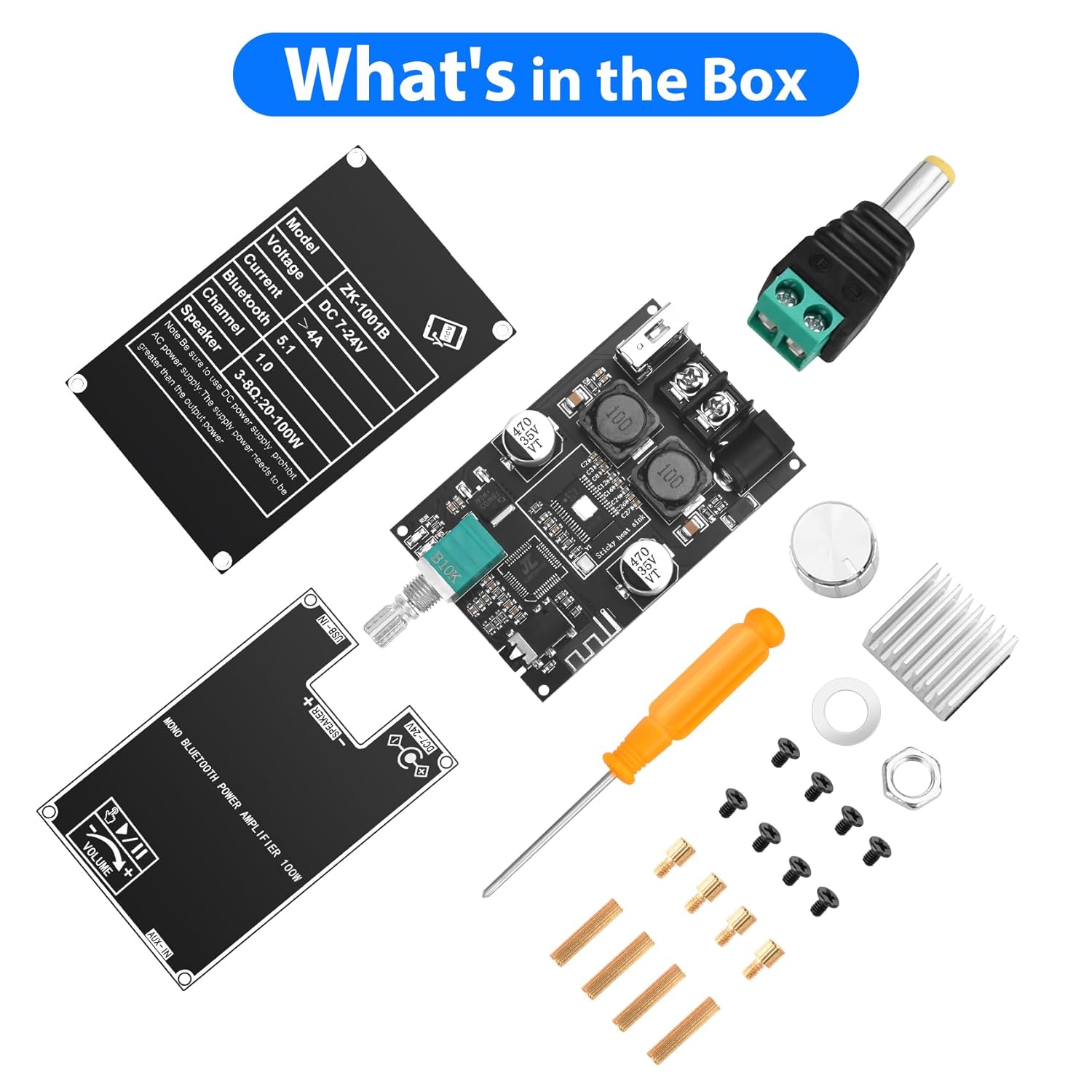
2. Кутуда эмне бар
Пакетти ачканда, сиз төмөнкү компоненттерди табышыңыз керек:
- Ampкөтөргүч такта
- Knob caps (for volume, treble, bass)
- Screwdriver
- Электр киргизүү кабели
- Mounting hardware (spacers, screws)
- Protective plates
3. Продукт бүтүп калдыview
The ZK-1001B amplifier board integrates a TPA3116D2 HiFi chip and Bluetooth 5.1 for high-fidelity audio. It includes controls for treble, bass, and volume, along with multiple input ports.
Controls
- Үн баскычы: Adjusts overall sound level. Also functions as a multi-function button (single click for play/pause, double click for next track, triple click for TWS mode, long press for power ON/OFF).
- Басс баскычы: Төмөнкү жыштыктагы аудиону тууралайт.
- Үч ыргытуу баскычы: Жогорку жыштыктагы аудиону тууралайт.

Inputs and Outputs
- DC 7-24V кубат киргизүү: Электр булагы туташтыруу үчүн.
- Динамиктин чыгышы: Connects to a single speaker (mono channel).
- USB-IN: For USB flash drive audio playback or as a USB sound card.
- Колдонуучу: 3.5mm audio jack for wired audio input.
Көрсөткүчтөр
- ИШ көрсөткүчү: Иштөө абалын көрсөтөт.
- TWS көрсөткүчү: Shows TWS pairing status.

4. Орнотуу нускамалары
- Компоненттерди таңгактан чыгаруу: Таңгактан кылдаттык менен бардык нерселерди алып салыңыз.
- Attach Heat Sink: If not pre-attached, remove the backing adhesive from the heat sink and firmly press it onto the TPA3116D2 chip on the ampкуткаруучу такта.
- Орнотуу баскычтары: Place the silver knob caps onto the volume, bass, and treble shafts.
- Mount Protective Plates: Use the provided spacers and screws to attach the top and bottom protective plates to the amplifier board. Ensure all ports and controls are accessible.
- Connect Speaker: Connect your speaker (3-8Ω, 20-100W) to the "SPEAKER +" and "SPEAKER -" terminals.
- Туташуу кубаты: Connect a DC 7-24V power supply to the DC power input jack. Ensure correct polarity. A 12V or 24V adapter is suitable. For portable use, a 12V battery can be used.

5. Иштөө нускамалары
- Күйгүзүү: Long press the volume knob to power on the amplifier board. The WORK indicator light will illuminate.
- Киргизүү режимин тандоо:
- Bluetooth режими: The board will automatically enter Bluetooth pairing mode. Издөө "ZK-1001B" on your device and connect.
- AUX режими: Connect an audio source (e.g., TV, computer, phone) to the 3.5mm AUX-IN jack. The board will automatically switch to AUX input.
- USB режими: Аудио менен USB флэш-дискти салыңыз files into the USB-IN port. The board will play audio from the USB drive. It can also function as a USB sound card when connected to a computer.
- Аудиону тууралоо:
- Көлөмү: Rotate the volume knob to increase or decrease the sound level.
- Ойнотуу/тындыруу: Single click the volume knob to play or pause audio.
- Кийинки трек: Double click the volume knob to skip to the next track (in Bluetooth or USB mode).
- Жогорку/бас: Rotate the respective knobs to adjust high and low frequencies.
- Өчүрүү: Long press the volume knob to power off the ampкуткаруучу такта.

6. TWS Pairing Function (True Wireless Stereo)
The ZK-1001B supports TWS pairing, allowing two ZK-1001B boards to function as left and right stereo channels for a wider soundstage.
- Prepare Two Boards: Ensure both ZK-1001B amplifier boards are powered on and not connected to any Bluetooth device.
- TWS режимине кириңиз: On one of the boards, triple click the volume knob. The TWS indicator light will flash, indicating it's searching for another board.
- Жупташтыруу: The two boards will automatically pair. Once paired, one board will act as the left channel and the other as the right channel. The TWS indicator lights on both boards will show a steady state (e.g., solid light or a different flashing pattern).
- Bluetooth туташтыруу: Connect your Bluetooth device to the primary amplifier board (the one you initiated TWS pairing on).
- TWS режиминен чыгуу: Triple click the volume knob again on either board to exit TWS mode.

7. Аудио киргизүү режимдери
The Daakro ZK-1001B offers versatile audio input options:
- Bluetooth 5.1: Wireless connection for smartphones, tablets, and other Bluetooth-enabled devices. Provides a stable connection up to 16.4 feet (5 meters).
- 3.5 мм AUX киргизүү: For wired connection to devices like TVs, computers, MP3 players, or other audio sources.
- USB Flash Drive: Directly play audio fileUSB флешкасынан.
- USB үн картасы: Connect the board to a computer via USB to use it as an external sound card, enhancing audio output quality.

8. Техникалык шарттар
| Өзгөчөлүк | Деталь |
|---|---|
| Модель номери | ZK-1001B |
| Бренд | Daakro |
| Монтаж түрү | Board/Module |
| Киргизүү көлөмүtage | Туруктуу ток 7-24 вольт |
| Каналдардын саны | 1 (Моно) |
| Чыгуу күчү | Up to 100W (depending on input voltage and speaker impedance) |
| Динамик импедансы | 3-8Ω (recommended 4Ω) |
| Bluetooth версиясы | 5.1 |
| Bluetooth диапазону | 16.4 фут (5 метр) чейин |
| Аудио киргизүү | Bluetooth, AUX (3.5mm), USB Flash Drive, USB Sound Card |
| Пакеттин өлчөмдөрү | 4.41 x 2.64 x 2.05 дюйм |
| Элемент Салмагы | 3.53 унция |
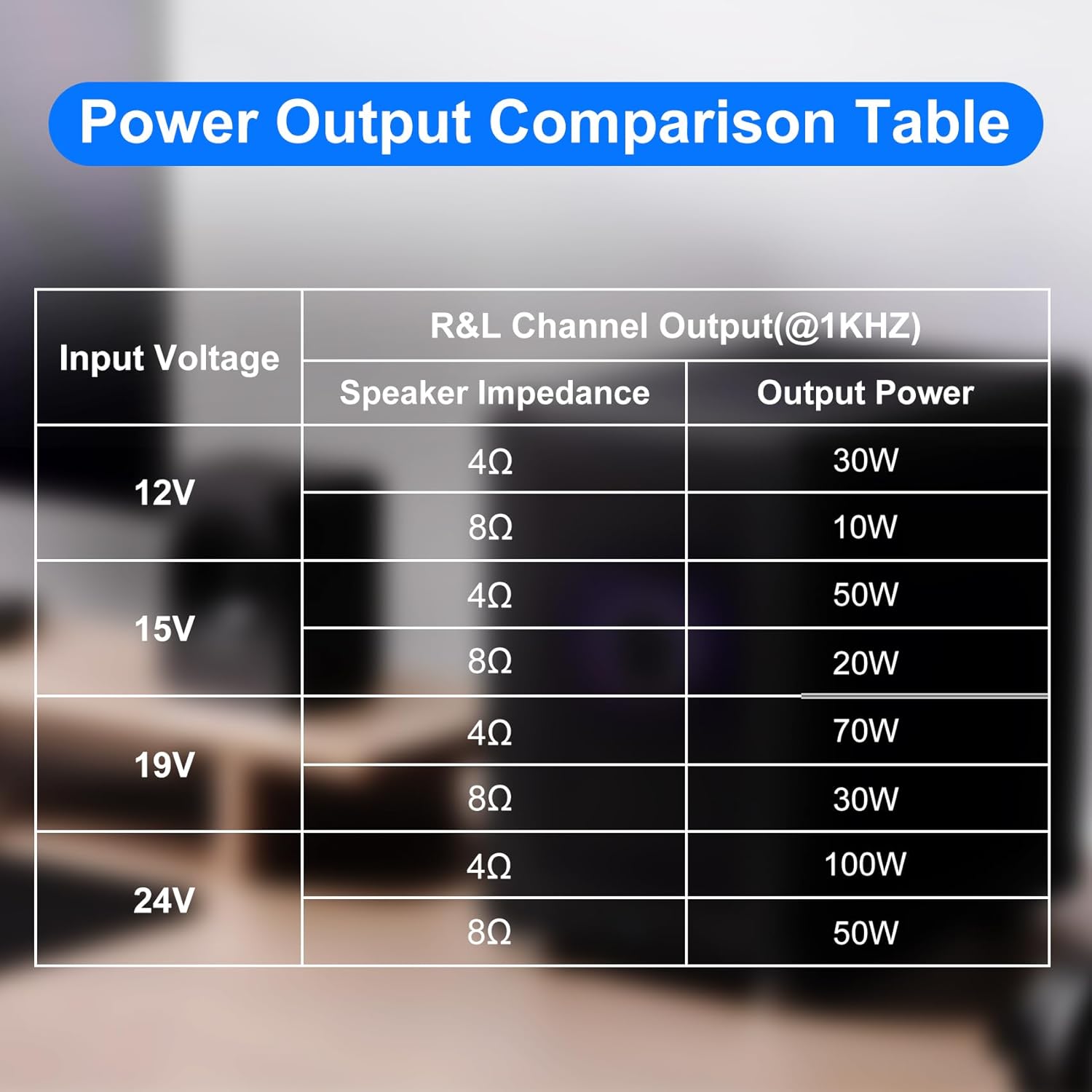
Power Output Comparison Table
| Киргизүү көлөмүtage | Динамик импедансы | Чыгуу күчү |
|---|---|---|
| 12V | 4Ω | 30 Вт |
| 8Ω | 10 Вт | |
| 15V | 4Ω | 50 Вт |
| 8Ω | 20 Вт | |
| 19V | 4Ω | 70 Вт |
| 8Ω | 30 Вт | |
| 24V | 4Ω | 100 Вт |
| 8Ω | 50 Вт |
Эскертүү: Жетиштүү томду камсыз кылууtage and current input for optimal power output. Higher voltage and current generally result in higher power. For the same conditions, a smaller speaker impedance yields greater power.
9. Техникалык тейлөө
- сактаңыз ampКөтөргүч тактаны тазалап, чаңдан арылыңыз. Тазалоо үчүн жумшак, кургак чүпүрөк колдонуңуз.
- Avoid exposing the board to moisture, extreme temperatures, or direct sunlight.
- Ensure proper ventilation to prevent overheating, especially during prolonged use at high volumes.
- Do not attempt to modify the circuit board, as this may void the warranty and cause damage.
10. Кыйынчылыктарды
Күч жок
- Check if the power supply is correctly connected and providing the specified DC 7-24V.
- Ensure the power adapter is functional.
- Verify the volume knob is long-pressed to turn on the device.
Үн жок
- Динамиктердин туташууларынын туура полярдуулугун жана бекем орнотулгандыгын текшериңиз.
- Ensure the volume is turned up on both the amplifier board and the audio source.
- Verify the correct audio input mode is selected (Bluetooth, AUX, USB).
- If using Bluetooth, ensure the device is properly paired and connected.
- Эгер AUX колдонуп жатсаңыз, аудио кабелдин бузулганын текшерип, анын толук сайылганын текшериңиз.
- If using USB, ensure the USB drive is formatted correctly and contains compatible audio files.
Distorted Sound
- Экөөнүн тең үнүн азайтыңыз amplifier board and the audio source.
- Check speaker impedance compatibility (3-8Ω).
- Ensure the power supply provides adequate current for the desired output power.
- Динамик зымдарын кыска туташуулар же бузулуулар үчүн текшериңиз.
Bluetooth ажыратуу
- Ensure the Bluetooth device is within the 16.4 feet (5 meters) range.
- Башка зымсыз аппараттардын кийлигишүүсүн текшериңиз.
- Bluetooth түзмөгүн кайра жупташтырып көрүңүз.
TWS жупташтыруу көйгөйлөрү
- Ensure both ZK-1001B boards are the same model and are not already connected to another Bluetooth device.
- Follow the triple-click procedure carefully on one board to initiate pairing.
- Ensure both boards are within close proximity during pairing.
11. Кепилдик жана колдоо
Daakro is committed to providing high-quality audio equipment.
- Кепилдик: The product typically comes with a 30-day warranty. Please refer to your purchase documentation for specific terms.
- Кардарларды тейлөө: Online customer service is available for support.
- Байланыш: For any issues or inquiries, please contact Daakro customer support through the platform of purchase or visit the official Daakro store for more information.