
1. Киришүү
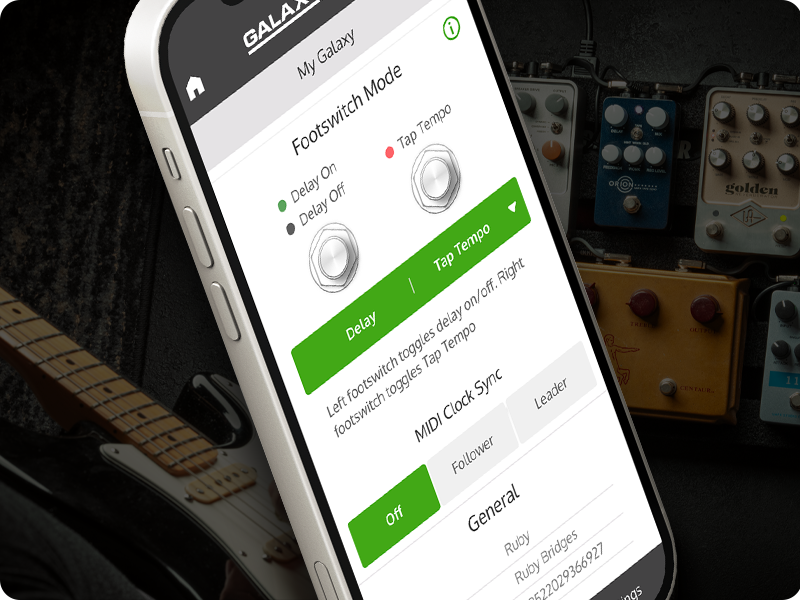
The Universal Audio ANTI 1992 High Gain Amp Pedal is a stereo amp and cab emulation pedal designed to deliver high-gain guitar tones. It features six famous mic/speaker pairs, built-in boosts, and offers both live and preset modes. Customization is available through the UAFX mobile app. This pedal emulates the sound of a 120-watt tube amplifier, providing aggressive, 'scooped' guitar tones suitable for modern metal, bone-crushing riffs, searing leads, and crystalline cleans.
2. Негизги өзгөчөлүктөрү
- Authentic emulation of early '90s 120-watt high-gain amp тондор.
- Powerful UAFX dual-engine for realistic sound.
- Integrated noise gate, TS-style overdrive, and boost for album-ready sounds.
- Dynamic Room Modeling technology derived from UA’s OX Amp Top Box.
- Six classic mic/speaker pairings for diverse tonal options.
3. Кутуда эмне бар
Upon unboxing your Universal Audio ANTI 1992 High Gain Amp Pedal, you should find the following components:
- Universal Audio ANTI 1992 High Gain Amp Педал
- Power supply (may be sold separately, check product packaging)
- USB кабели
- User Manual
4. Орнотуу
- Кубат туташуу: Connect a compatible 9V DC power supply (20 Milliamps, center-negative) to the 9VDC input on the rear of the pedal.
- Аспап туташуу: Connect your guitar to the IN 1/MONO input using a standard 1/4-inch instrument cable. For stereo input, use both IN 1/MONO and IN 2/STEREO.
- Чыгуу туташуу: Connect the OUT 1/MONO output to your amplifier or audio interface. For stereo output, use both OUT 1/MONO and OUT 2/STEREO.
- USB туташуу: For app control or firmware updates, connect a USB-C cable from the pedal's USB port to your computer or mobile device.
- Bluetooth жупташууда: To use the UAFX mobile app wirelessly, ensure Bluetooth is enabled on your device and follow the app's instructions to pair with the pedal.
5. Операциялык башкаруу каражаттары
The ANTI 1992 pedal features a range of knobs and switches for precise tone shaping:
- PRE GAIN: Киргизүү пайда деңгээлин тууралайт.
- КАТЫШУУ: Жогорку жыштыктагы жоопту көзөмөлдөйт.
- ЧЫГЫШ: Жалпы чыгаруу көлөмүн орнотот.
- LOW [OVERDRIVE]: Adjusts low frequencies and can engage overdrive.
- MID [OD TONE]: Controls mid-range frequencies and overdrive tone.
- HIGH [OD LEVEL]: Adjusts high frequencies and overdrive level.
- CAB Switch: Selects between different cabinet emulations (e.g., UK V30, CA V30, WHITE 75).
- КАНАЛ которуштуруу: Ар түрдүү ортосунда которулат amp channels (e.g., RTHM, CRNCH, LEAD).
- КҮЙҮК Аяк алмаштыргыч: Activates or bypasses the pedal effect.
- PRESET бут өчүргүч: Cycles through saved presets.
For advanced control and additional parameters, utilize the UAFX mobile app via Bluetooth or USB-C connection.
6. Байланыш
The ANTI 1992 pedal offers versatile connectivity options:
- 1/4-inch Audio Inputs/Outputs: Supports both mono and stereo configurations for instrument and ampкөтөргүч байланыштар.
- USB C түрү: Used for connecting to a computer or mobile device for firmware updates and app control.
- Bluetooth: Enables wireless control and customization via the UAFX mobile app.
- 9V DC кубат киргизүү: Standard power input for the pedal.
7. Продукт медиасы




Продукт видеолору
8. Техникалык шарттар
| Өзгөчөлүк | Деталь |
|---|---|
| Бренд | Universal Audio |
| Модель аты | ANTI 1992 |
| Модель номери | GPM-ANTI |
| Продукциянын өлчөмдөрү | 5.55"L x 3.62"W x 2.52"H |
| Элемент Салмагы | 567 грамм |
| Тtage | 9 вольт (ток) |
| Ampөчүрүү | 20 миллионamps |
| Аудио чыгаруу эффекттери | Бурмалоо, Overdrive |
| Controls Type | баскыч |
| Power Source | Электр зымдары |
| Аппараттык интерфейс | 1/4-inch Audio, Bluetooth, USB Type C |
| Сигнал форматы | Аналог |
| Түс | Кызыл |
| UPC | 819937004629 |
9. Техникалык тейлөө
To ensure the longevity and optimal performance of your Universal Audio ANTI 1992 High Gain Amp Pedal, follow these maintenance guidelines:
- Тазалоо: Use a soft, dry cloth to clean the pedal's exterior. Avoid abrasive cleaners or solvents, which can damage the finish and internal components.
- Сактагыч: Педальды салкын, кургак жерде, күндүн түз нурунан, өтө жогорку температурадан жана жогорку нымдуулуктан алыс сактаңыз.
- Байланыштары: Бардык кабелдердин туташууларынын эскиргендигин жана бузулгандыгын мезгил-мезгили менен текшерип туруңуз. Домкраттар чаң жана таштандылардан тазалангандыгын текшериңиз.
- Программалык камсыздоонун жаңыртуулары: Universal Audio'ну үзгүлтүксүз текшерип туруңуз website or UAFX app for available firmware updates to ensure your pedal has the latest features and bug fixes.
10. Кыйынчылыктарды
If you encounter issues with your ANTI 1992 pedal, consider the following common troubleshooting steps:
- Үн жок:
- Ensure the power supply is correctly connected and providing the specified 9V DC.
- Бардык аспап кабелдеринин туура туташуусун жана иштешин текшериңиз.
- Verify that the pedal is engaged (ON footswitch LED is lit).
- Сиздин ырастоо amplifier or audio interface is powered on and correctly configured.
- Үн сапаты начар:
- Adjust the PRE GAIN, OUTPUT, and EQ knobs to find a balanced tone.
- Experiment with different CAB and CHANNEL settings.
- Ensure your instrument's pickups and wiring are functioning correctly.
- Колдонмонун туташуу маселелери:
- Make sure Bluetooth is enabled on your mobile device and the pedal.
- Try connecting via USB-C cable to establish a connection.
- Restart both the pedal and your mobile device.
- Ensure the UAFX app is updated to the latest version.
- Керексиз ызы-чуу:
- Жогорку сапаттагы, изоляцияланган электр булагын колдонуңуз.
- Check for faulty cables or ground loops.
- Engage the built-in noise gate feature and adjust its settings via the app.
If these steps do not resolve the issue, please contact Universal Audio customer support.
11. Кепилдик жана колдоо
The Universal Audio ANTI 1992 High Gain Amp Pedal comes with a Чектелген Өмүр бою Кепилдик. For detailed terms and conditions, please refer to the warranty information provided with your product or visit the official Universal Audio webсайт.
For technical support, service, or further inquiries, please visit the Universal Audio support page or contact their customer service directly. Keep your purchase receipt and product serial number handy when seeking support.