Продукт бүттүview
This document provides instructions for the installation, operation, and maintenance of the Laptop Keyboard for MEDION AKOYA S4402 MD63410 Swiss SW with Backlit Black. This keyboard is designed as a replacement part for compatible laptop models, offering a Swiss (SW) layout and integrated backlighting for improved visibility in low-light conditions.
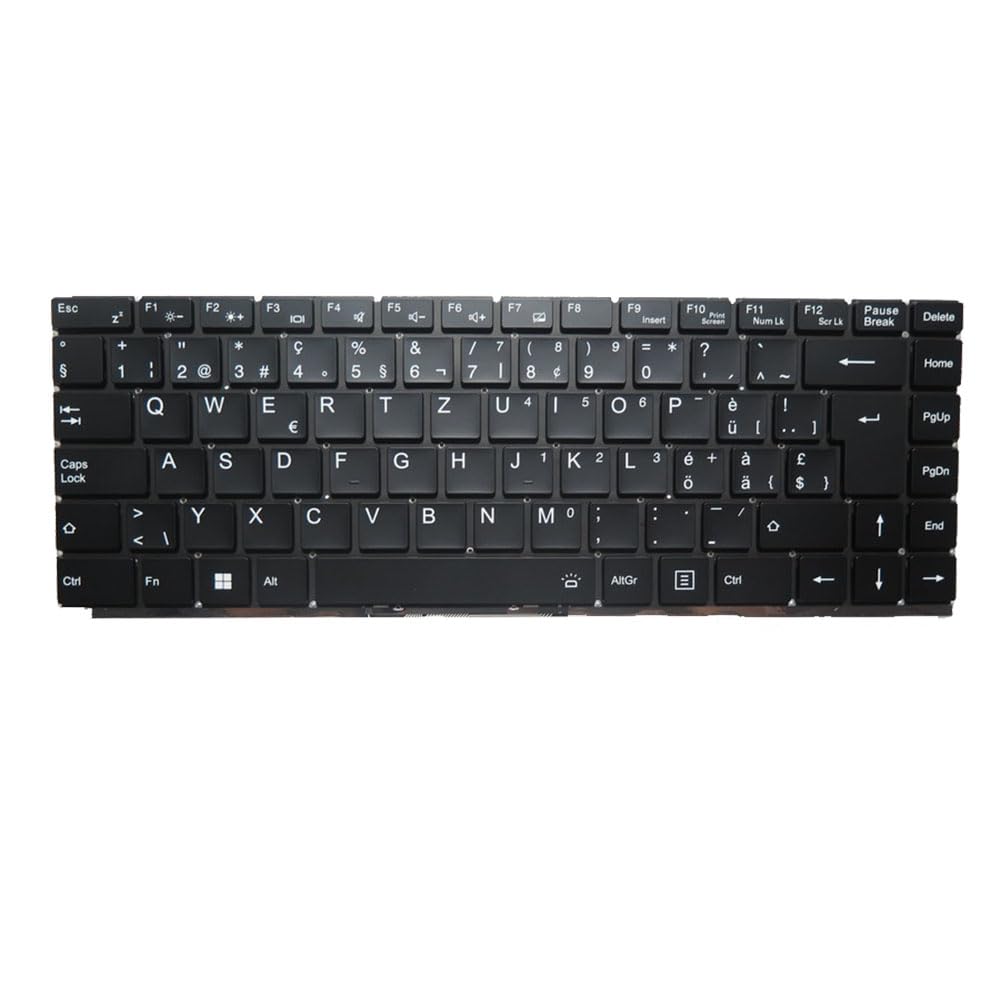
Сүрөт: алдыңкы view of the Laptop Keyboard for MEDION AKOYA S4402 MD63410. The keyboard features a black finish with white key legends, including a full alphanumeric section, function keys (F1-F12), navigation keys, and a numeric keypad. The layout is Swiss (SW), indicated by specific characters like '§', '€', 'é', 'à', 'ö', 'ä', 'ü', and '£'. The keyboard includes dedicated keys for backlight control (likely via Fn combinations) and standard laptop keyboard functions.
Техникалык шарттар
| Өзгөчөлүк | Деталь |
|---|---|
| Продукт түрү | Laptop Keyboard Replacement Part |
| Шайкештик | MEDION AKOYA S4402 MD63410 |
| Макет | Swiss (SW) |
| Арткы жарык | Ооба |
| Түс | Кара |
| Продукциянын өлчөмдөрү | 11.81 x 7.87 x 3.94 дюйм |
| Элемент Салмагы | 1.76 фунт |
| Өндүрүүчү | Жалпы |
| Модель номери | MD63410-5. |
| Келип чыккан өлкө | Кытай |
Орнотуу жана орнотуу
Installing a laptop keyboard typically requires technical expertise and careful handling of internal components. It is highly recommended to consult your laptop's official service manual or seek professional assistance for installation to avoid damage to your device.
General Guidelines (Consult Professional for Specific Steps):
- Өчүрүү: Ensure the laptop is completely powered off and disconnected from all power sources, including the battery.
- Демонтаж: Carefully disassemble the laptop components that obstruct access to the keyboard. This may involve removing the bottom cover, battery, optical drive, or top case, depending on the laptop model.
- Эски клавиатураны ажыратыңыз: Locate the keyboard ribbon cable connector on the motherboard. Gently unlatch the connector and disconnect the old keyboard's cable.
- Эски клавиатураны алып салуу: Unscrew or unclip the old keyboard from its housing.
- Жаңы баскычтопту орнотуу: Position the new keyboard into the housing. Ensure it fits correctly and all mounting points align.
- Жаңы клавиатураны туташтыруу: Carefully insert the new keyboard's ribbon cable into the connector on the motherboard and secure the latch. Ensure the cable is not bent or creased.
- Кайра чогултуу: Reassemble the laptop components in reverse order. Double-check all connections before fully closing the laptop.
- Сыноо функциясы: Power on the laptop and test all keyboard keys, including the backlight function, to ensure proper installation.
Жоопкерчиликтен баш тартуу: Improper installation can lead to damage to your laptop. The manufacturer is not responsible for any damage incurred during self-installation.
Иштөө нускамалары
This keyboard functions as a standard laptop keyboard with additional features specific to the Swiss (SW) layout and integrated backlighting.
Негизги функциялары:
- Standard Alphanumeric Keys: Тамгаларды, сандарды жана символдорду терүү үчүн колдонулат.
- Функция баскычтары (F1-F12): These keys often have secondary functions (e.g., volume control, screen brightness, Wi-Fi toggle) when pressed in combination with the Fn key. Refer to your laptop's specific documentation for exact Fn key combinations.
- Жарыкты башкаруу: The keyboard features integrated backlighting. Typically, the backlight can be toggled on/off or adjusted in brightness using a specific Fn key combination (e.g., Fn + Fx, where Fx is a function key with a backlight icon). Locate the key with a backlight symbol (often resembling a sun or light bulb) to control this feature.
- Swiss (SW) Layout Specifics: This keyboard includes characters and symbols specific to the Swiss layout, such as '§', '€', 'é', 'à', 'ö', 'ä', 'ü', and '£'. Familiarize yourself with the placement of these characters.
- Чабыттоо баскычтары: Includes Home, End, PgUp (Page Up), PgDn (Page Down), and arrow keys for document navigation.
Техникалык тейлөө
Туура тейлөө клавиатураңыздын иштөө мөөнөтүн узартып, оптималдуу иштөөсүн камсыздай алат.
- Тазалоо: Клавиатуранын бетин бир аз жумшак, түксүз чүпүрөк менен үзгүлтүксүз тазалап туруңузampсуу же жумшак, абразивдүү эмес тазалоочу эритме менен эритип алыңыз. Суюктуктарды түз эле клавиатурага чачпаңыз.
- Чаңды тазалоо: Use compressed air to remove dust and debris from between the keys. Hold the can upright and spray in short bursts.
- Төгүлгөндөн сактаныңыз: Клавиатураны туруктуу зыянга алып келиши мүмкүн болгон суюктуктун төгүлүшүнөн коргоңуз.
- Жумшак колдонуу: Avoid excessive force when typing to prevent premature wear on the keys.
Проблемаларды чечүү
If you encounter issues with your keyboard, consider the following common troubleshooting steps:
- Баскычтоп жооп бербейт:
- Ensure the keyboard ribbon cable is securely connected to the motherboard.
- Ноутбугуңузду өчүрүп күйгүзүңүз.
- Check device drivers in your operating system. Reinstall or update if necessary.
- Айрым баскычтар иштебей жатат:
- Check for physical obstructions or debris under the non-functional keys.
- If multiple keys in a specific area are not working, it might indicate a cable connection issue or a defect in the keyboard itself.
- Арткы жарык иштебейт:
- Ensure the backlight function is enabled via the appropriate Fn key combination.
- Check your laptop's BIOS/UEFI settings for keyboard backlight options.
- Туура эмес символдор терилген:
- Verify that the correct keyboard layout (Swiss SW) is selected in your operating system settings.
If issues persist after attempting these steps, professional diagnosis and repair may be required.
Кепилдик жана колдоо
Бул продукт менен келет 90 күндүк кепилдик from the date of purchase. This warranty covers manufacturing defects and ensures the product functions as described under normal use.
Кепилдик төмөнкүлөрдөн келип чыккан зыянды камтыбайт:
- Improper installation or handling.
- Accidental damage, spills, or physical abuse.
- Уруксатсыз оңдоолор же өзгөртүүлөр.
- Кадимки эскирүү.
For warranty claims or technical support, please contact the seller or retailer from whom you purchased this product. Ensure you have your proof of purchase readily available.


