1. Киришүү
The Q16 Pro Over Ear Open Ear Bluetooth 5.4 Earbuds are designed to provide a comfortable and immersive audio experience. Featuring a full-color LCD touch screen for intuitive control, these true wireless earbuds offer adaptive active noise reduction, an adjustable equalizer, and Bluetooth 5.4 connectivity for stable and high-quality sound transmission. The open-ear design ensures comfort during extended wear while allowing awareness of your surroundings.
2. Пакеттин мазмуну
The Q16 Pro package typically includes the following items:
- Q16 Pro Over Ear Earbuds (1 pair)
- Charging Case with Touch Screen Display
- USB Type-C кубаттоочу кабель
- User Manual
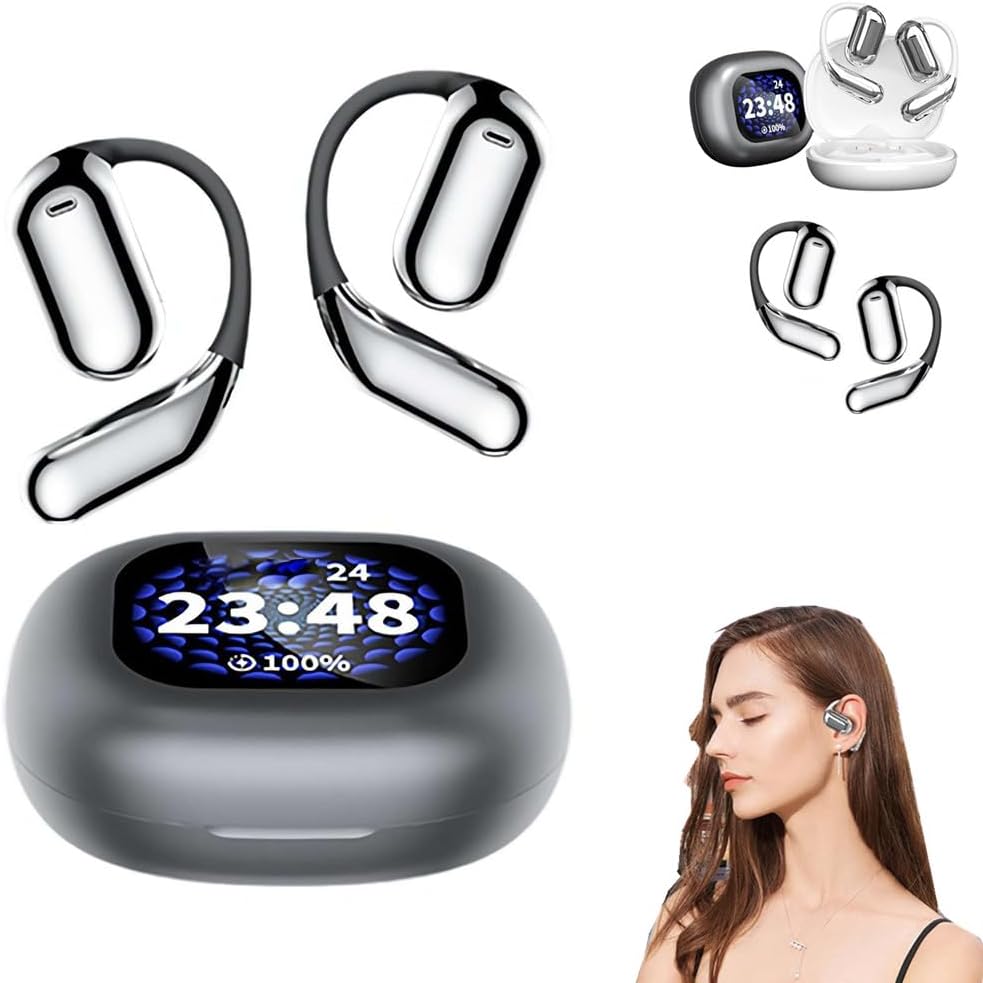
Image: The Q16 Pro earbuds and their charging case, showcasing the integrated display and the comfortable over-ear design.
3. Орнотуу колдонмосу
3.1 Аппаратты заряддоо
Before first use, fully charge the Q16 Pro earbuds and their charging case. The charging case has a built-in battery that can recharge the earbuds multiple times.
- Connect the provided USB Type-C cable to the charging port on the case.
- Кабелдин экинчи учун туура келген USB кубат адаптерине (кошумча эмес) же компьютердин USB портуна туташтырыңыз.
- The display on the charging case will indicate the charging status. A full charge for the case takes approximately 1.5 hours.
- Place the earbuds into their respective slots in the charging case. They will begin charging automatically. The case display will show the earbud battery levels.
3.2 Bluetooth жупташтыруу
To connect your Q16 Pro earbuds to a Bluetooth-enabled device:
- Кулакчындардын кубатталганын жана кубаттоочу кутучага салынганын текшериңиз.
- Заряддоо кутучасын ачыңыз. Кулакчындар жупташтыруу режимине автоматтык түрдө кирет.
- Түзмөгүңүздө (смартфон, планшет, компьютер) Bluetooth жөндөөлөрүнө өтүңүз.
- Издөө available devices. Select "Q16 Pro" from the list.
- Once connected, the earbuds will indicate successful pairing, and the case display may show a connection icon.
- Түзмөктө Bluetooth иштетилген болсо, кулакчындар кутудан чыгарылганда акыркы жупташтырылган түзмөккө автоматтык түрдө кайра туташат.

Image: Depiction of the advanced Bluetooth 5.4 chip, highlighting its role in faster and more stable signal transmission for the Q16 Pro earbuds.
4. Операция
4.1 Сенсордук экранды башкаруу элементтери
The Q16 Pro features a full-color LCD touch screen on the charging case, allowing for intuitive control of various functions without needing to access your paired device. Functions include:
- Музыка ойнотуу: Тректерди ойноо, тындыруу, өткөрүп жиберүү.
- Үндү көзөмөлдөө: Аудионун үнүн тууралоо.
- Ызы-чууну азайтуу: Toggle Adaptive Active Noise Reduction (ANC) on/off or adjust levels.
- Эквалайзерди которуу: Select from various preset equalizer modes (e.g., Bass, Jazz, Vocal).
- Мейкиндик үн эффекттери: Switch between intelligent music, game, and movie modes for an immersive experience.
- Чалууларды башкаруу: Чалууларга жооп бериңиз, бүтүрүңүз же четке кагыңыз.

Image: The Q16 Pro charging case display, illustrating the full-color touch screen and various features like active noise reduction, stereo sound, and HiFi audio.

Image: The Q16 Pro charging case display showing multiple interface options for controlling music, settings, and other functions with a single finger.
4.2 Аудио өзгөчөлүктөрү
The Q16 Pro earbuds are equipped with advanced audio technologies for a superior listening experience:
- Adaptive Active Noise Reduction (ANC): Effectively blocks external noise, allowing for a tranquil listening environment.
- Жөнгө салынуучу эквалайзер: Үн профессионалыңызды ыңгайлаштырыңызfile with various presets to match your music preferences, enhancing bass, jazz, or vocal clarity.
- Мейкиндик үн эффекттери: Experience immersive audio with dedicated modes for music, gaming, and movies, creating a sense of presence.
- ENC чалуу ызы-чуусун азайтуу: Ensures clear voice calls by reducing environmental noise during conversations.
- High Precision Laminated Horn: Delivers sound-grade surround sound with high elastic magnetic bass moving coil and polymeric ceramic treble single units.

Image: Visual representation of the Q16 Pro's spatial audio capabilities, creating an immersive and realistic sound field.

Сүрөт: жарылган view illustrating the internal components of the Q16 Pro earbud, highlighting the high-precision laminated horn and sound-grade surround sound technology.
4.3 Wearing Comfort
The Q16 Pro earbuds are designed for comfort and extended wear. Weighing approximately 8 grams per ear, their open-ear design avoids direct insertion into the ear canal, reducing discomfort and allowing you to remain aware of your surroundings while enjoying audio.

Image: A comparison showing the Q16 Pro's comfortable over-ear design versus traditional in-ear headphones, emphasizing reduced ear pain and secure fit.
5. Техникалык тейлөө
Proper maintenance ensures the longevity and optimal performance of your Q16 Pro earbuds.
- Тазалоо: Use a soft, dry, lint-free cloth to wipe the earbuds and charging case. Do not use abrasive cleaners, alcohol, or chemical solvents.
- Сактагыч: Колдонулбаганда, кулакчындарды чаңдан жана бузулуудан коргоо үчүн кубаттоочу кутуга салып сактаңыз. Күн нурунан жана экстремалдык температурадан алыс салкын, кургак жерде сактаңыз.
- Суудан качуу: Кулакчындар суу өткөрбөйт. Сууга, жамгырга же ашыкча нымдуулукка дуушар болбоңуз.
6. Кыйынчылыктарды
If you encounter issues with your Q16 Pro earbuds, refer to the following common problems and solutions:
| Көйгөй | Мүмкүн себеп | Чечим |
|---|---|---|
| Кулакчындар заряддалбай жатат | Charging cable not connected properly; dirty charging contacts; low power adapter. | Ensure cable is securely connected. Clean charging contacts on earbuds and case with a dry cotton swab. Use a standard 5V USB power adapter. |
| Түзмөк менен жупташтыруу мүмкүн эмес | Кулакчындар жупташтыруу режиминде эмес; түзмөктө Bluetooth өчүк; мурда жупташтырылган түзмөк тоскоолдук жаратууда. | Ensure earbuds are in pairing mode (open case). Turn Bluetooth off and on again on your device. Forget "Q16 Pro" from your device's Bluetooth list and re-pair. |
| Үн жок же үнү төмөн | Түзмөктө/наушниктерде үн өтө төмөн; кулакчындар туура эмес отургузулган; байланыш маселеси. | Increase volume on both your device and via the earbud touch controls. Ensure earbuds are securely in your ears. Reconnect Bluetooth. |
| үзгүлтүктүү байланыш | Түзмөктөн өтө алыс; тоскоолдук; кулакчындын батареясы аз. | Stay within 10 meters (33 feet) of your device. Avoid strong electromagnetic interference. Charge earbuds fully. |
7. Техникалык шарттар
| Өзгөчөлүк | Деталь |
|---|---|
| Продукт модели | Q16 Pro |
| Bluetooth версиясы | V5.4 |
| Жыштык диапазону | 2.4 ГГц~2.48 ГГц |
| Өткөрмө аралык | >10м (тоскоолдуксуз) |
| Заряддоо интерфейси | Type-C интерфейси |
| Батареянын сыйымдуулугу (корпус) | 500mAh |
| Батареянын иштөө мөөнөтү (наушник) | 40 саатка чейин (кубаттоочу корпусу менен) |
| Заряддоо убактысы (капка) | Болжол менен 1.5 саат |
| Башкаруу ыкмасы | Touch Screen, Media Control |
| Кулак жайгаштыруу | Ачык кулак |
| Форма фактору | Кулак үстүндө, кулакта |
| Түс | Кара |
| Өндүрүүчү | жалпы |
| Келип чыккан өлкө | Кытай |
8. Кепилдик жана колдоо
Бул продукт стандарттуу өндүрүүчүнүн кепилдиги менен келет. Кепилдиктин конкреттүү шарттары жана эрежелери үчүн, сатып алууңуз менен кошо берилген документтерди караңыз же сатуучуга түз кайрылыңыз.
For technical support, troubleshooting assistance beyond this manual, or warranty claims, please contact the retailer or manufacturer through the contact information provided at the point of purchase. Please have your product model (Q16 Pro) and purchase details ready when contacting support.


