
1. Киришүү
This manual provides comprehensive instructions for the installation, operation, and maintenance of your DAYBETTER LED Strip Lights 400ft. Please read this manual thoroughly before use to ensure proper function and safety.
2. Коопсуздук маалыматы
- Орнотуудан же техникалык тейлөөдөн мурун электр кубаты өчүрүлгөнүн текшериңиз.
- Бул продукт имараттын ичинде гана колдонуу үчүн иштелип чыккан. Сууга же жогорку нымдуулукка дуушар кылбаңыз.
- Do not cut the LED strips unless specifically indicated at designated cut marks. Cutting elsewhere may damage the product.
- Берилген кубат адаптерин гана колдонуңуз. Шайкеш келбеген адаптерди колдонуу зыянга же өрткө алып келиши мүмкүн.
- Балдар жетпеген жерде сактаңыз.
- Avoid bending the LED strips sharply, as this can damage the internal circuitry.
3. Пакеттин мазмуну
Пакетиңизде бардык буюмдар бар экенин текшериңиз:
- 4 x 100ft RGB LED Strip Lights (Total 400ft)
- 1 х IR алыстан башкаруу
- 1 х кубат адаптери
- 1 x IR Receiver/Controller Box
- 2 x AAA батарейкалар (алыстан башкаруу үчүн)
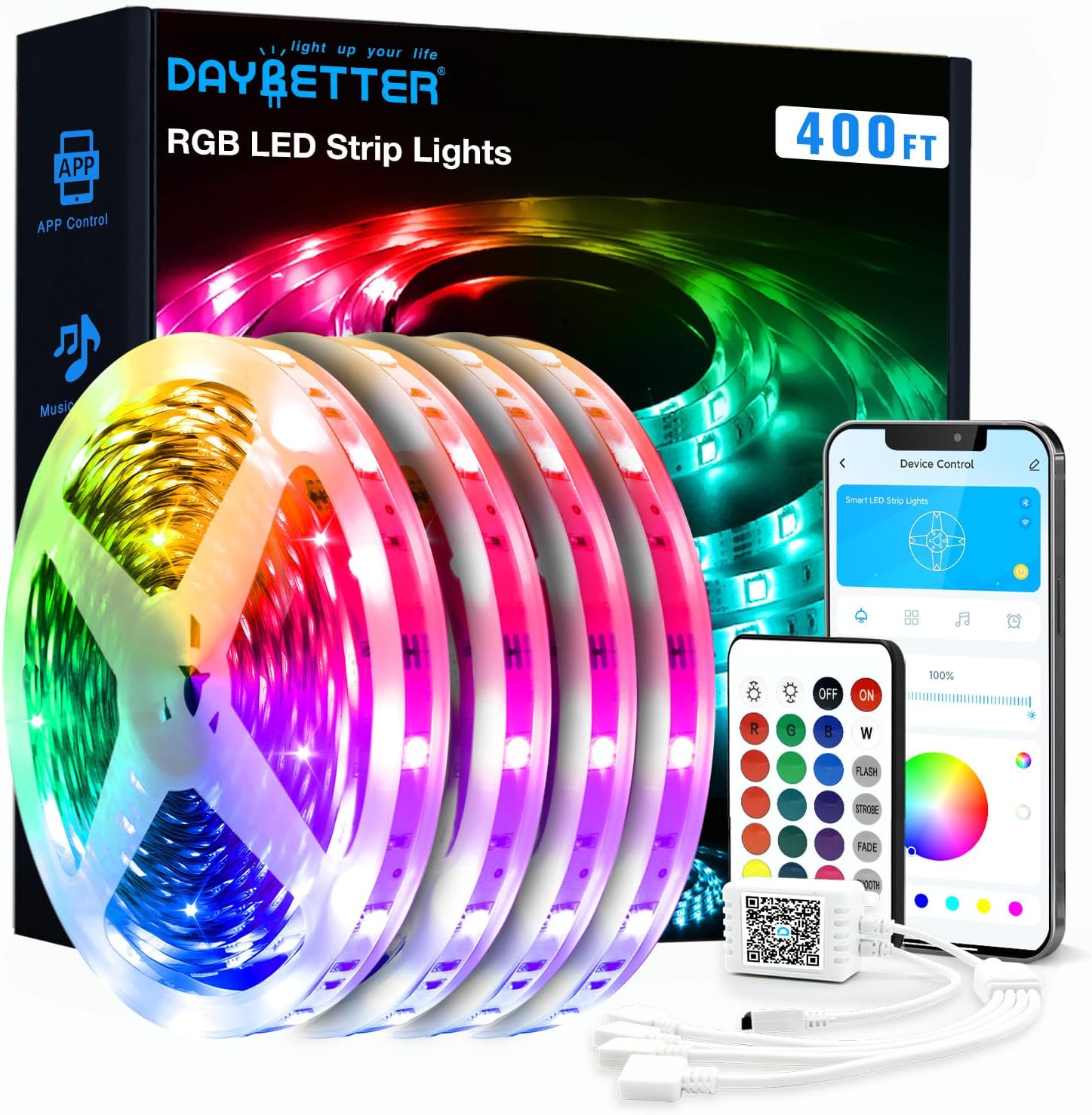
Сүрөт: бүттүview of the DAYBETTER LED Strip Lights 400ft package contents.
4. Орнотуу боюнча колдонмо
- Бетти даярдоо: Clean the desired installation surface thoroughly. Ensure it is dry, smooth, and free of dust or oil. This will ensure optimal adhesion of the LED strips.
- Unroll and Plan: Carefully unroll the LED strip lights. Before removing the adhesive backing, plan the layout to ensure the strips reach the desired areas and can connect to the power source.
- Attach the Strips: Remove the adhesive backing from the LED strip in small sections and firmly press the strip onto the prepared surface. Avoid stretching the strip during application.
- Туташуу компоненттери:
- Connect the LED strip(s) to the IR Receiver/Controller Box. Ensure the arrows on the connectors align.
- Connect the IR Receiver/Controller Box to the Power Adapter.
- Plug the Power Adapter into a standard electrical outlet.

Image: Connection diagram for LED strip lights, highlighting arrow alignment.
- Күйгүзүү: Once all connections are secure, plug the power adapter into an electrical outlet. The lights should illuminate.
5. Иштөө нускамалары
Your DAYBETTER LED Strip Lights can be controlled via the included IR remote or the DAYBETTER smartphone application.
5.1. Алыстан башкаруу
Insert the two AAA batteries into the remote control. Point the remote directly at the IR Receiver/Controller Box for optimal response. The remote allows you to:
- Turn lights On/Off
- Жарыктыкты тууралаңыз
- Select static colors (e.g., Red, Green, Blue, White)
- Choose dynamic modes (e.g., Flash, Strobe, Fade, Smooth)
5.2. Колдонмону башкаруу
For advanced features and convenience, download the DAYBETTER app on your smartphone.
- Колдонмону жүктөп алыңыз: Scan the QR code below or search for 'DAYBETTER' in the App Store (iOS) or Google Play Store (Android).
- Жупташтыруу: Ensure your phone's Bluetooth is enabled. Open the DAYBETTER app, and it should automatically detect your LED strip lights. Follow the on-screen prompts to pair.
- Колдонмонун өзгөчөлүктөрү: The app provides access to a wider range of controls, including:
- Түс палитрасы: 16 миллион түстөн тандаңыз.
- Динамикалык режимдер: More advanced flashing, fading, and jumping effects.
- Музыка синхрондоштуруу: Lights change color and rhythm with music played through your phone's microphone.
- Убакыт орнотуулары: Автоматтык түрдө күйгүзүү/өчүрүү убакыттарын пландаштырыңыз.

Image: Demonstrating app and remote control options for the LED strips.

5.3. Music Sync Feature
The music sync feature allows the LED lights to change colors and patterns in response to audio. Activate this feature through the DAYBETTER app. The app uses your smartphone's microphone to detect sound, creating a dynamic lighting experience.

Image: LED strip lights syncing to music.
5.4. Timing Settings
Utilize the timing function in the DAYBETTER app to schedule when your LED lights turn on or off automatically. This feature is useful for daily routines or energy saving.

Image: Setting up automatic on/off times using the app.
6. Техникалык тейлөө
- Тазалоо: Gently wipe the LED strips with a dry, soft cloth to remove dust. Do not use liquid cleaners or abrasive materials.
- Сактагыч: If storing the lights for an extended period, ensure they are clean, dry, and rolled loosely to prevent damage to the strip or adhesive.
- Клей: The adhesive is strong but may lose effectiveness if repositioned multiple times. Ensure the initial placement is accurate.
7. Кыйынчылыктарды
| Көйгөй | Мүмкүн себеп | Чечим |
|---|---|---|
| Жарыктар күйбөйт. | Power adapter not connected; IR receiver not connected; Remote batteries dead; Strip damaged. | Check all connections; Ensure power adapter is plugged in; Replace remote batteries; Inspect strip for visible damage. |
| Пульт иштебей жатат. | Remote batteries dead; Obstruction between remote and IR receiver; Remote too far from receiver. | Replace remote batteries; Ensure clear line of sight to IR receiver; Move closer to the receiver. |
| Колдонмо жарыктарга туташа албайт. | Bluetooth not enabled; Lights not powered on; App not updated. | Enable Bluetooth on your phone; Ensure lights are powered on; Update the DAYBETTER app to the latest version. |
| Lights show incorrect colors or sections are off. | Loose connection; Strip damage; Controller malfunction. | Check connections, especially arrow alignment; If a section is consistently faulty, the strip may be damaged. |
| Клей жабышпайт. | Surface not clean or dry; Surface texture unsuitable. | Clean and dry surface thoroughly; Consider using additional mounting clips for textured surfaces. |
8. Техникалык шарттар
| Өзгөчөлүк | Деталь |
|---|---|
| Бренд | DAYBETTER |
| Модель номери | TCF0243124G-V4 |
| Жалпы узундук | 400 feet (4 rolls of 100ft) |
| Жарык булагы түрү | LED |
| Ачык түс | Көп түстүү (RGB) |
| Башкаруу ыкмасы | Колдонмо, алыстан башкаруу |
| Power Source | Кондиционер (шнур менен) |
| Ички/тышкы колдонуу | Indoor |
| Сууга туруктуулук деңгээли | Сууга чыдамдуу эмес |
| Элемент Салмагы | 1.61 фунт |
| Батареялар талап кылынат | Yes (1 Lithium Ion battery included for controller, 2 AAA for remote) |
9. Кепилдик жана колдоо
DAYBETTER products are designed for quality and reliability. For warranty information or technical support, please refer to the contact details provided with your purchase or visit the official DAYBETTER website. Please have your model number (TCF0243124G-V4) and purchase information ready when contacting support.