
WLIVE B0DDC53GH4
WLIVE Farmhouse TV Stand (Model: B0DDC53GH4) Instruction Manual
Comprehensive guide for assembly, operation, and maintenance of your WLIVE Farmhouse TV Stand.
1. Продукт бүтүп калдыview
The WLIVE Farmhouse TV Stand is designed to accommodate televisions up to 65 inches. It features a rustic brown finish, steel-mesh cabinet doors, adjustable shelving, and integrated LED lighting. This entertainment center provides storage solutions for media devices, accessories, and decorative items.

Image 1.1: WLIVE Farmhouse TV Stand in Rustic Brown with a television.
2. Коопсуздук маалыматы
Сураныч, чогултуу жана колдонуу алдында бардык коопсуздук эскертүүлөрүн окуп, түшүнүңүз.
- Always ensure the TV stand is securely placed on a flat, stable surface.
- Use the anti-tipping device to prevent the stand from tipping over due to external impacts or when a heavy TV is placed on it.
- Ашыкча жүктөөнү жана оодарылып кетпеши үчүн үстүнкү текчеге оор буюмдарды койбоңуз.
- Кичинекей бөлүктөрүн жана таңгактоочу материалдарды муунуп калуу коркунучун болтурбоо үчүн балдардан алыс кармаңыз.
- Ensure all screws and fasteners are tightened properly during assembly. Periodically check for loose connections.
3. Техникалык шарттар
| Өзгөчөлүк | Деталь |
|---|---|
| Бренд | WLIVE |
| Модел | B0DDC53GH4 |
| Түс | Rustic Brown |
| Продукциянын өлчөмдөрү (D x W x Y) | 14"D x 59"W x 31.99"H |
| Сунушталган сыналгы өлчөмү | 65 дюймга чейин |
| Өзгөчөлүктөр | Adjustable Shelf, Anti-Tipping, Removable Shelf, Scratch Resistant |
| Монтаж түрү | Floor Mount |
| Бөлмө түрү | Уктоочу бөлмө |
| эшик стили | Flat Panel with Steel Mesh |
| Камтылган компоненттер | Shelves, Cabinet Doors, LED Lights |
| Аяктоо түрү | Жылмаланган |
| Текчелердин саны | 3 (жөндөлүүчү) |
| Негизги түрү | Буттар |
| Орнотуу түрү | бурун |
| Жогорку Материал түрү | Инженердик жыгач |
| Handle Material | Эритме болот |
| Ассамблея талап кылынат | Ооба |
| Элемент Салмагы | 116.6 фунт |

Image 3.1: Product dimensions and TV size compatibility.
4. Орнотуу жана чогултуу
This TV stand requires assembly. It is recommended that two adults perform the assembly to ensure safety and ease of construction. All necessary hardware and tools are included. Please follow the step-by-step instructions provided in the included manual. Clear a spacious area for assembly and keep all components organized.
4.1 Чогултуу боюнча видео көрсөтмө
For visual assistance during assembly, please refer to the video below:
Video 4.1: This video demonstrates the unpacking and assembly process for the WLIVE Tall Farmhouse Entertainment Center. It shows components being removed from the box, screws being installed, and the frame being constructed, concluding with the fully assembled unit.
4.2 Ассамблеянын негизги кадамдары
- Бардык компоненттерди таңгактан чыгарып, физикалык колдонмоңуздагы тетиктердин тизмеси менен салыштырып текшериңиз.
- Attach cam locks and dowels to the designated panels.
- Assemble the main frame of the TV stand, ensuring all connections are secure.
- Install the cabinet doors, ensuring proper alignment and smooth operation.
- Place the top shelf unit onto the main cabinet.
- Жөнгө салынуучу текчелерди каалаган абалга орнотуңуз.
- Attach the anti-tipping device to the back of the stand and secure it to a wall stud.
5. Иштөө нускамалары
5.1 LED жарыктандыруу системасы
The TV stand includes a customizable 31-color LED lighting system. The LED strips are app-controlled, allowing you to select colors and modes from your smartphone.
- Орнотуу: Carefully attach the LED strips to the designated areas on the TV stand. Ensure the adhesive is firm.
- Кубат туташуу: Plug the LED power adapter into a standard electrical outlet.
- Колдонмону башкаруу: Download the specified mobile application (refer to your physical manual for app name/QR code). Connect your smartphone to the LED system via Bluetooth.
- Ыңгайлаштыруу: Use the app to choose from 31 colors, adjust brightness, and select various flashing or fading modes to create your desired ambiance.

Image 5.1: App-controlled LED lighting in operation.
Video 5.1: This video demonstrates the LED lighting feature of the TV stand, showing various color changes and app control functionality. It highlights how the lights can enhance the viewтажрыйбасы.
5.2 жөнгө салынуучу текчелер
The internal shelves within the cabinets are adjustable, offering flexibility for storing items of various heights. Each cabinet features three different height options for the shelves.
- Текчени тууралоо үчүн, андагы буюмдарды этияттык менен алып салыңыз.
- Lift the shelf slightly and pull it out from its current support pins.
- Reinsert the support pins into the desired holes at the new height.
- Текчени кайра таяныч төөнөгүчтөрүнө коюп, анын тегиз жана бекем экенин текшериңиз.
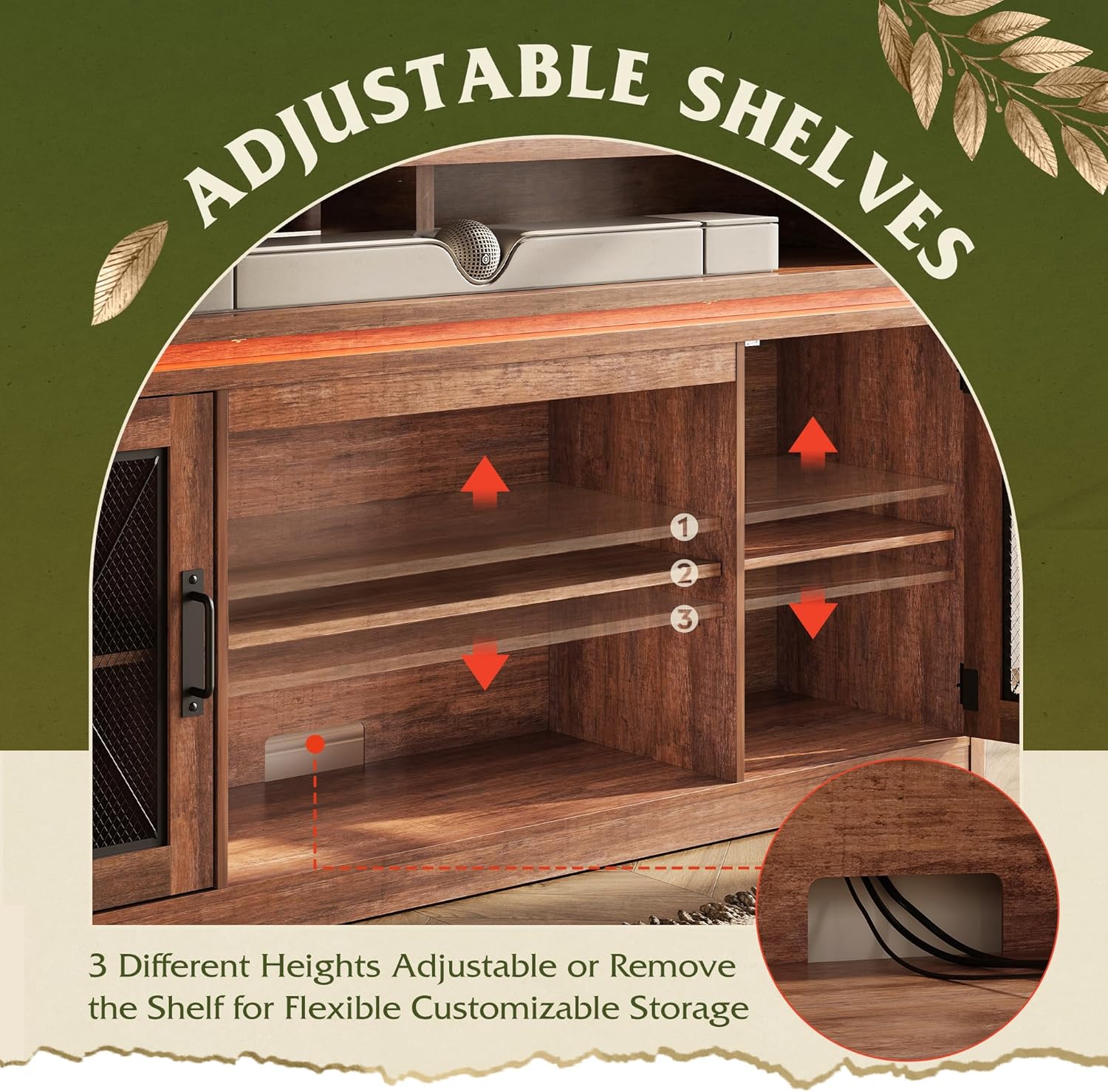
Сүрөт 5.2: Жөнгө салынуучу текче механизми.
5.3 Кабелди башкаруу
The TV stand is equipped with six rear cable ports to help organize and conceal wires from your media devices, maintaining a tidy appearance.
- Route all power and signal cables through the designated cable ports located on the back panel of the stand.
- Utilize cable ties or clips (not included) to bundle and secure cables, preventing tangles and improving airflow.
6. Техникалык тейлөө
To ensure the longevity and appearance of your WLIVE TV Stand, follow these maintenance guidelines:
- Тазалоо: Беттерди жумшак менен сүртүңүз, гamp cloth. Avoid harsh chemicals or abrasive cleaners, as these can damage the finish. The engineered wood surface is designed to be scratch-resistant and easy to clean.
- Чаңдандыруу: Чаңдын пайда болушуна жол бербөө үчүн стендди кургак, жумшак чүпүрөк менен дайыма чаң сүртүп туруңуз.
- Төгүлүүлөр: Төгүлгөн жерлерди дароо сүртүп, жыгачка боёп калбаш үчүн же зыянга учурабашы керек.
- Аппараттык камсыздоону текшерүү: Мезгил-мезгили менен бардык бурамалар жана бекиткичтер бекем болушу үчүн текшерип туруңуз. Керек болсо кайра тартыңыз.
- LED жарыктары: If the LED lights stop working, check the power connection and ensure the app is properly connected. If issues persist, contact customer support.
7. Кыйынчылыктарды
If you encounter any issues with your TV stand, please refer to the following common problems and solutions:
- Маселе: Телевизордун стенди туруксуз же солкулдап сезилет.
Чечим: Ensure all assembly screws are fully tightened. Verify that the stand is placed on a level surface. If an anti-tipping device was included, ensure it is properly installed and secured to a wall stud. - Маселе: LED чырактары күйбөй жатат же туура эмес иштеп жатат.
Чечим: Check if the LED power adapter is securely plugged into a working electrical outlet. Ensure the LED strips are properly connected to the controller. If using the app, verify Bluetooth connection and that the app is updated. - Маселе: Cabinet doors are not closing properly or are misaligned.
Чечим: Check the hinges for any loose screws and tighten them. Ensure the door stoppers are correctly positioned. Adjust the hinges if necessary (refer to your physical manual for detailed hinge adjustment instructions). - Маселе: Чогултуу учурунда тетиктердин жок болушу же бузулушу.
Чечим: Do not proceed with assembly if parts are missing or damaged. Contact WLIVE customer support immediately for replacement parts.
8. Кепилдик жана Кардарларды колдоо
WLIVE is committed to providing quality products and customer satisfaction. For any questions, concerns, or assistance with your TV stand, please contact our dedicated U.S. customer support team.
- Байланыш маалыматы: Refer to the contact details provided in your product packaging or on the official WLIVE webсайт.
- Кепилдик: Information regarding product warranty coverage can be found in your purchase documentation or by contacting customer support.
Ask a question about this manual
Ask about setup, troubleshooting, compatibility, parts, safety, or missing instructions. Manuals+ will review the question and use this page’s manual context to help answer it.