
1. Киришүү
This manual provides detailed instructions for the setup, operation, and maintenance of your Yoidesu 5G Wi-Fi 6 Mobile Hotspot. Please read this manual thoroughly before using the device to ensure optimal performance and safety. This portable hotspot offers high-speed internet connectivity for multiple devices, making it ideal for travel, outdoor use, and home networking.

Image: The Yoidesu 5G Mobile Hotspot shown next to a laptop, emphasizing its compact size and portability for use anywhere.
2. Пакеттин мазмуну
Пакетиңизде бардык буюмдар бар экенин текшериңиз:
- 1 x Yoidesu 5G Wi-Fi 6 Mobile Hotspot (Router)
- 1 x USB кабели
- 1 х Инструкция (бул документ)
- 1 x Eject Pin
3. Продукциянын өзгөчөлүктөрү
The Yoidesu 5G Wi-Fi 6 Mobile Hotspot is designed with advanced features to provide a superior wireless experience:
- High-Speed 5G Connection: Experience lightning-fast download speeds up to 2.77Gbps and upload speeds up to 1.25Gbps, significantly faster than 4G, ensuring smooth streaming and gaming.
- Nano SIM карта слоту: Supports multiple 5G and 4G frequency bands (5G NR, FDD N1/N3/N28, TDD N41/N78, CA B1+B3, etc.; 4G Band TDD-LTE B34/38/39/40/41, FDD-LTE B1/B3/B5/B8; 3G Band B1) for broad compatibility.
- Rugged and Portable Design: Features an IP67 reinforced design, offering protection against drops and water, making it a reliable companion for travel and outdoor activities. It includes a user-friendly LED indicator for monitoring data usage, signal strength, and Wi-Fi credentials.
- Узак мөөнөттүү батареянын иштөө мөөнөтү: Equipped with a 7100mAh high-capacity polymer battery, providing extended connectivity throughout the day with quick charging support.
- Dual-Band Wi-Fi and Multi-Device Support: Supports both 2.4GHz and 5.8GHz bands for reliable, high-speed connections. With Wi-Fi 6 (802.11a/b/g/n/ac/ax protocols), it can connect up to 16 devices simultaneously, including mobile phones, laptops, tablets, and game consoles, ensuring a private and secure connection.

Image: A graphic depicting a bar chart and a 5G icon, representing the high speed and low latency capabilities of the hotspot.

Image: The hotspot device displaying battery life information, indicating 8 hours of working time and 50 hours of standby time.
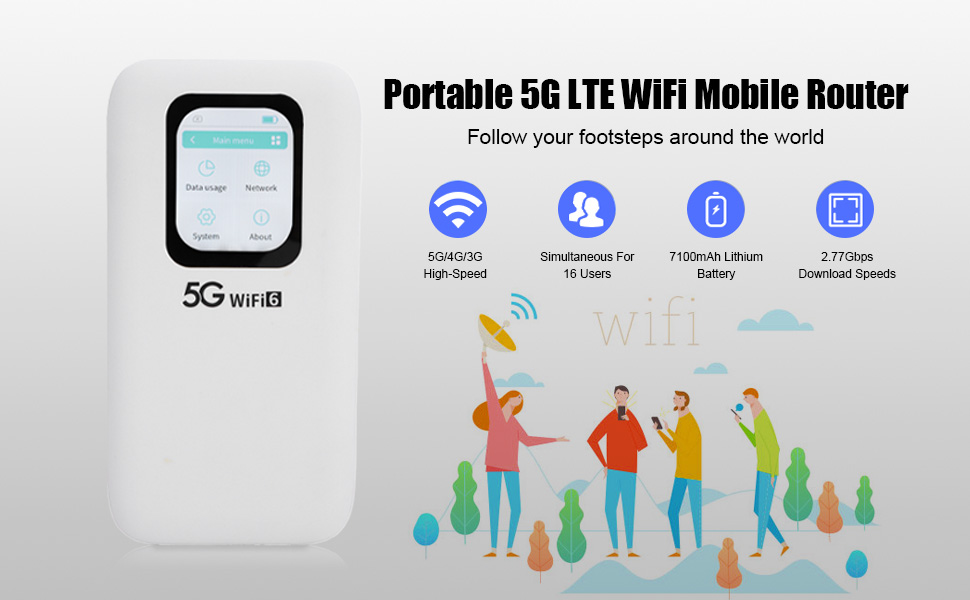
Image: The hotspot device's screen displaying its main menu, highlighting dual-band Wi-Fi and device sharing capabilities.

Image: The hotspot device shown in a social setting with multiple users, illustrating its support for up to 16 connected devices.
4. Орнотуу
Follow these steps to set up your Yoidesu Mobile Hotspot:
- Nano SIM картасын салыңыз:
- Аппараттагы SIM картанын уячасын табыңыз.
- Use the provided eject pin to open the SIM tray.
- Carefully place your Nano SIM card into the tray, ensuring correct orientation.
- Аспапты акырын ордунан чыккыча кайра түртүңүз.

Сүрөт: деталдуу view of the hotspot device, showing the process of inserting a Nano SIM card into its designated slot.
- Аппаратты заряддоо:
- Connect the provided USB cable to the hotspot's charging port and to a compatible USB power adapter (not included) or computer.
- Allow the device to charge fully before initial use. The LED indicator will show charging status.
- Күйгүзүү:
- Press and hold the power button (usually located on the side or front) for a few seconds until the screen illuminates.
- The device will boot up and attempt to connect to the cellular network.
5. Иштөө нускамалары
Once your hotspot is set up and powered on, follow these steps to use it:
- Connect Devices to Wi-Fi:
- Wi-Fi иштетилген түзмөгүңүздө (телефон, ноутбук, планшет) жеткиликтүү Wi-Fi тармактарын издеңиз.
- Locate the network name (SSID) displayed on your hotspot's screen.
- Enter the Wi-Fi password (key) also displayed on the hotspot's screen.
- Түзмөгүңүз интернетке хотспот аркылуу туташып турушу керек.
- Түзмөктүн абалын көзөмөлдөө:
- The 2.01-inch screen provides real-time information on signal strength, battery level, connected devices, and data usage.
- Use the touch controls on the screen to navigate through menus and view толук маалымат.
- Change Wi-Fi Settings:
- Access the 'System' or 'Network' menu on the hotspot's screen using the touch interface.
- From here, you can change the Wi-Fi name (SSID), password, security protocol (WPA3 recommended), and other network settings.
- Refer to the on-screen prompts for specific instructions.
- Өчүрүү:
- Press and hold the power button until the power-off option appears on the screen.
- Confirm to shut down the device.
6. Техникалык тейлөө
Proper maintenance ensures the longevity and optimal performance of your hotspot:
- Заряддоо: Always use the provided USB cable for charging. Avoid using damaged cables or chargers. Charge the device regularly, especially if it will be stored for an extended period.
- Тазалоо: Use a soft, dry cloth to clean the device. Avoid liquid cleaners or abrasive materials that could damage the screen or casing.
- Сактагыч: Store the hotspot in a cool, dry place away from direct sunlight and extreme temperatures.
- Программалык камсыздоо жаңыртуулары: Periodically check for firmware updates through the device's system settings or the manufacturer's website to ensure you have the latest features and security enhancements.
7. Кыйынчылыктарды
If you encounter issues with your Yoidesu Mobile Hotspot, refer to the following common problems and solutions:
| Көйгөй | Мүмкүн себеп | Чечим |
|---|---|---|
| Интернет байланышы жок | No SIM card, incorrect APN settings, no cellular signal, data plan expired. | Ensure SIM card is correctly inserted. Check APN settings in device menu. Move to an area with better cellular coverage. Verify data plan status with your carrier. |
| Wi-Fi ылдамдыгы жай | Too many connected devices, weak signal, network congestion, device interference. | Reduce the number of connected devices. Move closer to the hotspot. Try changing Wi-Fi channels in settings. Avoid placing near other electronic devices. |
| Түзмөк күйбөй жатат | Low battery, faulty power button. | Charge the device for at least 30 minutes. If still unresponsive, contact customer support. |
| Wi-Fi'га туташпай жатат | Incorrect Wi-Fi password, hotspot not broadcasting. | Verify the Wi-Fi password on the hotspot's screen. Restart the hotspot and your connecting device. |
8. Техникалык шарттар
| Өзгөчөлүк | Деталь |
|---|---|
| Бренд | Yoidesu |
| Модель аты | Yoidesuxp3rkg8obi |
| Байланыш технологиясы | Wi-Fi, 5G, 4G |
| Wi-Fi Generation | Wi-Fi 6 (802.11a/b/g/n/ac/ax) |
| Жыштык тилкелери | Кош тилкелүү (2.4 ГГц, 5.8 ГГц) |
| Data Transfer Rate (Download) | 2770 Мбит/сек чейин |
| Data Transfer Rate (Upload) | 156 Мбит/сек чейин |
| Максималдуу туташкан түзмөктөр | 16 |
| SIM карта түрү | Nano SIM |
| Батарея сыйымдуулугу | 7100 мАч полимердик батарейка |
| Screen Size | 2.01 дюйм |
| Башкаруу ыкмасы | Сенсордук экран |
| Коопсуздук протоколу | WPA3 |
| Операция системасы | Linux |
| Өзгөчөлүктөр | Weatherproof (IP67), LED Indicator, Multi-Device Support |
| Шайкеш түзмөктөр | Game Console, Laptop, PC, Smartphone, Tablet |
| Элемент Салмагы | 305 грамм |
9. Кепилдик жана колдоо
Your Yoidesu 5G Wi-Fi 6 Mobile Hotspot comes with a standard manufacturer's warranty. For specific warranty terms, please refer to the warranty card included in your package or visit the official Yoidesu website. If you require technical assistance, troubleshooting beyond this manual, or have questions about your device, please contact Yoidesu customer support.