
Introduction
This manual provides detailed instructions for the setup, operation, and maintenance of your Dpofirs Digital Audio Spectrum Analyzer and 15-Band Equalizer. This device is designed to enhance your audio experience by offering precise sound processing and real-time visual feedback of audio frequencies. Please read this manual thoroughly before using the product to ensure proper functionality and longevity.
Продукт спецификациялары
| Элемент түрү | Music Spectrum Equalizer |
| Band көрсөткүчү | 15 топ |
| Frequency Response | 20 Гц - 20 КГц |
| Сезимталдуулук | >-40 dB (94 dB SPL at 1 KHz) |
| Каналдар | Кош канал |
| Gain Equalizer | ±30 дБ |
| Процессор | ARM-CortexM3 |
| Өлчөмдөр | 26 x 7 x 4 см |
| Салмагы | 294 г |
Пакеттин мазмуну
Пакетте бардык буюмдар бар экенин текшериңиз:
- 1 x Music Spectrum Equalizer Unit
- 1 x User Manual
- 1 x Аудио кабели
- 1 x заряддоо кабели
- 1 x Knob Cap
- 1 x 2-pin Power Cord

Продукт бүттүview
Familiarize yourself with the various parts and controls of the Digital Audio Spectrum Analyzer.

Front Side Components:
- 3.5mm Sound Input: Connect your audio source here.
- 3.5mm Sound Output: Сиздин байланышыңыз amplifier or other audio playback device.
- EQ Regulating Encoder: Used for adjusting equalizer parameters and navigating menus.
- Spectrum Regulating Roller: Adjusts spectrum display settings.
Reverse Side Components:
- Spectrum Input Attenuation: Adjusts the input sensitivity for the spectrum display.
- 7-18V Power Input: Main power input for the device.
- 5V кубаттуулук киргизүү: Alternative or supplementary power input.
Жайгашуу
Follow these steps to set up your Digital Audio Spectrum Analyzer.
Кубат туташуу:
- Connect the provided 2-pin power cord to the 7-18V Power Input (6) on the reverse side of the unit.
- Alternatively, use a 5V USB charging connector or a dedicated 12V input for power.
- Маанилүү: When using DSP sound processing, the device must be powered independently. Failure to do so may introduce display crosstalk.
Аудио туташуусу:
Use the provided audio cable to connect your audio source and output device.
- Connect your audio source (e.g., DVD player) to the 3.5mm Sound Input (1) on the front side.
- туташтыруу 3.5mm Sound Output (2) on the front side to your ampөмүр бою (AMP) or other audio playback system.

Иштөө нускамалары
This section details how to operate your spectrum analyzer and equalizer.
Spectrum Display Usage:
- To enter the menu, press down on the dial wheel (EQ Regulating Encoder).
- Move the dial wheel left or right to navigate through setting items and adjust values.
- When the spectrum is displayed normally, rotate the dial wheel to adjust the gain.
- Hold the dial wheel down for 6 seconds to exit the current menu and save changes.
Убакытты тууралоо:
- Enter the time display mode (Mode: 9).
- Press the left key to select a position (e.g., hour, minute).
- Press the right key to select a number. The adjustment will be saved immediately.
Frequency Spectrum Display:
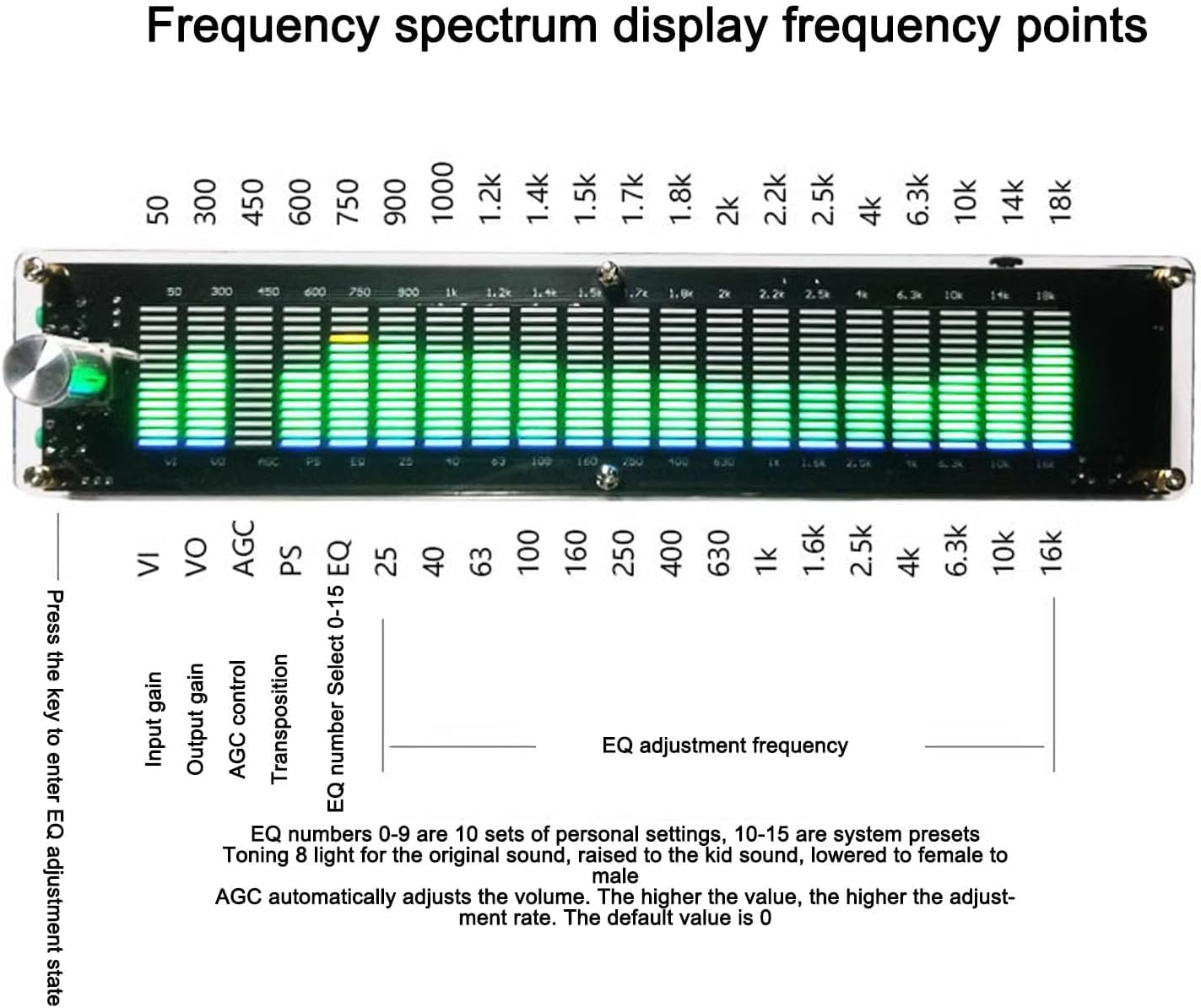
- The display shows 15 frequency points from 20Hz to 20KHz.
- VI: Киргизүү пайда
- VO: Output Gain
- AGC: Automatic Gain Control. Automatically adjusts volume. Higher value means higher adjustment rate. Default is 0.
- PS: Транспозиция
- EQ Number Select (0-15 EQ):
- EQ numbers 0-9 are 10 sets of personal settings.
- EQ numbers 10-15 are system presets.
- Example presets: "Toning 8 light for the original sound", "raised to the kid sound", "lowered to female to male".
Press the key to enter EQ adjustment state.

Техникалык тейлөө
To ensure the longevity and optimal performance of your Dpofirs Digital Audio Spectrum Analyzer, follow these maintenance guidelines:
- Тазалоо: Use a soft, dry cloth to clean the exterior of the device. Avoid using liquid cleaners or abrasive materials, as they may damage the surface or internal components.
- Сактагыч: Түзмөктү салкын, кургак жерде, күндүн түз нурунан, өтө жогорку температурадан жана нымдуулуктан алыс сактаңыз.
- Колдонуу: Handle the device with care to prevent drops or impacts, which could damage the internal circuitry or display.
- Өчүрүү: Disconnect the power supply when the device is not in use for extended periods.
Проблемаларды чечүү
If you encounter any issues with your Digital Audio Spectrum Analyzer, refer to the following common problems and solutions:
| Көйгөй | Мүмкүн себеп | Чечим |
|---|---|---|
| No display/Device not powering on | Power cable not connected or faulty; power source issue. | Ensure the power cable is securely connected. Verify the power source is active. Try a different power adapter if available. |
| Аудио чыгышы жок | Incorrect audio cable connection; output device issue. | Check that the 3.5mm sound output is correctly connected to your ampөмүрлүү. Камсыз кылуу ampкөтөргүч күйгүзүлгөн жана туура киргизүүгө коюлган. |
| No spectrum display/Incorrect display | No audio input; incorrect input attenuation; crosstalk. | Verify audio source is playing and connected to the 3.5mm sound input. Adjust the Spectrum Input Attenuation. Ensure independent power supply if DSP processing is active to prevent crosstalk. |
| Жооп бербей көзөмөлдөйт | Убактылуу программалык ката. | Disconnect and reconnect the power supply to restart the device. |
Кепилдик жана колдоо
This Dpofirs product comes with a standard warranty. For specific warranty details, please refer to the documentation provided at the time of purchase or contact your retailer. For technical support or further assistance, please visit the official Dpofirs webсайтка же кардарларды тейлөө бөлүмүнө кайрылыңыз.
Байланыш маалыматы:
- Бренд: Dpofirs
- Webсайт: Visit Dpofirs on Amazon