
1. Продукт бүтүп калдыview
The QRD Wireless Controller (Model: US-T5-JB02) is a high-performance replacement controller designed for Nintendo Switch, Switch Pro, Lite, and OLED models. It features advanced technologies such as Hall Effect joysticks for precise, drift-free control, dual vibration motors for immersive feedback, and a 6-axis gyroscope for accurate motion sensing. This controller also includes programmable back buttons and customizable LED backlighting, enhancing your gaming experience.
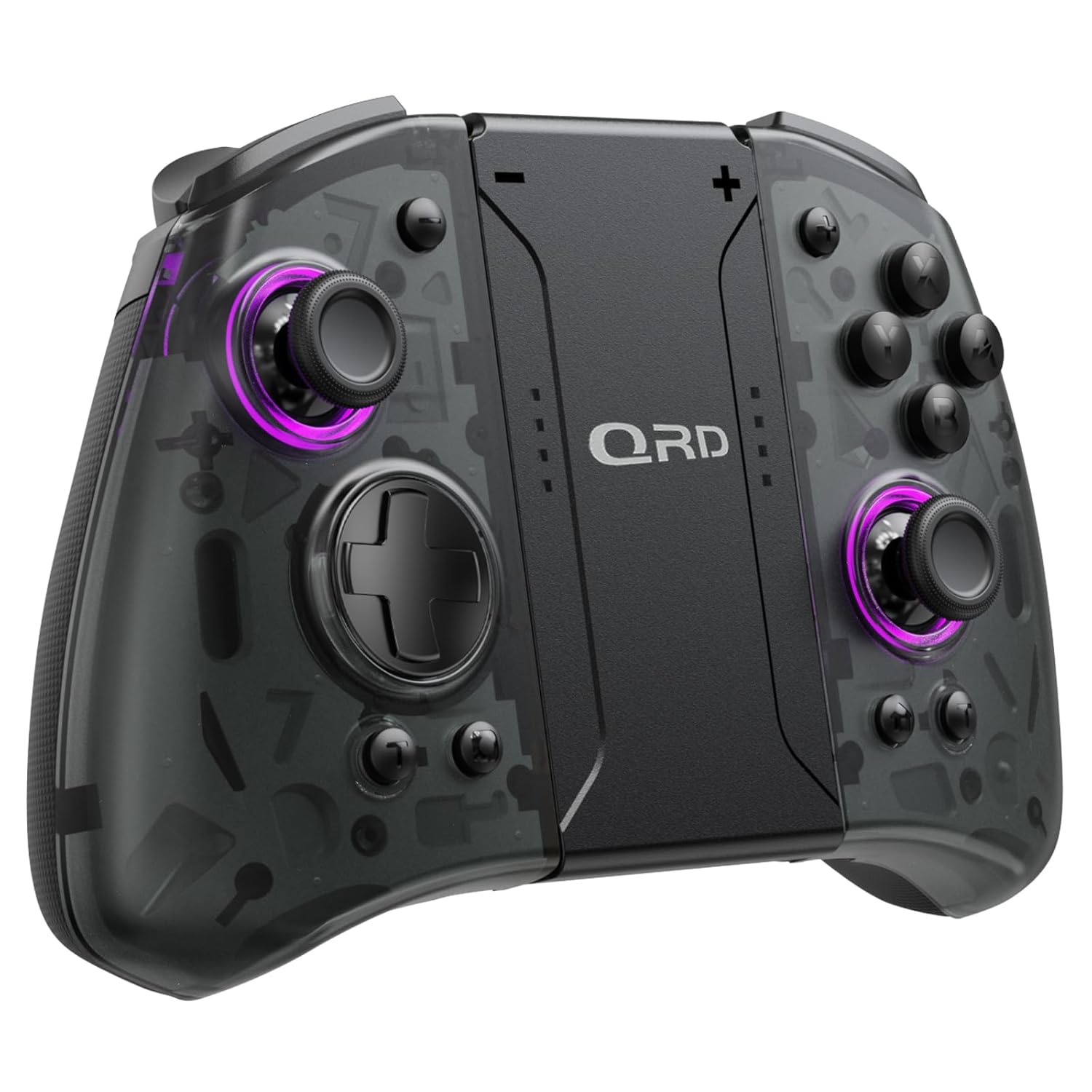
Сүрөт 1.1: Алдыңкы view of the QRD Wireless Controller, showcasing анын эргономикалык дизайны жана баскычтардын жайгашуусу.
2. Негизги өзгөчөлүктөрү
- Зымсыз Bluetooth 5.3 байланышы: Ensures stable, lag-free connection for seamless gameplay.
- Холл эффектисинин джойстиктери: Provides 360° precise, drift-free control and extended lifespan.
- Кош титирөө моторлору: Offers 3 levels of adjustable vibration for enhanced tactile feedback.
- 6-Axis Gyroscope Motion Sensing: Enables accurate tilt detection for precise aiming and movement in compatible games.
- Программалануучу артка баскычтар: Customize controls with single or multiple mappings for efficient combo execution.
- Турбо функциясы: Allows for rapid firing of buttons.
- LED арткы жарык: Features 8 different colors with static, breathing, and flashing modes for personalized aesthetics.
- Батареянын узак иштөө мөөнөтү: Up to 10 hours of uninterrupted gameplay on a single charge (2 hours charging time).
- Эргономикалык дизайн: Comfortable grip for extended gaming sessions, includes a screenshot function.

Image 2.1: Diagram highlighting key features such as Bluetooth 5.3, Dual Vibration, 6-Axis Gyro, Turbo, Macro Back Paddles, and Colorful Options.

Image 2.2: Illustration demonstrating the Hall Effect Joysticks, emphasizing drift-free and accurate control.
3. Орнотуу жана туташуу
3.1 Initial Pairing with Nintendo Switch
- Nintendo Switch консолуңуз күйгүзүлгөнүн жана эң акыркы система версиясына жаңыртылганын текшериңиз.
- БАШКЫ БЕТ менюсунан "Контроллерлер" > "Тартууну/Тартипти өзгөртүү" дегенди тандаңыз.
- On the QRD Wireless Controller, press and hold the HOME баскычы (usually located in the center) for 3-5 seconds until the LED indicators start flashing rapidly.
- Once the controller is successfully paired, the corresponding player LED(s) on the controller will light up solid.
- The controller can also be connected by sliding it into the Nintendo Switch Dock while the console is attached.
3.2 Reconnecting the Controller
To reconnect a previously paired controller, simply press the HOME баскычы once. The controller will automatically attempt to connect to the last paired console.
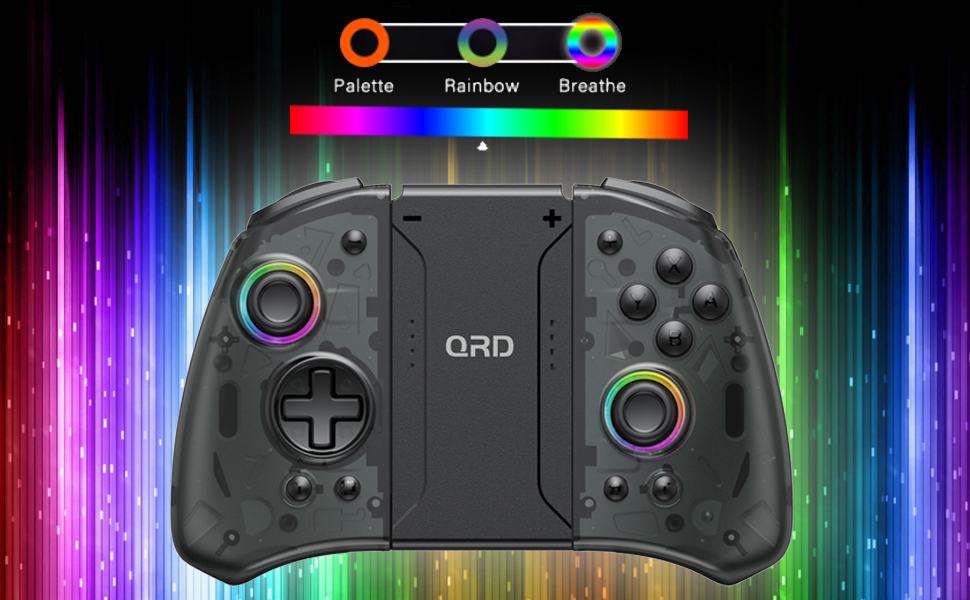
Image 3.1: Visual representation of controller compatibility with Nintendo Switch and Switch OLED models. Note: Not compatible with Switch Lite.
4. Иштөө нускамалары
4.1 Баскычтын жайгашуусу
Контроллердин баскычтарынын жайгашуусу менен таанышып алыңыз:
- Сол джойстик: Movement control.
- Оң Джойстик: Камера же мээлөөнү башкаруу.
- D-Pad: Багыттуу киргизүү.
- A/B/X/Y баскычтары: Аракет баскычтары.
- Сол/Оң баскычтар: Ийин баскычтары.
- ZL/ZR баскычтары: Триггер баскычтары.
- Үй баскычы: Returns to the HOME Menu, powers on/off the controller.
- Скриншот баскычы: Скриншотторду тартат.
- +/- баскычтары: Plus and Minus buttons for in-game functions.
- M1/M2 (Back Buttons): Programmable macro buttons.
4.2 Adjusting Vibration Intensity
The controller supports 3 levels of vibration intensity. To adjust, press and hold the Турбо баскычы анан басыңыз D-Pad Up or D-Pad Down to cycle through intensity levels (Low, Medium, High, Off).
4.3 Turbo Function Setup
To set a button to Turbo mode:
- басып, кармап туруңуз Турбо баскычы.
- While holding Turbo, press the desired action button (e.g., A, B, X, Y, L, R, ZL, ZR). The button will now continuously register input when held down.
- To clear Turbo for a specific button, repeat the process. To clear all Turbo settings, press and hold the Турбо баскычы 5 секундга.
4.4 Programming Back Buttons (Macro)
The M1 and M2 back buttons can be programmed to execute a sequence of button presses (macro). Each macro can store up to 16 button presses.
- басып, кармап туруңуз M1 or M2 программалоону каалаган баскыч.
- While holding the M button, press the SET баскычы (refer to manual diagram for location, typically a small button on the back). The indicator light will flash slowly.
- Enter the desired sequence of button presses (e.g., A, B, X, Y, D-Pad directions).
- басыңыз SET баскычы again to save the macro. The indicator light will stop flashing.
- To clear a macro, press and hold the programmed M button and then press the SET баскычы эки жолу.
4.5 LED Backlight Adjustment
The controller features customizable RGB lighting. To cycle through modes and colors:
- басыңыз LED баскычы (refer to manual diagram for location) to change between static color, breathing, and flashing modes.
- In static mode, press the LED баскычы repeatedly to cycle through the 8 available colors.

Image 4.1: Display of the controller's LED backlight options, including Palette (static colors), Rainbow, and Breathe modes.
5. Заряддоо жана батареянын иштөө мөөнөтү
The QRD Wireless Controller is equipped with a built-in rechargeable Lithium Polymer battery. A 2.5m USB-C cable is included for charging.
- Connect the USB-C end of the cable to the controller's charging port and the USB-A end to a power source (e.g., Nintendo Switch Dock, USB wall adapter, computer USB port).
- Толук кубаттоо үчүн заряддоо болжол менен 2 саатка созулат.
- Толук заряддоо 10 саатка чейин үзгүлтүксүз оюн ойноону камсыз кылат.
- The LED indicators on the controller will show charging status and battery level.
6. Техникалык тейлөө
To ensure the longevity and optimal performance of your QRD Wireless Controller, follow these maintenance guidelines:
- Тазалоо: Контроллерди сүртүү үчүн жумшак, кургак чүпүрөктү колдонуңуз. өжөр кир үчүн, бир аз гampчүпүрөктү суу менен. Катуу химиялык заттарды, эриткичтерди же абразивдүү тазалагычтарды колдонуудан алыс болуңуз.
- Сактагыч: Контроллерди салкын, кургак жерде, күндүн түз нурунан, өтө жогорку температурадан жана жогорку нымдуулуктан алыс сактаңыз.
- Колдонуу: Avoid dropping the controller or subjecting it to strong impacts. Do not disassemble the controller, as this may void the warranty and cause damage.
- Заряддоо: Do not leave the controller charging for excessively long periods after it is fully charged.
7. Кыйынчылыктарды
| Көйгөй | Мүмкүн себеп | Чечим |
|---|---|---|
| Контроллер туташпай жатат. | Батарея аз; Жупташтырылган эмес; Интерференция. | Charge the controller; Re-pair the controller following Section 3.1; Move closer to the console or away from other wireless devices. |
| Input lag or disconnection during gameplay. | Wireless interference; Distance from console; Low battery. | Ensure no strong wireless signals are nearby; Reduce distance to console; Charge the controller. |
| Joysticks drift or are unresponsive. | Calibration issue; Physical debris. | Go to Switch System Settings > Controllers and Sensors > Calibrate Control Sticks. Clean around the joystick base. |
| Баскычтар жооп бербейт. | Stuck button; Software glitch. | Ensure buttons are not physically stuck. Try resetting the controller (if a reset button is present, otherwise power cycle). |
| Вибрация иштебейт. | Vibration setting off; Game does not support vibration. | Adjust vibration intensity (Section 4.2). Verify game compatibility. |
8. Техникалык шарттар
| Өзгөчөлүк | Деталь |
|---|---|
| Модель номери | US-T5-JB02 |
| Байланыш | Bluetooth 5.3 |
| Шайкештик | Nintendo Switch, Switch Pro, Switch OLED |
| Джойстик түрү | Холл эффекти |
| Вибрация | Эки мотор, 3 жөнгө салынуучу деңгээл |
| Motion Control | 6-ок гироскоп |
| Программалануучу баскычтар | Yes (Back Buttons) |
| Батарея түрү | Литий полимери |
| Заряддоо убактысы | Болжол менен 2 саат |
| Ойнотуу убактысы | 10 саатка чейин |
| Заряддоо порту | USB-C |
| Өлчөмдөр | 7.95 x 5.51 x 2.36 дюйм (болжол менен) |
| Салмагы | 12.35 унция (болжол менен) |
9. Кепилдик жана колдоо
9.1 Кепилдик маалыматы
QRD products are manufactured with high-quality materials and undergo rigorous testing. This product comes with a standard manufacturer's warranty against defects in materials and workmanship. Please refer to the product packaging or the official QRD webкепилдиктин белгилүү бир шарттары жана мөөнөтү үчүн сайтты караңыз.
9.2 Кардарларды колдоо
For technical assistance, troubleshooting, or warranty claims, please contact QRD Customer Support. Have your product model number (US-T5-JB02) and purchase information ready when contacting support.
- Онлайн колдоо: Visit the official QRD website for FAQs, updated manuals, and support contact forms.
- Электрондук почта колдоо: [Insert QRD Support Email Address Here - if available, otherwise omit]
- Телефондук колдоо: [Insert QRD Support Phone Number Here - if available, otherwise omit]
We are committed to providing excellent customer service and ensuring your satisfaction with QRD products.


