
1. Киришүү
Thank you for choosing the EDYELL A1 Truly Wireless Bluetooth Earbuds. This manual provides essential information for setting up, operating, and maintaining your earbuds to ensure optimal performance and longevity. Please read this manual thoroughly before use.

Image 1.1: EDYELL A1 Earbuds and Charging Case
2. Пакеттин мазмуну
Пакетиңизде бардык буюмдар бар экенин текшериңиз:
- 1 Pair of EDYELL A1 Earbuds
- 1 Заряддоо кутусу
- 1 Type-C заряддоо кабели
- 2 Pairs of Earplugs (different sizes)
- 1 Колдонуучунун колдонмосу
3. Орнотуу
3.1. Кулакчындарды жана кутуну кубаттоо
Before first use, fully charge the earbuds and charging case. Connect the provided Type-C charging cable to the charging port on the case and a compatible USB power source. The LED indicators on the case will show charging status. A full charge provides up to 48 hours of total music playback with the charging case.

Image 3.1: Charging and Battery Life Overview
3.2. Bluetooth түзмөгү менен жупташуу
- Кулакчындардын кубатталганын текшериңиз.
- Заряддоо кутучасын ачыңыз. Кулакчындар жупташтыруу режимине автоматтык түрдө кирет.
- Түзмөгүңүздө (смартфон, планшет ж.б.) Bluetooth иштетиңиз.
- Издөө available Bluetooth devices and select "A1" from the list.
- Once connected, the earbuds will automatically pair with the last connected device when removed from the case.

Image 3.2: Fast Automatic Pairing Technology
3.3. Кулакчындарды орнотуу
For optimal sound quality and comfort, choose the correct size earplugs and ensure a secure fit.
- Select the earplug size that best fits your ear canal.
- Кулакчынды кулагыңызга акырын киргизиңиз.
- Rotate and adjust the earbud until it feels comfortable and snug, creating a good seal.

Image 3.3: Comfortable Fit with 4 Sizes
4. Иштөө нускамалары
4.1. Башкаруу элементтерине тийүү
The EDYELL A1 earbuds feature touch controls for various functions. Specific touch gestures may vary; refer to the quick start guide included in your package for detailed control mapping.
- Ойнотуу/тындыруу: Кулакчындарды бир жолу таптаңыз.
- Кийинки трек: Оң кулакчынды эки жолу таптаңыз.
- Мурунку трек: Сол кулакчынды эки жолу таптаңыз.
- Чалууга жооп берүү/аяктоо: Кулакчындарды бир жолу таптаңыз.
- Чакырууну четке кагуу: Кулакчындардын бирин басып, кармап туруңуз.
- Үн Жардамчысын жандыруу: Кулакчындарды үч жолу таптаңыз.
- ANC/Айкындуулук режими: Press and hold the left earbud (typically 2 seconds) to cycle through modes.
4.2. Активдүү ызы-чууну жокко чыгаруу (ANC)
The earbuds feature up to 35dB Active Noise Cancellation to reduce ambient sound. Activate or deactivate ANC using the touch controls as described above. This feature is designed to enhance your listening experience in noisy environments.

Image 4.1: Active Noise Cancellation in Use
4.3. Чакыруу функциялары
Equipped with 4 built-in microphones and CVC8.0 technology, the earbuds provide clear call quality by reducing background noise and enhancing your voice.
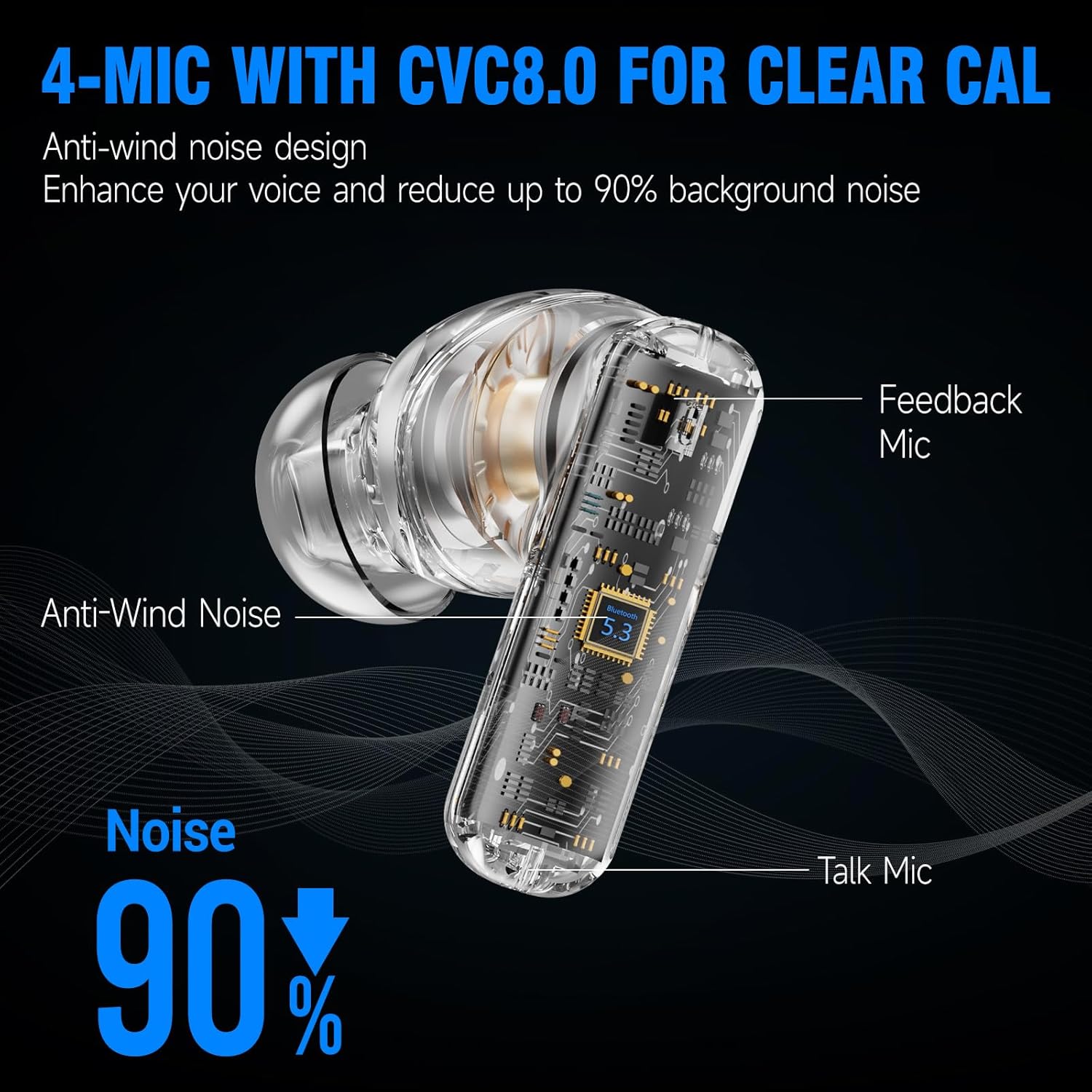
Image 4.2: 4-Mic with CVC8.0 for Clear Calls
4.4. Үн тажрыйбасы
The EDYELL A1 earbuds feature 13mm Titanized Diaphragm Dynamic Drivers, designed to deliver HiFi stereo sound with deep bass and clear treble.

Image 4.3: 13mm Driver Delivers HiFi Stereo Sound
5. Техникалык тейлөө
5.1. Тазалоо
Regularly clean your earbuds and charging case to maintain performance and hygiene. Use a soft, dry, lint-free cloth. Do not use abrasive cleaners or solvents. For earplugs, remove them and clean with mild soap and water, then dry thoroughly before reattaching.
5.2. Сууга туруктуулук
The earbuds are IPX5 water-resistant, meaning they can withstand splashes and sweat. They are not designed for submersion in water. Avoid exposing them to heavy rain or swimming.

Image 5.1: IPX5 Water Resistance
6. Кыйынчылыктарды
| Маселе | Мүмкүн чечим |
|---|---|
| Кулакчындар жупташкан жок | Кулакчындардын кубатталганын текшериңиз. Түзмөгүңүздөгү Bluetooth'ду өчүрүп, күйгүзүңүз. Bluetooth жөндөөлөрүнөн түзмөктү унутуп, кайра жупташтырыңыз. |
| Үн жок же үнү төмөн | Check device volume. Ensure earbuds are properly connected. Clean earbud mesh if blocked. |
| үзгүлтүктүү байланыш | Ensure no obstructions between earbuds and device. Keep device within Bluetooth range (approx. 10 meters). Avoid strong electromagnetic interference. |
| Микрофон иштебей жатат | Ensure earbuds are selected as the audio input device. Clean microphone ports. |
| ANC эффективдүү эмес | Ensure earbuds are properly seated in your ears with a good seal. Verify ANC is activated. |
7. Техникалык шарттар
| Өзгөчөлүк | Деталь |
|---|---|
| Модель аты | FM-Earbuds-A1 |
| Noise Control | Активдүү ызы-чууну жокко чыгаруу (35дБ чейин) |
| Байланыш технологиясы | Bluetooth 5.3 |
| Аудио драйвер түрү | 13мм динамикалык драйвер |
| Батареянын иштөө мөөнөтү | 48 саатка чейин (заряддоо кутусу менен) |
| Заряддоо порту | Type-C |
| Микрофондор | 4-built-in microphones with CVC8.0 |
| Сууга туруктуулук деңгээли | IPX5 |
| Башкаруу түрү | Touch Control |
| Материал | Пластик |
| Элемент Салмагы | 100 грамм |
| Продукциянын өлчөмдөрү | 11 x 11 x 4 см |
| Батарея клеткасынын курамы | Литий ион |
| Келип чыккан өлкө | Кытай |
8. Кепилдик жана колдоо
The EDYELL A1 Earbuds come with a 12-month EDYELL India Warranty. For any quality problems or warranty claims, please contact customer support via Amazon or directly using the contact information below.
Кардарларды тейлөө:
- Электрондук почта: support@fenman.in
- Телефон: +91 8882786235