1. Киришүү
This manual provides essential information for the safe and effective use of your Music Boxing Machine. Please read it thoroughly before operation and retain it for future reference. This device is designed for boxing enthusiasts of all ages, offering a dynamic and engaging workout experience with smart features.

Сүрөт 1: Алдыңкы view of the Music Boxing Machine with illuminated pads.
2. Коопсуздук маалыматы
- Ensure the machine is securely mounted to a stable wall surface before use.
- Do not apply excessive force beyond the machine's intended use, as this may cause damage or injury.
- Keep hands and fingers clear of moving parts or impact zones during operation.
- Кырсыктарды болтурбоо үчүн пайдалануу учурунда балдарды көзөмөлдөө.
- Аппаратты сууга же экстремалдык температурага тийгизүүдөн сактаңыз.
- Use only the provided USB charging cable for power.
3. Пакеттин мазмуну
Сураныч, пакетте төмөнкү нерселерди текшериңиз:
- Music Boxing Machine Unit
- USB заряддоо кабели
- Mounting Accessories (EVA stickers and/or Velcro straps)
- Колдонуучунун Колдонмосу (бул документ)

Figure 2: Included mounting accessories (Adhesive Velcro and Velcro straps) and product dimensions.
4. Орнотуу
4.1 Машинаны орнотуу
The Music Boxing Machine can be mounted on various smooth wall surfaces without drilling.
- Choose a suitable, smooth wall surface such as marble, tiles, or solid wood. Ensure the surface is clean and dry.
- Decide on your preferred mounting method:
- EVA Stickers: For a strong, permanent hold on very smooth surfaces.
- Adjustable Velcro Straps: For flexible height adjustment, suitable for adults, teenagers, and children. Apply the adhesive Velcro strips to the back of the machine and the corresponding strips to the wall.
- Mount the machine securely at a comfortable height for all users. The adjustable Velcro straps allow for easy repositioning.
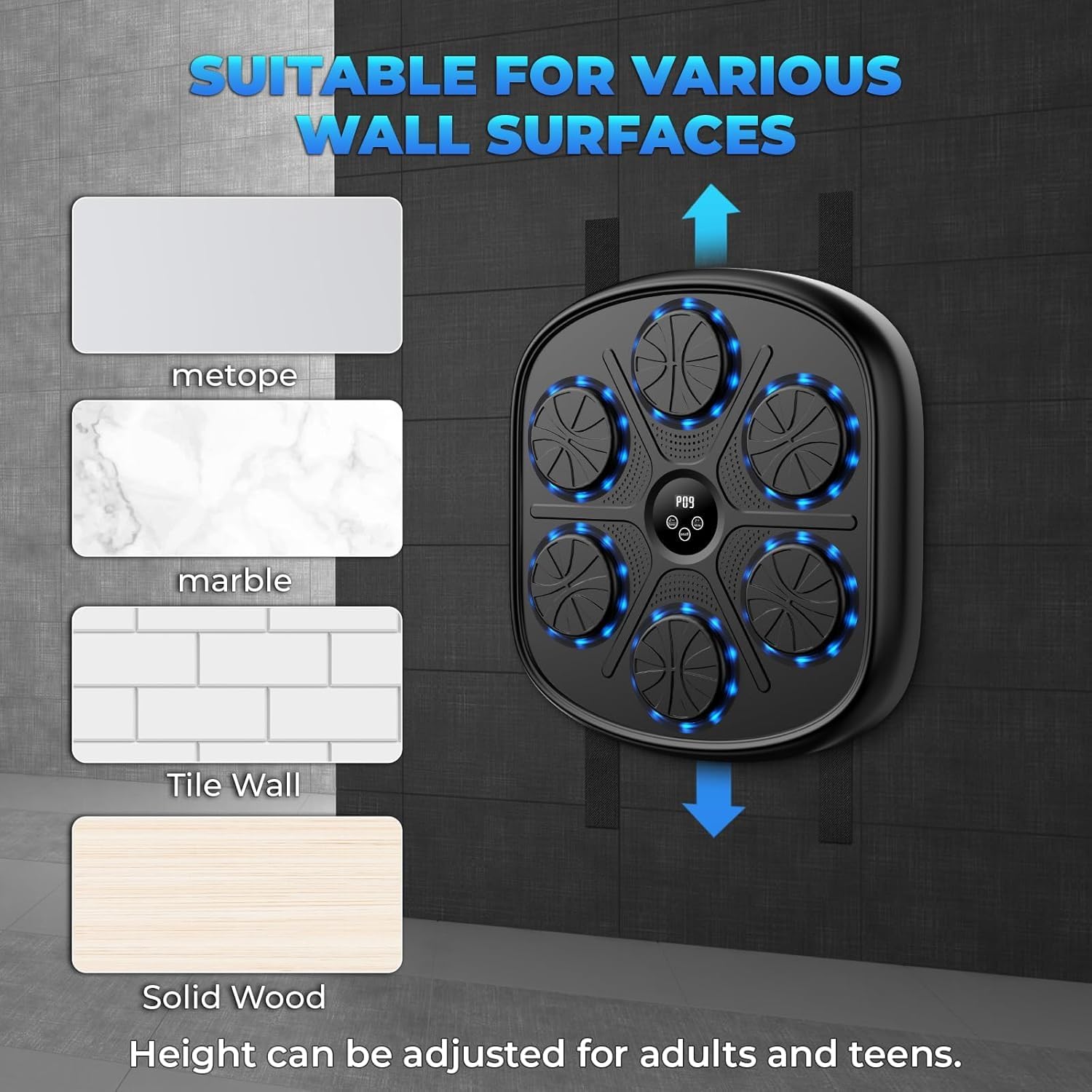
3-сүрөт: Мисamples of suitable wall surfaces for mounting the boxing machine.
4.2 Charging the Machine
The Music Boxing Machine is equipped with USB charging.
- Түзмөктө USB кубаттоо портун табыңыз.
- Connect the provided USB charging cable to the machine and a compatible USB power source (e.g., wall adapter, computer USB port).
- Allow the machine to charge fully before first use. An indicator light may show charging status.
5. Иштөө нускамалары
5.1 Күйгүзүү/өчүрүү
Press and hold the power button (usually located on the central display) to turn the machine on or off.
5.2 Bluetooth байланышы
Connect your smartphone via Bluetooth to play your favorite music during workouts.
- Ensure the Music Boxing Machine is powered on.
- Смартфонуңузда же аудио түзмөгүңүздө Bluetooth'ду иштетиңиз.
- Издөө available Bluetooth devices and select "Music Boxing Machine" (or similar name) to pair.
- Once paired, you can play music from your device through the machine's speakers.
5.3 Adjusting Speed and Modes
The machine offers 9 modes and 10 speeds to customize your workout intensity and challenge.
- Use the mode selection button (often labeled "Mode" or with an icon) to cycle through the 9 available modes. These may include various punch sequences, including unpredictable patterns.
- Use the speed adjustment buttons (often labeled "+" and "-" or with speed icons) to select from 10 different speeds. Higher speeds increase the pace of the light prompts and required reactions.

Figure 4: The central display indicating available modes and speed settings.
5.4 Smart Digital Display and Training
The intelligent digital display provides real-time data to enhance your training.
- The display shows data such as striking speed, striking power, and consecutive hit counts.
- Follow the light guides on the punching pads. When a pad illuminates, strike it.
- Music synchronization with the light guides makes training engaging and helps maintain rhythm.

Figure 5: The Music Boxing Machine in use, demonstrating its suitability for home exercise.
6. Техникалык тейлөө
6.1 Тазалоо
To maintain the cleanliness and longevity of your Music Boxing Machine:
- бети жумшак менен сүртүп, гamp кездеме.
- Do not use abrasive cleaners or solvents, as these may damage the material.
- Тазалоодон мурун, машинанын өчүрүлгөнүн жана розеткадан суурулганын текшериңиз.
6.2 Сактоо
When not in use, store the machine in a cool, dry place away from direct sunlight and extreme temperatures.
7. Кыйынчылыктарды
| Көйгөй | Мүмкүн себеп | Чечим |
|---|---|---|
| Машина иштебейт. | Батарея аз же кубат жок. | Charge the machine using the USB cable. Ensure the power button is pressed and held. |
| Bluetooth байланышы ишке ашпай калды. | Bluetooth not enabled on device, machine not in pairing mode, or too far. | Ensure Bluetooth is on. Restart both devices. Move closer to the machine. |
| Lights or sounds are not working correctly. | Incorrect mode selected or internal malfunction. | Cycle through modes. Restart the machine. If problem persists, contact support. |
| Machine falls off the wall. | Improper mounting or unsuitable wall surface. | Re-mount using appropriate method for your wall type. Ensure surface is clean and dry. Avoid violent strikes from strong persons as the machine is not designed for such impact. |
8. Техникалык шарттар
| Өзгөчөлүк | Деталь |
|---|---|
| Модель аты | adking-A |
| Бренд | Жалпы |
| Түс | Кара |
| Материал | Plastic (Body), Rubber (Outer Material) |
| Элемент Салмагы | 9 фунт |
| Өлчөмдөрү (болжол менен) | 45cm (Height) x 41.5cm (Width) x 6.8cm (Depth) |
| Байланыш | Bluetooth |
| Power Source | USB заряддоо |
| Режимдер | 9 |
| Ылдамдыктар | 10 |
| Өндүрүүчү | adking |
9. Кепилдик жана колдоо
Based on the product information, this item is Кепилдик жок.
For any questions or issues regarding your Music Boxing Machine, please refer to the seller or retailer from whom you purchased the product.
10. Маанилүү эскертүүлөр
- This manual does not include video demonstrations as no official product videos were available from the seller.
- The boxing game wall cannot withstand violent strikes from a strong person. It is designed for fitness and training, not heavy impact.


