
H3C H3C Magic NX15-UK
H3C Magic NX15 AX1500 кош тилкелүү гигабиттик Wi-Fi 6 роутер колдонуучусунун колдонмосу
Model: H3C Magic NX15-UK
1. Киришүү
The H3C Magic NX15 is a high-performance Gigabit Wi-Fi 6 router designed to provide a fast and reliable internet experience. Featuring a vertical design, full gigabit network ports, and Wi-Fi 6 (802.11ax) technology on the 5GHz band, it ensures high-speed connectivity. Equipped with four high-gain external antennas and EasyMesh compatibility, it offers wide and flexible network signal coverage. Enhanced security is provided through WPA3 encryption. This manual provides essential information for setting up, operating, and maintaining your H3C Magic NX15 router.
2. Пакеттин мазмуну
Сураныч, таңгактын ичиндегисин кылдаттык менен текшериңиз. Эгерде кандайдыр бир буюмдар жок болсо же бузулуп калса, сатуучуга кайрылыңыз.
- H3C Magic NX15 AX1500 Dual Band Gigabit Wi-Fi 6 Router
- Кубаттуу адаптер
- Ethernet кабели
- Ыкчам орнотуу көрсөтмөсү (бул колдонмо)
3. Продукт бүтүп калдыview
Familiarize yourself with the components and interfaces of your H3C Magic NX15 router.
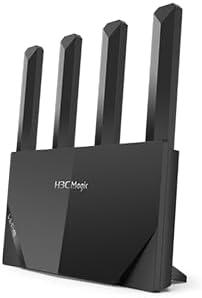
3.1-сүрөт: Фронт view of the H3C Magic NX15 router, showcasing its vertical design and four external antennas.
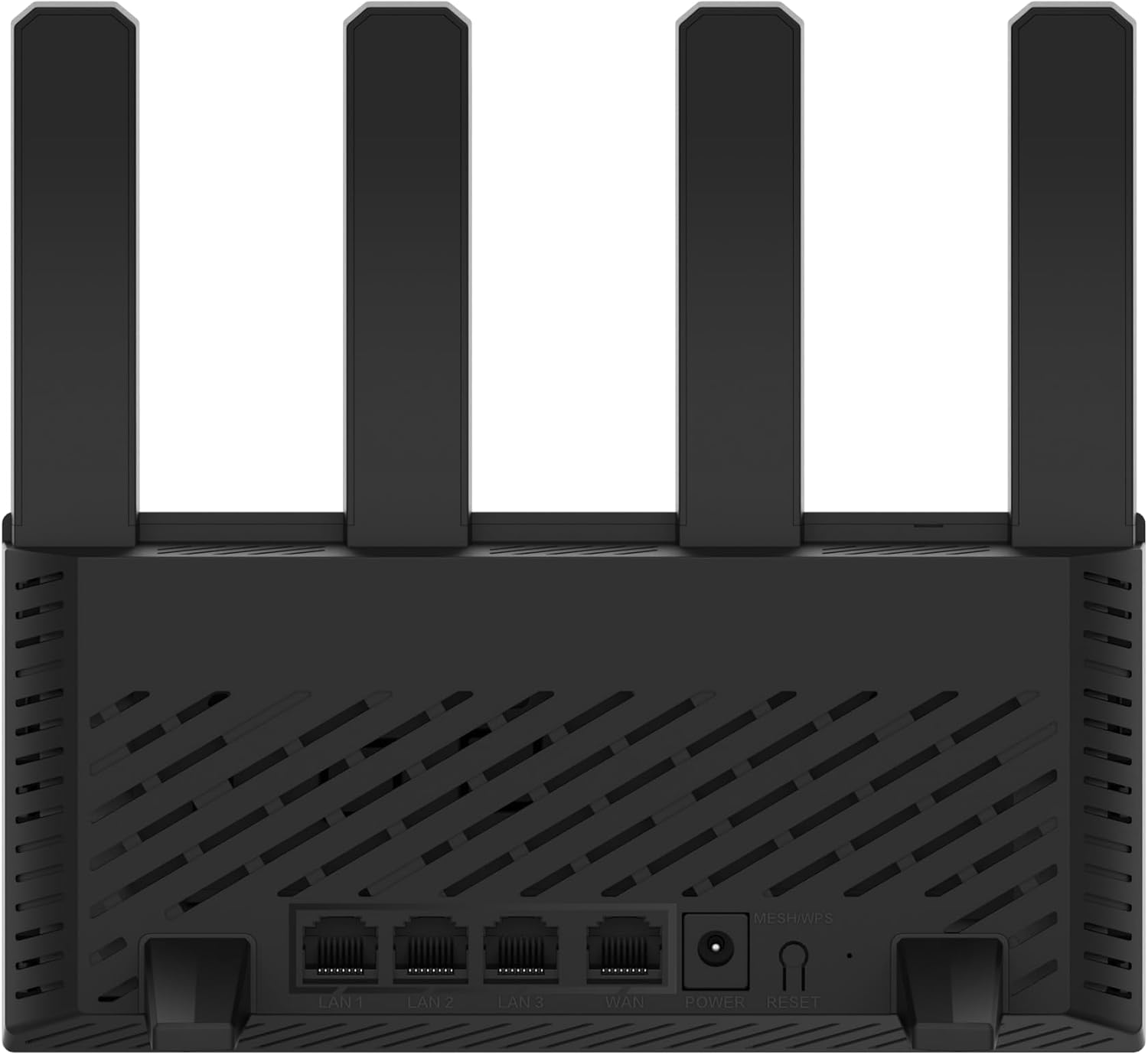
3.2-сүрөт: Арткы view of the H3C Magic NX15 router, displaying the LAN ports, WAN port, power input, and Reset/WPS button.

3.3-сүрөт: Жогорку view of the H3C Magic NX15 router, highlighting the ventilation design for heat dissipation.

3.4-сүрөт: Side view of the H3C Magic NX15 router, showing the sleek profile and additional ventilation slots.
Порттун жана баскычтын сүрөттөмөлөрү:
- WAN порт: Модемиңизге же интернет кызматын көрсөтүүчүңүздүн (ISP) тармагына туташат.
- LAN порттору (LAN1, LAN2, LAN3): Компьютерлер, оюн консолдору же акылдуу сыналгылар сыяктуу зымдуу түзмөктөргө туташыңыз.
- Электр порту: Камтылган кубат адаптерине туташат.
- Калыбына келтирүү/WPS баскычы:
- Press briefly to activate WPS (Wi-Fi Protected Setup) for easy connection of compatible devices.
- Press and hold for approximately 5-10 seconds to restore the router to factory default settings.
- Антенналар: Four high-gain external antennas for optimal Wi-Fi signal coverage.
4. Орнотуу колдонмосу
Follow these steps to set up your H3C Magic NX15 router for the first time.
- Маршрутизаторду таңгактан чыгаруу: Роутерди жана бардык аксессуарларды таңгактан этияттык менен алып салыңыз.
- Маршрутизаторду жайгаштырыңыз: Роутерди үйүңүздөгү же кеңсеңиздеги борбордук жерге, тоскоолдуктардан жана тоскоолдук булактарынан (мисалы, микротолкундуу мештер, зымсыз телефондор) алыс коюңуз. Жакшы желдетүүнү камсыз кылыңыз.
- Кубатка туташуу: Connect the included power adapter to the router's power port and then plug the adapter into a power outlet. Wait for the router to power on and its indicator lights to stabilize.
- Модемге туташуу: Connect one end of the provided Ethernet cable to the WAN port on your H3C Magic NX15 router and the other end to your modem's LAN port.
- Түзмөктөрдү туташтыруу (кошумча): For wired connections, connect an Ethernet cable from one of the router's LAN ports to your computer or other network device.
- Wi-Fi'га туташуу:
- Компьютериңизде же мобилдик түзмөгүңүздө жеткиликтүү Wi-Fi тармактарын издеңиз.
- Роутериңиздин ылдый жагындагы этикеткада басылган Wi-Fi тармагынын атын (SSID) тандаңыз.
- Enter the Wi-Fi password (also printed on the router's label) when prompted.
- Маршрутизаторду башкаруу барагына кирүү:
- ачуу а web браузер (мисалы, Chrome, Firefox, Edge).
- Демейки IP дарегин териңиз (адатта
192.168.1.1orh3cmagic.com) into the address bar and press Enter. Refer to the router's label for the exact address. - Follow the on-screen instructions to complete the initial setup, including setting a new administrator password and configuring your internet connection type (e.g., PPPoE, DHCP, Static IP).
5. Иштөө нускамалары
This section details the key features and how to operate your H3C Magic NX15 router.
5.1 Dual-Band Wi-Fi Operation
The H3C Magic NX15 supports dual-band Wi-Fi (2.4GHz and 5GHz) for optimal performance. It features intelligent band steering, which automatically directs your devices to the best available band (2.4GHz for wider coverage, 5GHz for higher speeds) without manual selection.
- 2.4 ГГц диапазону: Provides wider coverage and better penetration through walls, suitable for general browsing and devices further from the router.
- 5 ГГц диапазону: Offers higher speeds and lower latency, ideal for streaming 4K video, online gaming, and high-bandwidth applications, typically for devices closer to the router.
5.2 Intelligent Management via Mobile App
Manage your router conveniently using the dedicated H3C mobile application. The app allows for easy network settings configuration, network speed optimization, and various other operations.
- Колдонмону жүктөп алыңыз: Издөө the "H3C Magic" app in your device's app store (Google Play Store for Android or Apple App Store for iOS).
- Орнотуу жана ишке киргизүү: Колдонмону орнотуп, аны ачыңыз.
- Кирүү: Use your router's administrator credentials to log in to the app.
- Орнотууларды башкаруу: Колдонмодон сиз:
- Change Wi-Fi names and passwords.
- Туташкан түзмөктөрдү көзөмөлдөө.
- Ата-энелик көзөмөл орнотуу.
- Configure guest Wi-Fi networks.
- Optimize network performance.
5.3 EasyMesh for Whole-Home Wi-Fi
The H3C Magic NX15 supports EasyMesh technology, allowing you to expand your Wi-Fi coverage by adding additional compatible H3C mesh units. This creates a seamless whole-home Wi-Fi network, eliminating dead zones in large or complex house types.
- Refer to the EasyMesh setup guide provided with your additional mesh units for detailed instructions on expanding your network.
- Ensure all mesh units are compatible with the EasyMesh standard.
5.4 Тармактын коопсуздук функциялары
The router includes multiple functions to enhance your private network's security:
- WPA3 шифрлөө: Provides the latest and strongest Wi-Fi security protocol.
- Access Allowlist/Denylist: Control which devices can connect to your network based on their MAC addresses.
- Конок Wi-Fi: Негизги тармагыңызды коопсуз жана купуя сактоо менен коноктор үчүн өзүнчө Wi-Fi тармагын түзүңүз.
- Ата-энелик көзөмөл: Manage internet access times and block inappropriate content for specific devices.
These security features can be configured via the router's web management interface or the H3C mobile app.
6. Техникалык тейлөө
Proper maintenance ensures the longevity and optimal performance of your H3C Magic NX15 router.
- Жайгашкан жери: Keep the router in a well-ventilated area, away from direct sunlight, heat sources, and moisture. The stereoscopic heat dissipation design with a large metal heat sink helps maintain stable operation.
- Тазалоо: Regularly dust the router's exterior and ventilation slots with a soft, dry cloth. Do not use liquid cleaners or aerosols.
- Программалык камсыздоонун жаңыртуулары: Маршрутизатор аркылуу микропрограммалык камсыздоонун жаңыртууларын мезгил-мезгили менен текшерип жана орнотуп туруңуз web management interface or the mobile app. Firmware updates often include performance improvements, new features, and security patches.
- Кайра жүктөлүүдө: Эгер сиз тармак көйгөйлөрүнө туш болсоңуз, кубат адаптерин 10 секундга сууруп, андан кийин кайра сайып, роутерди өчүрүп-күйгүзүп көрүңүз.
- Коопсуздук: Wi-Fi сырсөзүңүздү жана роутер администраторунун сырсөзүн күчтүү, уникалдуу айкалыштарга үзгүлтүксүз алмаштырып туруңуз.
7. Кыйынчылыктарды
Бул бөлүмдө сиз кабылышы мүмкүн болгон жалпы көйгөйлөр каралат жана аларды чечүү жолдору каралган.
| Көйгөй | Мүмкүн себеп | Чечим |
|---|---|---|
| Интернетке кирүү жок |
|
|
| Wi-Fi сигналы алсыз же туруксуз |
|
|
| Маршрутизаторду башкаруу барагына кирүү мүмкүн эмес |
|
|
| Forgot Router Administrator Password | Сырсөз жоголду | Press and hold the Reset/WPS button on the router for 5-10 seconds to restore factory default settings. You will then need to reconfigure the router. |
8. Техникалык шарттар
Detailed technical specifications for the H3C Magic NX15 router.
| Өзгөчөлүк | Деталь |
|---|---|
| Модель аты | H3C Magic NX15 |
| Элемент моделинин номери | H3C Magic NX15-UK |
| Бренд | H3C |
| Зымсыз стандарт | 802.11ax (Wi-Fi 6) |
| Жыштык тилкесинин классы | Кош тилкелүү (2.4 ГГц жана 5 ГГц) |
| Антенналар | 4 жогорку күчөткүчтүү тышкы антенналар |
| Порттар | Gigabit WAN, Gigabit LAN (x3) |
| Өзгөчөлүктөр | Access Point Mode, EasyMesh, WPA3 Security, Parental Control, Guest Wi-Fi, App Management |
| Өлчөмдөрү (пакет) | 21 x 19.4 x 6.3 см |
| Салмагы (пакет) | 500 г |
| Өндүрүүчү | H3C |
| Келип чыккан өлкө | Кытай |
| Биринчи жеткиликтүү күн | 24 август 2024 жыл |
9. Кепилдик жана колдоо
The H3C Magic NX15 router comes with a standard manufacturer's warranty. For specific warranty terms and conditions, please refer to the warranty card included in your product packaging or visit the official H3C webсайт.
Техникалык колдоо:
If you encounter any issues or have questions regarding your H3C Magic NX15 router, please contact H3C technical support.
- Онлайн колдоо: Visit the official H3C support webКөп берилүүчү суроолор, көйгөйлөрдү аныктоо боюнча көрсөтмөлөр жана драйвер/программаны жүктөө үчүн сайт.
- Байланыш маалыматы: Refer to the H3C website or your product documentation for regional contact numbers and email support.
Please have your product model number (H3C Magic NX15-UK) and serial number ready when contacting support.
Ask a question about this manual
Ask about setup, troubleshooting, compatibility, parts, safety, or missing instructions. Manuals+ will review the question and use this page’s manual context to help answer it.