
1. Продукт бүтүп калдыview
The GUOANVISION S100 is an advanced outdoor PTZ (Pan-Tilt-Zoom) security camera featuring a unique dual-lens system. It combines a fixed wide-angle lens with a rotatable tracking lens to provide comprehensive surveillance without blind spots. Equipped with 6MP resolution, AI human detection, automatic tracking, two-way audio, and IP66 waterproofing, this camera is designed for robust outdoor monitoring.

Figure 1: GUOANVISION S100 Dual Lens Outdoor PTZ Security Camera
2. Пакеттин мазмуну
Орнотууну улантуудан мурун, бардык компоненттердин топтомуңузда бар экенин текшериңиз:
- GUOANVISION S100 Outdoor PTZ Camera
- Кронштейн орнотуу
- Кубат адаптери (шнурдуу электр)
- Монтаждоо бурамалар жана дубал сайгычтар
- Waterproof Caps for Connectors
- User Manual
Video 1: Unboxing and Package Contents of the GUOANVISION S100 Camera.
3. Орнотуу колдонмосу
3.1 Физикалык орнотуу
The GUOANVISION S100 camera supports both wall and ceiling mounting. Choose a location that provides optimal coverage and a stable Wi-Fi signal.
- Монтаждык кронштейнди тиркөө: Secure the mounting bracket to the camera using the provided screws.
- Бургулоо пункттарын белгилөө: Hold the camera with the attached bracket against the desired installation surface. Mark the drilling points.
- Бургулоо тешиктери: Белгиленген жерлерге тешиктерди бургула жана дубал тыгындарын киргизгиле.
- Камераны орнотуу: Align the bracket with the drilled holes and secure the camera using the mounting screws.
- Туташуу кубаты: Connect the power adapter to the camera and plug it into a power outlet. Ensure the connection is secure and protected from weather using the waterproof caps.

Figure 2: Illustration of wall and ceiling mounting options.
3.2 Колдонмону орнотуу жана жупташтыруу
To control and monitor your camera, download the iCSee app from your smartphone's app store (available for Android and iOS).
- Колдонмону жүктөп алуу: Scan the QR code in the included user manual or search for 'iCSee' in your app store.
- Каттоо эсеби: Open the iCSee app and follow the on-screen instructions to register a new account or log in if you already have one.
- Bluetooth жана Wi-Fi иштетүү: Ensure your smartphone's Bluetooth and 2.4GHz Wi-Fi are enabled.
- Түзмөк кошуу: In the app, tap the '+' icon to add a new device. The app should automatically detect the camera via Bluetooth. Confirm the device.
- Wi-Fi'га туташуу: Select your 2.4GHz Wi-Fi network and enter the password. The camera will connect to your network.
- MicroSD картасын салыңыз (милдеттүү эмес): For local recording, insert a MicroSD card (up to 128GB) into the designated slot on the camera.

Figure 3: Visual guide for iCSee app installation and device pairing.
Video 2: Detailed steps for connecting the camera to the iCSee app.
4. Иштөө нускамалары
4.1 Live View жана кош экрандуу мониторинг
Access the live feed from your camera through the iCSee app. The S100 features a dual-screen display, allowing you to view both the fixed wide-angle lens and the rotatable PTZ lens simultaneously.

Figure 4: Simultaneous display of both camera lenses in the iCSee app.
4.2 PTZ Control
The lower lens of the camera can be controlled remotely via the app, offering a horizontal pan of 350° and a vertical tilt of 90°.
- Панорама/Тилт: Use the directional controls in the app to adjust the camera's viewбурч.
- Алдын ала коюлган позициялар: Save frequently monitored areas as preset positions for quick navigation.

Figure 5: Diagram illustrating the 350° pan and 90° tilt functionality.
4.3 AI Human Detection & Auto-Tracking
The camera utilizes AI to accurately detect human movement and automatically track the subject within its field of view. This minimizes false alarms from animals or environmental factors.
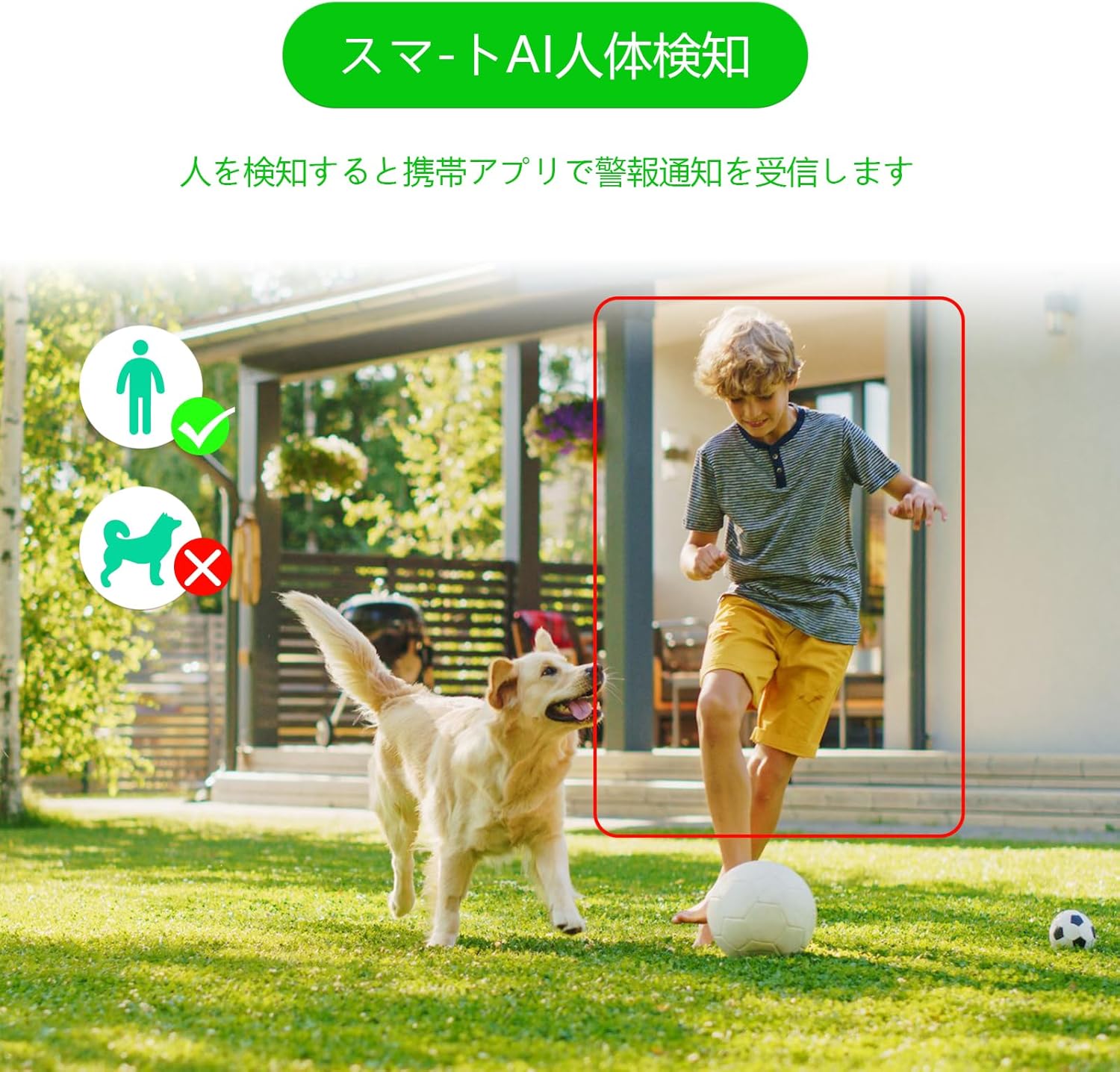
Figure 6: AI human detection feature, focusing on human figures.
Video 3: Demonstration of the camera's automatic motion tracking feature.
4.4 Түнкү көрүү режимдери
The S100 offers multiple night vision modes to suit different lighting conditions:
- Infrared режими: Стандарттуу ак-кара түнкү көрүү.
- Толук түстүү режим: Utilizes built-in lights to provide color images even in low light.
- Smart Mode: Аныкталган кыймылга жараша инфракызыл жана түстүү түнкү көрүүнүн ортосунда автоматтык түрдө которулат.

Figure 7: Comparison of infrared, smart, and full-color night vision modes.
Video 4: Demonstration of the camera's night vision capabilities in various settings.
4.5 Two-Way Audio & Alarm Functions
Communicate with visitors or deter intruders using the built-in microphone and speaker. The camera also features a light and sound alarm that can be triggered upon detection of suspicious activity.
- Эки тараптуу сүйлөшүү: Use the app to speak through the camera's speaker and listen through its microphone.
- Light & Sound Alarm: Configure the camera to activate flashing blue/red lights and an audible siren when human motion is detected at night.

Figure 8: Illustrates the two-way audio feature for remote communication.
5. Техникалык тейлөө
Regular maintenance ensures optimal performance and longevity of your GUOANVISION S100 camera.
- Тазалоо: Мезгил-мезгили менен камеранын линзасын жана корпусун жумшак, гamp чаңды жана кирди кетирүү үчүн кездеме колдонуңуз. Абразивдүү тазалоочу каражаттардан алыс болуңуз.
- Программалык камсыздоонун жаңыртуулары: Check the iCSee app regularly for available firmware updates. Keeping the firmware updated ensures you have the latest features and security enhancements.
- Туташуу текшерүү: Periodically verify the power and network connections to ensure they are secure and free from damage.
- SD Card башкаруу: If using a MicroSD card, ensure it is functioning correctly and has sufficient storage space. Format the card through the app if necessary.
6. Кыйынчылыктарды
Эгер камераңызда көйгөйлөргө туш болсоңуз, төмөнкү жалпы көйгөйлөрдү жана чечимдерди караңыз:
- Камера оффлайн:
- Check power supply: Ensure the camera is properly connected to power.
- Check Wi-Fi connection: Verify your Wi-Fi network is active and the camera is within range. Re-pair the camera if necessary.
- Router settings: Ensure your router is broadcasting a 2.4GHz Wi-Fi signal.
- No Recording/SD Card Not Detected:
- Ensure MicroSD card is correctly inserted.
- Check if the MicroSD card is damaged or full. Format it via the app or replace it.
- Verify recording settings in the iCSee app.
- Сүрөттүн сапаты начар:
- Камера линзасын тазалаңыз.
- Ensure adequate lighting, especially for color night vision.
- Check network stability; a weak Wi-Fi signal can affect streaming quality.
- Жалган ойготкучтар:
- Adjust AI human detection sensitivity in the app.
- Ensure the camera is positioned to minimize detection of non-human movement (e.g., swaying branches).
7. Техникалык шарттар
| Өзгөчөлүк | Деталь |
|---|---|
| Бренд | GUOANVISION |
| Модель аты | S100 |
| Сунушталган колдонуу | Baby Monitor, Pet Monitor, Indoor Security, Outdoor Security |
| Байланыш | Wired, Wi-Fi (2.4GHz) |
| Өзгөчөлүктөрү | HD Resolution, Dual Lens, PTZ, AI Human Detection, Auto-Tracking, Two-Way Audio, Light/Sound Alarm |
| Ички/тышкы колдонуу | Ички, сырткы |
| Шайкеш түзмөктөр | Смартфон (iOS, Android) |
| Power Source | Электр зымдары |
| Туташуу Протоколу | ONVIF |
| Монтаж түрү | Wall Mount, Ceiling Mount (Screw-in) |
| Product Exterior Material | Пластик |
| Суу өткөрбөйт рейтинги | IP66 |
| Ойготкуч түрү | Audio & Motion (Light & Sound) |
| Натыйжалуу дагы эле чечим | 6 MP (2x 3MP lenses) |
| Башкаруу ыкмасы | App (iCSee) |
| Батареялар талап кылынат | Жок |
| Видеону коддоо форматы | MPEG-4 |
| Видео тартуу форматы | MP4 |
| Түнкү көрүү диапазону | 15 метр |
| Түнкү көрүнүш | Color Night Vision, Infrared, Smart Mode |
| IR LED | 8 |
| Продукт өлчөмү | 22.9 x 12.7 x 22.9 см |
| Max Flash Memory Support | 128 ГБ (MicroSD) |
8. Кепилдик жана колдоо
GUOANVISION is committed to providing high-quality products and excellent customer service. If you have any questions, concerns, or encounter product defects during the warranty period, please do not hesitate to contact us.
8.1 Байланыш маалыматы
- Электрондук почта колдоо: support@guoanvision.net (24-hour response)
- Amazon кардарларды тейлөө: Navigate to 'Customer Service' > 'Your Orders' > 'Sold by' > 'Ask a question' for assistance with your purchase.
We will respond promptly to provide warranty service and support.