1. Киришүү
Thank you for choosing the Generic OFACDOCUO Gaming Table. This manual provides essential information for the safe and efficient assembly, operation, and maintenance of your new desk. Please read these instructions carefully before assembly and retain them for future reference.
2. Продукт бүтүп калдыview
The Generic OFACDOCUO Gaming Table is designed for versatility, suitable for gaming, office work, or study. It features an ergonomic design, robust construction, and thoughtful details for user convenience.
Негизги өзгөчөлүктөрү:
- Ergonomic Curved Desktop: Designed to fit the human body for improved comfort during extended use.
- High-Quality Density Board: Provides strong load-bearing capacity and resistance to deformation.
- U-Shaped Steel Bracket: Enhances structural stability and load-bearing capacity.
- Reinforced Beam Design: Minimizes shaking and ensures stability, especially during intense activities.
- Wire Threading Hole: Helps manage cables for a tidy desktop.
- Complimentary Tray: For convenient placement of computer mainframes or other items, with a heightened design for water resistance.
- Тегеректелген бурчтар: Prevents bumps and adds to the aesthetic appeal.
Компоненттери:
The package includes the desktop, U-shaped steel brackets, support beams, a complimentary tray, foot pads, and all necessary assembly hardware.

2.1-сүрөт: Мисample of the White Gaming Table setup with monitor, PC, and peripherals.

2.2-сүрөт: Мисample of the Black Gaming Table setup with monitor, PC, and office chair.

Figure 2.3: Illustration of the ergonomic curved desktop design, showing dimensions of 120cm length and 60cm width.

Figure 2.4: Details highlighting the high-quality density board material and rounded corners of the desktop.
3. Орнотуу жана монтаждоо нускамалары
Assembly of the Gaming Table is designed to be straightforward. Please follow the detailed installation instructions included in your product packaging. Ensure all parts are present before beginning assembly.
Жалпы Ассамблеянын кадамдары:
- Компоненттерди таңгактан чыгаруу: Carefully remove all parts from the packaging and lay them out on a clean, soft surface to prevent scratches. Verify all hardware and components are present against the packing list.
- Рамканы чогултуу: Attach the U-shaped steel brackets to the support beams using the provided screws. Ensure all connections are secure but do not overtighten initially.
- Иш тактасын тиркөө: Carefully place the desktop onto the assembled frame. Align the pre-drilled holes on the desktop with the holes on the frame. Secure the desktop to the frame using the appropriate screws.
- Аксессуарларды орнотуу: Attach the complimentary tray to the designated area under the desk. Insert the foot pads into the bottom of the U-shaped brackets to protect your floor.
- Акыркы бекемдөө: Бардык компоненттер ордуна коюлуп, тегизделгенден кийин, бардык бурамалар толугу менен бекемделет.
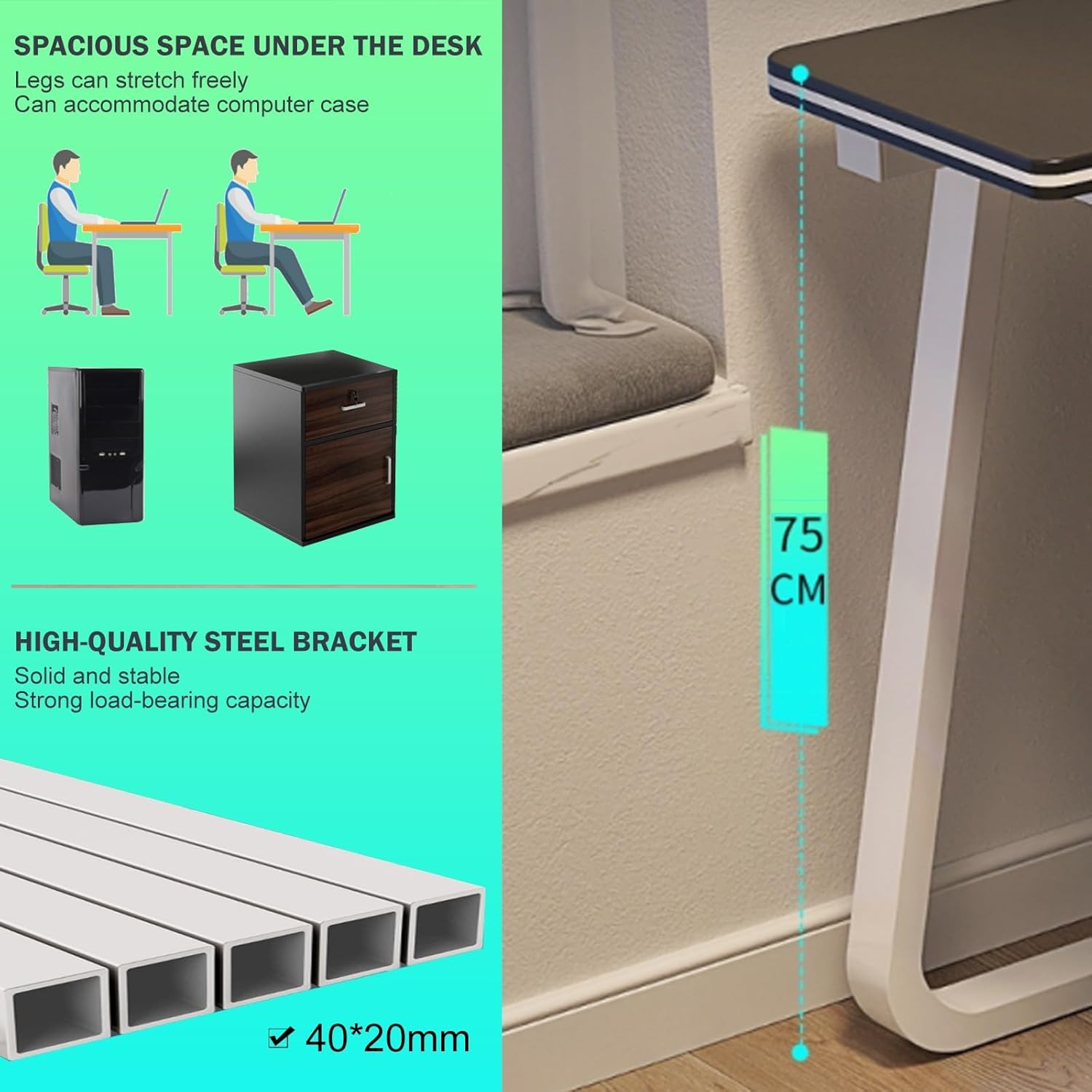
Figure 3.1: ашыкview of desk dimensions (75cm height) and detail of the high-quality steel bracket construction.

Figure 3.2: Comparison illustrating the upgraded stable structure with beam reinforcement versus a regular, unstable version without it.
4. Иштөө нускамалары
The Gaming Table is designed for straightforward use. No complex operational procedures are required.
- Жайгашкан жери: Position the desk on a flat, stable surface to ensure maximum stability.
- Кабелдик башкаруу: Utilize the integrated wire threading hole to route and organize cables from your monitor, PC, and other peripherals, keeping your desktop tidy.
- PC Tower Placement: The complimentary tray is designed to hold your computer mainframe, keeping it off the floor and protected.
- Салмагын бөлүштүрүү: Салмагын иш тактасына бирдей бөлүштүрүңүз. Ашыкча оор нерселерди бир тарапка коюудан алыс болуңуз.

Figure 4.1: Details of the complimentary tray for PC chassis, the wire threading hole for cable organization, and protective foot pads.
5. Техникалык тейлөө
Proper maintenance will ensure the longevity and appearance of your Gaming Table.
- Тазалоо: Иш тактасын жана алкакты жумшак менен сүртүңүз, гamp кездеме. Катуу химиялык заттарды же абразивдүү тазалагычтарды колдонуудан алыс болуңуз, бул финишке зыян келтириши мүмкүн.
- Төгүлүүлөр: In case of spills, wipe them immediately to prevent staining or damage to the desktop material.
- Текшерүү: Мезгил-мезгили менен бардык бурамалар менен байланыштарды текшерип туруңуз, алар бекем бойдон калууда. Керек болсо кайра тартыңыз.
- Экстремалдуу шарттарды болтурбоо: Do not expose the desk to extreme temperatures, direct sunlight for prolonged periods, or high humidity, as this may affect the material integrity.
6. Кыйынчылыктарды
If you encounter any issues with your Gaming Table, refer to the following common solutions:
- Үстөлдүн солкулдашы:
- Үстөлдүн тегиз жерге коюлганын текшериңиз.
- Бардык чогултуу бурамалары толугу менен бекемделгенин текшериңиз.
- Verify that the foot pads are correctly installed and making even contact with the floor.
- Чогултуу кыйынчылыгы:
- Refer to the detailed assembly instructions provided in the packaging.
- Ар бир кадам үчүн туура аппаратураны колдонуп жатканыңызды текшериңиз.
- Бөлүктөрдү күч менен бириктирбеңиз; эгерде алар туура келбесе, нускамаларды кайра текшериңиз.
- Scratches on Desktop:
- Use a desk mat or mouse pad to protect the surface from scratches from peripherals.
- Курч же оор буюмдарды жумушчу столдун үстүнө сүйрөп баруудан алыс болуңуз.
7. Техникалык шарттар
| Атрибут | Спецификация |
|---|---|
| Модель номери | OFACDOCUO |
| Продукциянын өлчөмдөрү | 120 x 60 x 75 см (Узундугу x Туурасы x Бийиктиги) |
| Элемент Салмагы | 22 фунт |
| Материал | MDF Desktop, Steel Bracket |
| Өндүрүүчү | Жалпы |
| ASIN | B0DF7DC2FF |

Figure 7.1: White Gaming Table illustrating key dimensions: 120cm length, 60cm width, and 73cm height to the desktop surface.
8. Кепилдик жана колдоо
This product comes with a standard manufacturer's warranty. For specific warranty details, please refer to the documentation included with your purchase.
If you have any questions, require assistance with assembly, or encounter any issues not covered in this manual, please do not hesitate to contact the seller or manufacturer's customer support. They are available to provide assistance and resolve any concerns you may have.
Contact information can typically be found on your purchase receipt or the product packaging.