
1. Киришүү
This manual provides detailed instructions for the proper use, setup, operation, and maintenance of your EBTOOLS Bluetooth Headset. Please read this manual thoroughly before using the product to ensure optimal performance and longevity.
2. Продукт бүтүп калдыview
2.1 Негизги өзгөчөлүктөрү
- Айлануучу микрофон: Easily adjust the microphone to the optimal angle for clear voice capture.
- Bluetooth 5.0 технологиясы: Ensures faster, more efficient, and stable wireless connectivity with compatible devices.
- Ыңгайлуу дизайн: Single-ear design with padded ear cushion and flexible headband for extended wear without discomfort.
- Батареянын узак иштөө мөөнөтү: Up to 17 hours of talk time and 200 hours of standby time on a 2-hour charge.
- Жалпы шайкештик: Works with laptops, cell phones, PCs, tablets, and other Bluetooth-enabled devices. Ideal for office, home, remote work, call centers, VoIP, and Skype.
2.2 Пакеттин мазмуну
Пакетиңизде бардык буюмдар бар экенин текшериңиз:
- EBTOOLS Bluetooth Headset
- Заряддоо базасы
- Микро USB заряддоо кабели
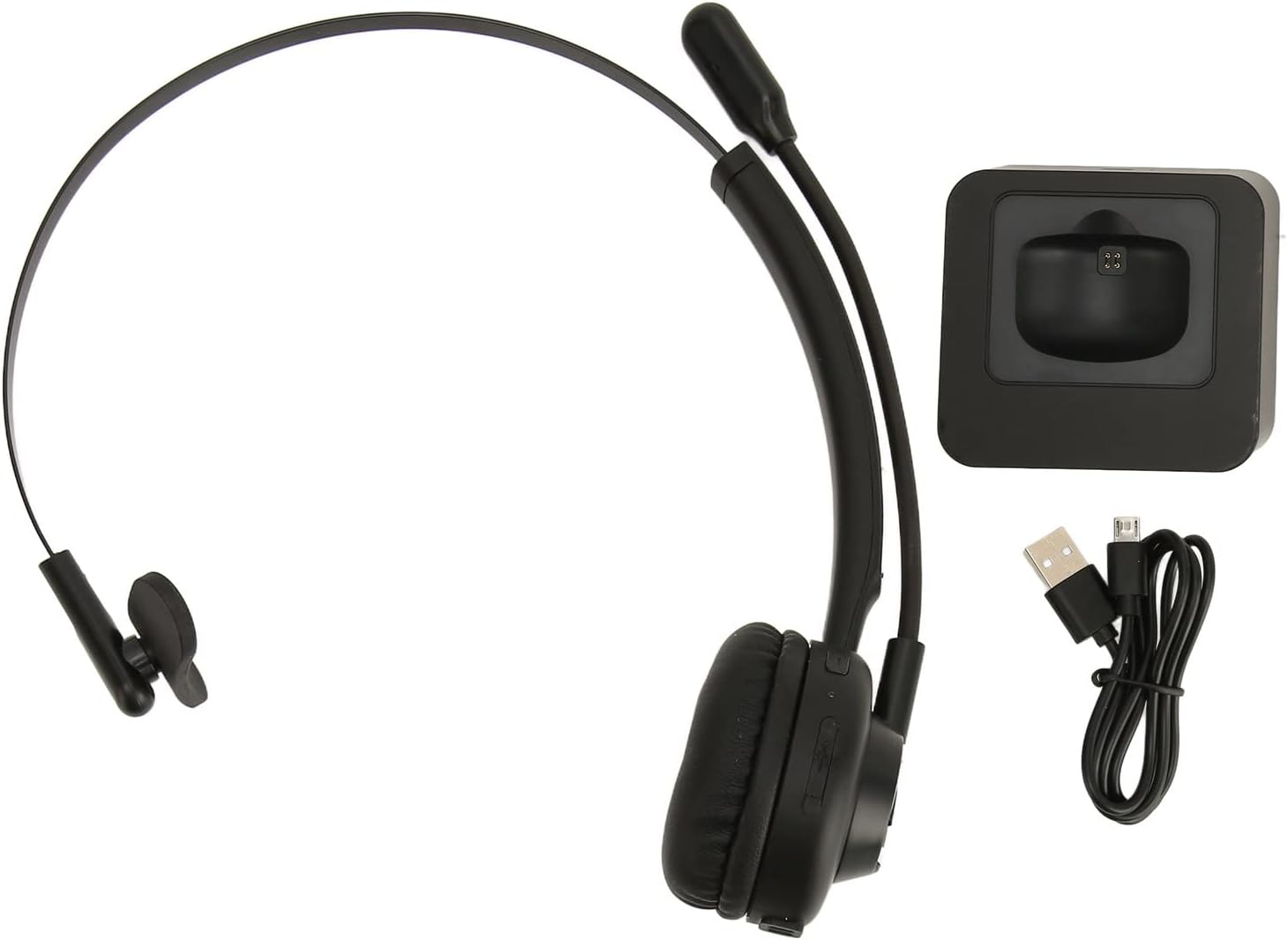
Image: The EBTOOLS Bluetooth Headset, its dedicated charging base, and a Micro USB charging cable, illustrating the complete package contents.
2.3 Headset Controls and Indicators

Image: A detailed diagram highlighting the Micro USB port, LED indicator, Volume Down button, Multifunctional button, and Volume Up button on the EBTOOLS Bluetooth Headset.
- Микро USB порту: Гарнитураны түз заряддоо үчүн.
- LED көрсөткүчү: Кубаттоо, кубаттоо жана жупташтыруу абалын көрсөтөт.
- Үндүн көлөмү - баскычы: Аудионун үнүн азайтат.
- Көп функциялуу баскыч: Controls power, pairing, call answer/end, and music playback.
- Көлөм + баскычы: Аудионун үнүн жогорулатат.
3. Орнотуу
3.1 Гарнитураны заряддоо
Before first use, fully charge the headset. You can charge it using the included charging base or directly via the Micro USB port.
- Connect the Micro USB cable to the charging base and a power source (e.g., computer USB port, USB wall adapter).
- Place the headset onto the charging base, ensuring the charging contacts align. The LED indicator on the headset will show charging status.
- Alternatively, connect the Micro USB cable directly to the headset's Micro USB port and a power source.
- A full charge typically takes approximately 2 hours. The LED indicator will change color or turn off once fully charged.

Сүрөт: жакын план view of the headset's earcup, showing the charging contacts designed to connect with the charging base.
3.2 Bluetooth түзмөгү менен жупташтыруу
To connect your headset to a device:
- Гарнитура өчүрүлгөнүн текшериңиз.
- басып, кармап туруңуз Көп функциялуу баскыч for approximately 5-7 seconds until the LED indicator flashes red and blue alternately, indicating pairing mode.
- Түзмөгүңүздө (телефон, компьютер, планшет) Bluetooth иштетип, жаңы түзмөктөрдү издеңиз.
- Select "EBTOOLS Headset" (or similar name) from the list of available devices.
- Once connected, the LED indicator on the headset will typically flash blue slowly or turn solid blue.
- Эгер сырсөз суралса, "0000" киргизиңиз.
3.3 Гарнитураны тагынуу
The headset is designed for comfort and flexibility.
- Adjust the flexible headband to fit comfortably over your head.
- The single ear design allows you to remain aware of your surroundings.
- Rotate the microphone boom to position it close to your mouth for optimal voice clarity. The microphone can be rotated 180 degrees to be worn on either the left or right ear.

Image: A person wearing the EBTOOLS Bluetooth Headset, demonstrating the comfortable fit and the adjustable, rotatable microphone positioned for clear communication.
4. Иштөө нускамалары
4.1 Күйгүзүү/өчүрүү
- Күйгүзүү: басып, кармап туруңуз Көп функциялуу баскыч болжол менен 3 секунд бою LED индикатору көк түстө күйүп-өчкөнгө чейин басыңыз.
- Өчүрүү: басып, кармап туруңуз Көп функциялуу баскыч for approximately 3-5 seconds until the LED indicator flashes red and then turns off.
4.2 Үндү тууралоо
- басыңыз Көлөм + Баскыч to increase the listening volume.
- басыңыз Көлөмү - баскычы угуу үнүн азайтуу.
4.3 Чалууларды башкаруу
- Чакырууга жооп берүү: баскычын кыска басыңыз Көп функциялуу баскыч when an incoming call rings.
- Чакырууну аяктоо: баскычын кыска басыңыз Көп функциялуу баскыч чалуу учурунда.
- Чакырууну четке кагуу: басып, кармап туруңуз Көп функциялуу баскыч for approximately 2 seconds when an incoming call rings.
- Акыркы номерди кайра терүү: эки жолу басыңыз Көп функциялуу баскыч чалуу жок болгондо.
4.4 Music Playback (if supported by device)
- Ойнотуу/тындыруу: баскычын кыска басыңыз Көп функциялуу баскыч.
- Кийинки трек: басып, кармап туруңуз Көлөм + Баскыч.
- Мурунку трек: басып, кармап туруңуз Көлөмү - баскычы.
4.5 Микрофонду колдонуу
The rotatable microphone ensures your voice is captured clearly.
- Adjust the microphone boom to be approximately 1-2 inches from your mouth.
- The microphone can be rotated 180 degrees to allow wearing the headset on either the left or right ear.

Сүрөт: жакын план view of the EBTOOLS headset's flexible microphone boom, highlighting its design for optimal voice pickup.
5. Техникалык тейлөө
5.1 Тазалоо
- Wipe the headset with a soft, dry, or slightly damp кездеме.
- Катуу химиялык заттарды, тазалоочу эриткичтерди же күчтүү жуучу каражаттарды колдонбоңуз.
- Ар кандай тешиктерге ным кирүүдөн сактаңыз.
5.2 Батареяга кам көрүү
- Батареянын ден соолугун сактоо үчүн, гарнитураны тез-тез колдонбосо дагы, дайыма заряддаңыз.
- Батареяны бат-баттан толук кубаттап калуудан алыс болуңуз.
- Гарнитураны салкын, кургак жерде, өтө жогорку температурадан алыс сактаңыз.
6. Кыйынчылыктарды
Гарнитураңызга байланыштуу көйгөйлөргө туш болсоңуз, төмөнкү жалпы чечимдерди караңыз:
| Көйгөй | Мүмкүн чечим |
|---|---|
| Гарнитура күйбөйт. | Ensure the headset is charged. Connect it to the charging base or directly via USB. |
| Түзмөк менен жупташтыруу мүмкүн эмес. | Ensure the headset is in pairing mode (LED flashing red/blue). Turn off and on your device's Bluetooth. Delete previous pairings on your device and try again. Ensure the headset is within range (typically 10 meters). |
| Үн жок же үнү төмөн. | Increase volume on both the headset and your connected device. Ensure the headset is selected as the audio output device on your computer or phone. Re-pair the headset. |
| Микрофон иштебей жатат. | Ensure the microphone is positioned correctly. Check microphone settings on your connected device to ensure the headset is selected as the input device. |
| үзгүлтүктүү байланыш. | Move closer to your connected device. Avoid obstacles between the headset and device. Reduce interference from other wireless devices. |
7. Техникалык шарттар
| Өзгөчөлүк | Деталь |
|---|---|
| Бренд аты | EBTOOLS |
| Модель номери | EBTOOLSrsgvuyg5fc |
| Байланыш технологиясы | Bluetooth 5.0 |
| Элемент Салмагы | 11.6 унция |
| Пакеттин өлчөмдөрү | 7.09 x 6.69 x 2.36 дюйм |
| Talk Time | 17 саатка чейин |
| Күтүү убактысы | 200 саатка чейин |
| Заряддоо убактысы | Болжол менен 2 саат |
8. Кепилдик жана колдоо
For warranty information or technical support, please refer to the documentation included with your purchase or contact EBTOOLS customer service through the retailer where the product was purchased. Keep your proof of purchase for warranty claims.


