
M5Stack M5StickC Plus2
M5Stack M5StickC PLUS2 User Manual
Модели: M5StickC Plus2
Brand: M5Stack
1. Киришүү
The M5Stack M5StickC PLUS2 is a compact and versatile IoT development kit, featuring the ESP32-PICO-V3-02 chip. Designed for rapid prototyping and integration into various projects, it offers robust BLE and WiFi connectivity, making it ideal for applications in IIoT, home automation, smart retail, and STEM education. This manual provides essential information for setting up, operating, and maintaining your M5StickC PLUS2 device.

Figure 1.1: M5StickC PLUS2 Development Kit with Watch Accessories. The image displays the main M5StickC Plus2 unit, a USB-C cable, a watch strap, and two types of mounting brackets (Wall and Brick).
2. Пакеттин мазмуну
Пакетиңизде бардык буюмдар бар экенин текшериңиз:
- 1 x M5StickC PLUS2 Unit
- 1 x Watch Strap
- 1 x USB-C Cable (50cm)
- 1 x WALL Mounting Bracket
- 1 x BRICK Mounting Bracket

Figure 2.1: Detailed breakdown of M5StickC PLUS2 Watch Kit components. Labels indicate M5StickC Plus2, USB-C 50CM cable, Watch Belt, BRICK mount, WALL mount, and key internal components like ESP32-PICO-V3-02, 8M FLASH, 2M PSRAM, CH9102, MPU6886, RTC BM8563, ST7789V2-1.14" display, built-in buzzer, IR transmitter, 200mAh battery, and SPM1423-PDM MIC.
3. Орнотуу
3.1 Алгачкы заряддоо
Before first use, fully charge the M5StickC PLUS2 using the provided USB-C cable. Connect the cable to the device's USB-C port and the other end to a standard USB power adapter (5V @ 500mA recommended) or a computer's USB port. The device has a 200mAh battery.
3.2 Компьютерге туташуу
To program or configure the M5StickC PLUS2, connect it to your computer using the USB-C cable. You may need to install appropriate drivers (e.g., CP210X or CH9102 drivers, depending on the specific USB-to-serial chip) for your operating system to recognize the device.
3.3 Программалык камсыздоону орнотуу
The M5StickC PLUS2 supports various development environments, including Arduino IDE, MicroPython (UIFlow), and ESP-IDF. Refer to the official M5Stack documentation for detailed instructions on setting up your preferred development environment and flashing firmware.
- Arduino IDE: Install the ESP32 board package and M5Stack libraries.
- UIFlow (MicroPython): Use the M5Burner tool to flash the UIFlow firmware, then program via the UIFlow web IDE.
- ESP-IDF: For advanced users, follow Espressif's ESP-IDF setup guide.
4. Operating the M5StickC PLUS2
4.1 Негизги операция
The M5StickC PLUS2 features a 1.14-inch TFT screen and multiple buttons for interaction. The exact functionality of these buttons and the display will depend on the firmware loaded onto the device.
- Күйгүзүү/өчүрүү: Typically, a long press of the main button (usually the side button) will power the device on or off.
- Навигация: Short presses of the buttons can be used for menu navigation or triggering specific functions as defined by your program.
4.2 Байланыш
The device supports Wi-Fi and Bluetooth Low Energy (BLE) for wireless communication.
- Wi-Fi: Connect to local Wi-Fi networks to access the internet, communicate with cloud services, or create a local web сервер.
- Bluetooth/BLE: Establish connections with other Bluetooth-enabled devices for data exchange or control.
4.3 Wearable Use
With the included watch accessories, the M5StickC PLUS2 can be worn as a wrist device, enabling portable IoT applications and data collection.

Figure 4.1: M5StickC PLUS2 configured as a wearable device. The image shows the device attached to the orange watch strap and worn on a person's wrist, demonstrating its compact size and portability.

Figure 4.2: Wearable Devices application. This image emphasizes the M5StickC PLUS2's small size and low power consumption, making it suitable for wearable technology.
4.4 Колдонуу сценарийлери
The M5StickC PLUS2 is versatile and can be used in various applications:
- Sports Activity Monitoring: Utilize its sensors (e.g., MPU6886 6-axis IMU) for tracking movement.
- IoT контроллери: Act as a central hub or node in smart home or industrial IoT systems.
- DIY Creation: A flexible platform for custom electronic projects and rapid prototyping.

Figure 4.3: Scope of Application for M5StickC PLUS2. The image illustrates three primary uses: Sports Activity Monitoring (person tying shoelaces), IoT Controller (smart building), and DIY Creation (electronic components on a breadboard).
5. Техникалык тейлөө
To ensure the longevity and optimal performance of your M5StickC PLUS2, follow these maintenance guidelines:
- Тазалоо: Түзмөктү тазалоо үчүн жумшак, кургак чүпүрөктү колдонуңуз. Суюктуктарды же абразивдүү тазалоочу каражаттарды колдонуудан алыс болуңуз.
- Сактагыч: Аппаратты түз күн нурунан жана экстремалдык температурадан алыс салкын, кургак жерде сактаңыз.
- Батареяга кам көрүү: Do not expose the battery to high temperatures or puncture it. If the device will not be used for an extended period, charge it to about 50% before storing.
- Физикалык зыянды болтурбоо: Protect the device from drops, impacts, and excessive force.
- Программалык камсыздоонун жаңыртуулары: M5Stack кызматкерин үзгүлтүксүз текшерип туруңуз webэң акыркы функцияларды жана каталарды оңдоону камсыз кылуу үчүн микропрограммалык камсыздоону жаңыртуу сайты.
6. Кыйынчылыктарды
If you encounter issues with your M5StickC PLUS2, try the following troubleshooting steps:
- Түзмөк күйбөй жатат:
- Ensure the battery is charged. Connect to a power source and wait a few minutes.
- Башка USB-C кабелин же кубат адаптерин колдонуп көрүңүз.
- Computer Not Recognizing Device:
- Install the necessary USB-to-serial drivers (e.g., CP210X or CH9102).
- Компьютериңиздеги башка USB портун колдонуп көрүңүз.
- Ensure the USB-C cable supports data transfer, not just charging.
- Микропрограмманы жүктөөдө ката кетти:
- Verify that the correct board and port are selected in your IDE.
- Башка тиркемелер сериялык портту колдонбогонун текшериңиз.
- Try holding the boot button (if applicable) while initiating the upload.
- Wi-Fi/Bluetooth туташуу маселелери:
- Check your code for correct Wi-Fi credentials or Bluetooth pairing procedures.
- Ensure the device is within range of the Wi-Fi router or Bluetooth device.
- Restart the M5StickC PLUS2 and the target network/device.
- Экран көрсөтүлбөй жатат:
- Түзмөк күйүк экенин текшериңиз.
- Verify that your program is correctly initializing and writing to the display.
For more detailed troubleshooting or specific technical support, please visit the official M5Stack documentation or community forums.
7. Техникалык шарттар

Figure 7.1: M5StickC PLUS2 Technical Specifications. This image presents a table detailing the resources and parameters of the device, including MCU, Flash, PSRAM, Power input, Buttons, MEMS, Buzzer, and Battery.
| Өзгөчөлүк | Параметр |
|---|---|
| Бренд | M5Stack |
| Модель аты | M5StickC Plus2 |
| MCU | ESP32-PICO-V3-02 |
| Flash | 8 MB |
| PSRAM | 2 MB |
| Дисплей | 1.14-inch TFT (ST7789V2) |
| ӨИК | MPU6886 (6-Axis) |
| RTC | BM8563 |
| Buzzer | Камтылган |
| IR өткөргүч | Ооба |
| Микрофон | SPM1423-PDM MIC |
| Батарея | 200mAh @ 3.7V (Nonstandard Battery) |
| Power Input | 5V @ 500mA (USB-C) |
| Байланыш | Wi-Fi, Bluetooth, BLE, HY2.0-4P, 8P@2.54mm |
| Элемент Салмагы | 2.39 унция |
| Пакеттин өлчөмдөрү | 4.88 x 2.6 x 0.91 дюйм |
| Келип чыккан өлкө | Кытай |
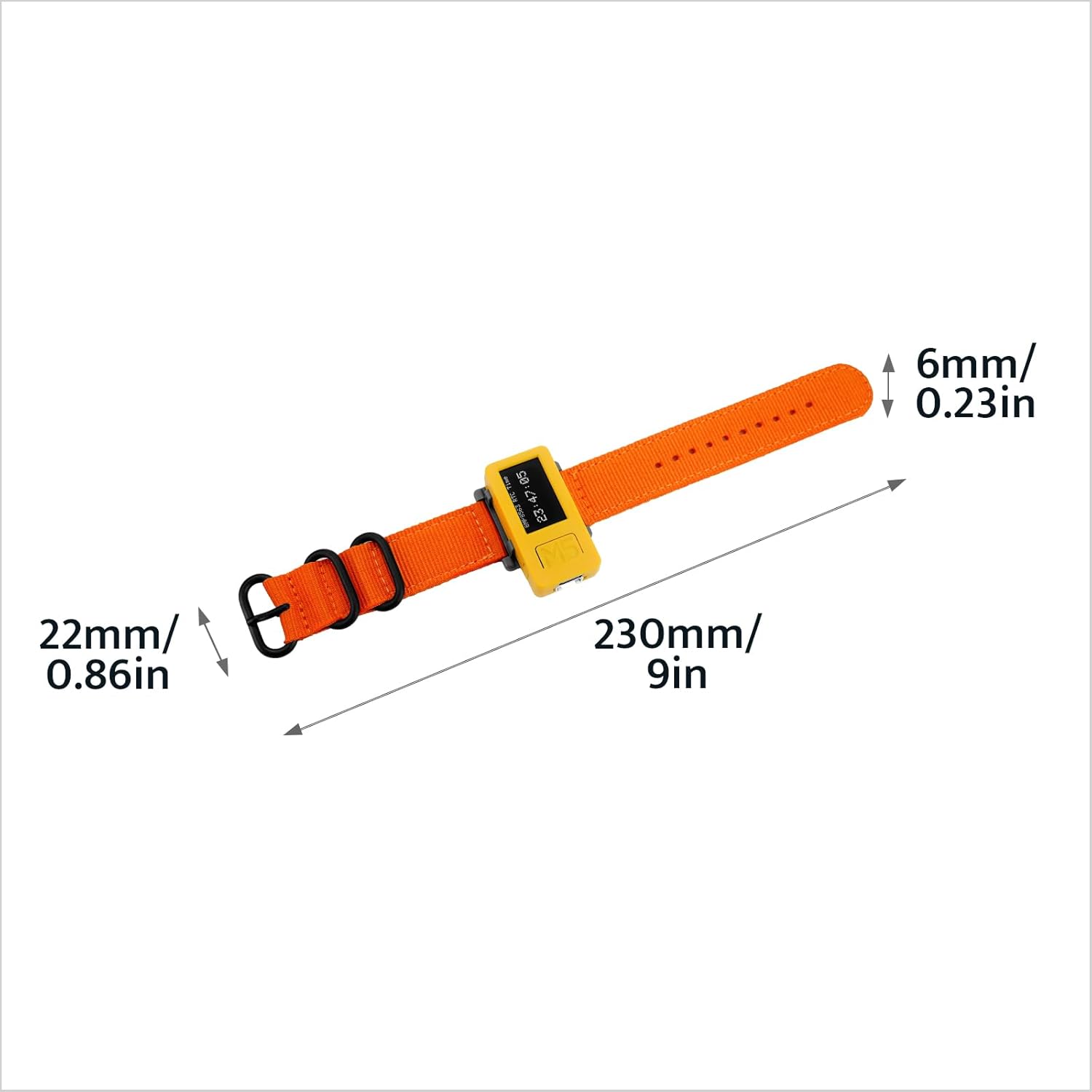
Figure 7.2: Watch Strap Dimensions. The image shows the watch strap with measurements: 6mm/0.23in width, 22mm/0.86in buckle width, and 230mm/9in total length.

Figure 7.3: M5StickC PLUS2 Weight. The device, attached to its watch strap, is shown on a digital scale displaying a weight of 28.8 grams.
8. Кепилдик жана колдоо
M5Stack products typically come with a standard manufacturer's warranty. For specific warranty terms and conditions, please refer to the official M5Stack webсайтка же кардарларды тейлөөгө кайрылыңыз.
For technical support, documentation, and community forums, please visit the official M5Stack resources:
- Official M5Stack Webсайт: www.m5stack.com
- M5Stack Store on Amazon: Visit M5Stack Store
M5Stack is committed to providing modular, open-source IoT development solutions, empowering innovation and rapid prototyping.
Ask a question about this manual
Ask about setup, troubleshooting, compatibility, parts, safety, or missing instructions. Manuals+ will review the question and use this page’s manual context to help answer it.