
Cellularline PBSOLAR10000O
Cellularline Power Bank Solar User Manual
Model: PBSOLAR10000O
1. Продукт бүтүп калдыview
The Cellularline Power Bank Solar is a portable charger designed for outdoor enthusiasts and everyday users. It features a high-capacity 10000 mAh battery and an integrated 1.5W ETFE solar panel, offering an alternative charging method using direct sunlight. Its robust design provides resistance against water and dust, making it suitable for various environments. The power bank is equipped with both USB-C Power Delivery 20W and USB 18W QC ports, allowing for simultaneous charging of two devices.
- Integrated 1.5W ETFE solar panel for efficient solar energy absorption.
- 10000 mAh capacity for extended device charging.
- IP54 certified: resistant to water and dust.
- Dual charging capability with USB-C Power Delivery 20W and USB 18W QC ports.

Figure 1: Cellularline Power Bank Solar - Front View
This image displays the Cellularline Power Bank Solar in its orange color, highlighting the textured solar panel on the front and the various ports on the side, including the USB-C and USB-A outputs, protected by a flap.
2. Пакеттин мазмуну
Сураныч, кутудан чыгарганда пакеттин мазмунун текшерип, бардык буюмдар бар экенин текшериңиз:
- 1 x Cellularline Power Bank Solar (Portable Charger)
- 1 x USB-C - USB-C кабели
- 1 x Instruction Manual
3. Коопсуздук маалыматы
To ensure safe operation and prolong the life of your Power Bank Solar, please adhere to the following safety guidelines:
- Power bankты өтө жогорку температурага (45°C жогору же 0°C төмөн) дуушар кылбаңыз.
- Аппаратты түшүрүп алуудан, ажыратуудан же өзүңүз оңдоого аракет кылуудан качыңыз.
- Keep away from fire, water, and corrosive materials.
- Заряддоодо же разряддоодо жакшы желдетүүнү камсыз кылыңыз.
- Эгерде түзмөк бузулган же шишип кеткен болсо, колдонбоңуз.
- Балдар жетпеген жерде сактаңыз.
- Продукцияны жергиликтүү эрежелерге ылайык таштаңыз.
4. Орнотуу
Before first use, it is recommended to fully charge the power bank using a wall charger and the provided USB-C cable. This ensures the internal battery is calibrated and ready for optimal performance.
- Unpack the Power Bank Solar and all accessories from the box.
- Connect the provided USB-C to USB-C cable to the USB-C port on the power bank.
- Connect the other end of the USB-C cable to a compatible USB-C wall charger (not included).
- Allow the power bank to charge until all indicator lights are solid, indicating a full charge.
5. Power банкын кубатталууда
5.1. Charging via Cable (Recommended for Fast Charging)
For the fastest and most efficient charging of your power bank, use the included USB-C to USB-C cable with a compatible wall adapter.
- Connect the USB-C cable to the power bank's USB-C input port.
- Plug the other end of the cable into a USB-C wall charger.
- Кубаттоо процессин көрсөтүү үчүн LED индикаторлору күйөт.

Figure 2: Power Bank Charging via Cable
This image shows the Cellularline Power Bank Solar connected to a charging cable, illustrating the standard method of recharging the power bank's internal battery.
5.2. Charging via Solar Panel
The integrated ETFE solar panel provides an emergency charging option and can extend the battery life when outdoors. Solar charging is slower than cable charging and is highly dependent on direct sunlight intensity.
- Place the power bank in direct sunlight with the solar panel facing upwards.
- Күн панелин тоскон эч кандай тоскоолдуктар жок экендигин текшериңиз.
- A dedicated solar charging indicator (if present) or the main battery indicators will show activity when solar charging is active.
- For optimal solar charging, avoid placing the device behind glass or in shaded areas.

Figure 3: Solar Panel Detail
Бул сүрөт жогорудан ылдыйга так берет view of the Cellularline Power Bank Solar, emphasizing the large, efficient ETFE solar panel designed for absorbing sunlight.
6. Заряддоочу түзүлүштөр
The Power Bank Solar can charge two devices simultaneously using its USB-C Power Delivery (PD) and USB Quick Charge (QC) ports.
- Түзмөгүңүздүн кубаттоочу кабелин кубаттоочу банктагы тиешелүү портко (USB-C же USB-A) туташтырыңыз.
- Кабелдин экинчи учун шайманга туташтырыңыз.
- Power банк түзмөгүңүздү автоматтык түрдө кубаттай баштайт.
- Monitor your device's screen for charging indication.

Figure 4: Charging a Device Outdoors
This image depicts a user holding the Cellularline Power Bank Solar, which is actively charging a smartphone, demonstrating its portability and utility for on-the-go power needs.
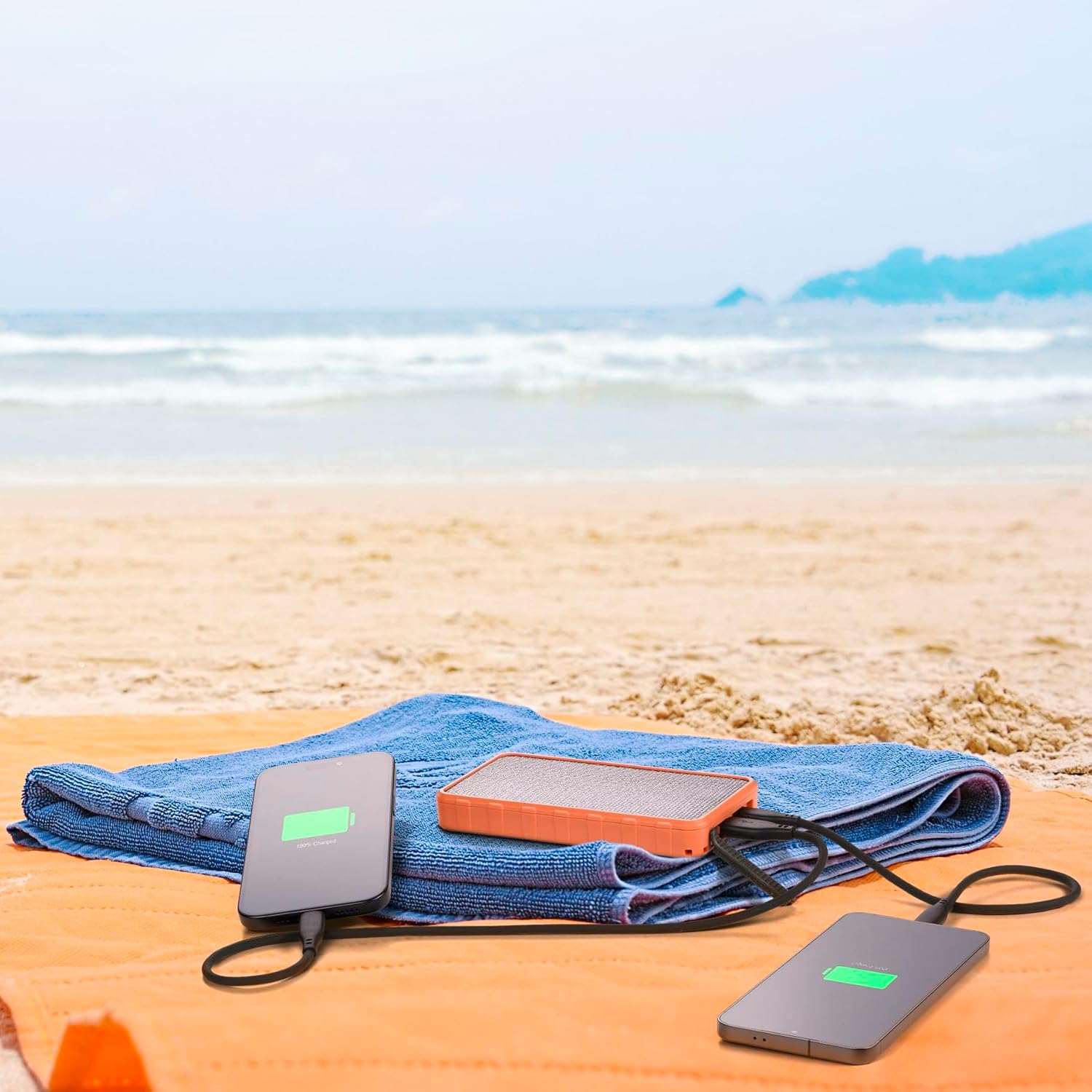
Figure 5: Dual Device Charging
This image illustrates the power bank's ability to charge two devices simultaneously, with both a smartphone and another portable device connected and showing charging indicators, set against a beach backdrop.
7. Функциялар жана функциялар
7.1. ETFE Solar Panel
The 1.5W ETFE (Ethylene Tetrafluoroethylene) solar panel offers enhanced durability and efficiency compared to traditional solar panels. ETFE material provides superior light transmittance, better resistance to high temperatures, and is more resistant to corrosion and dirt buildup, ensuring a longer lifespan and more consistent solar charging performance.
7.2. IP54 Суу жана чаңга туруктуулук
With an IP54 rating, the Power Bank Solar is protected against dust ingress that could harm the equipment and against splashing water from any direction. This makes it suitable for outdoor use in various weather conditions, though it is not designed for submersion in water.
7.3. Power Delivery (PD) and Quick Charge (QC)
The power bank supports modern fast-charging standards:
- USB-C Power Delivery 20W: Delivers up to 20W of power through the USB-C port, ideal for rapidly charging compatible smartphones, tablets, and other USB-C devices.
- USB 18W QC: Provides up to 18W of power through the USB-A port, compatible with devices supporting Qualcomm Quick Charge technology for faster charging.
8. Техникалык тейлөө
- Тазалоо: Use a soft, dry cloth to clean the power bank. Do not use harsh chemicals or abrasive cleaners.
- Сактагыч: Store the power bank in a cool, dry place away from direct sunlight and extreme temperatures when not in use for extended periods.
- Батареяга кам көрүү: Батареянын иштөө мөөнөтүн сактоо үчүн, эгерде ал үзгүлтүксүз колдонулбаса, аны жок дегенде үч айда бир жолу толук кубаттап жана зарядын жок кылып туруңуз.
- Порт коргоо: Ensure the port cover is securely closed when not in use to maintain IP54 water and dust resistance.
9. Кыйынчылыктарды
| Көйгөй | Мүмкүн себеп | Чечим |
|---|---|---|
| Power банк заряддалбай жатат | Кабель же адаптер көйгөйү; кубат банкы толук заряддалган; порт бузук. | Try a different cable or wall adapter. Ensure the power bank is not already full. Check for debris in ports. |
| Түзмөк кубат банкынан кубатталбай жатат | Power bank low on charge; incorrect cable; device not compatible; faulty port. | Recharge the power bank. Use the correct charging cable for your device. Ensure device is compatible with USB-C PD or USB QC. Try a different port. |
| Күн батареясын кубаттоо жай же иштебей жатат | Insufficient direct sunlight; solar panel obstructed or dirty; cloudy weather. | Place the power bank in direct, unobstructed sunlight. Clean the solar panel. Note that solar charging is supplementary and slower than wall charging. |
| Power банк колдонуу учурунда жылыйт | Заряддоо/разряддоо учурунда кадимкидей иштөө; ашыкча жүк. | Slight warmth is normal. If it becomes excessively hot, disconnect devices and allow it to cool down. Avoid charging in direct sunlight or enclosed spaces. |
10. Техникалык шарттар
| Өзгөчөлүк | Деталь |
|---|---|
| Бренд | Cellularline |
| Модель аты | PBSOLAR10000O |
| Батарея сыйымдуулугу | 10000 мАч |
| Батареянын курамы | Литий ион |
| Күн панели | 1.5W ETFE |
| USB-C чыгышы | Кубат жеткирүү 20W |
| USB-A чыгаруу | Ыкчам кубаттоо 18 Вт |
| Порттардын саны | 2 (1x USB-C, 1x USB-A) |
| Суу жана чаңга туруктуулук | IP54 тастыкталган |
| Өлчөмдөр | 14.5 cm (L) x 7.8 cm (W) x 1.9 cm (Thickness) |
| Салмагы | 390 г |
| Шайкеш түзмөктөр | Smartphone, Tablet, other USB-powered devices |
11. Кепилдик жана колдоо
Cellularline products are designed and manufactured to the highest quality standards. For information regarding warranty coverage, please refer to the warranty card included in your product packaging or visit the official Cellularline website. If you encounter any issues or require technical assistance, please contact Cellularline customer support through their official channels.
Официалдуу Webсайт: www.cellularline.com
Ask a question about this manual
Ask about setup, troubleshooting, compatibility, parts, safety, or missing instructions. Manuals+ will review the question and use this page’s manual context to help answer it.