Introduction
This manual provides detailed instructions for the operation, maintenance, and troubleshooting of your new STN-28 Colorful Cat Ear Luminous Wireless Bluetooth Headset. Please read this manual thoroughly before using the product to ensure proper function and longevity.
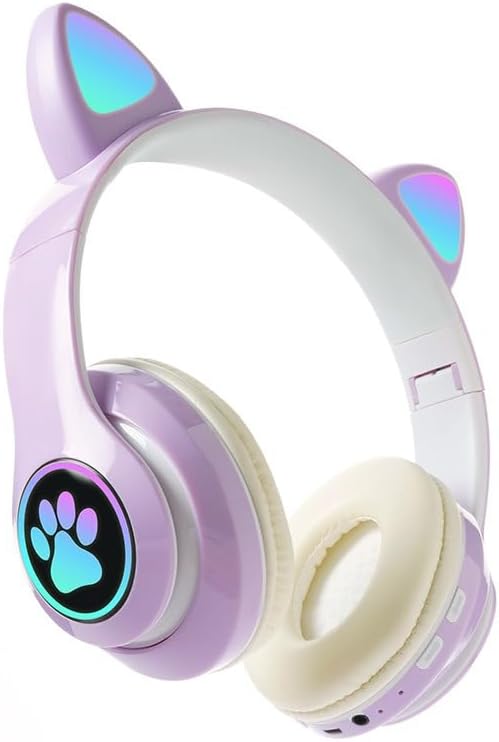
Image: The STN-28 Colorful Cat Ear Luminous Wireless Bluetooth Headset in light purple, featuring glowing cat ears and a paw print design on the ear cup.
Продукт өзгөчөлүктөрү
- Стилдүү дизайн: Features unique cat ear design with luminous accents.
- Зымсыз туташуу: Bluetooth 5.0+EDR for seamless pairing.
- Ыңгайлуу ылайыктуу: Padded ear cups and adjustable headband.
- Аудио башкаруу каражаттары: Integrated buttons for music, volume, and calls.
- Портативдик: Lightweight and foldable head-mounted design.
- TF картасын ойнотуу: Supports playing songs from an external TF card.
Пакеттин мазмуну
Сураныч, пакетте төмөнкү нерселерди текшериңиз:
- STN-28 Wireless Headset Body
- USB заряддоо кабели
- Колдонуучунун Колдонмосу (бул документ)
Жайгашуу
Гарнитураны заряддоо
Before first use, fully charge the headset. Connect the provided USB charging cable to the headset's USB charging port and to a compatible USB power source (e.g., computer USB port, USB wall adapter).
- The indicator light will show red during charging.
- Заряддоо убактысы болжол менен 2 саатты түзөт.
- The red light will turn off once the headset is fully charged.
The headset is equipped with a rechargeable 3.7V/400MAH polymer A-grade lithium battery with overcharge and over-discharge protection.
Күйгүзүү/өчүрүү
- Күйгүзүү үчүн: Press and hold the power button until the indicator lights flash red and blue.
- Өчүрүү үчүн: Индикатор жарыктары өчкөнгө чейин кубат баскычын басып, кармап туруңуз.
Иштөө нускамалары
Bluetooth Жупташтыруу
- Гарнитура толук заряддалганын жана өчүрүлгөнүн текшериңиз.
- Press and hold the power button for approximately 3-5 seconds until the indicator lights flash red and blue alternately. This indicates the headset is in pairing mode.
- Түзмөгүңүздө (смартфон, планшет, компьютер) Bluetooth иштетип, жеткиликтүү түзмөктөрдү издеңиз.
- Select "STN-28" or "LX-B39C" from the list of found devices.
- Once successfully paired, the indicator light on the headset will flash blue slowly.
- The headset supports Bluetooth 5.0+EDR and modes A2DP 1.2, AVRCP 1.0, HSP, HSF 1.5.
The transmission range is up to 10 meters (33 feet) in an open environment.
Music Playback and Call Control
The headset features integrated controls for media and calls. Specific button functions may vary slightly, but generally include:
- Ойнотуу/тындыруу: Көп функциялуу баскычты бир жолу басуу.
- Кийинки трек: "+" баскычын көпкө басыңыз.
- Мурунку трек: "-" баскычын көпкө басыңыз.
- Көлөмү: "+" баскычын кыска басыңыз.
- Үнүн азайтуу: "-" баскычын кыска басыңыз.
- Чалууга жооп берүү/аяктоо: Кирүүчү чалуу учурунда көп функциялуу баскычты бир жолу басыңыз.
- Чакырууну четке кагуу: Кирүүчү чалуу учурунда көп функциялуу баскычты көпкө басыңыз.

Сүрөт: деталдуу view of the headset's right ear cup, highlighting the control buttons for media playback and calls, as well as the charging port and TF card slot.
TF картасын ойнотуу
The headset supports playing audio files directly from an external TF (microSD) card. Insert a TF card with your desired music into the designated slot on the headset. The headset will automatically switch to TF card playback mode.
Техникалык тейлөө
- Гарнитураны жумшак, кургак чүпүрөк менен үзгүлтүксүз тазалап туруңуз. Абразивдүү тазалоочу каражаттарды же эриткичтерди колдонбоңуз.
- Гарнитураны экстремалдык температурага, нымдуулукка же тике күн нуруна тийгизүүдөн сактаңыз.
- Колдонбогондо гарнитураны салкын, кургак жерде сактаңыз.
- Гарнитураны өз алдынча бөлүп алууга же оңдоого аракет кылбаңыз, анткени бул кепилдикти жокко чыгарат.
- Заряддоо портун чаңдан жана таштандылардан таза кармаңыз.
Проблемаларды чечүү
| Көйгөй | Мүмкүн себеп | Чечим |
|---|---|---|
| Гарнитура күйбөйт. | Батарея аз. | Гарнитураны кеминде 2 саат кубаттаңыз. |
| Түзмөк менен жупташтыруу мүмкүн эмес. | Гарнитура жупташтыруу режиминде эмес; түзмөктө Bluetooth өчүк; аппарат өтө алыс. | Ensure headset is flashing red/blue; enable Bluetooth on device; move device closer (within 10M). |
| Ойнотуу учурунда үн чыкпайт. | Үн өтө төмөн; гарнитура туташкан эмес; түзмөктө туура эмес аудио чыгаруу тандалган. | Increase headset/device volume; re-pair headset; check device's audio settings. |
| Үн сапаты начар же ажыратылган. | Interference; device too far; low headset battery. | Move away from sources of interference; move closer to device; charge headset. |
Техникалык шарттар
| Өзгөчөлүк | Деталь |
|---|---|
| Модел | LX-B39C (STN-28) |
| Кийүү ыкмасы | Head-mounted, Folding |
| Bluetooth версиясы | 5.0+EDR |
| Supported Bluetooth Modes | A2DP 1.2, AVRCP 1.0, HSP, HSF 1.5 |
| Батарея сыйымдуулугу | 400mAh Полимер литий аккумулятору |
| Динамиктин өлчөмү/импеданс | 40мм / 32Ω |
| Сезимталдуулукту кабыл алуу | -84дБм |
| Максималдуу берүүчү күч | 6дБм |
| Берүүнүн диапазону | ≤10 метр |
| Заряддоо порту | USB |
| Заряддоо убактысы | Болжол менен 2 саат |
| Музыканы ойнотуу убактысы | 6 саатка чейин |
| Talk Time | 6 саатка чейин |
| Күтүү убактысы | 200 саат |
| Noise Control | Активдүү ызы-чууну жокко чыгаруу |
| Башкаруу ыкмасы | Touch / Media Control Buttons |
| Түс | Ачык кызгылт көк |
| Кулак жайгаштыруу | Кулак үстүндө |
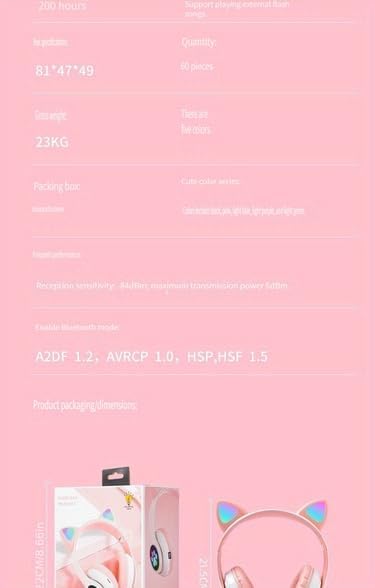
Image: A visual representation of the headset's dimensions and some technical specifications, including model number and battery capacity.
Кепилдик жана колдоо
For warranty information or technical support, please refer to the retailer where you purchased this product. Keep your proof of purchase for any warranty claims.
Manufacturer: Shantou Chaoyang District Gurao Lanxin Electronics Factory


