1. Киришүү
Сатып алганыңыз үчүн рахматasing the STN-28 Colorful Cat Ear Luminous Bluetooth Headset. This headset combines wireless audio technology with a unique luminous cat ear design, offering a comfortable and immersive listening experience. This manual provides essential information on how to set up, operate, and maintain your new headset.
2. Коопсуздук маалыматы
- Гарнитураны экстремалдык температурага, нымдуулукка же жегич заттардын таасирине тийгизбеңиз.
- Гарнитураны түшүрүүдөн же катуу таасирлерге дуушар кылуудан качыңыз.
- Гарнитураны өзүңүз бөлүп же оңдоого аракет кылбаңыз. Бул кепилдикти жокко чыгарат.
- Гарнитураны жумшак, кургак чүпүрөк менен тазалаңыз. Катуу химиялык заттарды же абразивдүү материалдарды колдонбоңуз.
- Үндүн катуу деңгээлинде узакка созулган угуу угуунун бузулушуна алып келиши мүмкүн. Үндү коопсуз деңгээлге тууралаңыз.
3. Пакеттин мазмуну
- STN-28 Wireless Headset Body
- USB заряддоо кабели
- Колдонуучунун Колдонмосу (бул документ)
4. Продукт бүтүп калдыview жана Controls
Familiarize yourself with the headset's components and control buttons.
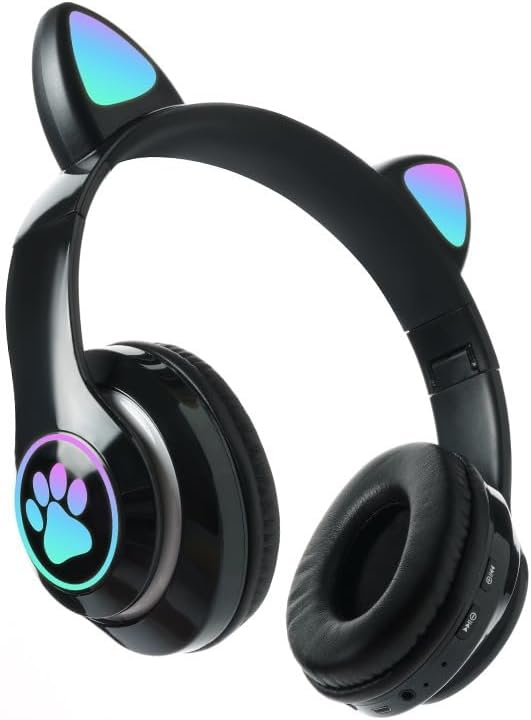
Сүрөт: алдыңкы view of the STN-28 headset in black, showcasing the luminous cat ears and paw print design on the earcups.

Image: Two STN-28 headsets, one in purple and one in pink, displayed on a wooden stand, highlighting their colorful design and cat ear feature.
Control Buttons (Typical Layout - Refer to your specific model for exact placement):
- Кубат баскычы: Күйгүзүү/өчүрүү, Ойнотуу/Тынытуу, Чалууга жооп берүү/Аяктоо.
- Үнүн жогорулатуу (+): Үнүн жогорулатуу, Кийинки трек (узун басуу).
- Үнүн төмөндөтүү (-): Үндү азайтуу, Мурунку трек (узун басуу).
- Режим баскычы (M): Switch between Bluetooth and TF Card mode.
- USB кубаттоо порту: Гарнитураны заряддоо үчүн.
- TF карта уячасы: Insert external TF card for music playback.
- LED көрсөткүч жарыгы: Shows power, connection, and charging status.
5. Орнотуу
5.1 Гарнитураны заряддоо
- USB кубаттоочу кабелди гарнитуранын USB кубаттоочу портуна туташтырыңыз.
- Кабелдин экинчи учун USB кубат булагына туташтырыңыз (мисалы, компьютердин USB порту, USB дубал адаптери).
- The LED indicator light will show a red light during charging.
- A full charge takes approximately 2 hours. The red light will turn off when fully charged.
Note: Ensure the headset is fully charged before first use for optimal battery life.
5.2 Күйгүзүү/өчүрүү
- Күйгүзүү үчүн: Press and hold the Power button for a few seconds until the LED indicator lights flash red and blue.
- Өчүрүү үчүн: Press and hold the Power button for a few seconds until the LED indicator light turns off.
5.3 Bluetooth жупташтыруу
- Гарнитура толук заряддалганын жана өчүрүлгөнүн текшериңиз.
- Press and hold the Power button until the LED indicator lights flash red and blue alternately. This indicates the headset is in pairing mode.
- Түзмөгүңүздө (смартфон, планшет, ноутбук) Bluetooth иштетиңиз жана жеткиликтүү түзмөктөрдү издеңиз.
- Select "STN-28" or "LX-B39C" from the list of found devices.
- Once successfully paired, the LED indicator light on the headset will flash blue slowly.
Note: The headset supports Bluetooth 5.0+EDR for stable and efficient connection.
6. Иштөө нускамалары
6.1 Музыканы ойнотуу (Bluetooth режими)
- Ойнотуу/тындыруу: Кубат баскычын кыска басыңыз.
- Көлөмү: "+" баскычын кыска басыңыз.
- Үнүн азайтуу: "-" баскычын кыска басыңыз.
- Кийинки трек: "+" баскычын көпкө басыңыз.
- Мурунку трек: "-" баскычын көпкө басыңыз.
6.2 Телефон чалуулар
- Чакырууга жооп берүү: Кирүүчү чалуу шыңгыраганда Кубат баскычын кыска басыңыз.
- Чакырууну аяктоо: Чалуу учурунда Кубат баскычын кыска басыңыз.
- Чакырууну четке кагуу: Кирүүчү чалуу шыңгыраганда Күйгүзүү/өчүрүү баскычын көпкө басыңыз.
6.3 TF картасын ойнотуу
- MP3 аудиосу бар TF (MicroSD) картасын салыңыз fileTF карта уячасына.
- The headset will automatically switch to TF card playback mode, or you may need to short press the "M" (Mode) button to switch.
- Use the Play/Pause, Volume Up/Down, and Next/Previous Track buttons as described in section 6.1.
6.4 Luminous Cat Ear Feature
The cat ears and paw print on the earcups feature luminous accents. This feature is typically activated automatically when the headset is powered on. There is no specific control mentioned for this feature, implying it's always on when the headset is active.
7. Техникалык тейлөө жана кам көрүү
- Тазалоо: Wipe the headset regularly with a soft, dry, lint-free cloth. Do not use liquid cleaners or sprays.
- Сактагыч: Колдонулбай турган учурда, гарнитураны салкын, кургак жерде, күн нуру түз тийбеген жана өтө жогорку температурадан алыс сактаңыз.
- Батареяга кам көрүү: Батареянын иштөө мөөнөтүн узартуу үчүн, бат-баттан батарейканы толук зарядсыздандырбаңыз. Гарнитураны узак убакыт бою колдонбосо дагы, дайыма заряддап туруңуз.
- Суу каршылык: The headset is listed as "Waterproof". While it offers protection against water, avoid submerging it in water or exposing it to heavy rain for prolonged periods to prevent damage.
8. Кыйынчылыктарды
| Көйгөй | Мүмкүн себеп | Чечим |
|---|---|---|
| Гарнитура күйбөйт. | Батарея аз. | Гарнитураны толук кубаттаңыз (болжол менен 2 саат). |
| Түзмөк менен жупташтыруу мүмкүн эмес. | Гарнитура жупташтыруу режиминде эмес; түзмөктө Bluetooth өчүк; аппарат өтө алыс. | Ensure headset is flashing red/blue; enable Bluetooth on device; keep devices within 10 meters. Try forgetting the device on your phone and re-pairing. |
| Үн жок же үнү төмөн. | Гарнитурада же түзмөктө үн өтө төмөн; гарнитура туташкан эмес. | Increase volume on both headset and connected device. Ensure headset is properly paired. |
| TF картасы ойнотулбай жатат. | Карта туура эмес киргизилген; колдоого алынбайт file format; headset not in TF card mode. | Reinsert TF card; ensure files are MP3; press 'M' button to switch to TF card mode. |
9. Техникалык шарттар
| Модел | STN-28 / LX-B39C |
| Кийүү ыкмасы | Head-mounted folding |
| Bluetooth версиясы | Bluetooth 5.0+EDR |
| Supported Bluetooth Modes | A2DP 1.2, AVRCP 1.0, HSP, HSF 1.5 |
| Батарея сыйымдуулугу | 400mAh Polymer A-grade Lithium Battery |
| Speaker Size / Impedance | 40мм / 32Ω |
| Берүүнүн диапазону | ≤10 meters (33 feet) |
| Заряддоо убактысы | Болжол менен 2 саат |
| Музыканы ойнотуу убактысы | ≤6 саат |
| Talk Time | ≤6 саат |
| Күтүү убактысы | 200 саат |
| Жыштык диапазону | 20 Гц - 20 000 Гц |
| Сууга туруктуулук деңгээли | Суу өткөрбөйт |
| Башкаруу түрү | Media Control, Touch (via buttons) |
| Өзгөчөлүктөр | Luminous Cat Ears, TF Card Playback |
10. Кепилдик жана колдоо
This product comes with a standard manufacturer's warranty. For specific warranty terms, conditions, and duration, please refer to the warranty card included with your purchase or contact the retailer where you purchased the product.
For technical support or inquiries, please contact your retailer or the manufacturer directly. Keep your purchase receipt as proof of purchase for warranty claims.


