
Introduction
Thank you for choosing the GGSTOPWATER Open Ear Headphones, Model JM13. These headphones are designed to provide a comfortable listening experience while maintaining awareness of your surroundings. Featuring Bluetooth 5.4 connectivity and an IPX5 waterproof rating, they are suitable for various activities including sports, gaming, and driving.
Please read this manual carefully to ensure proper use and to maximize the performance and lifespan of your device.
Пакеттин мазмуну
Пакетиңизде бардык буюмдар бар экенин текшериңиз:
- True Wireless Bluetooth Headphones (2 units)
- Headset Charging Compartment (1 unit)
- Type-C заряддоо кабели (1 бирдик)
- Колдонуучунун колдонмосу (1 бирдик)
- Silicone Lanyard (1 unit)

Продукт бүттүview
The GGSTOPWATER JM13 headphones feature an open-ear design with ear hooks for a secure and comfortable fit. The charging case is designed for portability and convenience.
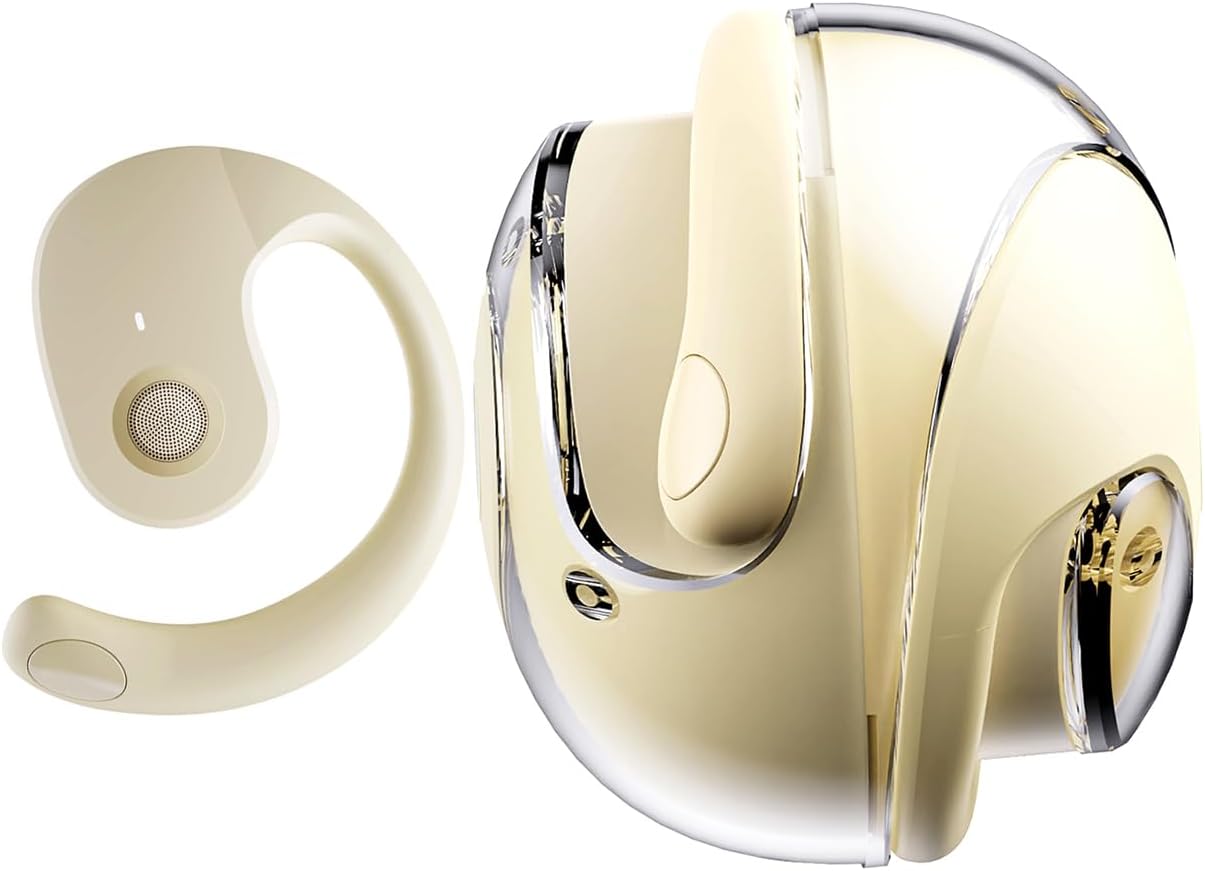
Жайгашуу
1. Наушникти жана капты заряддоо
Before first use, fully charge the headphones and the charging case. Place the headphones into the charging case. Connect the Type-C charging cable to the charging port on the case and plug the other end into a USB power source.
- Заряддоо убактысы: Толук кубаттоо үчүн болжол менен 1.5 саат.
- Headset Usage Time: Бир кубаттоо менен 4 саатка чейин.
- Күтүү убактысы: 120 саатка чейин.


2. Наушник тагынуу
The open-ear design with ear hooks ensures a stable and comfortable fit without entering the ear canal.
- Pick up the headset from the charging case.
- Wear it along the back of your ear, positioning the speaker over your ear canal.
- Gently adjust the headphones to a comfortable and secure position.

3. Bluetooth Жупташтыруу
The headphones utilize Bluetooth 5.4 for a stable and fast connection. They support multi-device linking and are compatible with iOS, Android, and Windows systems.
- Наушниктердин заряддалганын жана күйгүзүлгөнүн текшериңиз.
- Түзмөгүңүздөгү (смартфон, планшет, ноутбук) Bluetooth жөндөөлөрүн ачыңыз.
- Издөө available devices and select "JM13" from the list.
- Once connected, you will hear a confirmation tone, and the device will show as 'Connected'.

Иштөө нускамалары
Touch Controls
The headphones feature intuitive touch controls for managing calls and music playback.

| Акция | Function (Telephone Mode) | Функция (Музыка режими) |
|---|---|---|
| 2 сек. Узак басып туруңуз | Чакырууну четке кагуу | Жок |
| Click | Кирүүчү чалууга жооп бериңиз | Жок |
| Кайра басыңыз | Чакырууну өчүрүү | Жок |
| Double touch (L) | Жок | Мурунку ырды ойнотуу |
| Double touch (R) | Жок | Кийинки ырды ойнотуу |
| Бир тийүү | Жок | Ойнотуу/Тыныгуу |
| 3 сек. Узак басып туруңуз | Күйгүзүү/өчүрүү | Күйгүзүү/өчүрүү |
| Three touch (L) | Жок | Үндү азайтуу |
| Three touch (R) | Жок | Үнүн көтөрүү |
Көп чекиттүү туташуу
The headphones support connecting to multiple devices simultaneously. This allows you to seamlessly switch between, for example, your smartphone and laptop without needing to re-pair each time. Ensure both devices are paired with the headphones. The headphones will prioritize audio from the active device.
Техникалык тейлөө
Тазалоо
Үзгүлтүксүз тазалоо үндүн сапатын жана гигиенасын сактоого жардам берет:
- Наушниктерди жана кубаттоочу кутуну сүртүү үчүн жумшак, кургак, түксүз чүпүрөктү колдонуңуз.
- Катуу химиялык заттарды, тазалоочу эриткичтерди же күчтүү жуучу каражаттарды колдонбоңуз.
- Ар кандай тешиктерге ным кирүүдөн сактаңыз.
Сактагыч
Колдонулбаганда, наушниктерди чаңдан жана бузулуудан коргоо үчүн заряддоо кутусуна сактаңыз. Кургак, салкын жерде сактаңыз.
Сууга туруктуулук (IPX5)
The headphones are rated IPX5 water-resistant, meaning they can withstand splashes of water and sweat. This makes them suitable for workouts and light rain exposure. However, they are not designed for submersion in water or for use during heavy rain or showering. Ensure the charging port is dry before charging.
Проблемаларды чечүү
If you encounter issues with your GGSTOPWATER JM13 headphones, please refer to the following common solutions:
- Кубат жок: Наушниктердин жана заряддоо кутусунун толук заряддалганын текшериңиз.
- Жупташуу мүмкүн эмес:
- Ensure Bluetooth is enabled on your device and the headphones are within range.
- Turn off and then turn on the headphones.
- Delete "JM13" from your device's Bluetooth list and attempt to re-pair.
- If only one earbud connects, try placing both back in the case, closing it, and then reopening to reset.
- Үн жок же үнү төмөн:
- Check the volume level on both your connected device and the headphones using the touch controls.
- Ensure the headphones are properly seated on your ears.
- Confirm that the headphones are connected to the correct audio output on your device.
- Жооп бербеген тийүү башкаруулары:
- Сенсордук башкаруу элементтерин колдонууда манжаларыңыз таза жана кургак экенин текшериңиз.
- Restart the headphones by placing them in the charging case and taking them out again.
- кубаттоо маселелери:
- Заряддоо кабели корпуска да, кубат булагына да туташтырылганын текшериңиз.
- Башка Type-C кабелин жана кубат адаптерин колдонуп көрүңүз.
- Наушниктеги жана корпустун ичиндеги заряддоо контакттары таза жана сыныктары жок экенин текшериңиз.
Эгер бул кадамдар көйгөйүңүздү чечпесе, кардарларды колдоо кызматына кайрылыңыз.
Техникалык шарттар
| Өзгөчөлүк | Деталь |
|---|---|
| Модель аты | JM13 |
| Бренд | GGSTOPWATER |
| Байланыш технологиясы | Зымсыз (Bluetooth) |
| Bluetooth версиясы | 5.4 |
| Кулак жайгаштыруу | Ачык кулак |
| Наушник формасы | Кулак илгич |
| Сууга туруктуулук деңгээли | IPX5 (Water Resistant, Sweatproof) |
| Noise Control | Активдүү ызы-чууну жокко чыгаруу |
| Аудио драйвер түрү | Динамикалык драйвер (16 мм) |
| Жыштык диапазону | 20 Гц - 20 000 Гц |
| Импеданс | 32 Ом |
| Башкаруу ыкмасы | Алыстан башкаруу (сенсордук) |
| Батарея түрү | Литий полимери |
| Элемент Салмагы | 4.6 унция |
| Материал | Силикон |
| Шайкеш түзмөктөр | Laptops, Tablets, Cellphones (iOS, Android, Windows) |
Кепилдик жана колдоо
GGSTOPWATER products are manufactured to high-quality standards. For information regarding warranty coverage, please refer to the warranty card included in your product packaging or contact your retailer. Keep your purchase receipt as proof of purchase.
Кардарларды колдоо
If you have any questions, concerns, or require technical assistance, please contact GGSTOPWATER customer support through the retailer's platform or the official GGSTOPWATER website. Please have your product model (JM13) and purchase details ready when contacting support.