
Cuifati CUIFATIvpa8mfs61c
Cuifati 2K Body Camera User Manual
Model: CUIFATIvpa8mfs61c | Brand: Cuifati
1. Киришүү
Thank you for choosing the Cuifati 2K Body Camera. This device is designed for reliable video and photo capture in various professional and outdoor environments, including law enforcement, security, and personal use. Featuring 2K video resolution, 56MP dual lenses, and robust IP68 waterproofing, it is built to perform in challenging conditions. This manual will guide you through the features and functions of your new body camera.

Сүрөт 1.1: Алдыңкы view of the Cuifati 2K Body Camera.
2. Пакеттин мазмуну
Сураныч, төмөнкү нерселер үчүн кутучаны белгилеңиз:
- 1 x 2K Body Worn Camera
- 1 x USB кабели (Type-C)
- 1 x User Manual
- 1 х клип
3. Продукт бүтүп калдыview
Familiarize yourself with the various parts and controls of your Cuifati 2K Body Camera:
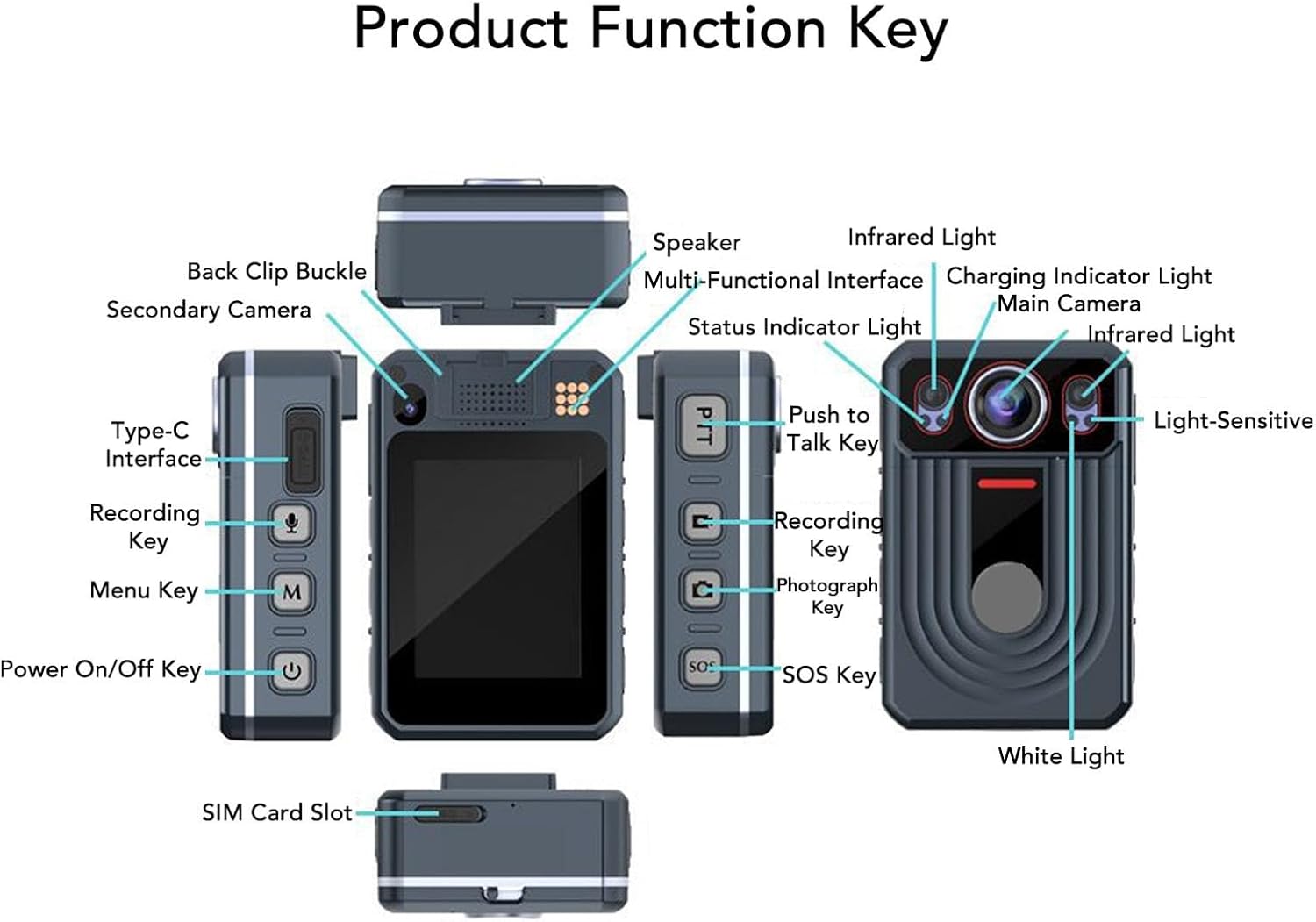
Figure 3.1: Labeled diagram of the Cuifati 2K Body Camera's components and keys.
Негизги компоненттерге төмөнкүлөр кирет:
- Негизги камера: Primary lens for video and photo capture.
- Кошумча камера: Additional lens for specific functions (e.g., rear recording).
- Инфракызыл жарык: Түнкү көрүнүштү жаздыруу үчүн.
- Ак жарык: Жарыктандыруу үчүн.
- Light-Sensitive Sensor: Автоматтык режимди которуу үчүн айланадагы жарыкты аныктайт.
- Баяндамачы: For audio playback and alerts.
- Multi-Functional Interface: For various connections.
- Заряддоо индикаторунун жарыгы: Заряддоо абалын көрсөтөт.
- Статус индикаторунун жарыгы: Indicates device status (recording, standby, etc.).
- Type-C интерфейси: Заряддоо жана маалыматтарды өткөрүү үчүн.
- Recording Key: Initiates video or audio recording.
- Меню ачкычы: Accesses device settings and options.
- Күйгүзүү/өчүрүү ачкычы: Аппаратты күйгүзөт же өчүрөт.
- Push to Talk Key (PTT): For intercom functionality.
- Photograph Key: Сүрөттөрдү кыймылсыз тартат.
- SOS ачкычы: Activates SOS recording or marks important points.
- Back Clip Buckle: Камераны кийимге же жабдууларга бекитүү үчүн.
- SIM карта слоту: For network connectivity (if applicable to specific models).
4. Орнотуу
4.1. Аппаратты заряддоо
Before first use, fully charge the body camera. Connect the provided USB Type-C cable to the camera's Type-C interface and the other end to a compatible USB power adapter (not included) or a computer's USB port. The Charging Indicator Light will show the charging status.
4.2. Эстутум сактагыч
The camera has a built-in 64GB memory card. It supports an external memory card up to 128GB (not included) for extended storage. Ensure the memory card is properly inserted if you choose to use an external one.
4.3. Күйгүзүү / Өчүрүү
Түзмөктү күйгүзүү үчүн, узак басуу the Power On/Off Key. To power off, узак басуу the Power On/Off Key again until the device shuts down.
5. Иштөө нускамалары
5.1. Видео жаздыруу
To start video recording, кыска басуу the Recording Key. The Status Indicator Light will change to indicate recording is in progress. To stop recording, кыска басуу the Recording Key again. The camera also supports pre-recording; узак басуу the Recording Key to activate this feature.
5.2. Аудио жазуу
To start audio-only recording, кыска басуу the Sound Recording button (often integrated with the Recording Key or a dedicated button). To stop, кыска басуу кайра.
5.3. Infrared (Night Vision) Light
The camera features HD Infrared Night Vision. To manually activate the infrared light, узак басуу the Sound Recording button. The camera can also automatically switch to infrared mode in low light conditions.
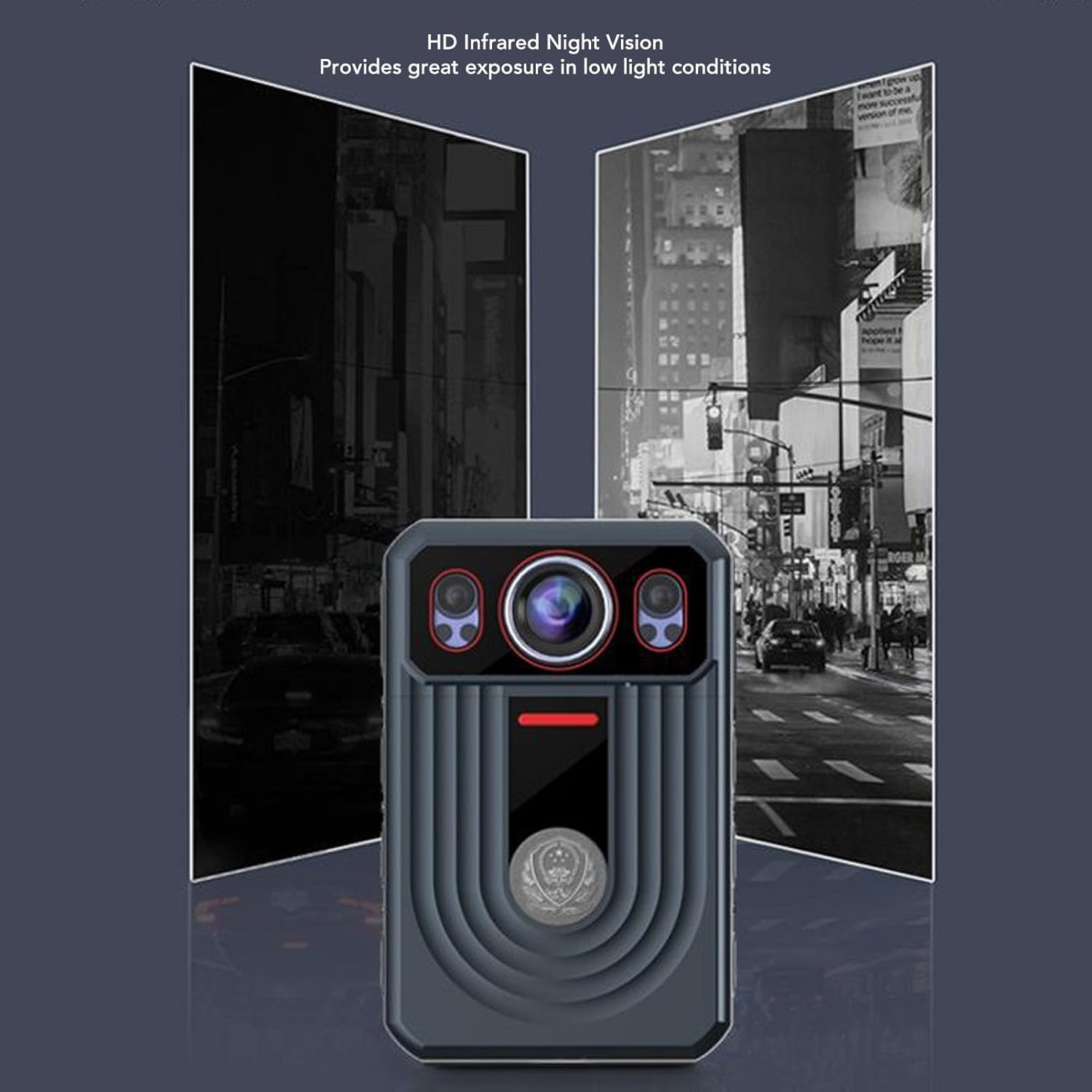
Figure 5.1: Demonstration of HD Infrared Night Vision capability.
5.4. Сүрөт тартуу
Сүрөткө тартуу үчүн, кыска басуу the Photograph Key. To switch video resolution settings, узак басуу the Photograph Key.
5.5. SOS функциясы
The SOS function allows you to mark important points in your video and sound recordings. Кыска басуу the SOS Key to mark a point. To activate SOS recording (which may trigger specific alerts or actions depending on configuration), узак басуу the SOS Key.
5.6. Push to Talk (PTT)
If your device supports Push to Talk functionality, узак басуу the PTT Key to talk. Release the key to listen for a response.
5.7. Меню навигациясы
To return to the previous screen or exit a menu, бир басуу the Menu Key. To activate the white light, узак басуу the Menu Key.
6. Негизги өзгөчөлүктөрү
- 2K видео жана 56MP сүрөттөр: Capture high-resolution video and still images with dual lenses, adjustable focus, and true-to-life color reproduction.
- Электрондук сүрөттү турукташтыруу (EIS): Тамактын жылмакай болушу үчүн камеранын титирөөсүн азайтатtage.
- 2.4 дюймдук сыйымдуулугу сенсордук экран: Easily playback videos and photos directly on the device.
- 120-degree Wide Angle Lens: Provides comprehensive scene coverage.
- HD инфракызыл түнкү көрүнүш: Automatically switches to infrared mode in low light for clear recording.
- Кыймылды аныктоо: Automatically detects movement for seamless recording.
- Цикл жаздыруу: Automatically overwrites old videos when memory is full to save space.
- Батареянын узак иштөө мөөнөтү: Built-in 3300mAh lithium polymer battery provides up to 9 hours of continuous recording.
- IP68 Waterproof & Durable: Designed to resist rough weather, including storms and snow, and is resistant to falls and explosions.
- Кошумча функциялар: Includes SOS, cluster intercom, remote monitoring, and the ability to record driving routes with location information.

Figure 6.1: Various application scenarios for the Cuifati 2K Body Camera.
7. Техникалык тейлөө
7.1. Тазалоо
Wipe the camera body with a soft, dry cloth. For the lens, use a specialized lens cleaning cloth and solution. Avoid using harsh chemicals or abrasive materials that could damage the device or lens coating.
7.2. Сактоо
Store the camera in a cool, dry place away from direct sunlight and extreme temperatures. If storing for an extended period, ensure the battery is partially charged (around 50%) to preserve its lifespan.
7.3. Батареяга кам көрүү
To maximize battery life, avoid fully discharging the battery frequently. Charge the device regularly, even if not in constant use.
8. Кыйынчылыктарды
If you encounter issues with your Cuifati 2K Body Camera, please refer to the following common problems and solutions:
- Түзмөк күйбөйт: Батарея заряддалганын текшериңиз. Камераны кубат булагына туташтырып, кайра аракет кылыңыз.
- Cannot record video/photo: Check if the memory card is full or properly inserted. Format the memory card if necessary (this will erase all data).
- Видео/аудио сапаты начар: Ensure the lens is clean. Check recording settings (resolution, frame rate). For audio, ensure the microphone is not obstructed.
- Түзмөк токтоп калат же жооп бербей калат: Try performing a soft reset by holding the Power On/Off Key for an extended period (e.g., 10-15 seconds) until the device restarts.
- Түнкү көрүү иштебей жатат: Ensure the infrared light is enabled (either manually or automatically). Check if there's sufficient darkness for automatic activation.
Эгер көйгөй чечилбесе, кардарларды колдоо менен байланышыңыз.
9. Техникалык шарттар
| Өзгөчөлүк | Спецификация |
|---|---|
| Бренд | Cuifati |
| Модель аты | CUIFATIvpa8mfs61c |
| Highest Video Resolution | 2K |
| Дисплей өлчөмү | 2.4 дюйм |
| Батарея түрү | Камтылган 3300mAh литий батареясы |
| Ички сактагыч | 64 ГБ |
| Max. External Storage Support | 128GB (Memory Card Not Included) |
| Суу өткөрбөйт рейтинги | IP68 |
| Image Stabilization | Ооба |
| Элемент Салмагы | 13.4 унция (болжол менен 380 г) |
| Пакеттин өлчөмдөрү | 6.69 x 4.33 x 2.76 дюйм |
10. Кепилдик жана колдоо
Your Cuifati 2K Body Camera comes with a standard manufacturer's warranty. Please refer to the warranty card included in your package or visit the official Cuifati webдеталдуу кепилдик шарттары жана шарттары үчүн сайт.
For technical support, troubleshooting assistance, or any inquiries regarding your product, please contact Cuifati customer service. Contact information can typically be found on the product packaging or the official Cuifati webсайт.
Ask a question about this manual
Ask about setup, troubleshooting, compatibility, parts, safety, or missing instructions. Manuals+ will review the question and use this page’s manual context to help answer it.