
Introduction
Thank you for choosing the Cuifati Mini Body Camera. This manual provides detailed instructions for the proper use, setup, and maintenance of your device. Please read this manual thoroughly before operating the camera to ensure optimal performance and longevity.
Пакеттин мазмуну
- 1 x Wearable Camera
- 1 x Ташуу сумкасы
- 1 x User Manual
- 1 x Lanyard
- 1 x Back Shell Bracket
- 1 х штатив
- 1 x USB кабели
- 1 x Тазалоочу чүпүрөк

Figure 1: Cuifati Mini Body Camera and included accessories.

Figure 2: Multi-scenario application examples for the body camera.
Продукт бүттүview
Familiarize yourself with the components and controls of your Cuifati Mini Body Camera.
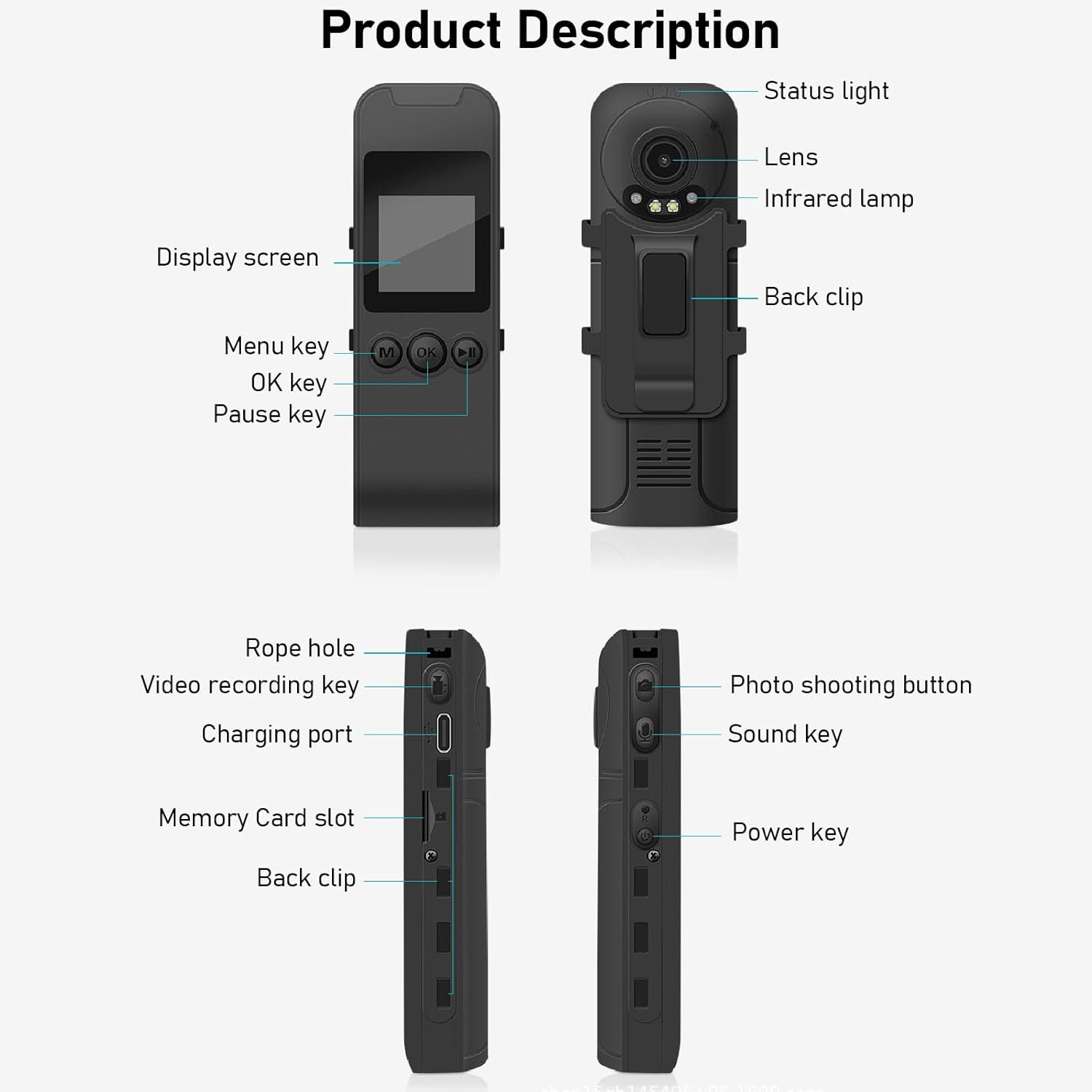
Figure 3: Labeled components of the Cuifati Mini Body Camera.
- Статус жарыгы: Indicates device status (e.g., recording, charging).
- Объектив: Main camera lens for video and photo capture.
- Инфракызыл Л.amp: Түнкү көрүнүш үчүн жарыктандырууну камсыз кылат.
- Артка клип: Камераны кийимге же башка беттерге бекитүү үчүн.
- Дисплей экраны: Түз эфир үчүн 1.3 дюймдук LCD view, ойнотуу жана менюну багыттоо.
- Menu Key (M): Түзмөктүн жөндөөлөрүнө кирет.
- OK Ачкыч: Confirms selections or starts/stops functions.
- Тыныгуу баскычы: Ойнотууну же жаздырууну тындырат.
- Rope Hole: Attachment point for the lanyard.
- Video Recording Key: Initiates and stops video recording.
- Кубаттоо порту (C түрү): Аппаратты кубаттоо жана компьютерге туташтыруу үчүн.
- Эстутум картасынын слоту: Insert microSD card for storage.
- Photo Shooting Button: Сүрөттөрдү кыймылсыз тартат.
- Sound Key: Controls audio recording.
- Кубат ачкычы: Аппаратты күйгүзөт же өчүрөт.
Жайгашуу
1. Батареяны заряддоо
Before first use, fully charge the camera's built-in lithium-ion battery. Connect the camera to a power source using the provided Type-C USB cable. The status light will indicate charging status. A full charge provides approximately 20 hours of work time and 10 hours of video recording.
Figure 4: Built-in 1200mAh battery for extended use.
2. Эстутум картасын салуу
The camera supports up to a 256GB memory card (not included). Locate the memory card slot on the side of the camera. Gently insert the microSD card with the gold contacts facing down until it clicks into place. To remove, push the card in slightly until it springs out.

Figure 5: Memory card slot for storage expansion.
Иштөө нускамалары
1. Күйгүзүү / Өчүрүү
- Күйгүзүү үчүн: Press and hold the Power Key until the display screen illuminates.
- Өчүрүү үчүн: Press and hold the Power Key until the device shuts down.
2. Видео жаздыруу
The camera records in 1440P HD at 30 frames per second with a 120° wide-angle lens and infrared night vision.
- Жазууну баштоо үчүн: Press the Video Recording Key. The status light will change, and a recording indicator will appear on the screen.
- Жаздырууну токтотуу үчүн: Press the Video Recording Key again.
- Цикл жаздыруу: Камера циклдик жаздырууну колдойт, автоматтык түрдө эң эскисинин үстүнөн жазат fileэстутум картасы толгондо.
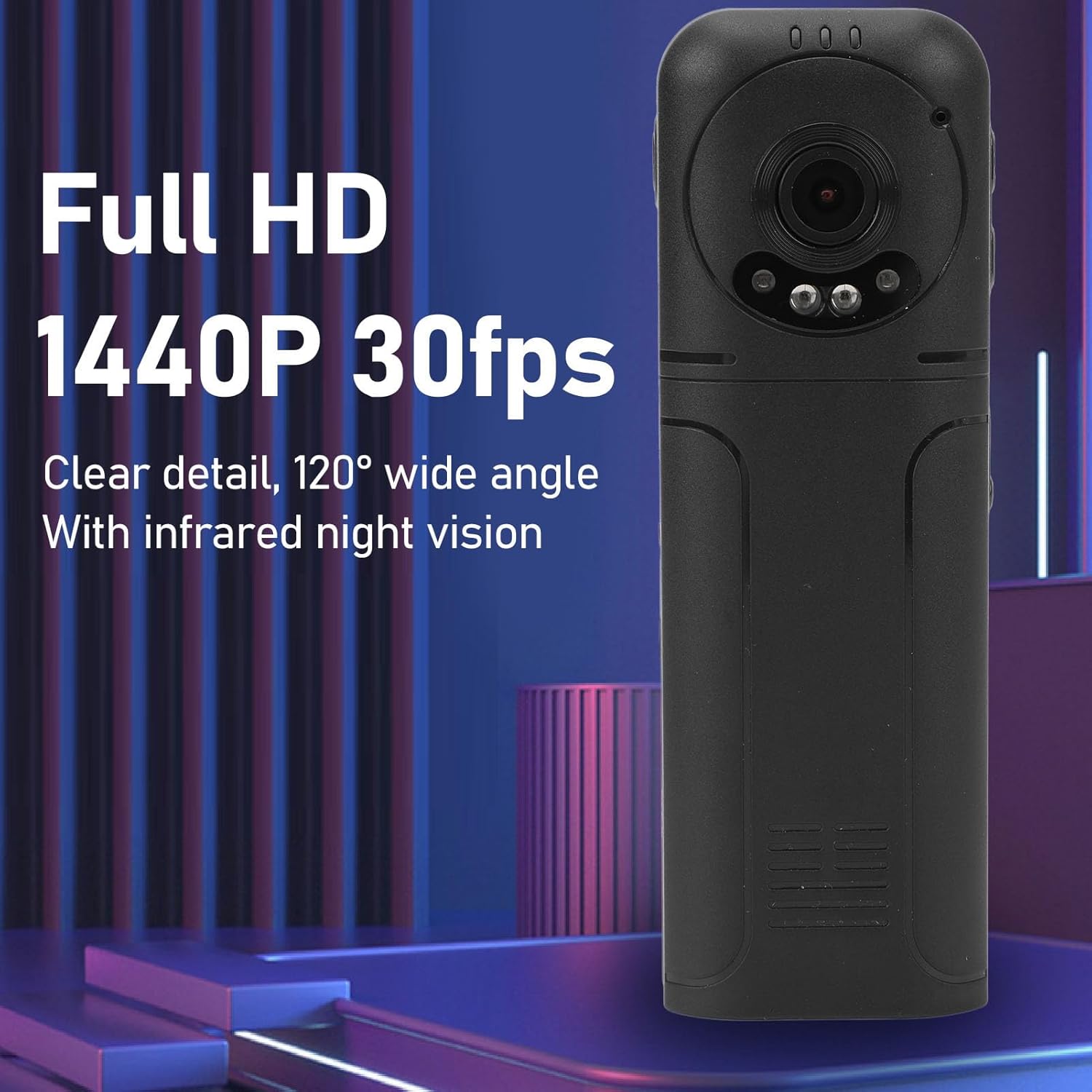
Figure 6: 1440P HD video recording with night vision.
3. Сүрөткө тартуу
- Сүрөткө тартуу үчүн: In standby mode, press the Photo Shooting Button.
4. Аудио жазуу
- To Start Audio Recording: Press the Sound Key.
- To Stop Audio Recording: Press the Sound Key again.

Figure 7: Audio recording functionality.
5. Ойнотуу жана File Башкаруу
The 1.3-inch LCD screen supports live playback, browsing, and pausing of videos, photos, and recordings directly on the device.

Figure 8: 1.3-inch color screen for on-device playback.
- Түзмөктө ойнотуу: Use the Menu, OK, and Pause keys to navigate and play fileэкранда.
- Компьютерге туташуу: Connect the camera to a computer via the Type-C USB cable to transfer, view, or delete files.
- OTG функциясы: If your mobile phone supports OTG, you can connect the camera directly to your phone for playback and file башкаруу.
Техникалык тейлөө
1. Тазалоо
- Use the provided cleaning cloth or a soft, dry cloth to wipe the camera body and lens.
- Do not use liquid cleaners or solvents, as they may damage the device.
2. Сактоо
- Камераны салкын, кургак жерде күндүн тике тийген нурунан жана экстремалдык температурадан алыс сактаңыз.
- Remove the memory card if storing for extended periods.
Проблемаларды чечүү
Эгер камераңызда көйгөйлөргө туш болсоңуз, төмөнкү жалпы көйгөйлөрдү жана чечимдерди караңыз:
| Көйгөй | Чечим |
|---|---|
| Камера күйбөйт. | Батарея заряддалганын текшериңиз. Кубат булагына туташып, кайра аракет кылыңыз. |
| Cannot record video/photo. | Check if a memory card is inserted correctly and has sufficient free space. Format the memory card if necessary (this will erase all data). |
| Эстутум картасы таанылган жок. | Ensure the memory card is inserted correctly. Try a different compatible memory card. Format the card using the camera's menu or a computer. |
| Видео/аудио сапаты начар. | Ensure the lens is clean. Check lighting conditions. For audio, ensure the microphone is not obstructed. |
| Түзмөк катып калат же жооп бербей калат. | Press and hold the Power Key for 10-15 seconds to force a restart. |
Техникалык шарттар
Below are the technical specifications for the Cuifati Mini Body Camera (Model CUIFATI2vg0ri8moa):
- Элемент түрү: Wearable Camera
- Материал: ABS
- Түнкү көрүнүш: 2pcs Night Vision Light Beads
- Видеонун чечилиши: 1440P (Maximum)
- Кадр ылдамдыгы: 30 FPS
- Батарея түрү: Литий-иондук батарейка
- Батарея сыйымдуулугу: 1200 мАч (орнотулган)
- Сактоо колдоо: Maximum 256GB Memory Card (Not Included)
- Заряддоо порту: Type-C
- APP аты: For RoadCam (if applicable for advanced features)
- Модель аты: CUIFATI2vg0ri8moa
- Өндүрүүчү: КУИФАТИ
Кепилдик жана колдоо
For warranty information or technical support, please refer to the documentation provided at the time of purchase or contact Cuifati customer service directly. Keep your purchase receipt as proof of purchase.