
1. Продукт бүтүп калдыview
The Uharbour Digital Torque Adapter transforms any standard 1/2" drive ratchet wrench into a high-precision digital torque wrench. This versatile adapter is designed for accurate torque measurement and application, making it ideal for various tasks including automotive, bicycle, and motorcycle maintenance.
Негизги өзгөчөлүктөр төмөнкүлөрдү камтыйт:
- Wide measurement range: 10 to 200 Newton-meters (Nm).
- High accuracy: ±2% error margin.
- Dual operating modes: PEAK mode for maximum torque recording and TRACK mode for real-time torque display.
- Visual and audible alerts: Buzzer and LED indicators for reaching preset torque values.
- Clear LCD display: Easy-to-read screen for precise real-time torque monitoring.
- Factory calibrated: Each unit is 100% factory calibrated and includes a calibration certificate for immediate reliability.

Image 1.1: Uharbour Digital Torque Adapter, storage case, and drive adapters.
2. Продукциянын компоненттери
Пакет, адатта, төмөнкүлөрдү камтыйт:
- Uharbour Digital Torque Adapter (1/2" drive)
- 1/2" to 3/8" drive adapter
- 1/2" to 1/4" drive adapter
- Hex key (for battery compartment, if applicable)
- Сактоочу куту
- Калибрлөө сертификаты
- Колдонмо
3. Башкаруу жана дисплей
Familiarize yourself with the adapter's controls and display elements:
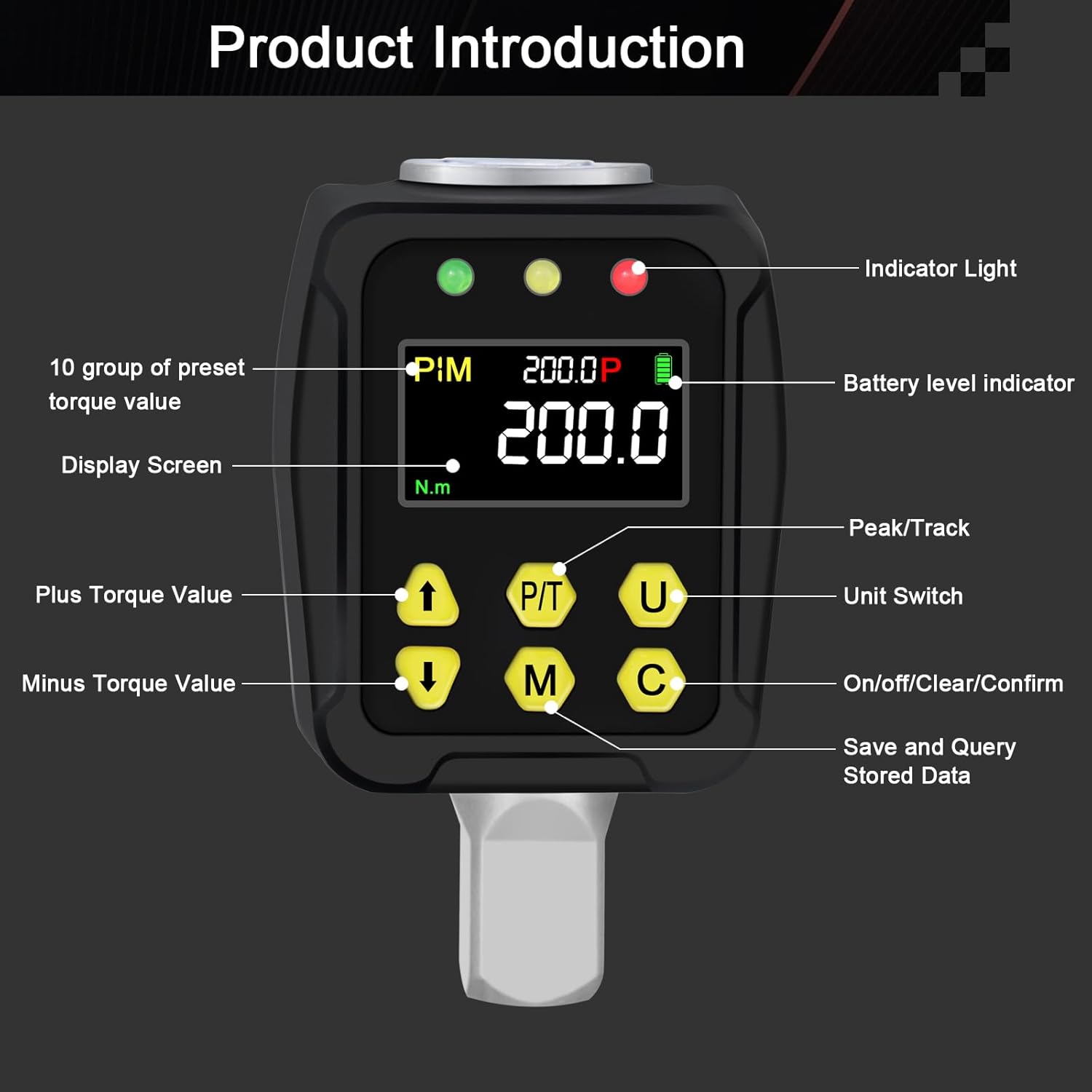
Image 3.1: Labeled components of the digital torque adapter.
- Индикатор жарыктары: Green, Yellow, Red LEDs to indicate proximity to target torque.
- Батарея деңгээлинин көрсөткүчү: Displays current battery charge.
- Дисплей экраны: LCD for showing torque values, modes, and settings.
- P/T Button (Peak/Track): Toggles between PEAK and TRACK operating modes.
- U Button (Unit Switch): Changes the unit of measurement (Nm, lb.ft, lb.in, kg.cm, kg.m).
- Өйдө жебе баскычы: Increases the preset torque value.
- Төмөн жебе баскычы: Decreases the preset torque value.
- M Button (Memory): Used to save and query stored data (e.g., preset torque values).
- C Button (On/Off/Clear/Confirm): Powers the device on/off, clears current readings, or confirms selections.
4. Орнотуу
4.1 Батареяны орнотуу
The adapter requires batteries for operation. Ensure batteries are correctly installed according to the polarity markings in the battery compartment. The device typically comes with batteries included.
4.2 Attaching to a Ratchet Wrench
To use the digital torque adapter, attach it to a standard 1/2" drive ratchet wrench. If your wrench has a different drive size, use the provided 1/2" to 3/8" or 1/2" to 1/4" adapters.
- Select the appropriate drive adapter if needed.
- Insert the square drive of the digital torque adapter into the drive head of your ratchet wrench.
- Туташуу коопсуз экенин текшериңиз.

Image 4.1: Attaching the digital torque adapter to a ratchet wrench, with optional drive adapters.
5. Иштөө нускамалары
5.1 Күйгүзүү/өчүрүү
- Күйгүзүү үчүн, басып, кармап туруңуз C баскычын дисплей күйгүчө басыңыз.
- Өчүрүү үчүн, басып туруңуз C button until the display turns off. The device may also have an auto-off feature after a period of inactivity.
5.2 Бирдикти тандоо
басыңыз U button to cycle through available torque units: Newton-meters (Nm), foot-pounds (lb.ft), inch-pounds (lb.in), kilogram-centimeters (kg.cm), and kilogram-meters (kg.m).

Image 5.1: Displaying various torque units and operating modes.
5.3 Mode Selection (PEAK/TRACK)
басыңыз P/T button to switch between PEAK and TRACK modes.
- TRACK Mode: Displays the torque value in real-time as force is applied. This is useful for monitoring live torque.
- PEAK режими: Records and displays the maximum torque value achieved during an application. Once the force is removed, the display holds the peak value. This mode is used when a specific target torque needs to be reached and held.
5.4 Setting Target Torque (PEAK Mode)
In PEAK mode, you can set a target torque value. The adapter will provide alerts as you approach and reach this value.
- Ensure the adapter is in PEAK mode.
- колдонуу Жогору жебе жана Төмөн жебе максаттуу момент маанисин тууралоо үчүн баскычтар.
- басыңыз C button to confirm the set value.
5.5 Torque Application and Alerts
When applying torque, the adapter provides visual and audible feedback:
- 80% Target Torque: Green LED light illuminates, accompanied by an intermittent beep.
- 90% Target Torque: Yellow LED light illuminates, accompanied by a faster intermittent beep.
- 100% Target Torque: Red LED light illuminates, accompanied by a constant beep.

Image 5.2: Visual and audible alerts during torque application.
5.6 Saving and Querying Data
The M button is used for memory functions, which may include saving preset torque values or querying previously stored data. Refer to the on-screen prompts for specific memory operations.
6. Техникалык тейлөө
6.1 Тазалоо
Wipe the adapter with a clean, dry, or slightly damp кездеме. Абразивдүү тазалоочу каражаттарды же эриткичтерди колдонбоңуз. Түзмөккө суюктуктардын кирбегенин текшериңиз.
6.2 Сактоо
Store the adapter in its protective case in a dry, cool place, away from direct sunlight and extreme temperatures. Remove batteries if the device will not be used for an extended period to prevent leakage.
6.3 Калибрлөө
The Uharbour Digital Torque Adapter is factory calibrated to ±2% accuracy and comes with a calibration certificate. Regular user calibration is not required. If you suspect accuracy issues, contact customer support.
7. Кыйынчылыктарды
- Дисплей иштебейт: Check battery level and ensure batteries are correctly installed. Replace batteries if necessary.
- Туура эмес окуулар: Ensure the adapter is securely attached to the wrench and the fastener. Verify the correct unit of measurement is selected. Avoid dropping or subjecting the device to severe impacts.
- No alerts: Check if the device is in PEAK mode and a target torque has been set. Ensure the buzzer is not muted (if such a feature exists, refer to the display).
For persistent issues, contact Uharbour customer support.
8. Техникалык шарттар
| Өзгөчөлүк | Спецификация |
|---|---|
| Бренд | Ухарбор |
| Модель номери | UHXM017 (TW025) |
| Drive Size | 1/2 inch (Square drive) |
| Момент диапазону | 10 - 200 Нм |
| Тактык | ±2% |
| Материал | Chrome Vanadium Steel, Aluminum |
| Дисплей | LCD |
| Иштөө режимдери | PEAK, TRACK |
| Alerts | Buzzer, LED (Green, Yellow, Red) |
| Power Source | Батарея (кошулган) |
| Продукт Салмагы | 470 грамм |
| UPC | 721545190758 |
9. Кепилдик жана колдоо
Uharbour products are manufactured to high-quality standards. For warranty information, technical support, or service inquiries, please refer to the contact details provided with your purchase or visit the official Uharbour webсайт. Сатып алганыңыздын далили катары сатып алуу дүмүрчөгүңүздү сактаңыз.