
Introduction
This manual provides detailed instructions for the Cillso H97 Wireless Earbuds. Please read this manual carefully before using the product to ensure proper operation and to maximize your user experience. Keep this manual for future reference.

Image: The Cillso H97 Wireless Earbuds in their charging case, displaying the digital battery indicator.
Пакеттин мазмуну
- Cillso H97 Wireless Earbuds (Left and Right)
- Заряддоо кутусу
- USB-C заряддоо кабели
- User Manual
Жайгашуу
1. Кулакчындарды жана кутуну кубаттоо
Before first use, fully charge the earbuds and the charging case. Connect the provided USB-C cable to the charging port on the case and to a 5V/1A or 5V/2A power adapter. The digital display on the case will indicate the charging status.
- Заряддоо убактысы: Толук кубаттоо үчүн болжол менен 1.5 саат.
- Батареянын иштөө мөөнөтү: Up to 8 hours of playback per charge, and up to 40 hours total with the charging case.
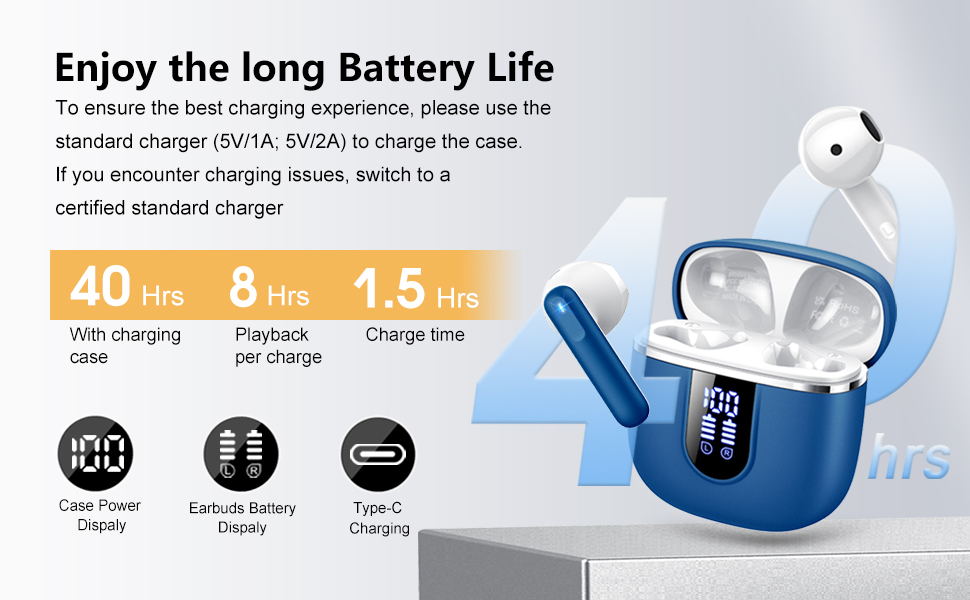
Image: Diagram illustrating the 40-hour total battery life, 8-hour single playback, and 1.5-hour charge time, along with the USB-C charging port and digital display.
The charging case is equipped with Over Current Protection (OCP) technology to prevent damage from prolonged high current. If the current exceeds the power limit, the power source will be cut off to protect the circuitry and device.

Image: Illustration explaining Over Current Protection (OCP) technology in the charging case.
2. Bluetooth түзмөгү менен жупташуу
- Заряддоо кутучасын ачыңыз. Кулакчындар жупташтыруу режимине автоматтык түрдө кирет.
- Түзмөгүңүздө (смартфон, планшет, ноутбук) Bluetooth иштетиңиз.
- Издөө "H97" in the list of available Bluetooth devices and select it to connect.
- Туташкандан кийин, сиз үндүү ырастоону угасыз жана кулакчындар колдонууга даяр болот.
The H97 earbuds feature Bluetooth 5.4 for a more stable connection, longer transmission range, lower power consumption, and reduced latency.

Image: Visual representation of Bluetooth 5.4 technology, highlighting benefits like stable connection, longer range, lower power consumption, and lower latency.
3. Кулакчын тагынуу
Gently insert the earbuds into your ears, ensuring a comfortable and secure fit. The rounded tips are designed for in-ear comfort. Adjust them until the sound quality is optimal and they feel stable.

Image: Diagram showing the recommended angle for inserting the earbud into the ear for a secure fit.
Иштөө нускамалары
Touch Controls
The H97 earbuds feature sensitive touch sensors for easy control of various functions:
| Акция | Функция |
|---|---|
| Double tap the left/right MFB button | Музыканы ойнотуу/тындыруу |
| One tap the left/right MFB button | Чалууга жооп берүү/аяктоо |
| Long press the right/left MFB button for 2s | Кийинки/Мурунку трек |
| One tap the left/right MFB button (during call) | Volume Up/Down (specific mapping not detailed, typical for single tap) |
| Triple tap MFB button | Activate Voice Assistant (common function) |

Image: Visual guide to the smart touch controls on the earbuds for playback and call management.
Аудио өзгөчөлүктөрү
The H97 earbuds deliver a high-quality audio experience:
- Hi-Fi стерео үн: Featuring 13mm diameter speakers with crystal clear treble, vibrant mid-range, and powerful bass.
- 3D Bass Stereo: Enhanced bass for an immersive listening experience.
- Crystal-Clear Чалуулар: Equipped with 4 ENC (Environmental Noise Cancelling) microphones to filter out background noise and suppress wind noise, ensuring clear communication.

Image: Diagram illustrating the 13mm speaker driver and triple-layer composite diaphragm for enhanced bass and sound quality.

Image: Illustration detailing the 4-microphone design for crystal-clear calls, including feedback and talk mics, and anti-wind noise features.
Шайкештик
The Cillso H97 Wireless Earbuds are compatible with a wide range of Bluetooth-enabled devices, including:
- Смартфондор (Android, iOS)
- Планшеттер
- Ноутбуктар
- Desktop Computers (with Bluetooth adapter)

Image: Icons representing compatibility with phones, tablets, laptops, and desktops, shown alongside the earbuds and a smartphone playing music.
Техникалык тейлөө
Тазалоо жана кам көрүү
The H97 earbuds are IP7 waterproof, offering protection against water, sweat, and rain. However, proper care is still recommended:
- Wipe the earbuds and charging case with a soft, dry cloth after each use, especially after workouts.
- Абразивдүү тазалагычтарды же эриткичтерди колдонуудан алыс болуңуз.
- Заряддоо кабелин туташтыруудан мурун кубаттоо порту кургак экенин текшериңиз.
- Кулакчындарды коргоо жана кубаттоо үчүн колдонулбаган учурда кубаттоо кутучасында сактаңыз.

Image: A person wearing the earbuds with water splashing, illustrating the IPX7 waterproof feature, along with icons for dust prevention, sweatproof, and nano material.
Заряддоо мыкты тажрыйбалары
- Always use the provided USB-C cable or a certified standard charger (5V/1A or 5V/2A) to charge the case.
- If you encounter charging issues, try switching to a different certified standard charger.
- Do not expose the charging case or earbuds to extreme temperatures.
Проблемаларды чечүү
Жалпы маселелер жана чечимдер
| Көйгөй | Мүмкүн чечим |
|---|---|
| Кулакчындар жупташтырылбай же туташпай жатат |
|
| Бир гана кулакчын иштейт |
|
| Көлөмү төмөн же үн сапаты начар |
|
| Заряддоо куту заряддалбай жатат |
|
Техникалык шарттар
| Өзгөчөлүк | Деталь |
|---|---|
| Модель номери | H97 |
| Бренд | Силлсо |
| Bluetooth версиясы | 5.4 |
| Аудио технологиясы | 3D Bass Stereo, Hi-Fi Stereo Sound |
| Динамик өлчөмү | 13 мм диаметри |
| Микрофондор | 4 ENC ызы-чууну жок кылуучу микрофондор |
| Батареянын иштөө мөөнөтү (наушник) | 8 саатка чейин (бир кубаттоо) |
| Жалпы ойноо убактысы | 40 саатка чейин (кубаттоочу корпусу менен) |
| Заряддоо порту | USB-C |
| Заряддоо киргизүү | 5V/1A or 5V/2A recommended |
| Суу өткөрбөйт рейтинги | IP7 |
| Шайкеш түзмөктөр | Smartphones, Tablets, Laptops, Bluetooth Devices |
| Жыштык диапазону | 20 Гц - 20 000 Гц |
| Наушник формасы | Тегеректелген кеңештер |
| Продукциянын өлчөмдөрү | 0.79 x 0.79 x 0.79 inches (earbud dimensions, case dimensions are 48.9mm x 53.4mm) |
| Элемент Салмагы | 0.352 унция |

Image: Visual representation of the earbuds and charging case dimensions, emphasizing their lightweight and pocket-sized design.
Кепилдик жана колдоо
Продукт кепилдиги жана кардарларды колдоо боюнча маалымат берилген маалыматтарда болгон эмес. Өнүмдүн таңгагына же өндүрүүчүнүн расмий өкүлүнө кайрылыңыз webкепилдик камтуу жөнүндө чоо-жайы жана кардарларды колдоо менен кантип байланышуу үчүн сайт.
Коопсуздук маалыматы
- Кулакчындарды же заряддоо кутучасын ажыратпаңыз же өзгөртпөңүз.
- Keep the product away from extreme temperatures, direct sunlight, and moisture.
- Өнүмдү түшүрүүдөн же катуу таасирлерге дуушар кылуудан качыңыз.
- Балдар жана үй жаныбарлары жетпеген жерде сактаңыз.
- Продукцияны жергиликтүү эрежелерге ылайык таштаңыз.