
Introduction
Thank you for choosing the Yoidesu Cordless Phone System. This system combines a corded base unit with a cordless handset, offering advanced features such as a digital answering machine, photo dialing, smart call blocking, and an expandable design. This manual will guide you through the setup, operation, and maintenance of your new phone system to ensure optimal performance.
Пакеттин мазмуну
Төмөндө тизмеленген нерселердин баары пакетиңизге камтылганын текшериңиз. Эгерде кандайдыр бир нерселер жок болсо же бузулса, кардарларды колдоо менен байланышыңыз.
- Зымдуу негизги блок, телефон трубкасы менен
- Зымсыз телефон
- Cordless Handset Charging Base
- AC Power Adapters (2)
- Телефон линиясы
- Зымсыз телефон үчүн кайра заряддалуучу батарея
- Колдонуучунун Колдонмосу (бул документ)
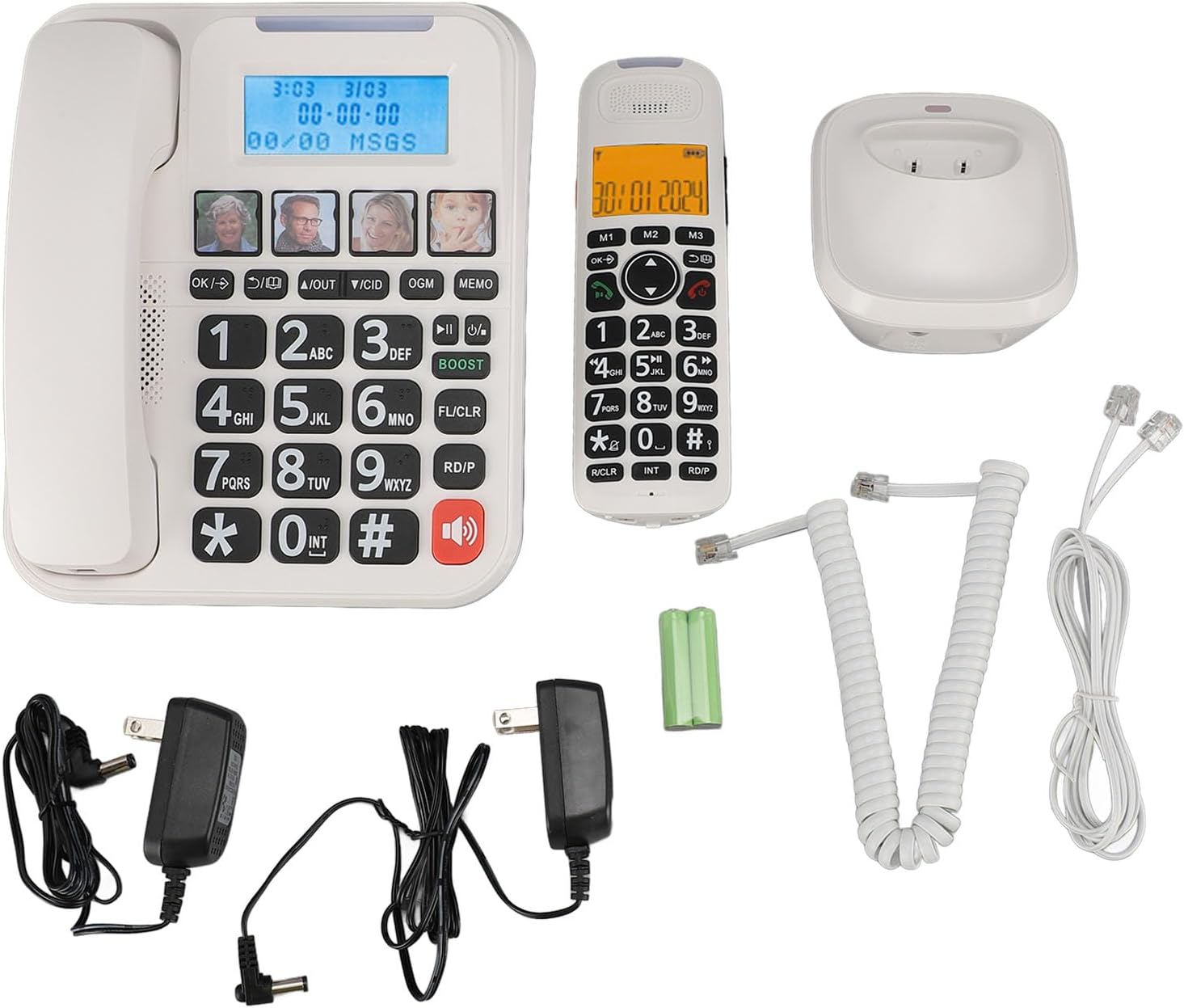
1-сүрөт: Complete package contents of the Yoidesu Cordless Phone System.
Продукт бүттүview
Зымдуу базалык блок
The base unit serves as the central hub for your phone system, featuring a large display, keypad, and dedicated buttons for answering machine functions and photo dialing.
- Чоң 2 дюймдук экран: Displays caller ID, call history, and answering machine status with high-contrast text.
- Чоң баскычтоп: Oversized buttons for easy dialing, especially in low-light conditions.
- Photo Dialing Buttons: Four customizable buttons for quick access to frequently dialed numbers with associated photos.
- AMP Баскыч: Enhances call volume by up to 28dB for improved clarity.
- Автоматтык жооп берүүчү аппараттын башкаруу элементтери: Play/Stop, Skip, Record, and Memo functions.

2-сүрөт: Фронт view of the Corded Base Unit.
Зымсыз телефон
The cordless handset provides mobility and convenience, allowing you to make and receive calls away from the base unit.
- Дисплей экраны: Shows caller information, menu options, and battery status.
- Чабыттоо баскычтары: For menu navigation and volume adjustment.
- Talk/End Buttons: To initiate and terminate calls.
- Intercom (INT) Button: For internal calls between handsets or base unit.

3-сүрөт: Фронт view of the Cordless Handset.
Жайгашуу
1. Негизги блокту туташтыруу
- Телефон линиясынын шнурунун бир учун негизги блоктун арткы жагындагы TEL LINE уячасына туташтырыңыз.
- Телефон линиясынын шнурунун экинчи учун дубалдагы телефон уячасына туташтырыңыз.
- Plug one AC power adapter into the DC IN 6V jack on the back of the base unit.
- AC кубат адаптеринин экинчи учун стандарттуу электр розеткасына сайыңыз.

4-сүрөт: Rear connections of the Base Unit.
2. Телефондун батареясын орнотуу
- Зымсыз телефондун артындагы батарея бөлүкчөсүнүн капкагын ачыңыз.
- Insert the supplied rechargeable battery, ensuring correct polarity (+/-).
- Батарея уясынын капкагын жабыңыз.
3. Телефонду заряддоо
- Plug the second AC power adapter into the DC IN 6V jack on the cordless handset charging base.
- AC кубат адаптеринин экинчи учун стандарттуу электр розеткасына сайыңыз.
- Place the cordless handset onto its charging base. The charging indicator on the handset should illuminate.
- Батареянын толук сыйымдуулугун камсыз кылуу үчүн телефонду алгачкы колдонуудан мурун кеминде 12 саат кубаттоого уруксат бериңиз.

5-сүрөт: Cordless Handset on Charging Base.
4. Кошумча телефондорду каттоо (милдеттүү эмес)
The system supports up to five handsets. Refer to the specific instructions provided with additional handsets for registration procedures. Typically, this involves placing the base unit in registration mode and then initiating registration from the new handset.
Иштөө нускамалары
Чалууларды кабыл алуу жана кабыл алуу
- Чалуу үчүн: Зымдуу телефонду көтөрүңүз же басыңыз СҮЙЛӨШҮҮ button on the cordless handset, then dial the number.
- Чакырууну кабыл алуу үчүн: Зымдуу телефонду көтөрүңүз же басыңыз СҮЙЛӨШҮҮ button on the cordless handset when the phone rings.
- Чалууну аяктоо үчүн: Place the corded handset back on the base or press the END зымсыз телефондун баскычы.
Чалуу үнүн тууралоо
Чалуу учурунда, басыңыз AMP button on the base unit to increase the volume by 28dB. On the cordless handset, use the navigation buttons to adjust the earpiece volume.
Using the Digital Answering Machine
The integrated answering machine can record up to 60 minutes of messages, outgoing announcements, and memos.
- Play Messages: басыңыз ОЙНОО/ТОКТОТУУ негизги бирдиктеги баскыч.
- Чыгуучу билдирүүнү жаздыруу (OGM): басыңыз OGM button and follow the voice prompts.
- Record Memo: басыңыз эсине button and speak after the tone.
Photo Dialing
Set up four frequently dialed numbers with associated photos for quick access.
- Программага: Select an empty photo slot on the base unit. Follow the on-screen prompts to enter the contact's name and phone number. You can then insert a printed photo into the designated slot.
- Чалуу үчүн: Simply press the desired photo button on the base unit.

6-сүрөт: Using the Photo Dialing feature.
Smart Call Blocker and Caller ID
The system can store up to 30 incoming call numbers on handsets and 29 on the base unit. The call block function helps prevent unwanted calls.
- Чалуучунун ID: Incoming call numbers are displayed on both the base unit and handset screens.
- Чалуу бөгөттөө: Access the call block menu to add numbers manually or block numbers from the caller ID history. You can set it to manual or automatic mode, allowing only calls from saved contacts.
Phonebook and Call History
Store up to 50 phonebook entries. Review 10 outgoing call numbers and incoming call numbers (30 on handset, 29 on base).
- Байланыш кошуу: Navigate to the phonebook menu and enter the name and number.
- Review Тарых: Use the navigation buttons to scroll through incoming and outgoing call lists.
Intercom and 3-Way Calling
The expandable system allows for internal communication and conference calls.
- Домофон: басыңыз INT button on a handset or base unit to call another registered handset or the base unit.
- 3 тараптуу чалуу: Supports conference calls between a landline, a sub-phone (handset), and a third-party phone. Refer to the system menu for initiating this feature.
Техникалык тейлөө
Тазалоо
Телефон системасын жумшак менен сүртүңүз, гamp кездеме. Катуу химиялык заттарды же абразивдүү тазалагычтарды колдонбоңуз. Тазалоодон мурун бирдиктин розеткадан ажыратылганын текшериңиз.
Батареяга кам көрүү
To prolong battery life, always return the cordless handset to its charging base when not in use. If the phone will be unused for an extended period, remove the battery from the handset.
Проблемаларды чечүү
| Көйгөй | Мүмкүн себеп | Чечим |
|---|---|---|
| Терүү үнү жок | Телефон линиясы ажыратылган же бузулган. | Ensure the telephone line cord is securely connected to both the base unit and the wall jack. Test with another phone if possible. |
| Телефон заряддалбай жатат | Handset not properly seated on charging base; charging base not powered; faulty battery. | Ensure the handset is correctly placed on the charging base. Check that the charging base's power adapter is plugged in. Replace battery if necessary. |
| Жауап беруучу аппарат жаздырбай жатат | Answering machine is off; memory is full. | Ensure the answering machine is turned on. Delete old messages to free up memory. |
| Чалуу сапаты начар/статикалык | Interference from other electronic devices; handset too far from base unit. | Move the base unit away from other electronics. Ensure the handset is within range of the base unit. |
Техникалык шарттар
- Модель номери: Yoidesuav12iq6wt4-14
- Автожооп бергичтин жаздыруу убактысы: 60 мүнөткө чейин
- Handset Expansion: Up to 5 handsets per base unit
- Коңгуроонун үн деңгээли: 90 дБ чейин (жөнгө салынат)
- Call Volume Boost: +28dB via AMP баскычы
- Экрандын өлчөмү: 2 inches (handset and base unit)
- Caller ID Storage: 30 incoming calls (handset), 29 incoming calls (base unit)
- Phonebook Entries: 50
- Чыгуучу чалуулар сактагычы: 10
- Пакеттин өлчөмдөрү: 12.99 x 9.06 x 3.94 дюйм
- Элемент Салмагы: 2.84 фунт
Кепилдик жана колдоо
For warranty information or technical assistance, please contact Yoidesu customer support. Keep your purchase receipt as proof of purchase for any warranty claims.
Өндүрүүчү: Yoidesu
Биринчи жеткиликтүү болгон күнү: 5-сентябрь, 2024-жыл