
1. Киришүү
Thank you for choosing the GOWENIC Bluetooth 5.3 Rechargeable Earpiece Headset. This manual provides essential information for setting up, operating, and maintaining your new earpiece. Please read it carefully before use to ensure optimal performance and longevity of the product.
2. Пакеттин мазмуну
Сураныч, пакетте төмөнкү нерселерди текшериңиз:
- 1 x GOWENIC Earpiece
- 1 x USB заряддоо кабели
3. Продукт бүтүп калдыview
Familiarize yourself with the components and controls of your GOWENIC Earpiece.
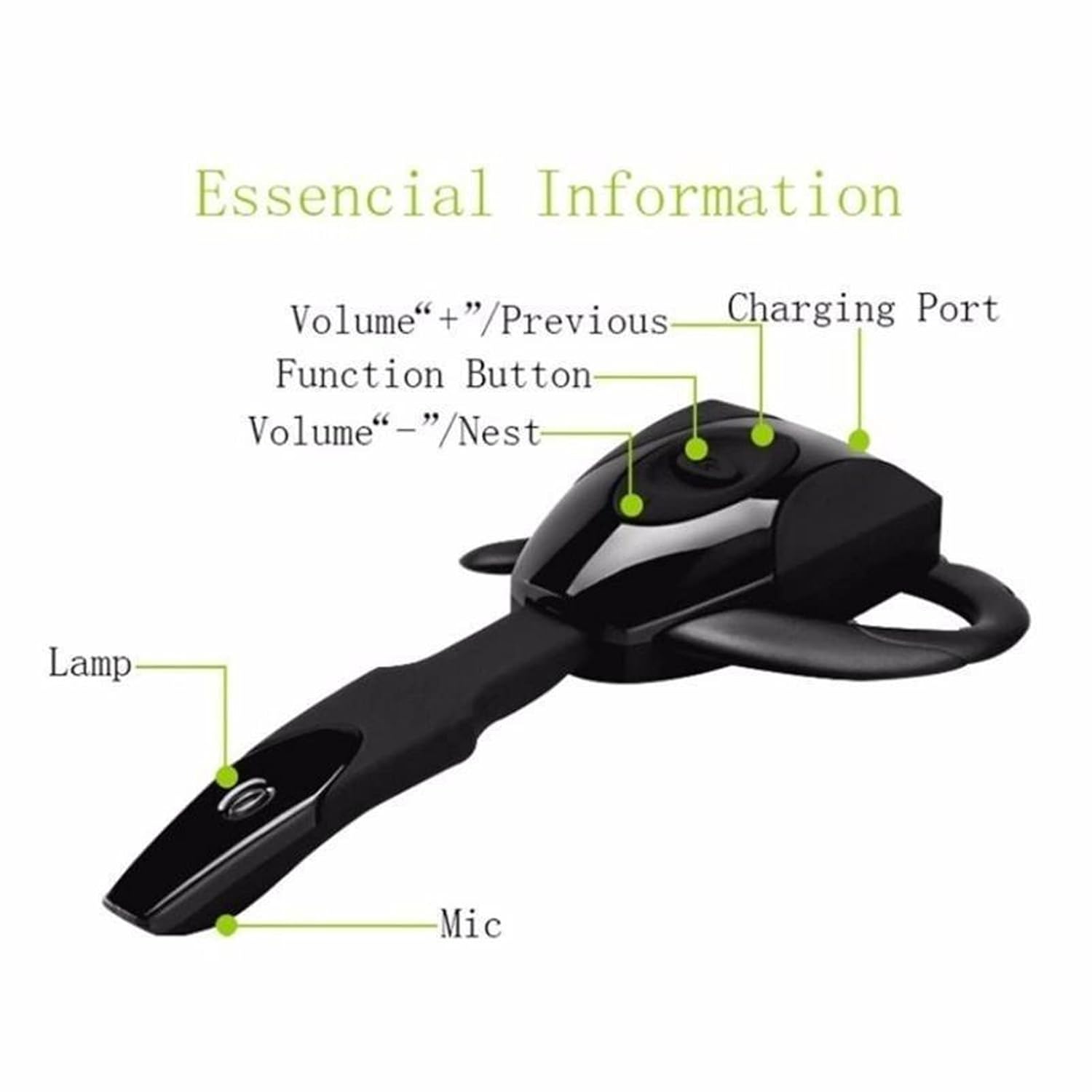
3.1-сүрөт: Earpiece Components. This image displays the earpiece with labels pointing to its key features: the Charging Port, Function Button, Volume +/Previous button, Volume -/Next button, Indicator Lamp, and Microphone.

3.2-сүрөт: Detailed Earpiece Diagram. This diagram provides a comprehensive view of the earpiece, highlighting the Multi-function button, Volume +/Next Song, Volume -/Previous Song, Indicator light, Charging port, Ear hang, Hi-Fi receiver, and Microphone.
- Көп функциялуу баскыч: Used for power on/off, play/pause, answer/end calls.
- Volume + / Previous Song: Short press for volume up, long press for previous track.
- Volume - / Next Song: Short press for volume down, long press for next track.
- Заряддоо порту: USB заряддоо кабелин бул жерге туташтырыңыз.
- Индикатор жарыгы: Статусун көрсөтөт (мисалы, кубаттоо, жупташтыруу, туташуу).
- Микрофон: Үн байланышы үчүн.
- Кулак илгич: Provides secure and comfortable fit.
4. Орнотуу
4.1. Charging the Earpiece
Before first use, fully charge the earpiece.
- Connect the small end of the USB charging cable to the charging port on the earpiece.
- USB кубаттоочу кабелдин чоңураак учун USB кубат булагына туташтырыңыз (мисалы, компьютердин USB порту, USB дубал адаптери).
- The indicator light will typically show a solid color (e.g., red) during charging and change or turn off when fully charged.
- Заряддоо убактысы болжол менен 1-2 саатты түзөт.
4.2. Кулакчынды тагынуу
The earpiece is designed for comfortable, long-term wear. You may need to adjust the ear hook for the best fit.

4.1-сүрөт: Earpiece Worn on Ear. This image demonstrates the earpiece comfortably positioned on a user's ear, highlighting its ergonomic design.

4.2-сүрөт: Ear Hook Installation and Charging Port Access. This series of images illustrates the steps for attaching and removing the ear hook, as well as locating the charging port on the earpiece.
- Identify the transparent cover and the ear hang/hook.
- Gently remove the transparent cover if present.
- Attach the ear hook to the earpiece, ensuring it clicks into place securely.
- Place the earpiece over your ear, adjusting the ear hook for a snug and comfortable fit.
4.3. Bluetooth Жупташтыруу
To connect your earpiece to a device:
- Күйгүзүү: Press and hold the Multi-function Button until the indicator light flashes (often blue and red alternately), indicating it is in pairing mode.
- Bluetooth иштетүү: Түзмөгүңүздө (смартфон, планшет, компьютер) Bluetooth иштетиңиз.
- Издөө Түзмөктөр: Түзмөгүңүздүн Bluetooth жөндөөлөрүнөн жеткиликтүү түзмөктөрдү издеңиз.
- Select Earpiece: Select "GOWENIC Earpiece" or a similar name from the list of found devices.
- Байланышты ырастоо: Once paired, the indicator light on the earpiece will typically flash blue slowly or turn off, and your device will confirm the connection.
The earpiece supports connection to two devices simultaneously.

4.3-сүрөт: Multi-Device Connection. This image illustrates the earpiece's capability to connect to two devices, such as smartphones and tablets, at the same time.
5. Иштөө нускамалары
5.1. Күйгүзүү/өчүрүү
- Күйгүзүү: Press and hold the Multi-function Button for approximately 3-5 seconds until the indicator light flashes.
- Өчүрүү: Press and hold the Multi-function Button for approximately 3-5 seconds until the indicator light turns off.
5.2. Чалууларды башкаруу
- Чакырууга жооп берүү: Short press the Multi-function Button when an incoming call rings.
- Чакырууну аяктоо: Чалуу учурунда көп функциялуу баскычты кыска басыңыз.
- Чакырууну четке кагуу: Press and hold the Multi-function Button for 2 seconds when an incoming call rings.
- Акыркы номерди кайра терүү: Double-press the Multi-function Button when not on a call.
5.3. Музыканы ойнотуу
- Ойнотуу/тындыруу: Көп функциялуу баскычты кыска басыңыз.
- Кийинки трек: Үн көлөмү - баскычын узакка басыңыз.
- Мурунку трек: Үнү + баскычын узакка басыңыз.
5.4. Үндү башкаруу
- Көлөмү: Көлөмү + баскычын кыска басыңыз.
- Үнүн азайтуу: Үн баскычын кыска басыңыз.
6. Техникалык тейлөө
To ensure the longevity and optimal performance of your earpiece:
- Keep the earpiece dry. Do not expose it to moisture or extreme temperatures.
- Clean the earpiece regularly with a soft, dry cloth. Avoid using harsh chemicals or abrasive materials.
- Store the earpiece in a cool, dry place when not in use.
- Кулакчынды түшүрүп алуудан же катуу соккуга кабылтуудан алыс болуңуз.
7. Кыйынчылыктарды
If you encounter issues with your earpiece, refer to the following common solutions:
| Көйгөй | Мүмкүн чечим |
|---|---|
| Earpiece does not power on | Ensure the earpiece is fully charged. Press and hold the Multi-function Button for a longer duration. |
| Түзмөк менен жупташтыруу мүмкүн эмес | Ensure the earpiece is in pairing mode (indicator light flashing). Turn off and on Bluetooth on your device. Move the earpiece closer to your device. Clear previous Bluetooth connections on your device. |
| Үн жок же үнү төмөн | Increase the volume on both the earpiece and your connected device. Ensure the earpiece is properly connected. Check if the audio output is set to the earpiece on your device. |
| Заряддоо маселеси | Ensure the USB cable is securely connected to both the earpiece and the power source. Try a different USB cable or power source. |
| үзгүлтүктүү байланыш | Ensure there are no obstructions between the earpiece and your device. Move away from sources of strong electromagnetic interference. |
8. Техникалык шарттар
Detailed technical specifications for the GOWENIC Earpiece:
- Элемент түрү: Кулакчын
- Материал: ABS
- Өлчөмү: Болжол менен 10.5 x 6 x 2 см (4.1 x 2.4 x 0.8 дюйм)
- Bluetooth версиясы: 5.3
- Батарея түрү: Камтылган кайра заряддалуучу литий батарея
- Батарея модели: 381423 литий батареясы
- Батарея сыйымдуулугу: 135mAh
- Түсү: Кара
- Элемент Салмагы: 2.08 унция
9. Кепилдик жана колдоо
GOWENIC products are designed for reliability and performance. For warranty information or technical support, please refer to the retailer's return policy or contact the seller directly through your purchase platform.
Сураныч, кепилдик дооматтар үчүн сатып алуу далилиңизди сактап коюңуз.