1. Продукт бүтүп калдыview
The SRN-1673S is a 16-channel Network Video Recorder (NVR) designed for surveillance systems, supporting up to 8MP resolution cameras. It features a built-in Power over Ethernet (PoE/PoE+) network switch, allowing direct power supply to connected cameras and simplifying installation. The NVR comes with a preinstalled 2TB Hard Disk Drive (HDD) for video storage and supports additional storage expansion up to 24TB across four front-accessible SATA ports. Video output to a monitor is available via HDMI and VGA ports. The system utilizes H.264 and MJPEG codecs for efficient video compression. Remote viewing is supported through a web browser or the iPOLiS mobile application.

1-сүрөт: алдыңкы жана каптал view of the SRN-1673S NVR unit. This image shows the overall chassis design and ventilation on the side.
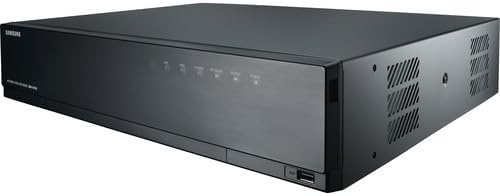
Сүрөт 2: Алдыңкы view of the SRN-1673S NVR, highlighting the front panel controls and a visible USB port for peripheral connections.
2. Орнотуу жана орнотуу
2.1 кутудан чыгаруу
Carefully unpack the NVR and all accessories from the box. Verify that all components are present. The package typically includes:
- SRN-1673S NVR Unit
- Кубат адаптери/кабели
- Чычкан
- Ыкчам баштоо колдонмосу (деталдуу нускамалар үчүн бул колдонмону караңыз)
2.2 Физикалык байланыштар
- Камераларды туташтыруу: Connect your IP cameras to the PoE ports on the rear of the NVR using Ethernet cables. The NVR's built-in PoE switch will provide power and data connectivity.
- Мониторду туташтыруу: Мониторду NVRдин HDMI же VGA чыгаруу портуна туташтырыңыз.
- Тармакка туташуу: Connect the NVR to your local network (router/switch) using an Ethernet cable for remote access and internet connectivity.
- Туташуу кубаты: Кубат адаптерин NVRге, андан кийин розеткага туташтырыңыз. NVR автоматтык түрдө күйөт.
- Чычканды туташтыруу: Connect the included USB mouse to a USB port on the NVR for local control.
2.3 Баштапкы конфигурация
Биринчи жолу жүктөлгөндө, NVR сизди баштапкы орнотуу устасы аркылуу жетектейт. Экрандагы көрсөтмөлөрдү аткарып, төмөнкүлөрдү аткарыңыз:
- Администратордун сырсөзүн орнотуңуз.
- Configure network settings (DHCP is usually default, or set a static IP).
- Scan and add connected cameras.
- Дата менен убакытты коюу.
- Format the preinstalled 2TB HDD if prompted (this will erase any existing data).
3. NVRди иштетүү
3.1 Live View
After initial setup, the NVR will display the live video feeds from connected cameras on the monitor. You can switch between single-camera view, көп камералуу торчо views, and customize display layouts.
3.2 Жазуу
NVR ар кандай жазуу режимдерин колдойт:
- Тынымсыз жаздыруу: Рекорддор 24/7.
- Кыймылды аныктоо жазуусу: Камера кыймылды аныктаганда гана жаздырат.
- Пландаштырылган жаздыруу: Алдын ала белгиленген графикке ылайык жазуу.
- Окуяны жаздыруу: Белгилүү бир окуяларга негизделген жазуулар (мисалы, сигнализацияны киргизүү).
Configure recording settings for each camera via the NVR's menu interface. The preinstalled 2TB HDD will store recordings based on these settings.
3.3 Ойнотуу
Кайраview foo жазылганtage:
- Access the Playback menu from the NVR interface.
- Каалаган камераны(ларды) жана дата/убакыт диапазонун тандаңыз.
- Жаздырууларды карап чыгуу үчүн убакыт тилкесин колдонуңуз.
- Playback controls (play, pause, fast forward, rewind) are available.
3.4 Remote Access
NVRге алыстан кирүүгө болот web browser or the iPOLiS mobile app.
- Web Браузер: NVRдин IP дарегин киргизиңиз web browser on a computer connected to the same network. Follow instructions to install any necessary plugins.
- iPOLiS Mobile App: Download the iPOLiS app from your device's app store. Add the NVR using its IP address or QR code (if supported) for live viewмобилдик түзмөгүңүздө ойнотуу жана угуу.
Up to 3 simultaneous users can access the NVR remotely.
4. Техникалык тейлөө
4.1 Катуу дискти башкаруу
Regularly check the status of the hard drive(s) through the NVR's system settings. If a drive fails or needs replacement, ensure the NVR is powered off before servicing. New HDDs may need to be formatted by the NVR before use.
4.2 Микропрограмма жаңыртуулары
Мезгил-мезгили менен өндүрүүчүнүн текшерүү website for firmware updates. Firmware updates can improve performance, add new features, and address security vulnerabilities. Follow the provided instructions carefully when performing an update to avoid system damage.
4.3 Тазалоо
Keep the NVR unit clean and free from dust. Use a soft, dry cloth to wipe the exterior. Ensure ventilation openings are not blocked to prevent overheating.
5. Кыйынчылыктарды
- Видео чыгаруу жок:
Текшерүү: Ensure the monitor is properly connected to the HDMI/VGA port and powered on. Verify the correct input source is selected on the monitor. - Камералар көрүнбөйт:
Текшерүү: Ensure cameras are properly connected to the NVR's PoE ports. Verify cameras are powered on (indicated by LED on camera or NVR port). Check camera IP addresses and ensure they are within the NVR's network range. Re-scan for cameras in the NVR's camera management settings. - Жаздыруу жок:
Текшерүү: Verify the 2TB HDD is installed and formatted. Check recording schedules and settings for each camera. Ensure the HDD is not full; if so, configure overwrite settings or add more storage. - Алыстан кирүү маселелери:
Текшерүү: Ensure the NVR is connected to the internet. Verify network settings (IP address, gateway, DNS). Check port forwarding settings on your router if accessing from outside the local network. Ensure the iPOLiS app or web browser plugin is up to date. - Системанын тоңушу/кечигүүсү:
Текшерүү: Ensure the NVR has adequate ventilation. Reduce the resolution or frame rate of cameras if the NVR's bandwidth capacity (80 Mb/s) is being exceeded. Check for firmware updates.
6. Техникалык шарттар
| Өзгөчөлүк | Description |
|---|---|
| Модел | SRN-1673S |
| Каналдардын саны | 16 |
| Max чечим | 8MP (Мегапикселдер) |
| өткөрүү жөндөмдүүлүгү | 80 Mb/s (for camera video transmission) |
| Preinstalled HDD | 2 ТБ (2000 ГБ) |
| Макс HDD сыйымдуулугу | Up to 24TB (4 x 6TB SATA HDDs) |
| Видеону кысуу | H.264, MJPEG |
| Video Outputs | Сапаттуу, VGA |
| PoE порттору | 16 (Plug-and-Play) |
| Аудио | Киргизүү/Чыгуу |
| Алыстан Viewing | Web Browser, iPOLiS Mobile App |
| Бир убакта колдонуучулар | 3ге чейин |
7. Кепилдик жана колдоо
For warranty information, please refer to the documentation provided with your purchase or visit the manufacturer's official webсайт. Кепилдиктин шарттары жана шарттары ар кандай болушу мүмкүн.
For technical support, troubleshooting assistance, or further inquiries, please contact your vendor or the manufacturer's customer support channels. Ensure you have your product model number (SRN-1673S) and any relevant purchase details ready when seeking support.


