
1. Киришүү
This manual provides comprehensive instructions for the installation, operation, and maintenance of your HUDAMZKY Ebike 40A Sine Wave Controller kit, which includes the 40A sine wave controller, CS866 color display, throttle, and PAS sensor. This system is designed to enhance the performance and control of electric bicycles equipped with 500W, 800W, 1000W, or 1800W brushless DC hub motors.
2. Коопсуздук маалыматы
- Always disconnect the battery before performing any installation, maintenance, or wiring adjustments.
- Кыска туташуунун алдын алуу үчүн бардык туташуулардын коопсуз жана туура изоляцияланганын текшериңиз.
- Do not attempt to modify the controller or display. Unauthorized modifications can lead to system failure or injury.
- Operate your e-bike responsibly and in accordance with local regulations.
- Keep the controller and display away from water and extreme temperatures.
3. Пакеттин мазмуну
Сиздин пакетте бардык компоненттер бар экенин текшериңиз:
- 1x 40A Sine Wave Controller (24V/36V/48V compatible)
- 1x CS866 Color Display
- 1x Adjustable Throttle
- 1x Pedal Assist System (PAS) Sensor

3.1-сүрөт: Бүттүview of the HUDAMZKY Ebike 40A Sine Wave Controller kit components, including the controller, CS866 color display, throttle, and PAS sensor.
4. Продукт бүтүп калдыview жана Техникалык шарттар
The 40A sine wave controller features an aluminum housing for efficient heat dissipation and is compatible with both Hall and non-Hall brushless motors. The CS866 color display provides essential riding data and allows for parameter customization.
4.1 Controller Specifications

4.1-сүрөт: Dimensions of the 40A Sine Wave Controller (212mm x 85mm x 45mm) and key electrical specifications.
- Максималдуу ток: 40 ± 1А
- Rated Voltage: DC36V-52V
- Номиналдуу кубаттуулугу: 2000 Вт
- Номиналдуу ток: 20A
- Speed Set: 1-4.2V
- MOSFETs: 15
- Турак жай: Aluminum for superior heat dissipation
- Шайкештик: Hall and non-Hall brushless DC motors
4.2 CS866 Color Display Specifications

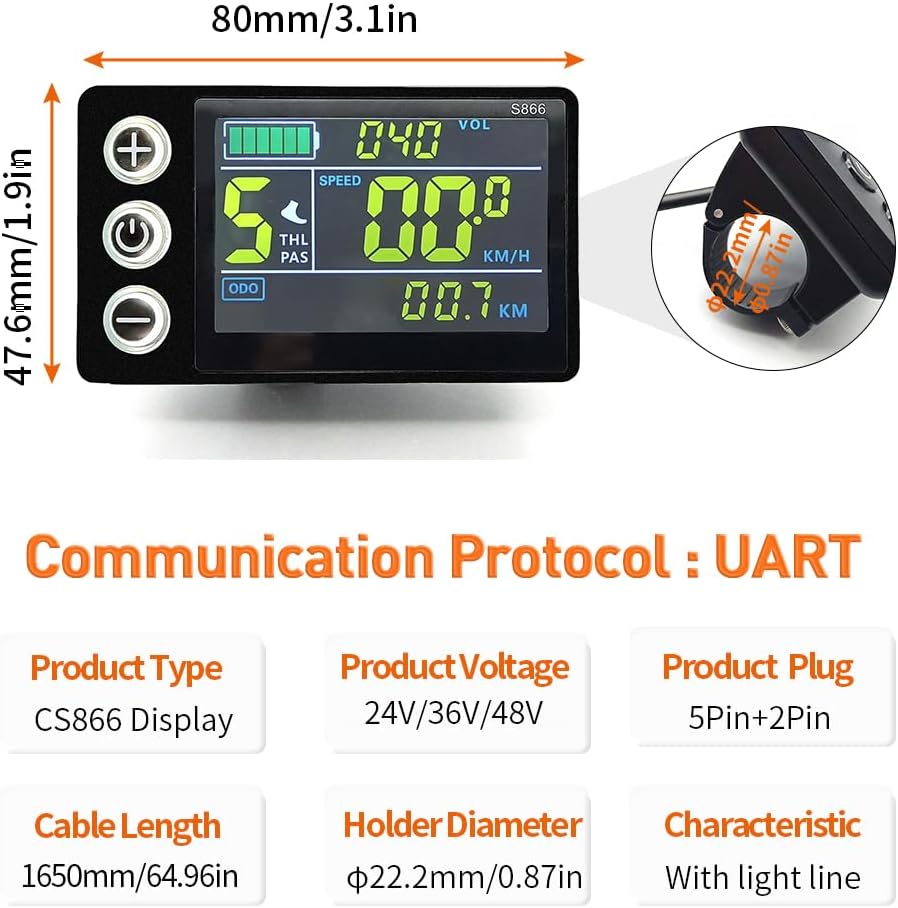
4.2-сүрөт: Dimensions of the CS866 Color Display (80mm x 47.6mm) and its technical specifications.
- Продукт түрү: CS866 Display
- Продуктtage: 24V/36V/48V
- Product Plug: 5Pin+2Pin
- Кабелдин узундугу: 1650мм (64.96in)
- Holder Diameter: Φ22.2mm (0.87in)
- Мүнөздөмө: With light line
- Байланыш протоколу: UART
4.3 Throttle and PAS Sensor Dimensions
4.3-сүрөт: Dimensions for the thumb throttle (30mm x 22.7mm) and the BZ-4(8) PAS sensor (65mm diameter).
5. Орнотуу жана орнотуу
5.1 Электр өткөргүч схемасы
Carefully follow the wiring diagram below to connect the controller to your e-bike components. Ensure each connector is securely fastened.

5.1-сүрөт: Detailed wiring diagram for the 40A controller, showing connections for Phase Line, Hall Line, Battery, Throttle, PAS, Display, E-Brakes, Tail Light, Limit Line, and Self-study wires.
Туташуу чоо-жайы:
- Phase Line: Blue, Green, Yellow (Connect to motor phase wires)
- Hall Line: Blue, Green, Red, Yellow (Connect to motor Hall sensor wires)
- Батарея: Black, Red (Connect to e-bike battery, XT60 plug recommended for safety)
- Муунткуч: Black, White, Red (Connect to throttle unit)
- PAS: Yellow, Black, Brown (Connect to Pedal Assist Sensor)
- Дисплей: Blue, Green, Red, Black (Connect to CS866 display)
- Электрондук тормоз: Black, Red (Connect to e-brake levers)
- Жарык: Black, Red (Connect to e-bike lighting system)
- Self-study: White (Used for motor phase learning)
- Limit Line: Blue (Optional speed limit function)

5.2-сүрөт: Illustration of the XT60 battery plug for secure connection and the dual-mode controller's learning line for motor direction correction.
The controller features a dual-mode design with a learning line. If the motor rotates in reverse after initial connection, disconnect the two learning lines and reconnect them briefly to correct the motor's rotation direction. Do not keep them connected long-term.
5.2 Компонентти орнотуу
- Контроллер: Mount the controller in a secure location on your e-bike, ensuring good airflow for optimal heat dissipation.
- CS866 Display: Attach the display to your handlebars using the provided holder. The holder diameter is Φ22.2mm (0.87in).
- Муунткуч: Install the throttle on either the left or right side of your handlebars, according to your preference.
- PAS сенсору: Install the PAS sensor on your pedal crank. Ensure it is correctly aligned to detect pedal rotation.
- Motor Phase Learning: After all connections are made, power on the system. The controller will automatically learn the motor phases for seamless integration with both Hall and non-Hall brushless motors.
6. Иштөө нускамалары
6.1 Күйгүзүү/өчүрүү
Press and hold the power button on the CS866 display to turn the system on or off.
6.2 CS866 Display Functions

6.1-сүрөт: Бүттүview of CS866 display functions, including key entry for mode settings and various customizable parameters.
The CS866 display provides real-time information and allows for customization:
- Маалымат дисплей: Speed, battery level, total mileage (ODO), trip distance (DST), error codes (ERR), voltage (VOL), current (CUR), wattage (WATT).
- Жарыкты башкаруу: Long-press the 'Up' button to turn the e-bike lights on or off. The light circuit provides 0.15A current at battery voltage.
- Throttle and PAS Modes: The system supports both throttle and Pedal Assist System (PAS) modes. You can use either independently or together.
6.3 Programming Parameters (P-Settings)
To enter programming mode, long-press the 'Key Enter Mode Settings' button (usually the 'M' or 'Set' button, or a combination of 'Up' and 'Down' buttons depending on the display version). Navigate through the parameters using the 'Up' and 'Down' buttons and confirm with the 'Set' button.

6.2-сүрөт: CS866 display wiring for instrument line sequence and light line, crucial for understanding parameter settings.
- Б03 (Тtage Selection): Set the correct battery voltage (24V, 36V, or 48V) to ensure accurate battery level display.
- P05 (Assist Levels): Adjust the number of pedal assist levels (e.g., 3, 5, 9 levels).
- P06 (Wheel Diameter): Input the correct wheel diameter in inches for accurate speed and distance readings.
- Other parameters may include Start Mode Setting, Drive Mode Setting, and Power Switch Control. Refer to the display's specific manual or contact support for a full list of P-settings.
7. Техникалык тейлөө
- Бардык электр туташууларынын бекемдигин жана коррозияга туруктуулугун үзгүлтүксүз текшерип туруңуз.
- Keep the controller and display clean and free from dust and debris. Use a soft, dry cloth for cleaning.
- Inspect wiring for any signs of wear or damage. Replace damaged wires immediately.
- Жылуулуктун туура таркалышын камсыз кылуу үчүн контроллердин алюминий корпусу тоскоолдуксуз турганын текшериңиз.
8. Кыйынчылыктарды
- Система күйбөй жатат: Check battery connection, ensure the battery is charged, and verify display wiring.
- Мотор жооп бербейт: Check motor phase and Hall sensor connections. Perform motor phase learning if necessary. Verify throttle and PAS sensor connections.
- Inaccurate Speed/Distance: Ensure the correct wheel diameter (P06) is set in the display parameters.
- Дисплей ката коддору: Refer to the CS866 display's specific manual for interpretation of error codes. Common issues include sensor malfunctions or communication errors.
- Motor Reverses Direction: Briefly connect and then disconnect the 'Self-study' wires to correct motor rotation.
If you encounter persistent issues, consult a qualified e-bike technician or contact customer support.
9. Кепилдик жана колдоо
Warranty information for this product is typically provided by the seller at the time of purchase. Please retain your proof of purchase for any warranty claims.
For technical support, troubleshooting assistance beyond this manual, or warranty inquiries, please contact the seller or manufacturer directly. Provide your product model number (40A and CS866) and a detailed description of the issue.