
1. Киришүү
The Gravity MGR3 Marine Stereo Receiver is designed for audio entertainment in various environments, including cars, boats, ATVs, motorcycles, and RVs. This manual provides instructions for installation, operation, and maintenance to ensure optimal performance and longevity of your device.
The MGR3 features multiple playback options, including USB, SD card, AUX input, and FM radio. It also includes Bluetooth connectivity for wireless audio streaming and a remote control for convenient operation. Its weatherproof design ensures durability in challenging outdoor conditions.
2. Коопсуздук маалыматы
- Орнотуудан жана иштетүүдөн мурун бардык нускамаларды кылдат окуп чыгыңыз.
- Түзмөккө же унаага зыян келтирбөө үчүн зымдардын жана туташуулардын туура орнотулганын текшериңиз. Орнотуу боюнча күмөн санасаңыз, адиске кайрылыңыз.
- Do not operate the unit in a manner that distracts from safe driving or operation of your vehicle.
- Protect the unit from extreme temperatures, direct sunlight for prolonged periods, and excessive moisture beyond its IPX5 rating.
- Агрегатты ажыратууга же өзгөртүүгө аракет кылбаңыз. Бул кепилдикти жокко чыгарып, зыян келтириши мүмкүн.
- Keep the remote control and small parts out of reach of children.
3. Пакеттин мазмуну
Пакетте бардык буюмдар бар экенин текшериңиз:
- Gravity MGR3 Marine Stereo Receiver
- Алыстан башкаруу
- Электр зымдары
- Монтаждоочу жабдык
- Колдонуучунун Колдонмосу (бул документ)
4. Продукт бүтүп калдыview
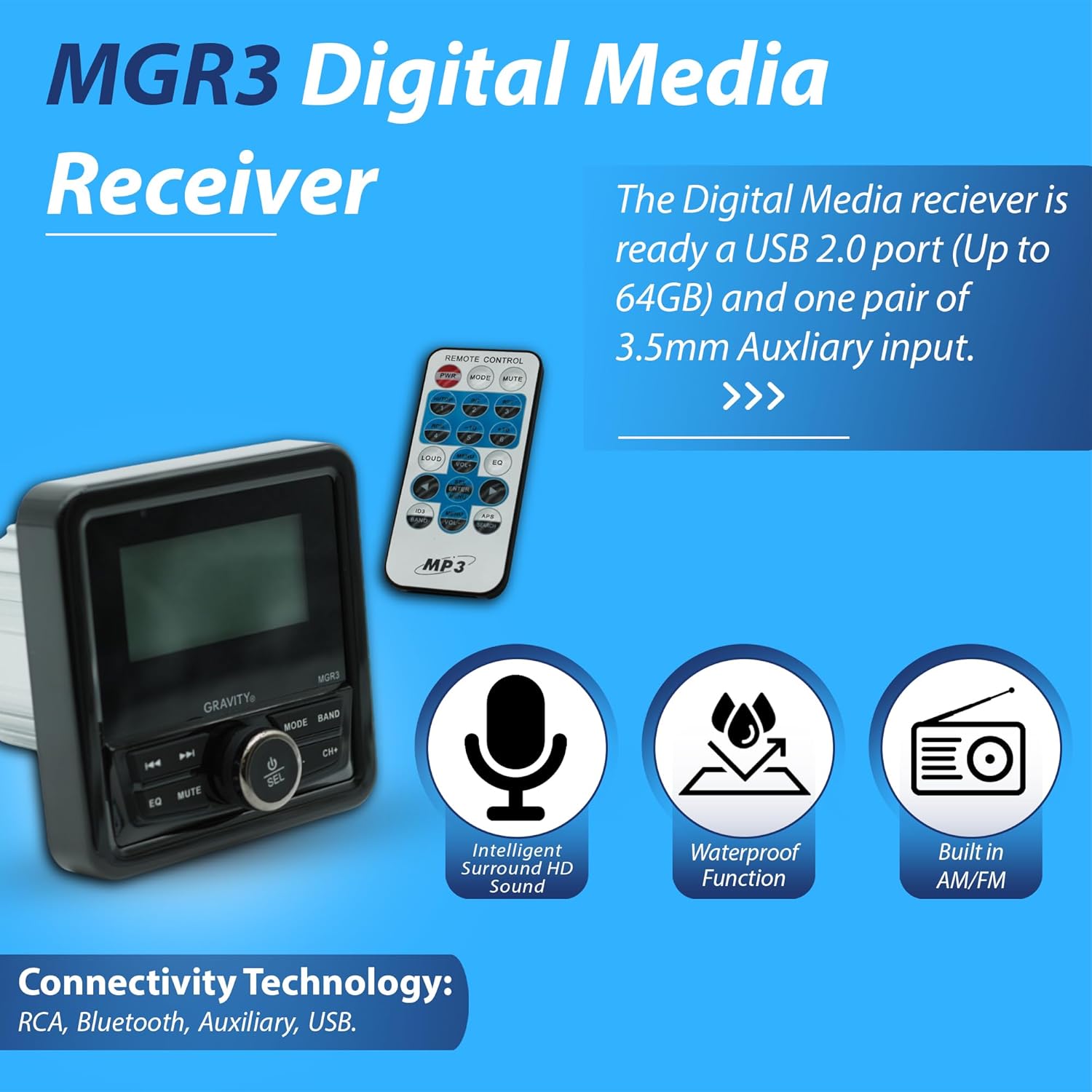
4.1-сүрөт: Фронт view of the Gravity MGR3 Digital Media Receiver and its remote control. This image highlights the unit's display, control buttons, and the included remote.
Негизги өзгөчөлүктөрү:
- Көп режимде ойнотуу: Supports USB, SD card, AUX input, and FM radio for diverse audio sources.
- Bluetooth байланышы: Шайкеш түзмөктөрдөн зымсыз аудио агымын өткөрүүгө мүмкүндүк берет.
- Алыстан башкаруу: Provides convenient control over audio settings from a distance.
- Аба ырайына чыдамдуу дизайн: Built to withstand outdoor conditions, suitable for marine and off-road use. Features IPX5 water resistance and dustproof construction.
- Ыңгайлаштырылган үн: Integrated equalizer with preset sound modes (Rock, Pop, Classical).
- Чыгуу күчү: 50W x 4 Channels (200W total output).
- Анти-шок коргоо: Super electronic anti-shock for consistent playback.
- RCA Audio Signal Output: Тышкы туташтыруу үчүн ampкөтөргүчтөр же сабвуферлер.

4.2-сүрөт: Бүттүview of key features including 200W output, IPX5 water resistance, auxiliary input, anti-shock, and RCA output.

4.3-сүрөт: Visual representation of the MGR3's dustproof and waterproof capabilities, emphasizing its rugged design.
5. Орнотуу жана орнотуу
5.1 Монтаждоо өлчөмдөрү
Before installation, ensure adequate space for the unit. Refer to the dimensions below for proper fitment.

5.1-сүрөт: Physical dimensions of the MGR3 unit. Front panel width is 4.33 inches, mounting depth is 3.92 inches, and height is 2.89 inches.
5.2 Зымдарды туташтыруу
The MGR3 comes with a wiring harness for connection to your vehicle's power, ground, and speakers.
- Кубаттуулук (Кызыл/Сары): Которулган 12V кубат булагына туташтырыңыз (тутандыруу).
- Жер (Кара): Шассинин бекем жерге туташтыруучу чекитине туташтырыңыз.
- Speaker Outputs (Colored Pairs): Connect to your vehicle's speakers. Ensure correct polarity (+/-).
- Антенна: Connect to an external FM antenna.
- RCA чыгаруулары: Тышкы туташуу үчүн amplifiers or a subwoofer.
Note: For detailed wiring diagrams, please refer to the separate installation guide or consult a professional installer. Incorrect wiring can cause damage to the unit or vehicle.
6. Иштөө нускамалары
6.1 Алдыңкы панелдин башкаруу элементтери
The MGR3 features intuitive front panel controls for basic functions.
- Күйгүзүү/Сел баскычы: Press to turn on/off. Rotate to adjust volume. Press to select menu options.
- MODE баскычы: Cycles through available audio sources (FM, USB, SD, AUX, Bluetooth).
- БАНД баскычы: In FM mode, cycles through radio bands (FM1, FM2, FM3).
- EQ баскычы: Accesses equalizer settings.
- MUTE баскычы: Аудионун үнүн басуу/ачуу.
- CH-/CH+ Buttons: Changes radio stations, tracks, or navigates menus.
- Мурунку/Кийинки трек баскычтары: Skips to previous/next track in media playback.
6.2 Алыстан башкаруу функциялары
The included remote control provides full access to all functions.

6.1-сүрөт: Detailed layout of the remote control buttons and their functions.
- Power on/off control (PWR)
- Mode selector (MOD)
- Mute control (MUTE)
- Pause button (Play/Pause)
- Intro play button (INT)
- Track repeat button (RPT)
- Random play button (ROM)
- Track down button (Previous Track)
- Track up button (Next Track)
- Loud control (LOUD)
- EQ button (EQ)
- Scan control (APS)
- Audio control/function selector (MENU/VOL+/-)
- Volume (VOL+/-)
- Band selector (BAND)
- Auto memory control scan & store (APS SEARCH)
6.3 Bluetooth операциясы
- Жупташтыруу:
- Turn on the MGR3 and select Bluetooth mode using the MODE button.
- On your Bluetooth-enabled device, search for available devices.
- Select "MGR3" from the list to pair. A confirmation tone will sound upon successful pairing.
- Аудио агымы: Once paired, you can stream audio from your device to the MGR3. Use the MGR3's controls or your device to play, pause, and skip tracks.
6.4 USB/SD картаны ойнотуу
- Insert a USB drive or SD card into the designated slot.
- The unit will automatically switch to USB/SD mode and begin playback. If not, press the MODE button to select.
- Use the track buttons to navigate through files.
6.5 AUX киргизүү
- Connect an external audio device (e.g., MP3 player) to the 3.5mm AUX input jack.
- Press the MODE button to select AUX input.
- Туташкан тышкы түзмөктөн ойнотууну башкарыңыз.
6.6 FM радиосу
- Press the MODE button to select FM radio.
- Use the CH-/CH+ buttons to manually tune to stations.
- Press and hold CH-/CH+ for automatic station seeking.
- Press the BAND button to switch between FM1, FM2, and FM3 bands.
- To save a station, tune to the desired frequency, then press and hold one of the numbered preset buttons on the remote (1-6) until you hear a confirmation beep.
6.7 Эквалайзердин жөндөөлөрү
Press the EQ button on the front panel or remote to cycle through preset equalizer modes such as Rock, Pop, Classical, and Flat.
7. Техникалык тейлөө
- Тазалоо: Use a soft, dry cloth to clean the unit's surface. For stubborn dirt, a slightly damp кездемени, андан кийин кургак чүпүрөктү колдонсо болот. Абразивдүү тазалоочу каражаттарды же эриткичтерди колдонбоңуз.
- Суу таасири: While the unit is weatherproof (IPX5), avoid direct high-pressure water jets. Ensure all covers for USB/SD slots are securely closed when not in use, especially in wet conditions.
- Байланыштары: Бардык зымдардын туташууларынын дат баскандыгын же бошоп калгандыгын мезгил-мезгили менен текшерип туруңуз, айрыкча деңиз чөйрөсүндө.
8. Кыйынчылыктарды
| Көйгөй | Мүмкүн себеп | Чечим |
|---|---|---|
| Күч жок | күйгөн сактагыч; туура эмес зымдар; бош электр байланышы. | Check and replace fuse; verify wiring connections; ensure power cable is securely connected. |
| Үн жок | Volume too low; Mute activated; incorrect input source; speaker wiring issue. | Increase volume; deactivate Mute; select correct input source; check speaker connections. |
| Bluetooth туташпай жатат | Device not in pairing mode; MGR3 not in Bluetooth mode; device too far. | Ensure both devices are in pairing mode; select Bluetooth mode on MGR3; move device closer. |
| USB/SD карта ойнотулбай жатат | Колдоого алынбайт file форматтоо; бузулган files; карта/диск туура эмес салынган. | камсыз кылуу files are in supported format (e.g., MP3); reformat card/drive; reinsert card/drive firmly. |
| FM кабыл алуу начар | Антенна туташкан эмес; начар сигнал; кийлигишүү. | Check antenna connection; try repositioning antenna; move away from sources of interference. |
9. Техникалык шарттар
| Модель номери | MGR3 |
| Бренд | Гравитация |
| Чыгуу күчү | 200 Watts (50W x 4 Channels) |
| Байланыш технологиясы | Bluetooth, USB, SD, AUX, FM |
| Controller Type | Кол менен башкаруу (аралыктан) |
| Өзгөчө өзгөчөлүк | Built-In Bluetooth, Weatherproof (IPX5), Dustproof, Electronic Anti-Shock |
| Аудио чыгаруу режими | Стерео |
| Элемент Салмагы | 1.2 фунт |
| Пакеттин өлчөмдөрү | 6 x 6 x 6 дюйм |
10. Кепилдик жана колдоо
Gravity products are designed and manufactured to the highest quality standards. For warranty information and customer support, please refer to the warranty card included with your product or visit the official Gravity webсайт.
When contacting support, please have your model number (MGR3) and purchase date available.