
1. Introduction and Overview
The Jesverty SPS-6015H is a high-performance, variable DC regulated bench power supply designed for a wide range of applications. It features an encoder knob for precise voltage and current adjustments, an output ON/OFF switch for convenience, and a 4-digit LED display for clear readings. Built-in Over-Voltage Protection (OVP) and Over-Current Protection (OCP) ensure safe operation for both the device and connected loads. Its compact and lightweight design makes it suitable for laboratories, educational sites, factory testing, maintenance, battery charging, anodizing, and DIY electronic projects.

Сүрөт 1.1: Алдыңкы view of the Jesverty SPS-6015H DC Power Supply.

Figure 1.2: The Jesverty SPS-6015H is suitable for various applications including DIY, school, electronic laboratories, and auto repair shops.
2. Коопсуздук нускамалары
To ensure safe operation and prolong the lifespan of your device, please adhere to the following safety guidelines:
- Ар дайым кубат булагын жерге туташтырылган розеткага туташтырыңыз.
- Аппаратты нымдуу жерде иштетпеңиз же damp шарттар.
- Ensure proper ventilation to prevent overheating. Do not block the cooling fan or vents.
- Avoid short-circuiting the output terminals when the output is active.
- Агрегатты ажыратууга же өзгөртүүгө аракет кылбаңыз. Бардык тейлөөлөрдү квалификациялуу кызматкерлерге тапшырыңыз.
- Киргизилген томду текшериңизtage requirements match your local power supply before connecting.
- Always turn off the output before connecting or disconnecting loads.
3. Продукциянын өзгөчөлүктөрү
- Encoder Adjustment Knob: Upgraded from traditional potentiometers, offering more convenient and precise setting of voltage and current with 0.01V/0.01A resolution.
- Чыгарууну күйгүзүү/өчүрүү баскычы: Easily switch the output on or off without disconnecting the load or turning off the main power.
- Комплекстүү коргоо: Includes Over-Voltage Protection (OVP) and Over-Current Protection (OCP) to safeguard connected devices.
- Temperature-Regulated Cooling Fan: Ensures stable operation and prevents overheating.
- Компакт жана жеңил дизайн: Measures approximately 13.2(D) x 8.4(W) x 6.5(H) inches and weighs about 6.6 lbs, saving workbench space.
- 4 орундуу LED дисплей: Provides clear and accurate readings of voltage жана ток.

Figure 3.1: High precision 4-digit LED display for accurate power output.
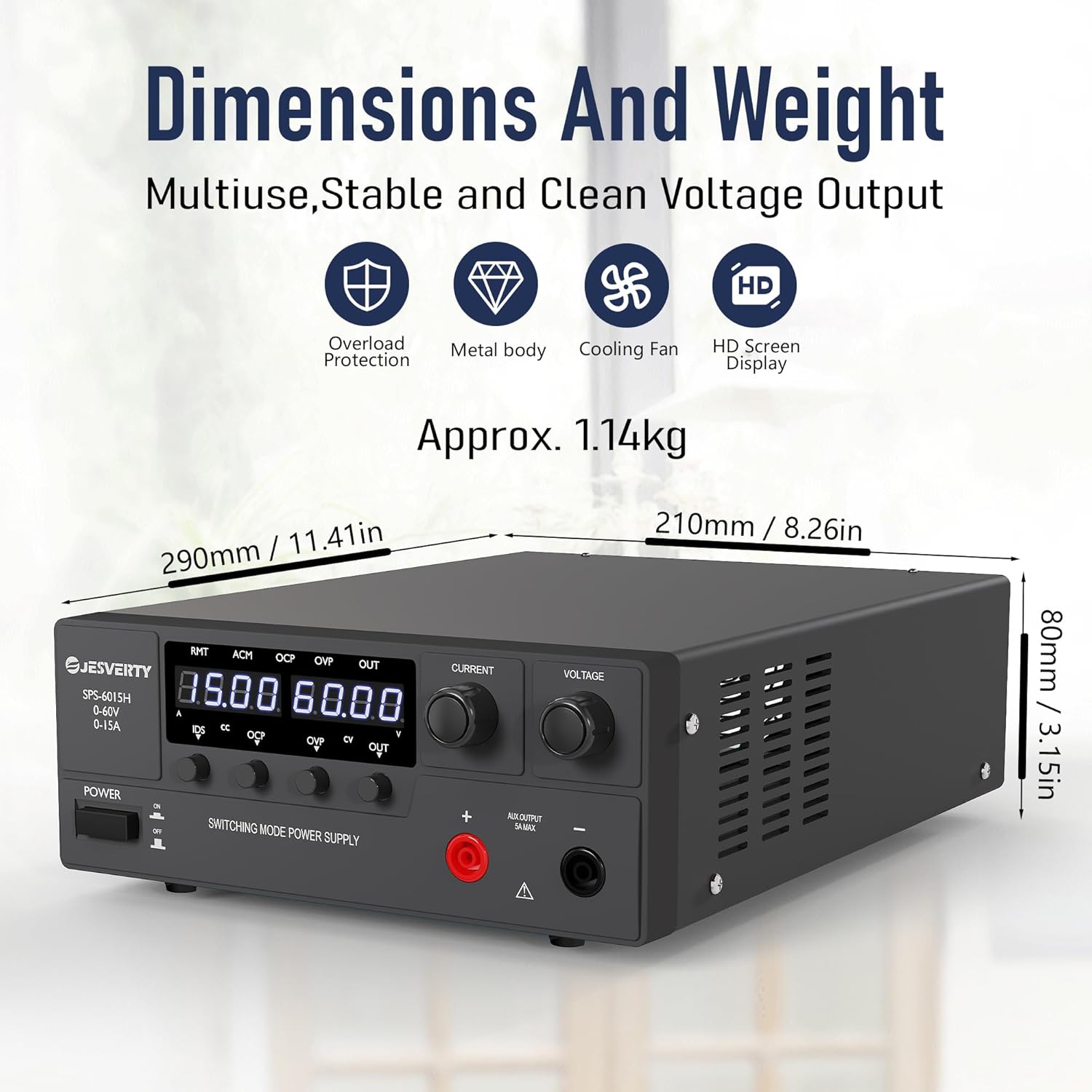
Figure 3.2: Compact dimensions and lightweight design for efficient use of space.
4. Пакеттин мазмуну
Пакетти ачкандан кийин, бардык буюмдар бар экенин жана жакшы абалда экендигин текшериңиз:
- 1 x Jesverty SPS-H/HP Unit (SPS-6015H)
- 1 x Power Cord (AC input settings may vary by region)
- 1 х Инструкция (бул документ)
5. Орнотуу
Follow these steps to set up your Jesverty SPS-6015H DC Power Supply:
- Пакеттен чыгаруу: Кубат менен камсыздоону жана бардык аксессуарларды таңгактан этияттык менен алып салыңыз.
- Жайгашкан жери: Place the unit on a stable, flat surface with adequate ventilation. Ensure there is sufficient space around the unit for air circulation, especially around the rear cooling fan.
- Кубат туташуу: Connect the provided power cord to the AC input terminal on the rear of the power supply and then to a grounded electrical outlet.
- Чыгуу туташуулары: The unit features main output terminals (red for positive, black for negative) on the rear and an auxiliary output terminal (5A max) on the front. Connect your load using appropriate cables to the desired output terminals. Ensure correct polarity.

5.1-сүрөт: Алдыңкы жана арткы панелдерview, showing output connectors and cooling fan.
6. Иштөө нускамалары
This section details the operational procedures for your DC power supply.
Video 6.1: A demonstration video showing the operation of the Jesverty SPS-6015H DC Power Supply, including power on/off, voltage and current adjustment, and OVP/OCP protection settings.
6.1. Күйгүзүү/өчүрүү
- To turn on the power supply, press the КҮЧ button located on the front panel. The LED display will illuminate.
- To turn off the power supply, press the КҮЧ кайра баскычын.
6.2. Томtage жана Учурдагы тууралоо
The SPS-6015H uses encoder knobs for precise adjustments:
- Тtage Тууралоо: айлантыңыз ТОМTAGE knob to adjust the output voltagд. Басыңыз ТОМTAGE knob to select which digit to adjust (e.g., tens, units, tenths, hundredths). Rotate to change the value of the selected digit.
- Учурдагы тууралоо: айлантыңыз УЧУРДА knob to adjust the output current limit. Press the УЧУРДА knob to select which digit to adjust. Rotate to change the value of the selected digit.
6.3. Output ON/OFF Control
- Каалаган томду койгондон кийинtage and current, press the OUT чыгарууну иштетүү үчүн баскычты басыңыз. OUT LED күйөт.
- To disable the output, press the OUT кайра баскычын. The OUT LED will turn off. This allows for safe connection/disconnection of loads without powering down the unit.
6.4. Over-Voltage Коргоо (OVP) Орнотуу
OVP protects your load from excessive voltagд. Качан чыгаруу томtage exceeds the set OVP trip point, the output will be automatically shut off.
- басыңыз OVP button to enter the OVP configuration interface. The OVP LED will flash.
- колдонуу ТОМTAGE knob to set the desired OVP trip point.
- To enable/disable OVP, press and rotate the УЧУРДА knob to toggle between ON and OFF.
- басыңыз OVP button again to exit the OVP configuration and return to the main interface.
6.5. Over-Current Protection (OCP) Setting
OCP protects your load from excessive current. When the output current exceeds the set OCP trip point, the output will be automatically shut off.
- басыңыз OCP button to enter the OCP configuration interface. The OCP LED will flash.
- колдонуу ТОМTAGE knob to set the desired OCP trip point.
- To enable/disable OCP, press and rotate the УЧУРДА knob to toggle between ON and OFF.
- басыңыз OCP button again to exit the OCP configuration and return to the main interface.
6.6. Батареяны кубаттоо функциясы
The Jesverty SPS-6015H can be used for charging various battery types. Always ensure to set the correct voltage and current limits for your specific battery type before connecting.

6.1-сүрөт: Мисample of the power supply connected for battery charging. Always set current and voltagд туура.
7. Техникалык тейлөө
Regular maintenance helps ensure optimal performance and longevity of your power supply:
- Тазалоо: Use a soft, dry cloth to clean the exterior of the unit. Do not use abrasive cleaners or solvents. Ensure the unit is powered off and unplugged before cleaning.
- Вентиляция: Periodically check that the ventilation openings and cooling fan are free from dust and debris. Use compressed air to clear any blockages.
- Сактагыч: Узак мөөнөткө колдонулбаганда, кубат менен камсыздоону салкын, кургак жерде, тике күн нурунан жана өтө температурадан алыс сактаңыз.
8. Кыйынчылыктарды
If you encounter issues with your Jesverty SPS-6015H, refer to the table below for common problems and solutions:
| Көйгөй | Мүмкүн себеп | Чечим |
|---|---|---|
| Кубат жок/дисплей өчүк | Электр шнуру туташтырылган эмес; Кубат өчүргүч өчүрүлгөн; Розеткадан кубат жок. | Электр шнурунун туташуусун текшерүү; кубат которгучу ON экенин текшериңиз; Башка түзмөк менен розетка сынагы. |
| Чыгаруунун көлөмү жокtage/Current | Output switch (OUT) is off; OVP/OCP activated; Load short-circuited or open-circuited. | басыңыз OUT button; Check OVP/OCP settings and reset if necessary; Verify load connection and integrity. |
| Тtage/Current cannot be adjusted | Knob not pressed to select digit; Unit in protection mode. | Press the knob to select the digit for adjustment; Check OVP/OCP status. |
| Бирдик ашыкча ысып жатат | Бөгөттөлгөн желдетүү; Ашыкча жүк. | Ensure clear ventilation paths; Reduce load or operating time. |
If the problem persists after attempting these solutions, please contact Jesverty Customer Service for assistance.
9. Техникалык шарттар
| Параметр | Нарк |
|---|---|
| Модел | SPS-6015H |
| Output Voltage | 0-60V |
| Output Current | 0-15A |
| Чыгуу Wattage | 900 Вт |
| Киргизүү көлөмүtage (AC) | 100-73V (AC) |
| Дисплей | 4 цифралуу LED |
| Тууралоо түрү | Encoder баскычы |
| Коргоо өзгөчөлүктөрү | OVP (Ашыкча томtage Protection), OCP (Over-Current Protection) |
| Муздатуу ыкмасы | Air (with Temperature-Regulated Fan) |
| Элемент Салмагы | 3 килограмм (болжол менен 6.61 фунт) |
| Пакеттин өлчөмдөрү | 15.63 x 10.94 x 5.79 дюйм |
| Келип чыккан өлкө | Кытай |
10. Кепилдик жана Кардарларды колдоо
Jesverty products are designed for reliability and performance. For specific warranty details, please refer to the warranty card included with your product or contact Jesverty Customer Service.
Should you have any problems or questions about your order or the product, please feel free to contact Jesverty Customer Service via Amazon message or email. Our professional technical support team is ready to assist you.
For the latest information and support, visit the official Jesverty Store on Amazon: Jesverty Store