
1. Продукт бүтүп калдыview
The Haylou X1 Plus are True Wireless Stereo (TWS) headphones designed for a superior audio experience. Featuring Bluetooth 5.4 for stable connectivity and Environmental Noise Cancellation (ENC) for clear calls, these headphones offer convenience and quality sound. This manual provides essential information for setup, operation, and maintenance.
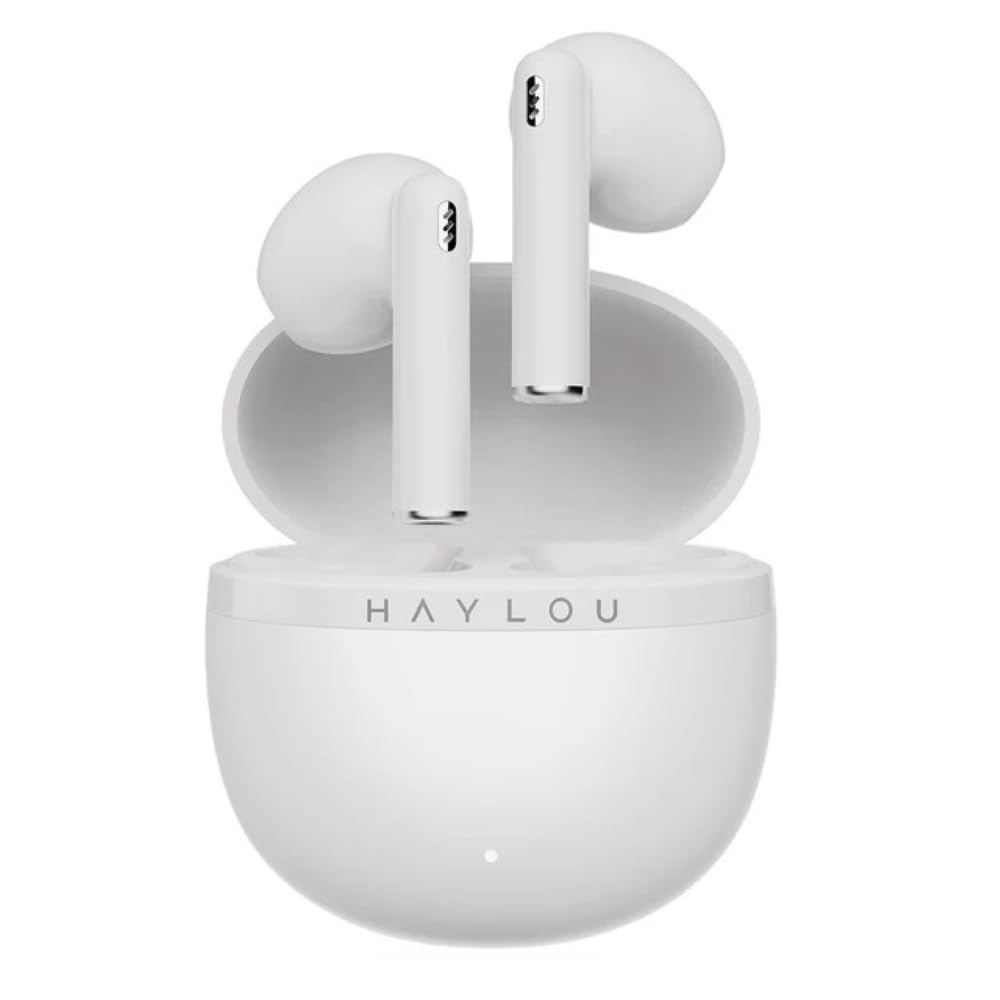
Image: The Haylou X1 Plus TWS earbuds shown in their charging case.
2. Кутуда эмне бар
Upon opening your Haylou X1 Plus package, please verify that all components are present:
- Haylou X1 Plus Earbuds
- Заряддоо кутусу
- USB заряддоо кабели
- Кулак жаздыктары (ар кандай өлчөмдөгү)
- Колдонуучунун Колдонмосу (бул документ)

Image: Haylou X1 Plus earbuds and their charging case, typically found within the product packaging.
3. Орнотуу
3.1 Кулакчындарды жана кутучаны заряддоо
- Кулакчындарды заряддоо кутусуна салыңыз, алар туура орнотулганын текшериңиз.
- Connect the USB charging cable to the charging port on the case and a power source (e.g., USB adapter, computer USB port).
- The indicator light on the charging case will show the charging status. A full charge is indicated when the light changes or turns off (refer to specific LED behavior in the quick start guide if available).
3.2 Түзмөк менен жупташтыруу
- Кулакчындар толук заряддалганын текшериңиз.
- Open the charging case. The earbuds will automatically enter pairing mode, indicated by a flashing light on one or both earbuds.
- Түзмөгүңүздө (смартфон, планшет, компьютер) Bluetooth иштетиңиз.
- Издөө available Bluetooth devices and select "Haylou X1 Plus" from the list.
- Туташкандан кийин үн билдирүүсү ийгиликтүү жупташтырууну ырастайт.

Image: The Haylou X1 Plus earbuds resting in their open charging case, ready for pairing or charging.
4. Иштөө нускамалары
4.1 Күйгүзүү/өчүрүү
- Күйгүзүү: Open the charging case, and the earbuds will automatically power on. Alternatively, press and hold the touch panel on both earbuds for approximately 1.5 seconds.
- Өчүрүү: Place the earbuds back into the charging case and close the lid. They will automatically power off and begin charging. Alternatively, disconnect from Bluetooth and they will power off after a few minutes, or press and hold the touch panel for approximately 4.5 seconds.
4.2 Music Control (Touch Control)
- Ойнотуу/тындыруу: Tap the touch panel on either earbud once.
- Кийинки трек: Double-tap the touch panel on the right earbud.
- Мурунку трек: Double-tap the touch panel on the left earbud.
4.3 Call Control (Touch Control)
- Чалууга жооп берүү/аяктоо: Tap the touch panel on either earbud once.
- Чакырууну четке кагуу: Press and hold the touch panel on either earbud for approximately 1.5 seconds.
4.4 Үн жардамчысы
- Үн Жардамчысын жандыруу: Triple-tap the touch panel on the left earbud.
4.5 Экологиялык чууну жокко чыгаруу (ENC)
The Haylou X1 Plus features ENC technology to reduce ambient noise during calls, ensuring clearer communication. This feature is automatically active during phone calls.

Image: A person wearing the Haylou X1 Plus earbuds, demonstrating typical usage.
5. Техникалык тейлөө
Proper maintenance ensures the longevity and optimal performance of your Haylou X1 Plus headphones.
- Тазалоо: Regularly clean the earbuds and charging case with a soft, dry, lint-free cloth. Avoid using abrasive materials, solvents, or harsh chemicals.
- Кулак жаздыктары: Remove and clean ear cushions periodically. Ensure they are completely dry before reattaching.
- Сактагыч: Колдонулбаганда, кулакчындарды коргоо жана кубаттоо үчүн кубаттоочу кутучага сактаңыз. Салкын, кургак жерде, экстремалдык температурадан алыс сактаңыз.
- Батареяга кам көрүү: Avoid fully discharging the battery frequently. Charge the earbuds and case regularly, even if not in constant use, to maintain battery health.
- Суу таасири: The earbuds are not waterproof. Avoid exposure to water, sweat, or moisture.
6. Кыйынчылыктарды
If you encounter issues with your Haylou X1 Plus headphones, try the following solutions:
- Кулакчындар жупташкан жок:
- Эки кулакчындын тең кубатталганын текшериңиз.
- Кулакчындарды кайра кутуга салып, капкагын жаап, жупташтыруу режимине кайра кирүү үчүн кайра ачыңыз.
- Delete "Haylou X1 Plus" from your device's Bluetooth list and attempt to pair again.
- Бир кулакчындан үн чыкпайт:
- Эки кулакчындын тең кубатталганын текшериңиз.
- Кулакчындарды баштапкы абалга келтирип көрүңүз (төмөндө караңыз).
- Заряддоо маселелери:
- Заряддоо кабелин жана кубат адаптерин текшериңиз.
- Кулакчындардын жана кутучанын кубаттоочу контакттары таза жана таштандылардан таза экенин текшериңиз.
- Кулакчындарды баштапкы абалга келтирүү:
- Кулакчындардын экөөнү тең зарядкага салыңыз.
- Press and hold the function button on the charging case (if available, otherwise refer to specific model instructions) for approximately 10-15 seconds until the indicator light flashes. This usually clears pairing records.
- Remove earbuds and attempt to pair again.
7. Техникалык шарттар
Key technical specifications for the Haylou X1 Plus TWS Bluetooth 5.4 ENC Wireless Headphones:
| Өзгөчөлүк | Спецификация |
|---|---|
| Бренд | HAYLOU |
| Модель аты | Haylou X1 Plus |
| Модель номери | Haylou X1 PLus T013 |
| Байланыш технологиясы | Зымсыз (Bluetooth 5.4) |
| Форма фактору | Чыныгы зымсыз |
| Түс | Ак |
| Продукт өзгөчөлүктөрү | Microphone Included, Rechargeable Battery, Touch Control, ENC Noise Cancellation |
| Элемент Салмагы | 95 Grams (approximate, including case) |
| кутучанын мазмуну | Кабель, кулак жаздыкчалары, колдонуучу колдонмосу |
8. Кепилдик жана колдоо
The Haylou X1 Plus headphones come with a Haylou Turkey Guarantee, ensuring product quality and support. For warranty claims or technical assistance, please retain your proof of purchase and contact the authorized Haylou service center or your retailer.
For further support, please refer to the official Haylou webсайтка же кардарларды тейлөө каналдарына кайрылыңыз.