
1. Киришүү
This manual provides comprehensive instructions for the TIDRADIO TD-M11 Waterproof Two-Way Radio. Please read this manual thoroughly before operating the device to ensure safe and efficient use. The TD-M11 is designed for reliable communication in various environments, featuring a durable, waterproof design and advanced functionalities.
2. Кутуда эмне бар
Таңгактан чыгаргандан кийин, төмөндө көрсөтүлгөн нерселердин бардыгы бар экенин жана жакшы абалда экендигин текшериңиз:
- 10 x Walkie Talkies TD-M11
- 10 х Батарея
- 10 x Walkie Talkies Earpiece
- 10 x Belt Clip
- 10 x USB Charging Cable & Adapter
- 10 x Кол боо
- 5 x Кол
3. Продукт бүтүп калдыview
The TIDRADIO TD-M11 is a compact and robust two-way radio designed for clear and reliable communication. It features 22 channels and 2W output power, making it suitable for various applications from team work to outdoor activities. Its IP67 waterproof rating ensures durability in challenging conditions.

Сүрөт 1: Алдыңкы view of the TIDRADIO TD-M11 Two-Way Radio.
Негизги өзгөчөлүктөрү:
- IP67 Суу өткөрбөй тургандай иштөөсү: Ар кандай аба ырайынын шарттарына туруштук берүү үчүн иштелип чыккан.
- Bluetooth байланышы: For APP programming via Odmaster.
- LED дисплей: Hidden LED lighting for clear status display and NOAA weather forecast.
- Built-in VOX: Hands-free operation for enhanced convenience.
- Type-C заряддоо: Convenient USB charging for the 1000 mAh Li-ion battery.
- Busy Channel Lockout (BLCO): Prevents transmission on occupied channels.

Figure 2: The TD-M11 radio is suitable for outdoor activities.

Figure 3: Physical dimensions of the TD-M11 radio.

Figure 4: The TD-M11 radio features long battery life.
4. Орнотуу
4.1 Батареяны заряддоо
The TD-M11 is equipped with a 1000 mAh Li-ion battery and supports Type-C USB charging. Connect the provided USB charging cable and adapter to the radio's Type-C port. The LED indicator will show charging status. Ensure the radio is fully charged before first use for optimal battery life.
4.2 Аксессуарларды тиркөө
- Кур клип: Attach the belt clip to the back of the radio for convenient carrying.
- Кулакчын: Connect the earpiece to the radio's audio jack for private listening and hands-free communication.
- Кол боо: Secure the hand strap to the designated loop on the radio to prevent accidental drops.
4.3 Баштапкы күйгүзүү
To power on the radio, rotate the volume knob clockwise until you hear a click. The LED display will illuminate, indicating the current channel and battery level. Adjust the volume to a comfortable level.
5. Иштөө нускамалары
5.1 Негизги байланыш
To transmit, press and hold the Push-To-Talk (PTT) button located on the side of the radio. Speak clearly into the microphone. Release the PTT button to receive. Ensure all radios are set to the same channel for communication.
5.2 Канал тандоо
Use the CH+ and CH- buttons on the side of the radio to cycle through the available 22 channels. The selected channel number will be displayed on the LED screen.
5.3 VOX функциясы (Үн менен башкарылуучу алмашуу)
The built-in VOX function allows for hands-free transmission. When activated, the radio will automatically transmit when it detects your voice, eliminating the need to press the PTT button. Refer to the Odmaster App for VOX level adjustment.
5.4 NOAA Weather Receiver
The TD-M11 includes a NOAA Weather Receiver function, allowing you to receive weather forecasts and alerts. This feature is displayed on the hidden LED screen, providing critical information for outdoor safety.
5.5 Bluetooth Programming with Odmaster App
The TD-M11 can be programmed wirelessly using the Odmaster App on your mobile phone. This allows you to read and write frequencies, adjust settings, and search for nearby repeaters for extended range communication. Note: Bluetooth is for programming only, not for other accessories.

Figure 5: Visual guide for programming the TD-M11 via the Odmaster App.
Video 1: Demonstration of programming the TIDRADIO TD-M11 using the Odmaster App.
6. Техникалык тейлөө
6.1 Тазалоо
Regularly clean the radio's exterior with a soft, damp cloth. Avoid using harsh chemicals or abrasive cleaners. Ensure the Type-C charging port cover is securely closed to maintain its waterproof integrity.
6.2 Батареяга кам көрүү
To prolong battery life, avoid overcharging or completely draining the battery. Store the radio in a cool, dry place when not in use. If the radio falls into water, shake or wipe off the water before using it again.

Figure 6: The TD-M11 radio is IP67 waterproof.
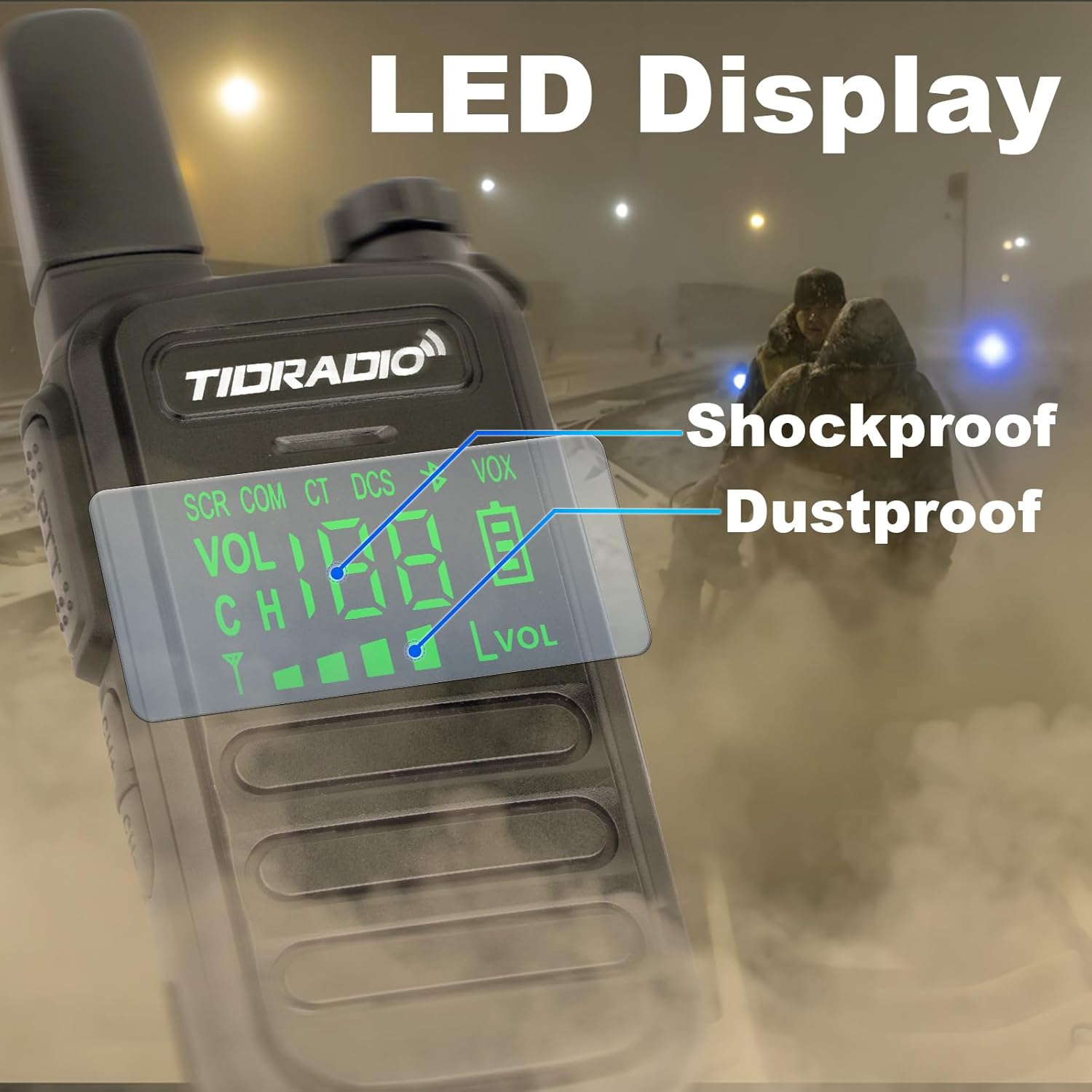
Figure 7: The LED display is protected by shockproof and dustproof design.
7. Кыйынчылыктарды
If you encounter issues with your TD-M11 radio, please refer to the following common problems and solutions:
| Көйгөй | Мүмкүн себеп | Чечим |
|---|---|---|
| Күч жок | Батарея аз же түгөнүп калган. | Батарейканы толугу менен кубаттаңыз. |
| Өткөрүп же кабыл албайт | Radios are on different channels. | Ensure both radios are set to the same channel. |
| Аудио сапаты начар | Obstructions or distance between radios. | Move to an open area or closer to the other radio. |
| Bluetooth programming fails | Bluetooth not enabled on radio or phone, or incorrect model selected in app. | Long press CH+ button to enable Bluetooth. Ensure correct model (TD-M11) is selected in the Odmaster App. |
8. Техникалык шарттар
Detailed technical specifications for the TIDRADIO TD-M11:
| Өзгөчөлүк | Спецификация |
|---|---|
| Бренд | TIDRADIO |
| Модель номери | TD-M11 |
| Түс | Кара |
| Каналдардын саны | 22 |
| Жыштык диапазону | 400-470 МГц |
| Сүйлөшүү диапазону максималдуу | 5 километр |
| Тtage | 3.6 вольт |
| Сууга туруктуулук деңгээли | Суу өткөрбөйт (IP67) |
| Батарея түрү | 1000 mAh Li-ion Battery (included) |
| Батареянын орточо иштөө мөөнөтү | 35 саат |
| Connectivity Protocol | Bluetooth |
| Өзгөчөлүктөр | LED Display, NOAA Weather Radio, USB-C Charging, Wireless Programming, Shockproof and Drop-proof |
| Шайкеш түзмөктөр | Mobile phones, Repeaters, External microphones/headsets |
9. Коопсуздук маалыматы
Please observe the following safety precautions to prevent injury or damage to your radio:
- Радиону жарылуучу чөйрөдө (мисалы, күйүүчү газдар, чаң бөлүкчөлөрү, металл порошоктору) иштетпеңиз.
- Радиону бөлүктөргө бөлбөңүз же өзгөртпөңүз. Оңдоо иштерин ыйгарым укуктуу кызматкерлер гана жүргүзүшү керек.
- Радиону күчтүү магниттик талаалардан алыс кармаңыз.
- Use only TIDRADIO approved batteries and chargers.
- Тике күн нурунун же экстремалдык температуранын узакка созулган таасиринен алыс болуңуз.
10. Кепилдик жана колдоо
For warranty information or technical support, please refer to the documentation included with your purchase or contact TIDRADIO customer service directly. Keep your purchase receipt as proof of purchase for warranty claims.