
1. Киришүү
This manual provides detailed instructions for the safe and effective operation, maintenance, and troubleshooting of your Uharbour Digital Torque Wrench 1/2 Drive, model UHXM012. Please read this manual thoroughly before using the product to ensure proper function and to prevent damage or injury.
2. Коопсуздук маалыматы
WARNING: Failure to follow these safety instructions may result in injury or damage to the tool or workpiece.
- Always wear appropriate personal protective equipment, such as safety glasses, when using this tool.
- Моментти колдонуудан мурун, жумуш бөлүгүнүн бекем бекитилгенин текшериңиз.
- Do not exceed the maximum torque capacity of 147.5 ft-lbs (200 Nm).
- Момент ачкычын ажыратуучу тилке катары колдонбоңуз.
- Keep the tool clean and dry. Store it in its protective case when not in use.
- Do not attempt to disassemble or modify the torque wrench. Refer all servicing to qualified personnel.
- Балдар жетпеген жерде сактаңыз.
3. Пакеттин мазмуну
Төмөндө тизмеленген нерселердин баары пакетиңизге камтылганын текшериңиз:
- Uharbour Digital Torque Wrench (1/2" Drive)
- Калибрлөө сертификаты
- Көрсөтмө (бул документ)
- Сактоочу куту
- Alkaline Batteries (pre-installed or included separately)
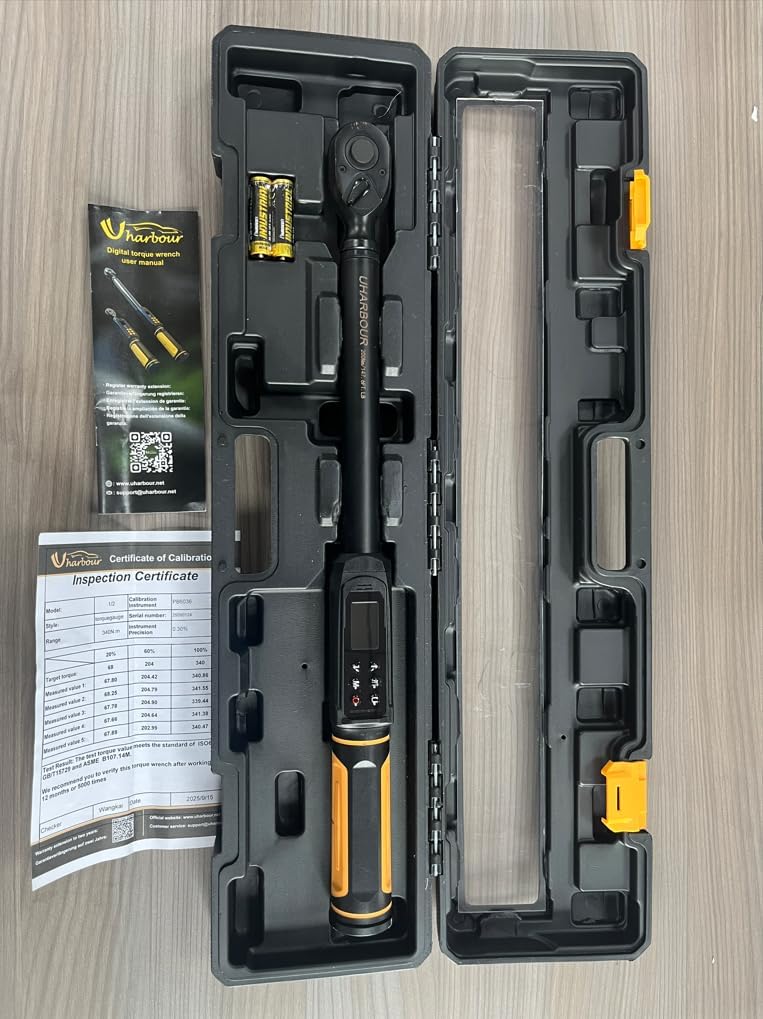
Figure 3.1: The Uharbour Digital Torque Wrench and its included accessories, neatly organized within its durable storage case.
4. Продукт бүтүп калдыview
The Uharbour Digital Torque Wrench is designed for precise torque applications across various tasks, including automotive, motorcycle, and bicycle maintenance. It features a durable construction and an intuitive digital interface.
Негизги өзгөчөлүктөрү:
- Wide Torque Range: 2.2-147.5 ft-lbs (3-200 Nm).
- Жогорку тактык: ±2% for reliable measurements.
- Peak & Track Modes: For target setting and real-time monitoring.
- Эскертүүлөр: Vibration, buzzer, and LED indicators for target torque.
- Dual-Direction Ratchet: Supports both clockwise and counterclockwise operations.
- Бир нече өлчөө бирдиктери: N-m, kgf-cm, lb-ft, and lb-in.
- Жогорку сапаттагы LED экран: For clear and easy-to-read measurements.

Figure 4.1: The digital display of the torque wrench, showing current torque value, selected units (N.m, lb.ft, lb.in, kg.cm), and mode indicators (P for Peak, T for Track).
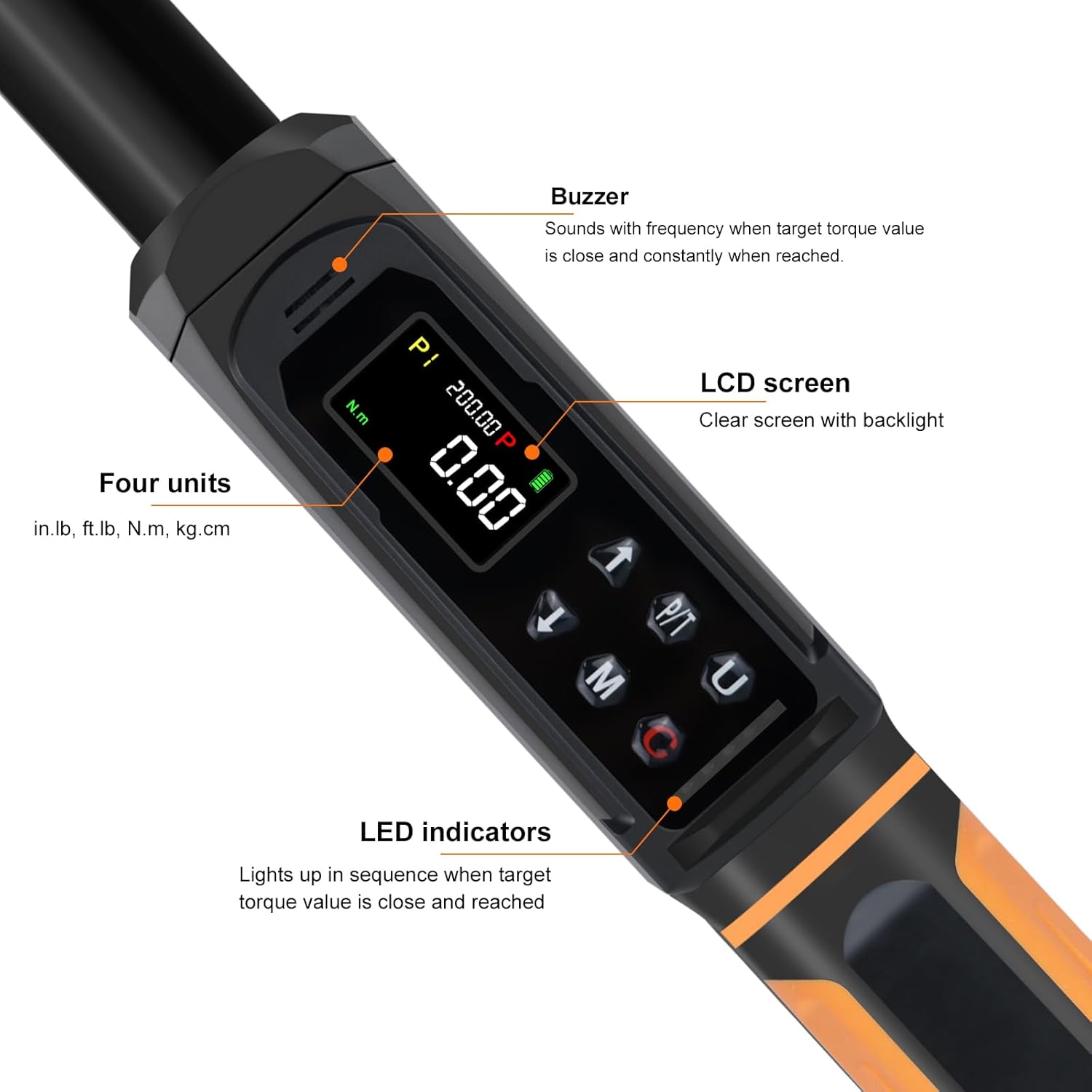
4.2-сүрөт: деталдуу view of the wrench's control panel, highlighting the LCD screen, buzzer, LED indicators, and buttons for unit selection (U), mode (M), and power/clear (C).
5. Орнотуу
5.1 Батареяны орнотуу
The Uharbour Digital Torque Wrench requires alkaline batteries for operation. Ensure batteries are installed correctly before first use.
- Батарея бөлүмүнүн капкагын, адатта, тутканын түбүнөн табыңыз.
- Open the cover and insert the required alkaline batteries, observing the correct polarity (+/-) as indicated inside the compartment.
- Батарея бөлүгүнүн капкагын бекем жабыңыз.
Эскертүү: If the wrench will not be used for an extended period, remove the batteries to prevent leakage and damage.
6. Иштөө нускамалары
6.1 Күйгүзүү/өчүрүү
- Күйгүзүү үчүн, басыңыз Power/Clear (C) баскычы.
- The wrench will automatically power off after a period of inactivity to conserve battery life.
6.2 Өлчөө бирдиктерин тандоо
The wrench supports four measurement units: N-m, kgf-cm, lb-ft, and lb-in.
- басыңыз Unit (U) button to cycle through the available units until your desired unit is displayed.
6.3 Иштөө режимдери
The Uharbour Digital Torque Wrench features two primary operating modes: Peak mode and Track mode.

Figure 6.1: Visual representation of the three reading modes: Track mode for real-time display, Peak mode for maximum torque applied, and Torque Memory for historical data.
6.3.1 Track Mode (T)
- In Track mode, the display shows the real-time torque value being applied.
- To select Track mode, press the Режим (M) button until 'T' is displayed on the screen.
- This mode is useful for continuous monitoring of torque during tightening.
6.3.2 Peak Mode (P)
- In Peak mode, the wrench records and displays the maximum torque value applied during a tightening operation.
- To select Peak mode, press the Режим (M) button until 'P' is displayed on the screen.
- Максаттуу момент маанисин орнотуу үчүн:
- While in Peak mode, press the Режим (M) button again to enter target setting.
- колдонуу Up (↑) жана Down (↓) максаттуу момент маанисин тууралоо үчүн баскычтар.
- басыңыз Режим (M) орнотууну ырастоо үчүн баскычты басыңыз.
- When the applied torque approaches the target value, the wrench will provide alerts via vibration, a buzzer, and LED indicators.
6.4 Dual-Direction Ratchet
The 1/2" drive reversible ratchet head allows for both clockwise (CW) and counterclockwise (CCW) operation. To change direction, simply flip the lever on the ratchet head.

Figure 6.2: The torque wrench being used to tighten a lug nut, illustrating the dual-direction ratchet mechanism and the quick-release button for sockets.
6.5 Ыкчам чыгаруу баскычы
The quick release button on the ratchet head allows for easy and secure attachment and detachment of sockets.
7. Техникалык тейлөө
- Тазалоо: Ар бир колдонгондон кийин ачкычты таза, кургак чүпүрөк менен сүртүңүз. Абразивдүү тазалоочу каражаттарды же эриткичтерди колдонбоңуз.
- Сактагыч: Store the torque wrench in its protective case in a dry, cool place, away from direct sunlight and extreme temperatures.
- Батареяны алмаштыруу: Replace batteries when the low battery indicator appears on the display. Dispose of used batteries responsibly.
- Калибрлөө: Digital torque wrenches require periodic calibration to maintain accuracy. Refer to the included Certificate of Calibration for details.
8. Кыйынчылыктарды
| Көйгөй | Мүмкүн себеп | Чечим |
|---|---|---|
| Ачкыч күйбөйт. | Өлүк же туура эмес орнотулган батарейкалар. | Check battery polarity. Replace batteries with new alkaline batteries. |
| Туура эмес окуулар. | Wrench needs calibration; improper usage. | Ensure proper technique. Refer to calibration certificate for recommended service intervals. |
| Дисплей күңүрт же бүлбүлдөп турат. | Батареянын кубаттуулугу төмөн. | Батареяларды алмаштырыңыз. |
| No alert (vibration, buzzer, LED) at target torque. | Wrench not in Peak mode; alert settings off. | Ensure wrench is in Peak mode and target torque is set. Check if alert functions are enabled (if applicable). |
9. Техникалык шарттар
| Өзгөчөлүк | Деталь |
|---|---|
| Модель номери | UHXM012 |
| Drive Size | 1/2 дюйм |
| Момент диапазону | 2.2-147.5 фут-лб (3-200 Нм) |
| Тактык | ±2% |
| Өлчөө бирдиктери | Nm, kgf-cm, lb-ft, lb-in |
| Иштөө режимдери | Чоку, Трек |
| Alerts | Vibration, Buzzer, LED |
| Ratchet Direction | Саат жебеси боюнча жана ага каршы |
| Материал | Alloy Aluminum, Chrome Vanadium Steel, Plastic, Rubber |
| Power Source | Alkaline Батареялар |
| Элемент Салмагы | 2.38 кг (болжол менен) |
| Пакеттин өлчөмдөрү | 59.18 x 15.75 x 7.37 см (болжол менен) |
10. Кепилдик жана колдоо
Your Uharbour Digital Torque Wrench comes with a Certificate of Calibration, ensuring its accuracy at the time of manufacture. For warranty information and support, please refer to the details provided on your Certificate of Calibration or contact Uharbour customer service.
- Кепилдиктин узартылышы: The product may be eligible for a warranty extension to two years. Please check the calibration certificate for registration details.
- Кардарларды колдоо: For technical assistance or service inquiries, please contact customer.service.support@uharbour.net.

Figure 10.1: The Uharbour Digital Torque Wrench alongside its Inspection Certificate, which includes calibration data and warranty information.