
Introduction
Thank you for choosing the Vieta Pro Silence 3 Bluetooth 5.4 Active Noise Cancelling Headphones. These headphones are designed to provide a superior audio experience with advanced features for comfort and convenience. Please read this manual carefully before using your headphones to ensure proper operation and to maximize their lifespan.
Пакеттин мазмуну
- Vieta Pro Silence 3 Headphones
- USB-C заряддоо кабели
- 3.5 мм аудио кабель
- User Manual
Продукт бүттүview
Familiarize yourself with the various parts and controls of your Vieta Pro Silence 3 headphones.
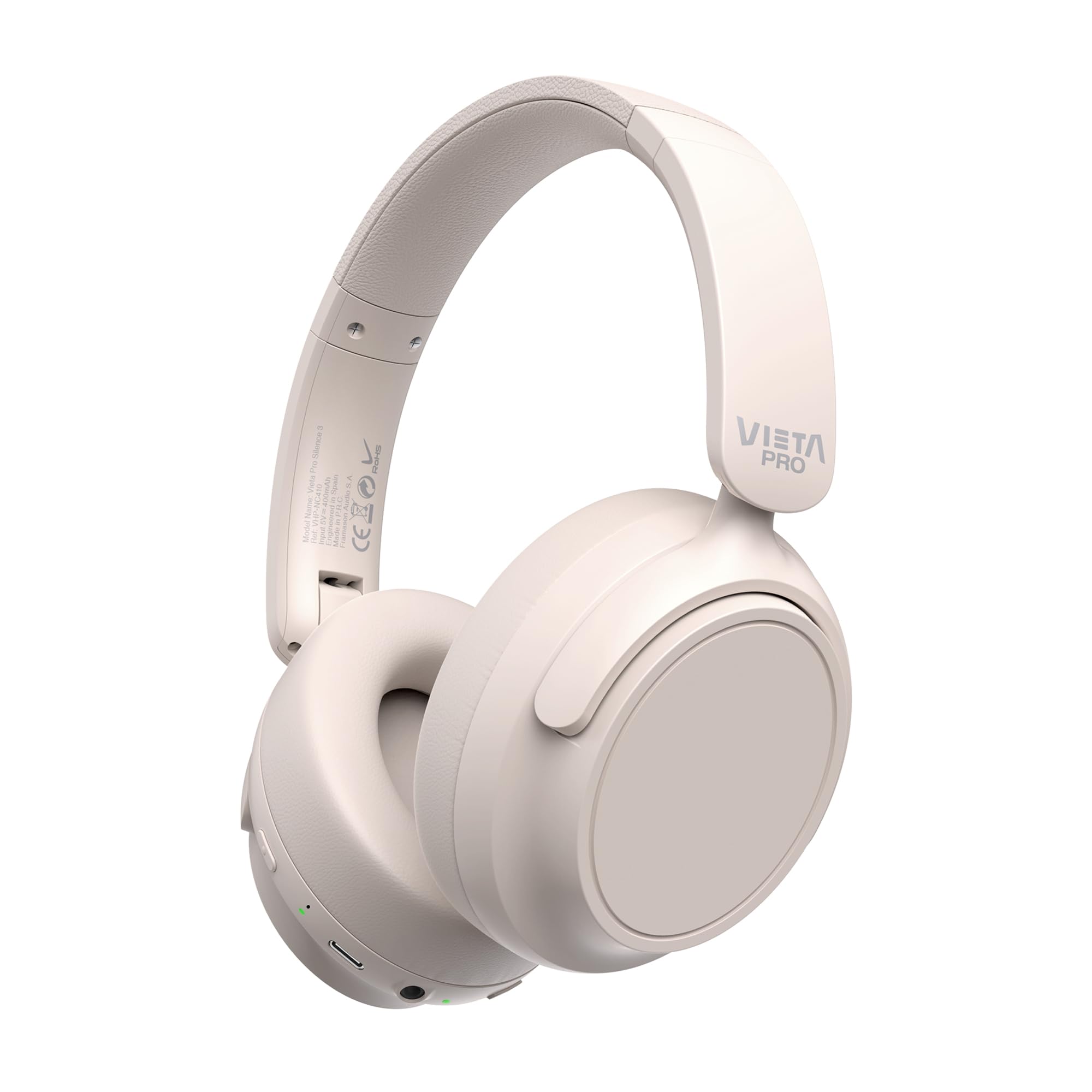
Сүрөт: алдыңкы view of the Vieta Pro Silence 3 headphones, showcasinалардын жалпы дизайны.

Сүрөт: каптал view of the Vieta Pro Silence 3 headphones, highlighting the earcups and adjustable headband.

Image: Close-up of a Vieta Pro Silence 3 earcup, illustrating the control buttons, charging port, and 3.5mm audio jack.
The headphones feature a foldable design for easy portability.

Image: Vieta Pro Silence 3 headphones in their folded state, demonstrating their compact design for travel and storage.
Жайгашуу
1. Наушниктерди заряддоо
Before first use, fully charge your headphones. Connect the supplied USB-C cable to the charging port on the headphones and the other end to a USB power source (e.g., wall adapter, computer USB port).
- LED индикатору кубаттоо абалын көрсөтөт (мисалы, кызыл - кубаттоо үчүн, көк - толук заряддалган үчүн).
- Толук кубаттоо 50 саатка чейин ойнотууну камсыз кылат.
- Fast charging via USB-C allows for quick power-ups.
2. Күйгүзүү / Өчүрүү
- Күйгүзүү үчүн: LED индикатору күйүп, сиз уккулуктуу эскертүүнү укканга чейин кубат баскычын болжол менен 3 секунд басып туруңуз.
- Өчүрүү үчүн: LED индикатору өчүп, сиз уккулуктуу эскертүү угулганга чейин кубат баскычын болжол менен 3 секунд басып туруңуз.
3. Bluetooth Жупташтыруу
- Наушниктердин өчүрүлгөнүн текшериңиз.
- Күйгүзүү баскычын LED индикатору кезектешип көк жана кызыл түстө күйүп-өчкөнгө чейин 5-7 секунд басып туруңуз, бул жупташтыруу режимин көрсөтөт.
- Түзмөгүңүздө (смартфон, планшет, компьютер) Bluetooth иштетип, жеткиликтүү түзмөктөрдү издеңиз.
- Select "Vieta Pro Silence 3" from the list of found devices.
- Жупташтырылгандан кийин, LED индикатору жай көк түстө күйүп-өчөт жана сиз ырастоо сигналын угасыз.
Кулакчындар күйгүзүлгөндө автоматтык түрдө акыркы жупташтырылган түзмөккө кайра туташуу аракетин көрүшөт.
4. Зымдуу туташуу (кошумча киргизүү)
You can use the headphones with a wired connection when Bluetooth is not available or preferred. Connect one end of the 3.5mm audio cable to the auxiliary input port on the headphones and the other end to your audio source's 3.5mm jack.
- When using the wired connection, Bluetooth functionality is disabled.
- Active Noise Cancellation (ANC) can still be used in wired mode.
Иштөө нускамалары
1. Музыканы ойнотуу
- Ойнотуу/тындыруу: Көп функциялуу баскычты бир жолу басыңыз.
- Кийинки трек: Үнүн жогорулатуу баскычын басып, кармап туруңуз.
- Мурунку трек: Үндү азайтуу баскычын басып, кармап туруңуз.
- Көлөмү: Үндү жогорулатуу баскычын кыска басыңыз.
- Үнүн азайтуу: Үндү азайтуу баскычын кыска басыңыз.
2. Чалууларды башкаруу
- Чалууга жооп берүү/аяктоо: Көп функциялуу баскычты бир жолу басыңыз.
- Чакырууну четке кагуу: Көп функциялуу баскычты 2 секунд басып туруңуз.
- Үн жардамчысы: Түзмөгүңүздүн үн жардамчысын (Siri, Google Assistant ж.б.) иштетүү үчүн Көп функциялуу баскычты эки жолу басыңыз.
3. Активдүү ызы-чууну жокко чыгаруу (ANC)
The ANC feature reduces ambient noise, allowing for a more immersive listening experience.
- ANCти иштетүү/өчүрүү: Press the dedicated ANC button once. The LED indicator for ANC will light up (e.g., green) when active.
- ANC can be used independently or with Bluetooth/wired audio.
4. Dual Pairing Function
The Dual Pairing feature allows you to connect your headphones to two Bluetooth devices simultaneously.
- Pair the headphones with the first device as described in the "Bluetooth Pairing" section.
- Биринчи түзмөктө Bluetooth'ду өчүрүңүз.
- Put the headphones back into pairing mode and pair them with the second device.
- Enable Bluetooth on the first device. The headphones should now be connected to both devices.
- Аудио активдүү түрдө өткөрүп жаткан түзмөктөн ойнотулат.
Техникалык тейлөө
- Наушниктерди жумшак, кургак чүпүрөк менен тазалаңыз. Абразивдүү тазалагычтарды же эриткичтерди колдонбоңуз.
- Наушниктерди экстремалдык температурага, нымдуулукка же тике күн нуруна тийгизүүдөн сактаңыз.
- Store the headphones in a cool, dry place when not in use, preferably in their folded state to protect them.
- Кулакчындарды бөлүктөргө бөлүүгө же өзгөртүүгө аракет кылбаңыз, анткени бул кепилдикти жокко чыгарат.
Проблемаларды чечүү
| Көйгөй | Мүмкүн чечим |
|---|---|
| Кулакчындар күйбөйт. | Наушниктердин заряддалганын текшериңиз. Аларды USB-C кабели аркылуу кубат булагына туташтырыңыз. |
| Bluetooth аркылуу жупташтыруу мүмкүн эмес. |
|
| Үн жок же үнү төмөн. |
|
| АНК эффективдүү иштебей жатат. |
|
Техникалык шарттар
| Өзгөчөлүк | Деталь |
|---|---|
| Модель аты | Тынчтык 3 |
| Модель номери | RM |
| Байланыш технологиясы | Bluetooth 5.4, зымдуу (3.5 мм уяча) |
| Noise Cancellation | Активдүү Шумду Жоюу (ANC) |
| Батареянын иштөө мөөнөтү | 50 саатка чейин |
| Заряддоо порту | USB-C (тез кубаттоо) |
| Микрофон | Integrated for hands-free calls |
| Форма фактору | Circum-Auricular (Over-Ear) |
| Импеданс | 32 Ом |
| Өзгөчөлүктөр | Dual Pairing, Foldable Design, Low Latency Mode |
Коопсуздук маалыматы
- Угуунун бузулушун алдын алуу үчүн кулакчындарды узак убакыт бою жогорку үндө колдонбоңуз.
- Айланадагы үндөрдү уга албаганыңыз кооптуу болушу мүмкүн болгон учурларда (мисалы, унаа айдоо, велосипед тебүү, жол тыгынында жөө басуу) кулакчындарды колдонбоңуз.
- Балдар жетпеген жерде сактаңыз.
- Продукцияны жергиликтүү эрежелерге ылайык таштаңыз.
Кепилдик жана колдоо
For warranty information and technical support, please refer to the documentation provided with your purchase or visit the official Vieta Pro webсайт. Кепилдик дооматтары үчүн сатып алганыңыздын далилин сактап коюңуз.
Note: Information regarding specific warranty duration or direct support contacts was not available in the provided product data.