
Keychron Q3 HE
Keychron Q3 HE QMK зымсыз механикалык клавиатура колдонуучусунун колдонмосу
Model: Q3 HE
Introduction
This manual provides comprehensive instructions for the setup, operation, maintenance, and troubleshooting of your Keychron Q3 HE QMK Wireless Custom Mechanical Keyboard. The Keychron Q3 HE is an 80% layout wireless QMK custom keyboard featuring Hall Effect Gateron 2.0 magnetic switches, designed for enhanced gaming and typing experiences with adjustable actuation points and rapid triggering.
Crafted from durable 6063 aluminum, this keyboard offers robust construction and a premium feel. It supports multiple connectivity options including 2.4 GHz wireless, Bluetooth 5.1, and wired USB-C.
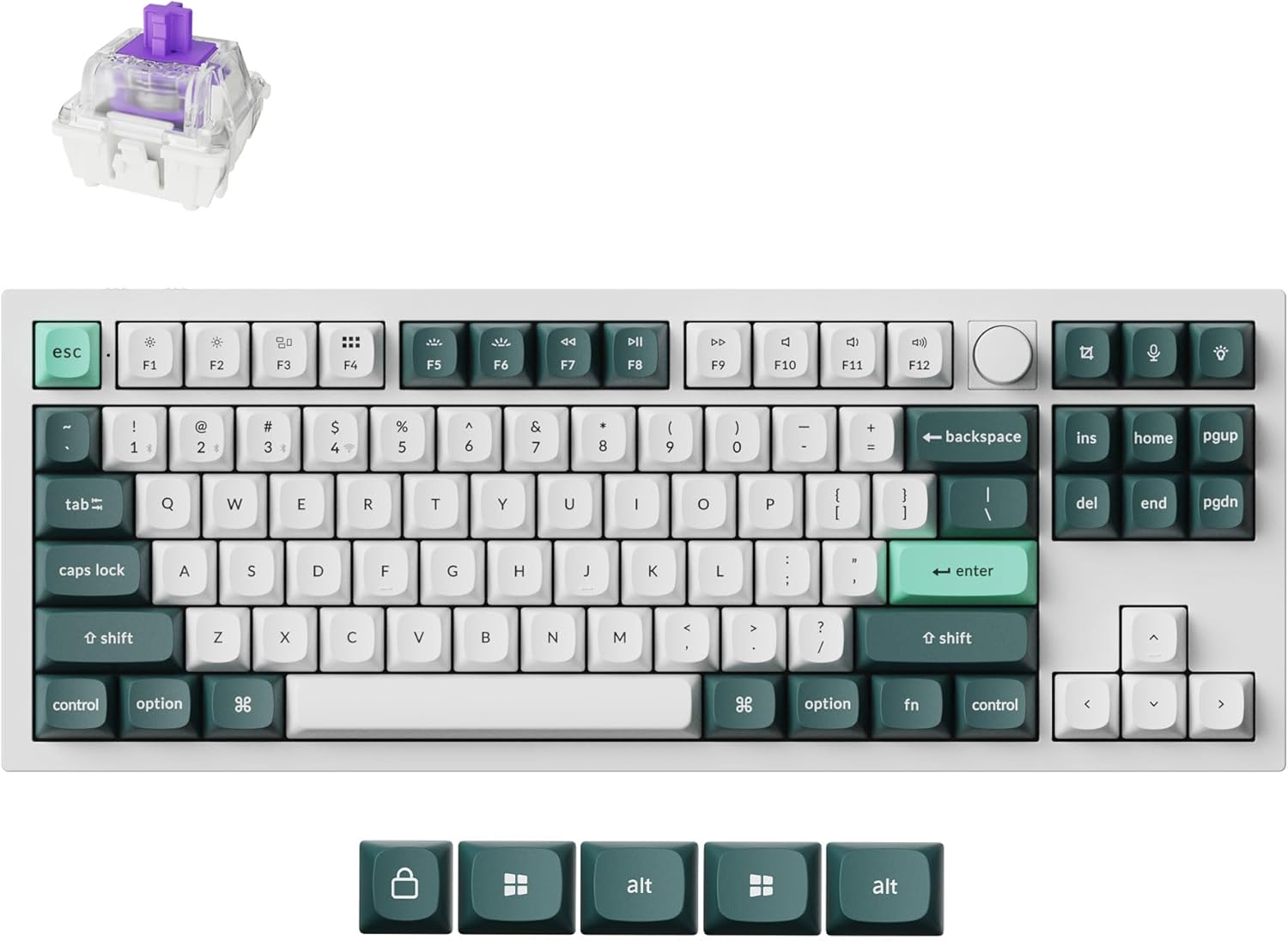
Image: The Keychron Q3 HE keyboard in Shell White, showcasing its 80% layout with a knob, and the distinct keycap colors.
Пакеттин мазмуну
Пакетиңизде бардык буюмдар бар экенин текшериңиз:
- Keychron Q3 HE Keyboard
- USB-C - USB-C кабели
- USB-Aдан USB-C адаптерге чейин
- Баскыч капкагын тарткыч
- Switch Puller
- Колдонуучунун Колдонмосу (бул документ)
- Additional Keycaps (for Windows/Mac compatibility)
Орнотуу колдонмосу
1. Баштапкы заряддоо
Before first use, connect the keyboard to a power source using the provided USB-C cable. The keyboard features a 4000 mAh battery. A full charge is recommended for optimal wireless performance.
2. Байланыш параметрлери
The Keychron Q3 HE supports three connection modes: 2.4 GHz wireless, Bluetooth 5.1, and wired USB-C.
2.1. 2.4 ГГц зымсыз байланыш
For high-performance gaming, the 2.4 GHz wireless connection offers a rapid 1000 Hz polling rate.
- Locate the 2.4 GHz receiver (dongle) typically stored in the keyboard's compartment or included separately.
- Plug the 2.4 GHz receiver into an available USB port on your computer.
- Toggle the keyboard's mode switch to the "2.4G" position.
- The keyboard should automatically connect. If not, refer to the troubleshooting section.
2.2. Bluetooth 5.1 туташуу
The Bluetooth 5.1 connection allows seamless multitasking across up to three devices (computer, phone, tablet).
- Toggle the keyboard's mode switch to the "BT" (Bluetooth) position.
- басып, кармап туруңуз fn+1 (же fn+2 / fn+3) key combination for 4 seconds until the indicator light flashes rapidly, indicating pairing mode.
- On your device (computer, phone, tablet), open Bluetooth settings and search for "Keychron Q3 HE".
- Жупташтыруу үчүн баскычтопту тандаңыз. Туташтырылгандан кийин индикатор жарыгы өчүп-өчүп токтойт.
- To switch between paired devices, press fn+1, fn+2, же fn+3.

Image: The Keychron Q3 HE keyboard connected wirelessly to a laptop, smartphone, and tablet, demonstrating its multi-device capability.
2.3. Зымдуу туташуу
For a stable, direct connection, use the provided USB-C cable.
- Connect one end of the USB-C cable to the keyboard's USB-C port.
- Connect the other end to a USB-C port on your computer. If your computer only has USB-A ports, use the provided USB-A to USB-C adapter.
- Toggle the keyboard's mode switch to the "Cable" position.
- The keyboard will be recognized as a standard USB HID device.
3. Операциялык системанын которгучу
The keyboard has a switch to select between Windows and Mac layouts. Ensure this switch is set correctly for your operating system to ensure proper key mapping.
Image: The Keychron Q3 HE keyboard, showing the included alternative keycaps for Windows and Mac operating systems.
Баскычтопту иштетүү
1. Gateron Double-Rail Magnetic Hall Effect Switches
The Q3 HE features Gateron Double-Rail Magnetic Hall Effect Switches, offering precise and customizable performance. These switches have a sensitivity of 0.1 mm and an adjustable actuation range from 0.2 mm to 3.8 mm. They are designed for unparalleled stability and smoothness, with a lifespan of 150 million clicks.
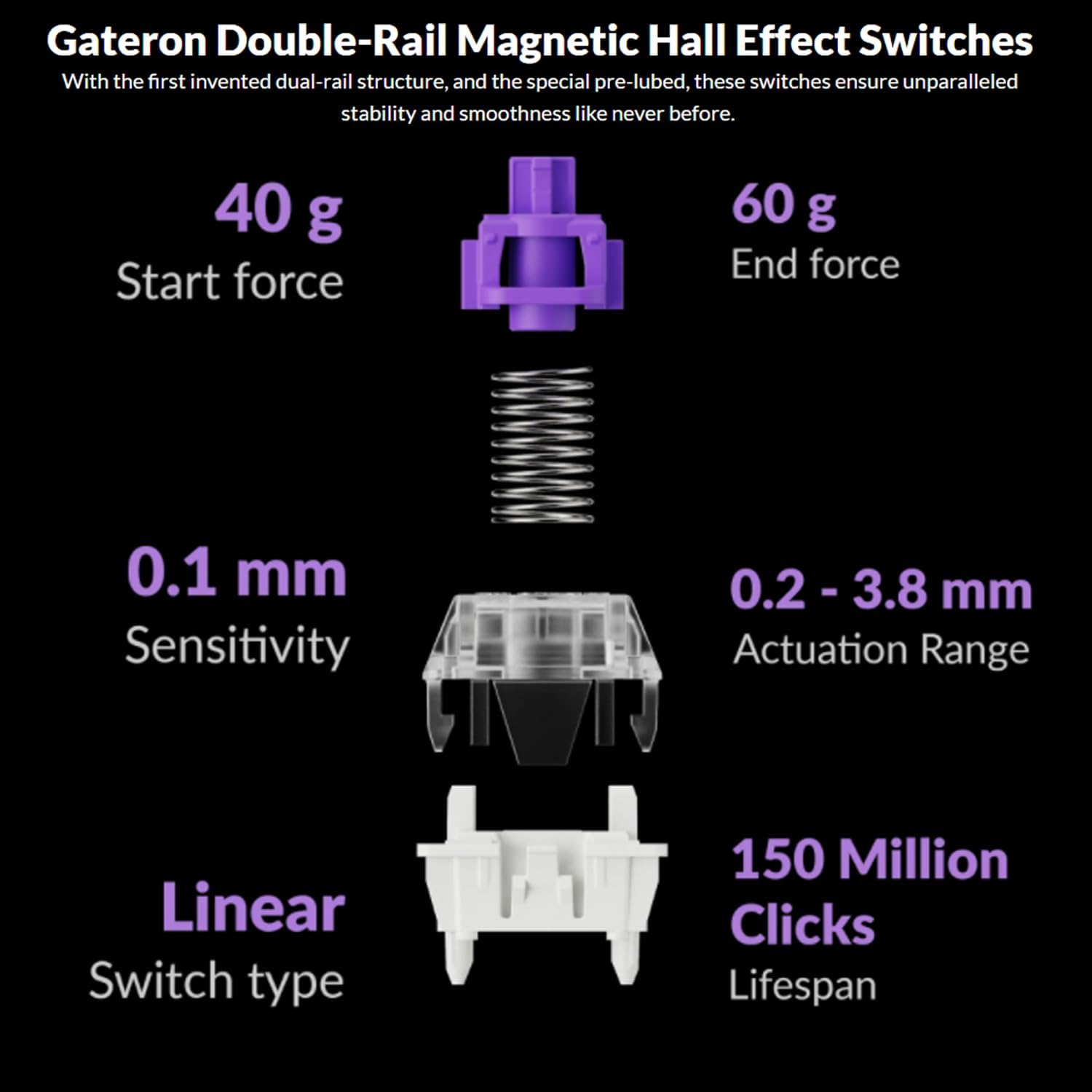
Image: Diagram illustrating the specifications of Gateron Double-Rail Magnetic Hall Effect Switches, including start force, end force, sensitivity, actuation range, switch type, and lifespan.
2. Programmable Knob and Keys
The integrated knob and all keys on the Q3 HE are fully programmable via the Keychron Launcher web app. This allows you to:
- Remap keys to different functions.
- Adjust the actuation points of the magnetic switches.
- Create personalized macro commands.
- Set custom shortcuts and key combinations.
Keychron ишке киргизгичине кирүү web колдонмо аркылуу web browser to customize your keyboard settings.
3. RGB арткы жарыктандыруу
The Q3 HE features south-facing RGB LED lights, designed to provide optimal illumination from the typist's perspective. This orientation also prevents interference when using Cherry-profile баскычтар.
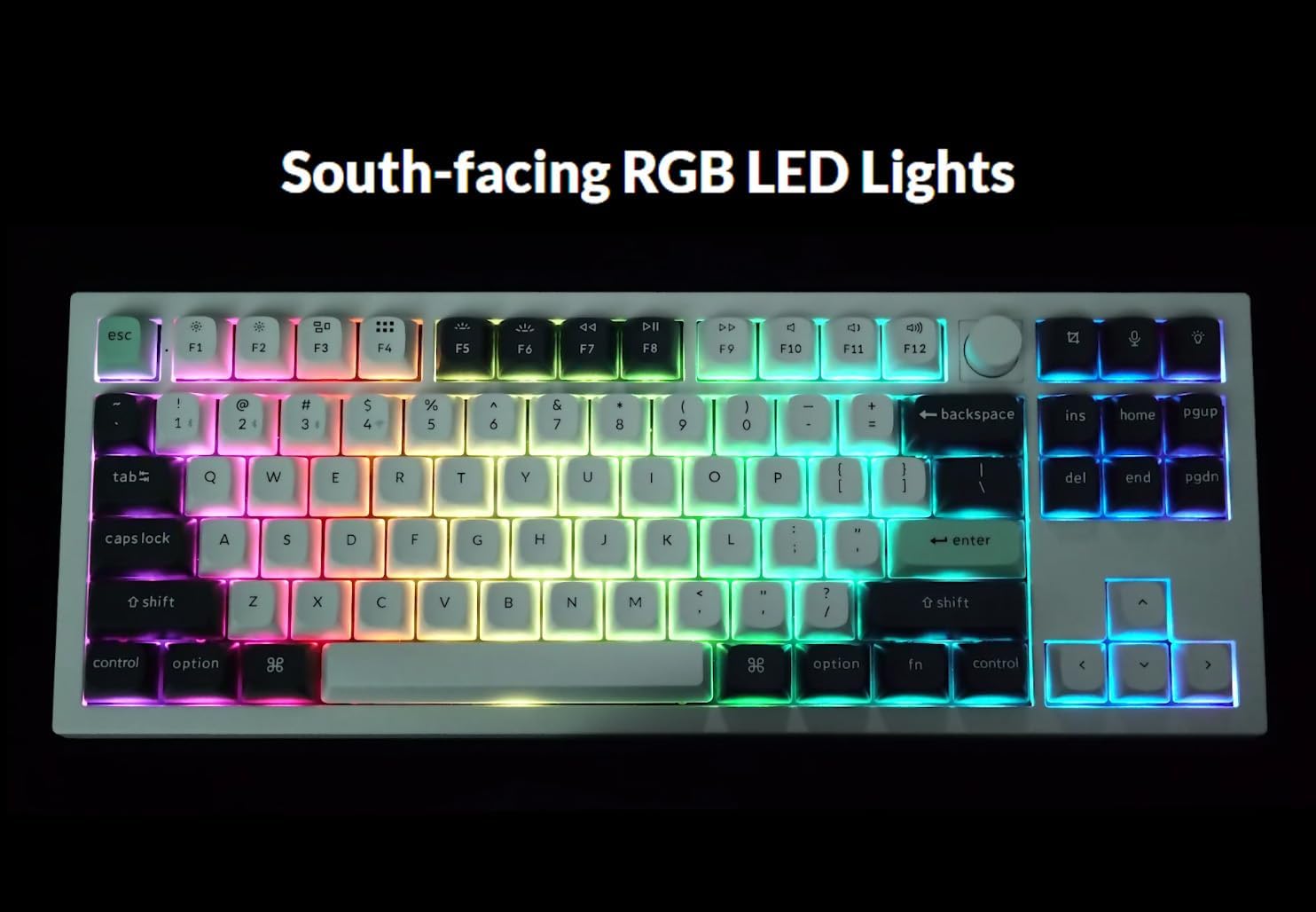
Image: The Keychron Q3 HE keyboard displaying its vibrant, south-facing RGB backlighting, illuminating the keycaps.
Use the designated function keys (e.g., Fn + Light Key or Fn + F5/F6) to cycle through different lighting effects and adjust brightness. Refer to the keyboard's quick start guide for specific key combinations.
4. OSA Double-Shot PBT Keycaps
The keyboard comes equipped with durable OSA Double-Shot PBT Keycaps. These keycaps are known for their resistance to shine and wear over time, ensuring longevity and a consistent typing feel.

Сүрөт: жакын план view of the OSA Double-Shot PBT Keycaps, showing their construction and texture.
Техникалык тейлөө
1. Клавиатураңызды тазалоо
- Тазалоодон мурун клавиатураны бардык кубат булактарынан жана түзмөктөрдөн ажыратыңыз.
- Баскыч капкактарынын ортосундагы чаңды жана калдыктарды тазалоо үчүн кысылган аба банкасын колдонуңуз.
- For surface cleaning, gently wipe the keycaps and frame with a soft, lint-free cloth dampаз өлчөмдөгү суу же жумшак, абразивдүү тазалоо эритмеси менен тазалаңыз. Ашыкча нымдуулуктан сактаныңыз.
- Тазалоочу эритмелерди түздөн-түз клавиатурага чачпаңыз.
2. Батареяга кам көрүү
- The keyboard is powered by a 4000 mAh Lithium Ion battery.
- Батареянын иштөө мөөнөтүн узартуу үчүн, бат-баттан батарейканы толук зарядсыздандырбаңыз.
- Клавиатураны узак убакыт бою колдонбогондо салкын, кургак жерде сактаңыз.
- If the keyboard will not be used for a long time, charge it to about 50% before storing.
Проблемаларды чечүү
| Көйгөй | Мүмкүн себеп | Чечим |
|---|---|---|
| Баскычтоп жооп бербей жатат (зымдуу) | Loose cable connection, incorrect mode switch, driver issue. |
|
| Keyboard not connecting (2.4 GHz) | Receiver not plugged in, incorrect mode switch, interference. |
|
| Баскычтоп туташпай жатат (Bluetooth) | Not in pairing mode, device Bluetooth off, already connected to max devices. |
|
| Keys randomly stop responding / Incorrect key output | Software glitch, incorrect actuation point setting, physical debris. |
|
| RGB lights not working or inconsistent | Low battery, software setting, light effect disabled. |
|
Техникалык шарттар
| Өзгөчөлүк | Деталь |
|---|---|
| Модель аты | Keychron Q3 HE |
| Макет | 80% (TKL) |
| Которгучтар | Gateron Double-Rail Magnetic Hall Effect Switches |
| Иштетүү диапазону | 0.2 mm - 3.8 mm (adjustable) |
| Байланыш | 2.4 ГГц зымсыз, Bluetooth 5.1, USB-C зымдуу |
| Polling Rate (2.4 GHz) | 1000 Гц |
| Дене материалы | 6063 алюминий |
| Баскыч капкактары | OSA Double-Shot PBT |
| Арткы жарыктандыруу | Түштүктү караган RGB LED |
| Батарея сыйымдуулугу | 4000 мАч литий-ион |
| Батареянын иштөө мөөнөтү | 100 саатка чейин (эң төмөн жарыктыкта) |
| Элемент Салмагы | 5.5 фунт (болжол менен 2.5 кг) |
| Өлчөмдөрү (пакет) | 15.79 x 8.03 x 2.8 дюйм |
| Операциялык системанын шайкештиги | Mac, Windows |
Кепилдик жана колдоо
Keychron products are designed and manufactured to high quality standards. For detailed warranty information, including coverage period and terms, please refer to the official Keychron webсайтка же продуктуңузга кошулган кепилдик картасы.
For technical support, frequently asked questions (FAQs), and driver/software downloads (including Keychron Launcher), please visit the official Keychron support page:
When contacting support, please have your product model (Q3 HE) and serial number (if applicable) ready.
Ask a question about this manual
Ask about setup, troubleshooting, compatibility, parts, safety, or missing instructions. Manuals+ will review the question and use this page’s manual context to help answer it.