
1. Киришүү
Сатып алганыңыз үчүн рахматasing the Bewinner Portable Bluetooth Speaker. This manual provides essential information for setting up, operating, and maintaining your speaker. Please read it carefully before use to ensure optimal performance and longevity of your device.
Негизги өзгөчөлүктөрү:
- Classic Wooden Case Structure: Features a walnut wood grain shell with a black net design for an elegant aesthetic.
- Dual Speakers with Independent Bass Guide Hole: Enhances sound quality with strong bass and clear tones.
- Intelligent Sound Processing Technology: Improves clarity, layering, and power for a dynamic audio experience.
- Bluetooth 5.0 туташуусу: Supports wireless connection up to 10 meters with mobile phones, tablets, and computers.
- Бир нече ойнотуу параметрлери: Includes AUX sound cable, USB disk, and small memory card (up to 32GB) playback.
- Орнотулган FM радиосу: Enhances radio sensitivity for stable signal reception.
2. Пакеттин мазмуну
Сураныч, пакетте төмөнкү нерселерди текшериңиз:
- 1 x Bewinner Portable Bluetooth Speaker
- 1 x Instruction Manual
- 1 x USB заряддоо кабели
- 1 x 3.5mm AUX Sound Cable
3. Продукт бүтүп калдыview жана Controls
Familiarize yourself with the speaker's ports and controls:
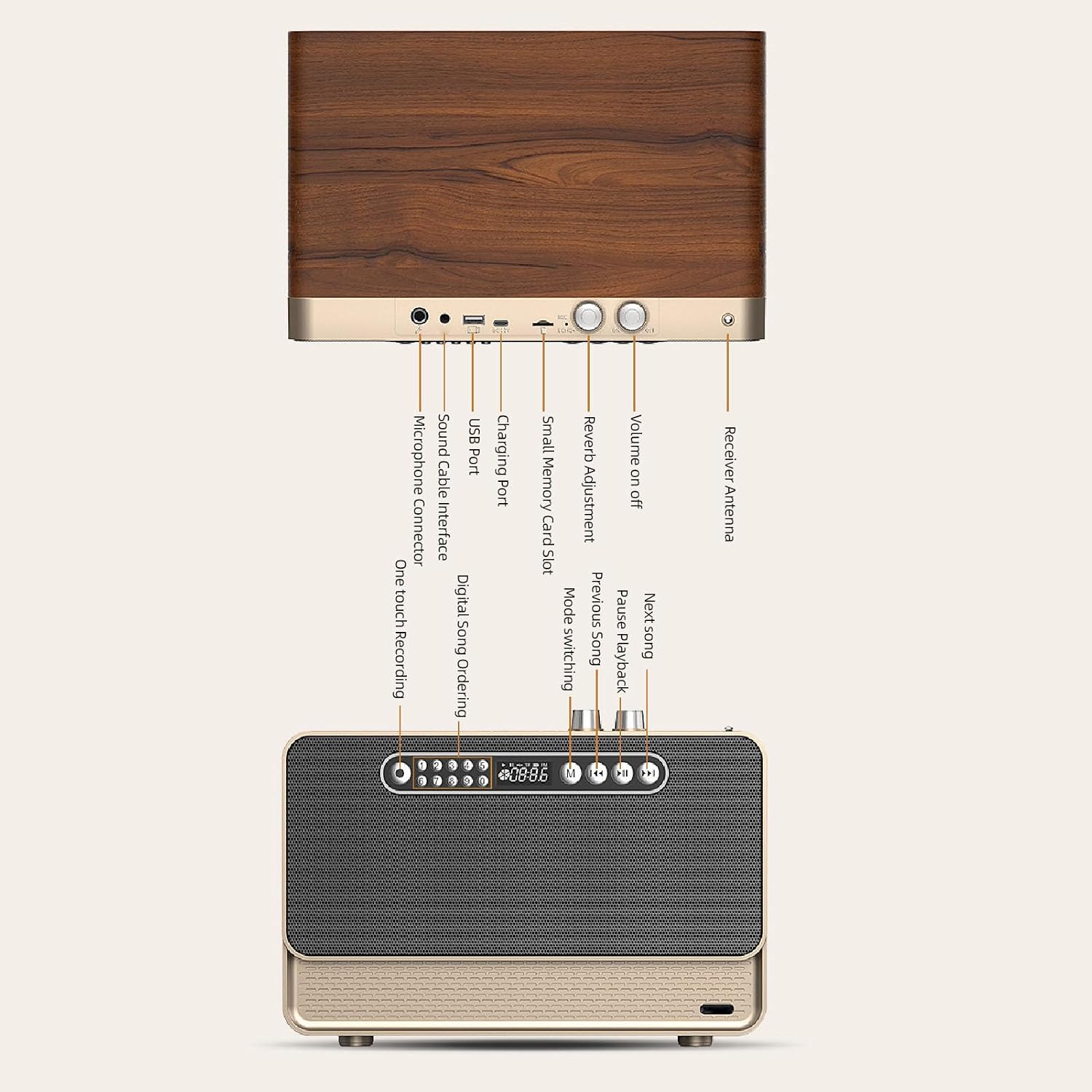
Image: Detailed diagram showing the various ports and control buttons on the Bewinner Portable Bluetooth Speaker, including the volume knob, charging port, USB port, small memory card slot, sound cable interface, microphone connector, and receiver antenna.
- Үндү күйгүзүү/өчүрүү: Rotary knob to power the speaker on/off and adjust volume.
- Реверберацияны жөндөө: Knob for adjusting sound reverb effect.
- Алуучу антенна: FM радио кабыл алуусун жакшыртуу үчүн кеңейтүү.
- Заряддоо порту: USB заряддоо кабелин бул жерге туташтырыңыз.
- USB порт: USB дискти ойнотуу үчүн.
- Small Memory Card Slot: Insert a small memory card (up to 32GB) for playback.
- Sound Cable Interface (AUX): Connect the 3.5mm AUX cable for wired audio input.
- Микрофон туташтыргычы: For external microphone input (if supported).
- Бир тийүү менен жаздыруу: Button for recording functions.
- Digital Song Ordering: Buttons for direct song selection.
- Которуу режими (M): Button to switch between Bluetooth, AUX, FM, USB, and Memory Card modes.
- Мурунку ыр / Кийинки ыр: Buttons for track navigation.
- Pause/Playback: Button to play or pause audio.
4. Орнотуу
4.1 Динамикти заряддоо
Before first use, fully charge the speaker. Connect the provided USB charging cable to the speaker's charging port and the other end to a 5V USB power adapter (not included) or a computer's USB port. The charging indicator will show the charging status and turn off when fully charged.
4.2 Күйгүзүү/өчүрүү
айлантыңыз Үн / Өчүк knob clockwise to power on the speaker. Rotate it counter-clockwise until it clicks to power off the speaker.
5. Иштөө нускамалары
5.1 Bluetooth байланышы
- Power on the speaker. The speaker will automatically enter Bluetooth pairing mode, indicated by a flashing light or an audible prompt.
- On your mobile phone, tablet, or computer, enable Bluetooth and search for available devices.
- Select "Bewinner Speaker" (or similar name) from the list of devices to pair.
- Once paired, the speaker will confirm with an audible prompt, and the indicator light will become solid.
- You can now play audio from your device through the speaker. The connection distance is up to 10 meters.
5.2 AUX Sound Cable Playback
For wired audio connection:

Image: The Bewinner Portable Bluetooth Speaker connected to a laptop using the 3.5mm AUX sound cable, demonstrating wired audio playback.
- Connect one end of the provided 3.5mm AUX sound cable to the speaker's Sound Cable Interface.
- Connect the other end to the audio output jack of your computer, phone, or other audio device.
- басыңыз Mode Switching (M) динамиктеги баскычты ал AUX режимине өткөнгө чейин басып туруңуз.
- Туташкан түзмөгүңүздөн аудио ойнотуңуз.
5.3 USB Disk and Small Memory Card Playback
The speaker supports playback from USB disks and small memory cards (up to 32GB) with MP3, WAV, and WMA formats.

Image: A close-up of the Bewinner Portable Bluetooth Speaker with a USB flash drive inserted into its USB port, illustrating USB disk playback capability.
- Insert a USB disk into the USB порту or a small memory card into the Small Memory Card Slot.
- Динамик сактагыч түзмөгүн автоматтык түрдө аныктап, аудиону ойнотууну баштайт fileс. Болбосо, басыңыз Mode Switching (M) туура режимди тандоо үчүн баскычты басыңыз.
- колдонуу Мурунку ыр, Кийинки ыр, жана Тыныгуу/ойнотуу buttons to control music playback.
5.4 FM радио функциясы
Камтылган FM радиосун колдонуу үчүн:

Image: The Bewinner Portable Bluetooth Speaker with its telescopic antenna extended, highlighting its FM radio functionality and ability to receive stable signals.
- узартуу Алуучу Антенна жакшыраак сигнал кабыл алуу үчүн.
- басыңыз Mode Switching (M) button until the speaker enters FM radio mode.
- Динамик автоматтык түрдө жеткиликтүү FM станцияларын сканерлейт жана сактайт.
- колдонуу Мурунку ыр жана Кийинки ыр баскычтар сакталган станциялардын ортосунда чабыттоо.
5.5 Үндү жакшыртуу

Image: A stylized depiction of a microchip with the word 'BASS' prominently displayed, symbolizing the speaker's intelligent sound processing technology that enhances bass and overall audio quality.
The speaker features intelligent sound processing technology to improve audio clarity, layering, and power. The dual speakers with independent bass guide holes contribute to a powerful and dynamic bass response.

Сүрөт: жарылган view of the Bewinner Portable Bluetooth Speaker, revealing its internal dual speakers and independent bass guide holes, illustrating the design for enhanced sound quality and powerful bass.
6. Техникалык тейлөө
- Динамикти суудан, нымдан жана экстремалдык температурадан алыс кармаңыз.
- Динамикти жумшак, кургак чүпүрөк менен тазалаңыз. Абразивдүү тазалагычтарды же эриткичтерди колдонбоңуз.
- Спикерди түшүрүүдөн же катуу таасирлерге дуушар кылуудан качыңыз.
- Узак мөөнөткө колдонулбаганда, динамикти салкын, кургак жерде сактаңыз жана батареянын ден соолугун сактоо үчүн аны мезгил-мезгили менен заряддап туруңуз.
7. Кыйынчылыктарды
- Кубат жок: Ensure the speaker is charged. Check the power knob is turned on.
- Үн жок: Check the volume level on both the speaker and the connected device. Ensure the correct input mode (Bluetooth, AUX, USB, Memory Card, FM) is selected.
- Bluetooth жупташтыруу маселелери: Make sure the speaker is in pairing mode. Disable and re-enable Bluetooth on your device. Move closer to the speaker to ensure it's within the 10-meter range.
- FM кабыл алуу начар: Extend the receiver antenna fully. Try repositioning the speaker for better signal.
- USB/Memory Card Not Playing: аудиону камсыз кылуу files are in supported formats (MP3, WAV, WMA). Check that the storage device is properly inserted and not corrupted.
8. Техникалык шарттар
| Өзгөчөлүк | Спецификация |
|---|---|
| Модель номери | Bewinner25s87k4n0e |
| Бренд | Bewinner |
| Материал | Synthetic Fiber Wood |
| Bluetooth версиясы | 5.0 |
| Батарея сыйымдуулугу | 3000mAh Li Polymer (Built-in) |
| Заряддоо Voltage | 5V |
| Small Memory Card Support | Maximum 32GB (Excluded) |
| Music Media Support | MP3, WAV, WMA |
| Продукциянын өлчөмдөрү | 13.78 x 10.63 x 10.24 дюйм |
| Элемент Салмагы | 6.75 фунт |
| Байланыш технологиясы | Bluetooth, AUX, USB, Memory Card, FM Radio |
| Power Source | Батарея менен иштейт |
| Сунушталган Колдонуулар | Ички/тышкы |
9. Кепилдик жана колдоо
This product comes with a standard manufacturer's warranty. Please refer to the warranty card included in your package for specific terms and conditions. For technical support, troubleshooting assistance, or warranty claims, please contact Bewinner customer service through the retailer where the product was purchased.