1. Киришүү
The Generic G63 Smart Light Sound Machine is a versatile device designed to enhance your daily routine and improve sleep quality. It integrates multiple functions including a smart LED light with seven color selections, a natural sleep aid sound machine, an alarm clock with sunrise simulation, and a convenient 10W wireless charging pad for compatible devices. This manual provides detailed instructions for setup, operation, and maintenance of your new device.

Image: The Generic G63 Smart Light Sound Machine, showcasing its design with integrated clock, wireless charging pad, and vibrant LED lighting.
2. Коопсуздук маалыматы
- Аппаратты сууга же ашыкча нымдуулукка дуушар кылбаңыз.
- Аппаратты түшүрүүдөн же катуу таасирлерден сактаныңыз.
- Use only the provided or recommended power adapter (5V/2A) to prevent damage.
- Аппаратты жылуулук булактарынан жана түз күн нурунан алыс кармаңыз.
- Аппаратты өз алдынча бөлүүгө же оңдоого аракет кылбаңыз. Квалификациялуу тейлөө кызматкерлерине кайрылыңыз.
- Айрыкча зымсыз кубаттоо учурунда, түзмөктүн айланасында жакшы желдетүүнү камсыз кылыңыз.
3. Пакеттин мазмуну
Сураныч, пакетте төмөнкү нерселерди текшериңиз:
- Generic G63 Smart Light Sound Machine
- USB-C заряддоо кабели
- Алыстан башкаруу
- Колдонуучунун Колдонмосу (бул документ)
4. Продукциянын өзгөчөлүктөрү
- Multi-functional Lamp: Combines smart lighting, sound machine, and alarm clock.
- Зымсыз кубаттоо: Integrated 10W wireless charging pad for compatible smartphones and devices.
- Динамикалык жарыктандыруу: Seven selectable LED light colors with dimmable options and sunrise simulation.
- Үн машинасы: Features natural sleep aid sounds and can function as a Bluetooth speaker (V5.2, 3W).
- Ойготкуч саат: Digital display with alarm function.
- Voice-Activated Adjustment: Lights can change to the rhythm of music or be adjusted via voice commands.
- 360° Surround Sound Structure: Designed for immersive audio experience.
- Портативдик дизайн: Built-in 3.7V/300MAH battery for 2-3 hours of use.
5. Орнотуу
5.1 Алгачкы заряддоо
Before first use, fully charge the Smart Light Sound Machine. Connect the provided USB-C charging cable to the device's charging port and the other end to a 5V/2A power adapter (not included) or a compatible USB power source. The charging indicator will show the charging status. A full charge takes approximately 2.5 hours.
5.2 Орнотуу
Place the device on a stable, flat surface, such as a bedside table or desk. Ensure there is adequate space around the device for ventilation, especially for the wireless charging function.
6. Иштөө нускамалары

Image: Key Function Introduction, showing the control buttons on the device's base for volume, call management, and light effects.
6.1 Күйгүзүү/өчүрүү
Press and hold the power button (usually indicated by a power symbol) for a few seconds to turn the device on or off. The digital display will illuminate when the device is powered on.
6.2 Убакытты орнотуу
To set the time, refer to the specific instructions in your remote control's manual or the device's on-screen prompts. Typically, there is a dedicated button for time setting, followed by using volume/navigation buttons to adjust hours and minutes. Confirm your selection to save the time.
6.3 Жарыкты башкаруу
Press the "Mode/Switch Light Effect" button (often labeled 'M' or a light bulb icon) to cycle through the seven available light colors and effects. Hold the button to dim or brighten the light. The sunrise simulation feature can be activated through the alarm settings.

Image: The Smart Light Sound Machine providing ambient light in a bedroom setting, demonstrating its use as a sleep aid.
6.4 Sound Control and Bluetooth Pairing
Bluetooth жупташууда: Turn on the device. Activate Bluetooth on your smartphone or audio device and search for "G63" or "Smart Light Sound Machine" in the list of available devices. Select it to pair. A confirmation sound will indicate successful pairing.
Үндү тууралоо: Use the "Volume Down/Previous Song" buttons (often labeled with '-' and '+' or arrow icons) on the device or remote control to adjust the volume. Short press for volume, long press to skip tracks.
Үндөрдү ойнотуу: Once paired via Bluetooth, you can play music or select from the device's built-in natural sleep aid sounds. Use the mode button to switch between Bluetooth audio and internal sound modes.

Image: The Smart Light Sound Machine emitting colorful lights and musical notes, illustrating its audio capabilities.
6.5 Ойготкуч саат функциясы
To set an alarm, locate the alarm button (often an alarm clock icon) on the device or remote. Press it to enter alarm setting mode. Use the navigation buttons to set the desired alarm time and select the alarm sound or sunrise simulation option. Confirm to save the alarm. To snooze or turn off the alarm, refer to the specific button functions on the device.
6.6 Зымсыз заряддоо
Place your Qi-compatible smartphone or device on the designated wireless charging pad located on the base of the Smart Light Sound Machine. Ensure the device is centered on the pad for optimal charging. The charging indicator on your phone will confirm that charging has begun. This device supports up to 10W wireless charging.

Image: The Smart Light Sound Machine with a smartphone on its wireless charging pad. Note: While the image indicates 5W, the product specifications state 10W wireless charging capability.
6.7 Voice-Activated Adjustment
The device supports intelligent voice-activated adjustments. When enabled, the lights can change in rhythm with music or be adjusted by voice commands. Refer to the device's specific voice command prompts or the remote control for activation and usage details.
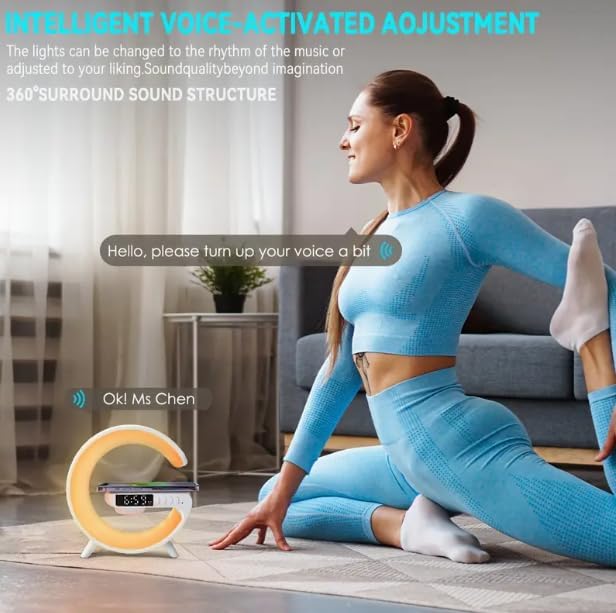
Image: Illustration of the voice-activated adjustment feature, where the device responds to spoken commands.
7. Техникалык тейлөө
- Тазалоо: Аппараттын бетин тазалоо үчүн жумшак, кургак чүпүрөктү колдонуңуз. Абразивдүү тазалагычтарды же эриткичтерди колдонбоңуз.
- Сактагыч: Узак мөөнөткө колдонулбаганда, аспапты күн тийбеген, салкын, кургак жерде сактаңыз.
- Батареяга кам көрүү: Батареянын иштөө мөөнөтүн узартуу үчүн, түзмөктү тез-тез толук зарядсыздандырбаңыз. Аны үзгүлтүксүз колдонбосоңуз да, үзгүлтүксүз кубаттап туруңуз.
8. Кыйынчылыктарды
| Көйгөй | Мүмкүн себеп | Чечим |
|---|---|---|
| Түзмөк күйбөй жатат. | Батареянын заряды аз; Кубат кабели туура эмес туташтырылган. | Charge the device fully. Ensure the USB-C cable is securely connected to both the device and a working power source. |
| Динамиктен үн жок. | Volume too low; Not paired via Bluetooth; Incorrect mode selected. | Increase volume. Re-pair Bluetooth device. Ensure the device is in Bluetooth audio mode if playing from an external source. |
| Зымсыз кубаттоо иштебейт. | Phone not Qi-compatible; Phone not centered; Foreign objects on pad; Device not powered on. | Ensure your phone supports Qi wireless charging. Re-position phone on the center of the pad. Remove any metal objects or thick cases. Ensure the Smart Light Sound Machine is powered on. |
| Cannot set or change time/alarm. | Incorrect button sequence; Firmware issue. | Refer to the specific instructions for time/alarm setting in the manual or remote control guide. Try resetting the device if issues persist. |
| Lights not changing or dimming. | Incorrect button usage; Device malfunction. | Ensure you are using the correct button ("Mode/Switch Light Effect") and pressing/holding it as instructed. |
9. Техникалык шарттар
| Модел | G63 |
| Өлчөмдөрү (L x W x Y) | 5.7"D x 5.7"W x 2.17"H (approx. 150x54x157mm) |
| Элемент Салмагы | 7.3 унция |
| Bluetooth версиясы | V5.2 |
| Спикердин күчү | 3W |
| Батарея | 3.7V/300MAH |
| Убакытты колдонуңуз | 2-3 саат |
| Заряддоо убактысы | 2.5 саат |
| Заряддоо порту | C түрү |
| Заряддоо киргизүү | 5V/2A |
| Зымсыз кубаттоо чыгышы | 10 Вт |
| Жарык булагы түрү | LED (7 түс) |
| Материал | Пластик |
| Камтылган компоненттер | Алыстан башкаруу |

Image: Product Size diagram, illustrating the physical dimensions of the Smart Light Sound Machine.
10. Кепилдик жана колдоо
This product comes with a standard manufacturer's warranty. Please refer to the warranty card included in your package for specific terms and conditions. For technical support, troubleshooting assistance, or warranty claims, please contact the retailer or manufacturer directly using the contact information provided with your purchase.
For further assistance, please visit the Generic brand's official support webсайтка же кардарларды тейлөөгө кайрылыңыз.


