
KAPEYDESI Captain 600
KAPEYDESI Captain 600 Wireless Gaming Headset
Модель: Капитан 600
Introduction
This manual provides detailed instructions for the setup, operation, and maintenance of your KAPEYDESI Captain 600 Wireless Gaming Headset. Please read this manual thoroughly before using the product to ensure optimal performance and longevity.

Image: The KAPEYDESI Captain 600 Wireless Gaming Headset, showcasing its design along with the included USB dongle and 3.5mm audio cable.
Кутуда эмне бар
Төмөнкү нерселердин баары пакетиңизге камтылганын текшериңиз:
- 1 x KAPEYDESI Captain 600 Gaming Headset
- 1 x Detachable Noise Cancelling Microphone
- 1 x Type-C заряддоо кабели
- 1 x USB өткөргүч (2.4 ГГц зымсыз донгл)
- 1 x 3.5 мм аудио кабель
- 1 х Колдонуучунун колдонмосу (бул документ)
Продукт өзгөчөлүктөрү
Ар тараптуу байланыш
The Captain 600 offers three connection modes for broad compatibility:
- 2.4 ГГц зымсыз: Utilizes a USB dongle for low-latency, stable connection up to 49 feet. Ideal for PS5, PS4, PC, and Mac.
- Bluetooth 5.3: Смартфондорго, планшеттерге жана башка Bluetooth иштетилген түзмөктөргө зымсыз туташуу үчүн.
- 3.5mm Wired: Provides universal compatibility with devices like Xbox Series consoles (microphone supported), and Nintendo Switch (microphone not supported).

Image: A visual representation of the headset's multiple connection options, including 2.4GHz wireless, Bluetooth 5.3, and 3.5mm wired modes for various gaming platforms and devices.
Жогорку тактыктагы аудио
Equipped with 50mm dynamic drivers, the headset delivers clear and immersive audio with a frequency response up to 20 KHz and low latency (≤20ms) for precise sound localization in games.

Image: An exploded diagram illustrating the internal audio components of the headset, including the 50mm drivers and ear cushion design for sound quality and comfort.
Ызы-чууну жок кылган микрофон
The detachable omnidirectional microphone features Environmental Noise Cancellation (ENC) technology, reducing background noise for clear communication with teammates.

Сүрөт: деталдуу view of the detachable microphone, highlighting its Environmental Noise Cancellation (ENC) capability for clear voice transmission.
Узартылган батареянын иштөө мөөнөтү
Enjoy over 50 hours of continuous use on a single charge. A full charge takes approximately 3 hours via the Type-C charging cable.

Image: The headset accompanied by icons representing its Type-C charging, over 50 hours of battery life, and fast charging capabilities.
Ыңгайлуу жана көчмө
The headset features a lightweight, foldable design (approximately 10 ounces / 0.47 kg) with memory foam leatherette ear and head pads, and an adjustable headband for comfortable extended gaming sessions.
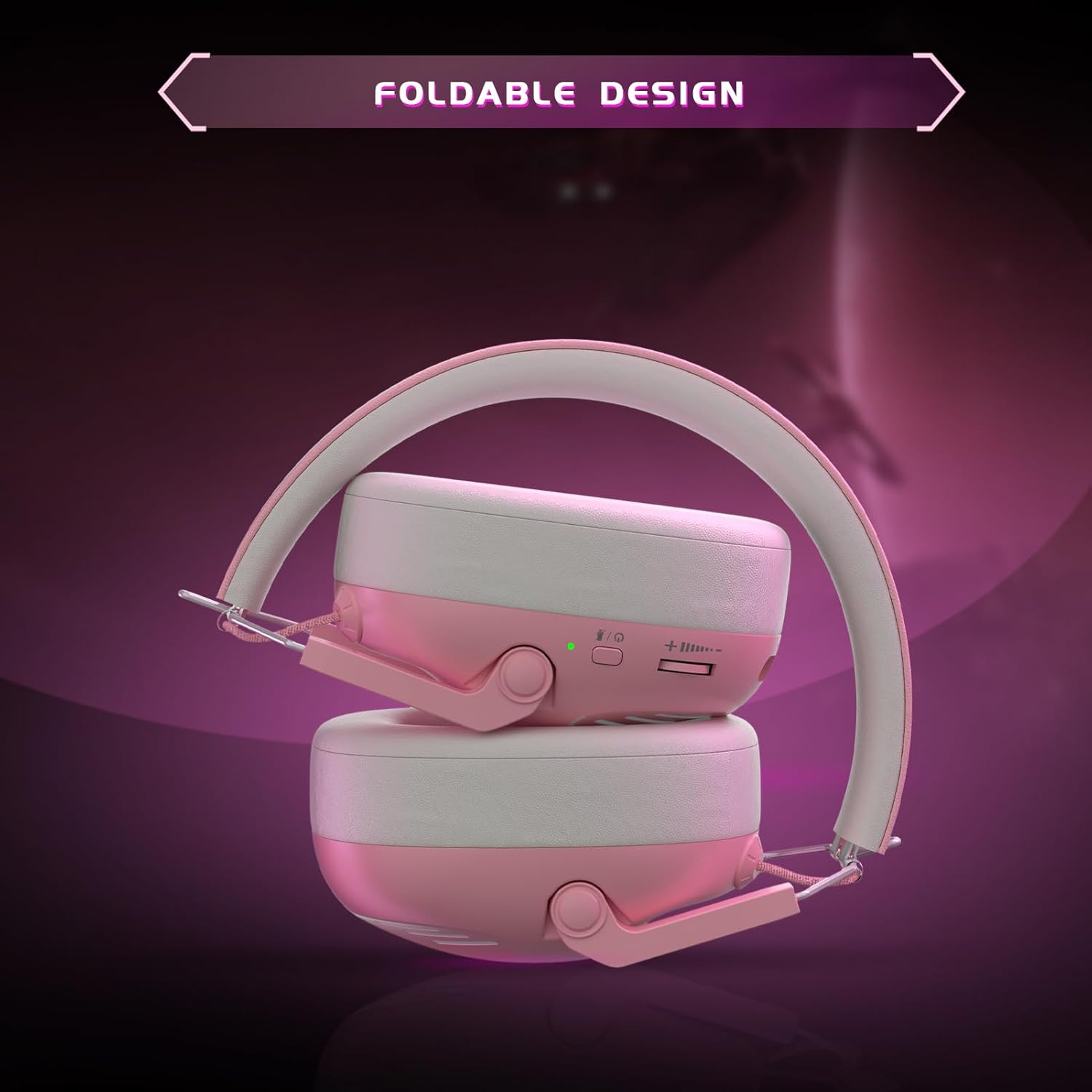
Image: The headset in its folded configuration, demonstrating its portable design for easy storage and transport.
Орнотуу нускамалары
Гарнитураны заряддоо
- Connect the included Type-C charging cable to the headset's charging port.
- Кабелдин экинчи учун USB кубат булагына туташтырыңыз (мисалы, компьютердин USB порту, USB дубал адаптери).
- The LED indicator on the headset will show charging status. A full charge takes approximately 3 hours.
Connecting via 2.4GHz Wireless (USB Dongle)
This mode is recommended for PS5, PS4, PC, and Mac for optimal low-latency performance.
- Insert the USB transmitter (dongle) into an available USB port on your gaming console or computer.
- LED индикатору күйгүчө кубат баскычын басып, кармап туруу менен гарнитураны күйгүзүңүз.
- The headset and dongle should automatically pair. The LED on both devices will indicate a successful connection (refer to LED indicator section for details).
- On your device, ensure the audio output is set to the 'KAPEYDESI Captain 600' or 'USB Headset'.
Bluetooth 5.3 аркылуу туташууда
This mode is suitable for smartphones, tablets, and other Bluetooth-enabled devices.
- With the headset powered off, press and hold the power button for approximately 5-7 seconds until the LED indicator flashes rapidly (usually blue and red), indicating pairing mode.
- Түзмөгүңүздө Bluetooth жөндөөлөрүнө өтүп, жеткиликтүү түзмөктөрдү издеңиз.
- Select 'KAPEYDESI Captain 600' from the list to connect.
- Туташтырылгандан кийин, гарнитурадагы LED индикатору туруктуу көк жарыкты көрсөтөт.
Connecting via 3.5mm Wired Cable
This mode provides universal compatibility and is required for Xbox Series consoles (microphone supported) and Nintendo Switch (microphone not supported).
- Гарнитура өчүрүлгөнүн текшериңиз.
- 3.5 мм аудио кабелдин бир учун гарнитуранын 3.5 мм уячасына туташтырыңыз.
- Connect the other end of the cable to the 3.5mm audio port on your controller or device.
- The headset will operate in passive wired mode. No battery power is required for audio, but the microphone may require power depending on the device.
Иштөө нускамалары
Күйгүзүү/өчүрүү
- Күйгүзүү: Press and hold the power button for 2 seconds. The LED indicator will light up.
- Өчүрүү: Press and hold the power button for 3 seconds. The LED indicator will turn off.
Үндү көзөмөлдөө
- Use the volume roller/buttons located on the headset to adjust the audio output level.
Микрофонду колдонуу
- Ажыратылуучу микрофонду гарнитурадагы белгиленген портко туташтырыңыз.
- Ensure the microphone is positioned correctly for clear voice pickup.
- Use the microphone mute button (if present) on the headset to toggle microphone functionality.
- Note: Microphone functionality is not supported when connected to Nintendo Switch via 3.5mm cable.
Техникалык тейлөө жана кам көрүү
- Тазалоо: Гарнитураны тазалоо үчүн жумшак, кургак чүпүрөктү колдонуңуз. Абразивдүү тазалагычтарды же эриткичтерди колдонбоңуз.
- Сактагыч: Гарнитураны салкын, кургак жерде, күндүн түз нурунан жана өтө жогорку температурадан алыс сактаңыз. Бүктөлүүчү дизайны аны компакттуу сактоого мүмкүндүк берет.
- Батареяга кам көрүү: Батареянын иштөө мөөнөтүн узартуу үчүн, гарнитураны бат-баттан толук зарядсыздандырбаңыз. Узак мөөнөткө колдонулбаса да, аны үзгүлтүксүз заряддаңыз.
- Суудан качуу: Гарнитураны сууга же ашыкча нымдуулукка дуушар кылбаңыз.
Проблемаларды чечүү
Үн жок / Төмөн үнү
- Гарнитура күйгүзүлгөнүн жана толук заряддалганын текшериңиз.
- Гарнитурадагы жана туташкан түзмөгүңүздөгү үн деңгээлин текшериңиз.
- Verify that the correct audio output device is selected in your device's sound settings (e.g., 'KAPEYDESI Captain 600' or 'USB Headset').
- If using 2.4GHz wireless, ensure the USB dongle is securely inserted and paired.
- If using Bluetooth, ensure the headset is paired and connected to your device.
- If using the 3.5mm cable, ensure it is fully inserted into both the headset and the device.
Микрофон иштебейт
- Микрофон гарнитурага бекем туташтырылганын текшериңиз.
- Check if the microphone mute button on the headset is disengaged.
- Түзмөгүңүздүн үн жөндөөлөрүндө туура киргизүү түзмөгү тандалганын текшериңиз.
- Note: The microphone is not supported when connected to Nintendo Switch via 3.5mm cable.
- For Xbox Series, ensure you are using the 3.5mm wired connection.
Байланыш маселелери
- 2.4 ГГц: Try re-inserting the USB dongle. If issues persist, try a different USB port.
- Bluetooth: Unpair the headset from your device and attempt to pair again. Ensure no other Bluetooth devices are causing interference.
- Ensure the headset is within the effective range of the wireless connection (up to 49 feet for 2.4GHz, 10 meters for Bluetooth).
Техникалык шарттар
| Өзгөчөлүк | Деталь |
|---|---|
| Модель аты | Captain 600 Wireless Gaming Headset |
| Байланыш технологиясы | 2.4 ГГц зымсыз, Bluetooth 5.3, 3.5 мм зымдуу |
| Аудио драйверинин өлчөмү | 50 мм |
| Frequency Response | 20 KHz |
| Аудио кечигүү | ≤20 Milliseconds (2.4GHz) |
| Bluetooth диапазону | 10 метр |
| Батареянын иштөө мөөнөтү | 50+ саат |
| Заряддоо убактысы | 3 саат (С түрү) |
| Микрофон | Detachable Omnidirectional with ENC |
| Салмагы | 0.47 килограмм (болжол менен 10 унция) |
| Шайкеш түзмөктөр | PS5, PS4, PC, Mac, Smartphones, Tablets, Nintendo Switch (audio only), Xbox Series (wired only) |
Кардарларды колдоо
For any questions, technical assistance, or issues not covered in this manual, please contact KAPEYDESI customer support. Our dedicated after-sales team is committed to resolving customer issues promptly and effectively.
Please refer to the product packaging or the official KAPEYDESI webакыркы байланыш маалыматы үчүн сайт.
Ask a question about this manual
Ask about setup, troubleshooting, compatibility, parts, safety, or missing instructions. Manuals+ will review the question and use this page’s manual context to help answer it.