
1. Introduction and Overview
FLYINGVOICE FIP12WP – бул карылар үйүндө, ооруканада жашаган же өз алдынча жашаган улгайган адамдар үчүн колдонууга ыңгайлуу болуу үчүн атайын иштелип чыккан Интернет протоколу аркылуу үн байланышы (VoIP) телефону. Ал чоң, оңой окулуучу баскычтарга, жөнгө салынуучу үн деңгээлине жана ишенимдүү жана жеткиликтүү байланышты камсыз кылуу үчүн атайын тез терүүчү баскычтарга ээ.

2. Негизги өзгөчөлүктөрү
- Тез терүү үчүн ылайыкташтырылган ABC баскычтары: Шашылыш учурларда тез жетүү мүмкүнчүлүгүн камсыз кылуу үчүн A, B жана C баскычтарын шашылыш байланыштарды же көп чалынган номерлерди сактоо үчүн оңой программалаңыз.
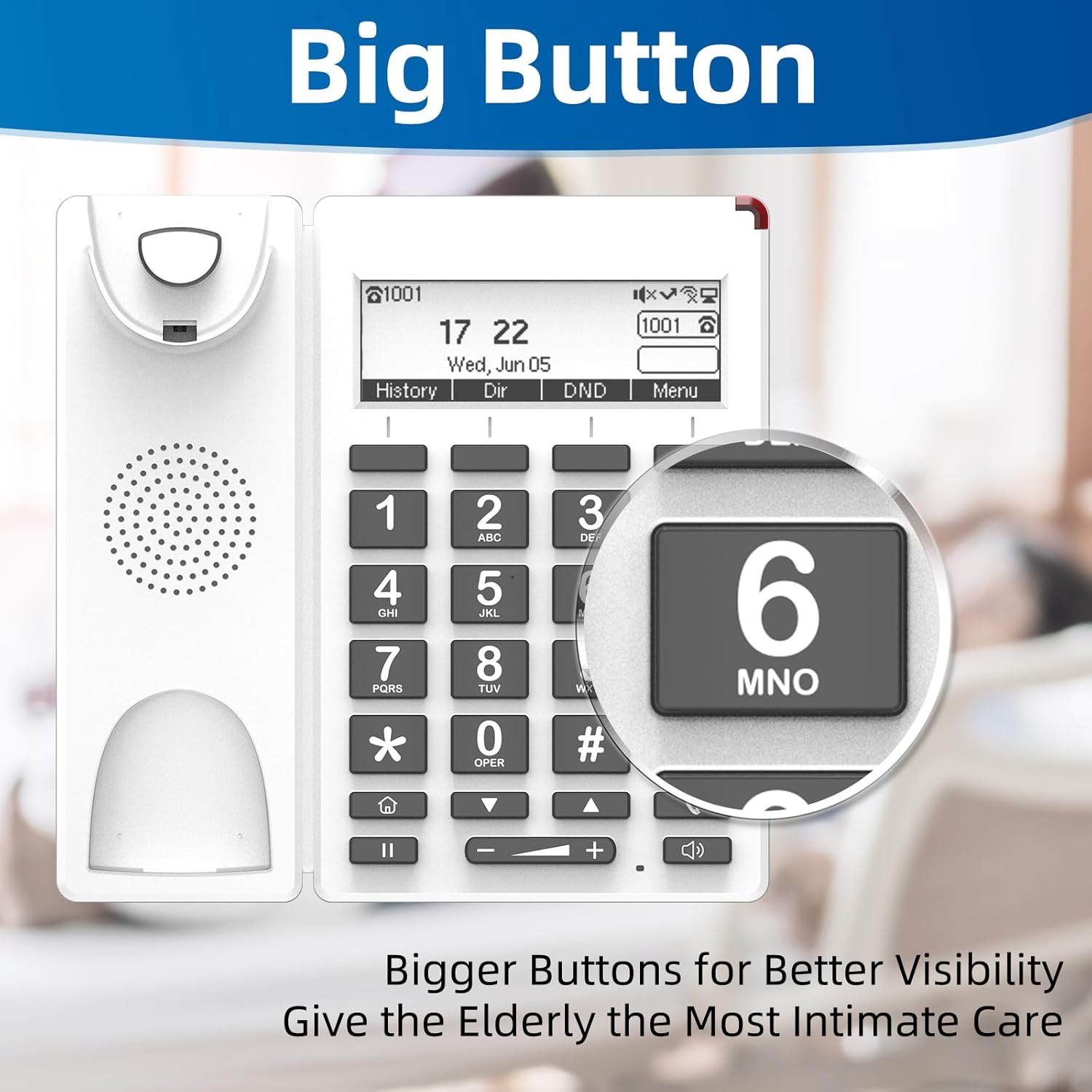
- Чоң баскычтар жана ЖАРДАМ баскычы: Чоң, оңой көрүнгөн баскычтар көрүү мүмкүнчүлүгү чектелген колдонуучулар үчүн иштелип чыккан. Атайын HELP баскычы шашылыш жардамга тез жетүүнү камсыз кылат.
- Жөнгө салынуучу күчөтүлгөн үн көлөмү: Телефондун үнүнүн үнү 90 дБден, ал эми динамиктин үнүнүн үнү 110 дБден ашат, бул угуусу начар колдонуучулар үчүн да чалуулардын так болушун камсыздайт. Үндү телефондогу баскычтар аркылуу ыңгайлуу түрдө тууралоо мүмкүн.
- Кызыл индикатордук жарык: Үстү жагында ачык кызыл жарык колдонуучуларга кирүүчү чалуулар же өткөрүлүп жиберилген билдирүүлөр жөнүндө эскертет, бул угуусу начар адамдар үчүн пайдалуу.
- Дубалга орнотулган дизайн: Телефонду дубалга оңой эле орнотсо болот, бул орунду үнөмдөө жана кокусунан кулап түшүүнүн алдын алат.
- Жарыктандырылган LCD дисплейи: Чалуу убактысын, датасын жана маалыматын так көрсөтөт.
- HD үн сапаты: Жогорку сапаттагы аудио тунуктугу үчүн G.722, G.711 WB, Opus жана AMR-WB кодектерин колдойт.
- Wi-Fi жана PoE колдоосу: Бир эле учурда маалыматтарды жана электр энергиясын берүү үчүн 2.4G Wi-Fi жана Power over Ethernet (PoE) сыяктуу ийкемдүү туташуу параметрлерин сунуштайт.


3. Орнотуу
FIP12WP VoIP телефонуңузду орнотуу үчүн төмөнкү кадамдарды аткарыңыз:
- Телефонду туташтыруу: Оролгон шнурдун бир учун телефондун түбүндөгү атайын портко сайыңыз. Анын ордуна бекем орнотулганын текшериңиз.
- Стендди бекитиңиз (үстөлдөргө колдонуу үчүн): Эгер телефонду жумушчу столдо колдонсоңуз, стендди телефондун арткы жагындагы уячалар менен тегиздеп, ордуна орногонго чейин бекем басыңыз. Бул жумушчу столдун 45 градус бурчун камсыз кылат.
- Дубалга орнотуу (кошумча): Дубалга орнотуу үчүн, телефонду дубалга бекитүү үчүн берилген бурамаларды колдонуңуз. Телефон дубалга 15 градус бурч менен орнотууга ылайыкташтырылган.
- Кубат жана тармак туташуусу: Телефонду тармагыңызга жана кубат булагына туташтырыңыз. FIP12WP жөнөкөйлөштүрүлгөн кабелдерди туташтыруу үчүн Wi-Fi (2.4G) жана Power over Ethernet (PoE) кызматтарын колдойт. Эгер PoE колдонулуп жатса, PoE иштетилген коммутатордон же инжектордон Ethernet кабелин телефондун LAN портуна туташтырыңыз. Эгер PoE колдонулбаса, кубат адаптерин (кошулмада жок) телефонго жана стандарттуу розеткага туташтырыңыз, андан кийин тармакка кирүү үчүн Ethernet кабелин LAN портуна туташтырыңыз.


4. Иштөө нускамалары
Чалууларды кабыл алуу жана кабыл алуу
- Чалуу үчүн: Трубканы көтөрүңүз же динамик баскычын басыңыз. Чоң сандуу баскычтопту колдонуп, каалаган номерди териңиз. Чалууну баштоо үчүн терүү баскычын (көбүнчө телефон сүрөтчөсү менен белгиленген) басыңыз.
- Тез терүү баскычтарын (A, B, C) колдонуу: Дайындалган байланышка автоматтык түрдө чалуу үчүн алдын ала программаланган A, B же C баскычтарынын бирин басып, кармап туруңуз. Бул баскычтар көп чалынган үй-бүлө мүчөлөрү же камкорчулар үчүн идеалдуу.
- HELP баскычы менен шашылыш чалуулар: Шашылыш учурда, атайын ЖАРДАМ баскычын басыңыз. Бул автоматтык түрдө алдын ала конфигурацияланган шашылыш жардам номерин терип, жардамга тез жетүүнү камсыз кылат.
- Чакырууну кабыл алуу үчүн: Телефон шыңгыраганда, жооп берүү үчүн трубканы көтөрүңүз же динамик баскычын басыңыз. Кирүүчү чалуулар үчүн кызыл жарык күйүп-өчөт.
- Чалуу учурунда үндү тууралоо: Активдүү чалуу учурунда телефондун же динамиктин үнүн тууралоо үчүн баскычтоптун астында жайгашкан үндү катуулатуу (+) жана үндү азайтуу (-) баскычтарын колдонуңуз.
Дисплей жана индикаторлор
- Арткы жарыктандырылган LCD дисплей учурдагы убакытты, датаны жана чалуунун абалын көрсөтөт.
- Телефондун үстүндөгү кызыл жарык өткөрүлүп жиберилген чалуулар же жаңы билдирүүлөр үчүн күйөт.
5. Техникалык тейлөө
FIP12WP телефонуңуздун узак мөөнөттүү иштешин жана оптималдуу иштешин камсыз кылуу үчүн, төмөнкү техникалык тейлөө көрсөтмөлөрүн аткарыңыз:
- Тазалоо: Телефондун бетин жумшак, кургак чүпүрөк менен сүртүңүз. Өжөр тактар үчүн бир аз сүртүңүзamp жумшак самын кошулган чүпүрөктү колдонсо болот, бирок телефондун тешиктерине суюктуктун кирбешин текшериңиз. Катуу химиялык заттарды же абразивдүү тазалоочу каражаттарды колдонбоңуз.
- Телефондун шнуру: Уюлдук телефондун шнурунун бүктөлүп же бузулуп калганын мезгил-мезгили менен текшерип туруңуз. Үндүн так болушун камсыз кылуу үчүн зарыл болсо, алмаштырыңыз.
- Жайгашкан жери: Телефонду туруктуу жерге, түз күн нурунан, ашыкча ысыктан, нымдуулуктан жана күчтүү электромагниттик талаалардан алыс коюңуз.
- Электр камсыздоо: Кубат булагы (эгер колдонулса) бекем туташтырылганын жана бузулбаганын текшериңиз.
6. Кыйынчылыктарды
Эгерде сиз FIP12WP телефонуңузда көйгөйлөргө туш болсоңуз, төмөнкү чечимдерди колдонуп көрүңүз:
| Көйгөй | Мүмкүн себеп | Чечим |
|---|---|---|
| Чалуу сигналы жок / Чалууларды жасай албай жатам | Тармакка туташуу көйгөйү, электр кубаты көйгөйү же VoIP кызматы катталган эмес. | Ethernet кабелинин туташуусун же Wi-Fi абалын текшериңиз. Кубат адаптери туташтырылганын текшериңиз (эгер PoE колдонулбаса). Телефондун дисплейинде VoIP кызматынын каттоо абалын текшериңиз. Телефонду жана тармак роутериңизди өчүрүп-күйгүзүңүз. |
| Чалуу адамды уга албайт / Чалуу мени уга албайт | Үнү өтө төмөн, телефон туура туташтырылган эмес же тармактын сапатында көйгөй бар. | +/- баскычтарын колдонуп, үндү тууралаңыз. Телефондун зымы бекем сайылганын текшериңиз. Тармактын туруктуулугун текшериңиз. |
| Кызыл жарык тынымсыз күйүп турат | Өткөрүп жиберилген чалуулар же жаңы үн почта билдирүүлөрү. | Чалуулар таржымалыңызды же үн почтаңызды текшериңиз. Билдирүүлөр өчүрүлгөндөн кийин жарык өчүшү керек. |
| Телефон Wi-Fiга туташпай жатат | Туура эмес Wi-Fi сырсөзү, байланыш аймагынан тышкары же роутердеги көйгөй. | Wi-Fi сырсөзүн эки жолу текшериңиз. Телефонду роутерге жакындатыңыз. Роутерди өчүрүп-күйгүзүңүз. |
Эгерде бул кадамдарды жасагандан кийин көйгөй чечилбесе, кошумча жардам алуу үчүн FLYINGVOICE кардарларды колдоо кызматына кайрылыңыз.
7. Техникалык шарттар
- Модель номери: FIP12WP
- Продукциянын өлчөмдөрү: 7.72 x 3.07 x 10.63 дюйм
- Түсү: Ак
- Материал: Пластик
- Телефон түрү: Зымдуу VoIP телефону
- Кубат булагы: Зымдуу электр (PoE колдойт)
- Жооп берүү системасынын түрү: Санарип
- Шайкеш түзмөктөр: VoIP кызматтары, PSTN/ISDN тармактары, Чалуучуну аныктоо кызматтары, Конференциялык чалууларды кабыл ала турган түзмөктөр
- Конференция чалуу мүмкүнчүлүгү: 3-жол
- Көп линия операциясы: Бир линиялык операция
- Телефондун үн деңгээли: 90дБ жогору
- Динамиктин үн катуулугу: 110дБ жогору
- Wi-Fi: 2.4G WiFi
- DSS ачкычтары: 4 (A/B/C/ЖАРДАМ)

8. Кепилдик жана колдоо
FLYINGVOICE жогорку сапаттагы продукцияларды жана кардарлардын канааттануусун камсыз кылууга умтулат. FIP12WP телефонуңуз боюнча кандайдыр бир техникалык жардам же суроолор боюнча төмөнкү ресурстарды колдонуңуз:
- Жеке техникалык колдоо: Жекелештирилген техникалык колдоо алуу үчүн FLYINGVOICE менен түздөн-түз байланышыңыз.
- Алыстан башкаруу куралдары: Телефонду FLYINGVOICE FACS (булут негизиндеги) жана FDC (жергиликтүү тармак) башкаруу куралдары аркылуу борборлоштуруп башкарууга болот, аларды кызмат көрсөтүүчүңүз же IT администраторуңуз алыстан конфигурациялоо жана көйгөйлөрдү чечүү үчүн колдонушу мүмкүн.
- Кепилдик маалыматы: Сураныч, өнүмүңүз менен кошо берилген кепилдик картасын караңыз же расмий FLYINGVOICE веб-сайтына кириңиз. webдеталдуу кепилдик шарттары жана шарттары үчүн сайт.
