
DMK DHCC3000
ZBTK DHCC3000 Double Axis Handheld Laser Cleaning Head User Manual
Model: DHCC3000 | Brand: DMK
1. Киришүү
This manual provides comprehensive instructions for the safe and effective operation, setup, maintenance, and troubleshooting of the ZBTK DHCC3000 Double Axis Handheld Laser Cleaning Head. This advanced system is designed for precise and efficient cleaning of various materials, including metal and wood, utilizing fiber laser technology.
The DHCC3000 features a double axis and double pendulum design, enhancing stability, control, and cleaning performance for industrial applications. Its compact and portable design ensures versatility across different work environments.
2. Коопсуздук маалыматы
Operating laser equipment requires strict adherence to safety protocols to prevent injury and equipment damage. Always read and understand all safety warnings and instructions before operating the DHCC3000.
- Көздү коргоо: Always wear appropriate laser safety glasses that are rated for the specific laser wavelength and power output of the DHCC3000. Never look directly into the laser beam or at reflections.
- Терини коргоо: Avoid direct exposure of skin to the laser beam. Wear protective clothing if necessary.
- Вентиляция: Ensure adequate ventilation in the work area to dissipate fumes and particles generated during the cleaning process.
- Өрт коркунучу: Be aware of potential fire hazards, especially when cleaning flammable materials. Have appropriate fire suppression equipment readily available.
- Электр коопсуздугу: Ensure all electrical connections are secure and properly grounded. Do not operate the device with damaged cables or connectors.
- Ыйгарым укуктуу персонал: Only trained and authorized personnel should operate the laser cleaning system.
- Шашылыш токтотуу: Familiarize yourself with the location and operation of the emergency stop button on the main laser system.
3. Продукт бүтүп калдыview
3.1 Негизги өзгөчөлүктөрү
- Double Axis Precision: Ensures thorough and precise cleaning of metal and wood surfaces.
- Double Pendulum Design: Enhances stability and control during operation, leading to efficient cleaning.
- Versatile Cleaning System: Suitable for a wide range of materials, including various metals and wood.
- Efficient Cleaning Performance: Delivers high-performance cleaning results, ideal for demanding industrial applications.
- Компакт жана көчмө: Lightweight design facilitates easy transport and use in diverse work settings.
- Өркүндөтүлгөн тазалоо технологиясы: Utilizes state-of-the-art fiber laser technology for unparalleled precision and efficiency.
- Колдонуучуга ыңгайлуу эргономика: Designed for comfortable handling, reducing operator fatigue during extended use.
- Мыкты курулуш: Engineered to withstand the rigors of daily industrial use, ensuring long-term durability.
3.2 Компоненттер камтылган
- ZBTK Original DHCC3000 Handheld Laser Cleaning Head (1 unit)
- Associated control unit/display (as depicted in product images)
- Necessary connection cables (not explicitly listed but implied for operation)

Figure 3.2.1: The ZBTK DHCC3000 Handheld Laser Cleaning Head shown alongside its control screen, illustrating the complete system.
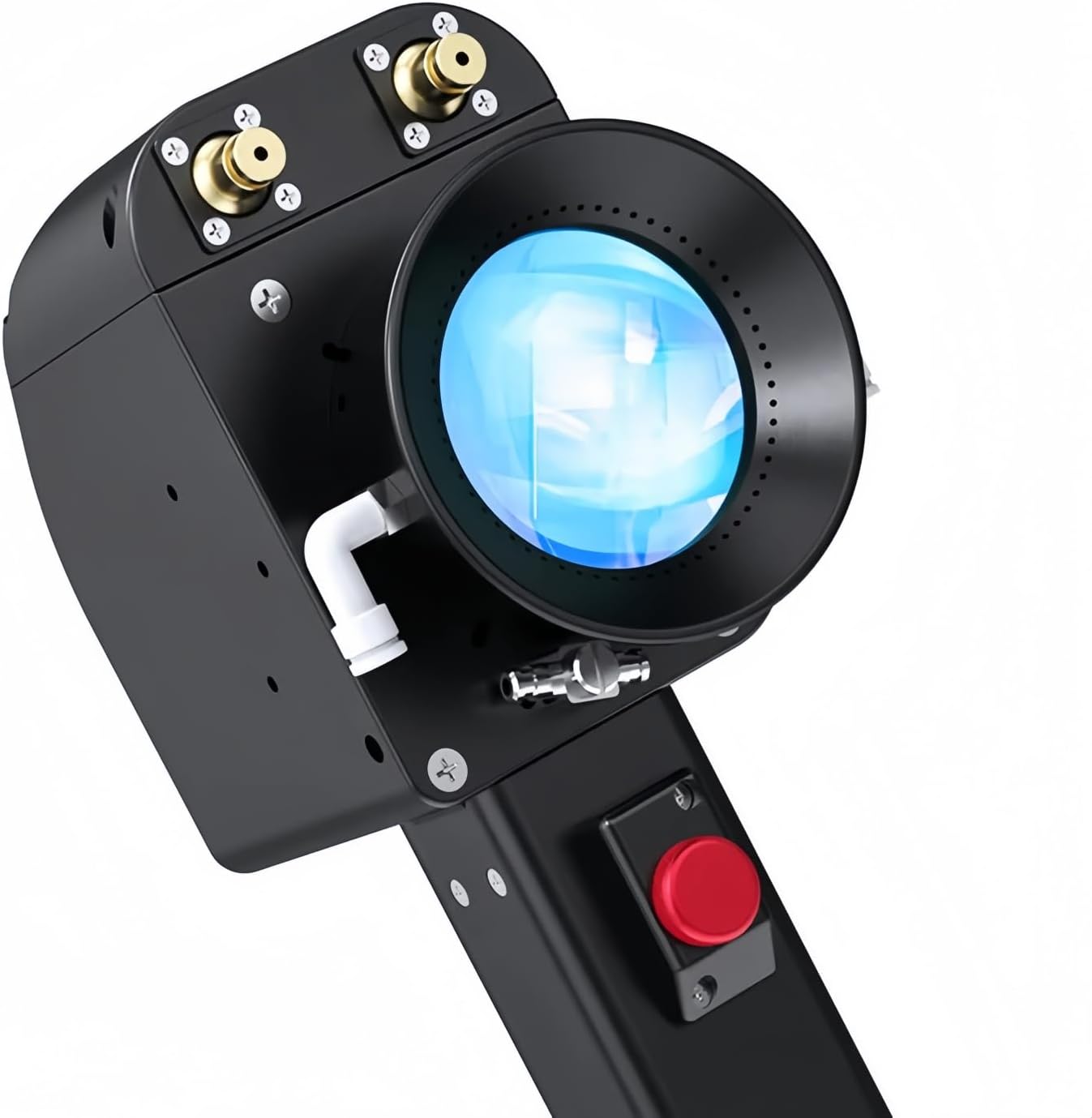
3.2.2-сүрөт: деталдуу view of the ZBTK DHCC3000 laser cleaning head, highlighting its ergonomic design and optical components.

Figure 3.2.3: The control screen interface of the DHCC3000, displaying various system settings and operational modes.
4. Орнотуу
Proper setup is crucial for the safe and efficient operation of the DHCC3000 laser cleaning system. Follow these steps carefully:
- Таңгактан чыгаруу жана текшерүү: Carefully remove all components from the packaging. Inspect for any signs of shipping damage. Report any damage to the supplier immediately.
- Жайгашкан жери: Position the main laser cleaning machine (not included with head) and the DHCC3000 head in a stable, well-ventilated area, away from flammable materials and excessive dust.
- Connect the Laser Head: Connect the DHCC3000 handheld laser cleaning head to the main laser cleaning machine's output port using the provided fiber optic cable and control cables. Ensure connections are secure and free from kinks or sharp bends.
- Кубат туташуу: Connect the main laser cleaning machine to a suitable power source as specified in its manual. Ensure proper grounding.
- Муздатуу системасы: Verify that the cooling system of the main laser machine is properly connected and filled with the appropriate coolant, and is operational.
- Коопсуздук блоктору: Confirm that all safety interlocks (e.g., door interlocks, emergency stop buttons) on the main system are functional and properly engaged.
- Баштапкы күйгүзүү: Power on the main laser cleaning machine according to its specific instructions. The DHCC3000 control screen should illuminate.
5. Иштөө нускамалары
Система орнотулгандан кийин, иштөө үчүн бул кадамдарды аткарыңыз:
- Системаны инициализациялоо: Allow the main laser system to complete its self-check and initialization process.
- Language Selection (if applicable): On the DHCC3000 control screen, navigate to settings to select your preferred language.

Figure 5.1.1: The control screen displaying language selection options, allowing users to choose their preferred interface language.
- Параметр орнотуулары: Access the cleaning parameters menu on the control screen. Adjust settings such as laser power, pulse frequency, scanning speed, and cleaning mode (e.g., line, circle, spiral) based on the material and type of contamination. Refer to the main laser machine's manual for detailed parameter guidelines.
- Target Preparation: Ensure the surface to be cleaned is stable and free from loose debris. Secure small objects if necessary.
- Wearing PPE: Don your laser safety glasses and any other required personal protective equipment.
- Лазерди иштетүү: Once parameters are set and safety measures are in place, activate the laser emission via the main system's controls.
- Тазалоо процесси: Hold the DHCC3000 handheld head firmly. Position the head at the recommended working distance from the surface. Press the trigger button on the handle to initiate the laser beam. Move the head smoothly and consistently over the area to be cleaned. Observe the cleaning effect and adjust movement speed as needed.
- Мониторинг: Continuously monitor the cleaning process and the system's performance indicators on the control screen.
- Өчүрүү: Release the trigger button to stop the laser emission. Once cleaning is complete, deactivate the laser system according to the main machine's shutdown procedure.
6. Техникалык тейлөө
Regular maintenance ensures the longevity and optimal performance of your DHCC3000 laser cleaning head. Perform these tasks routinely:
- Линзаны тазалоо: The protective lens at the front of the laser head can accumulate dust and debris. Clean it regularly using specialized optical lens cleaning solutions and lint-free wipes. Avoid abrasive materials.
- Турак жайды тазалоо: Wipe down the exterior of the handheld head with a soft, damp кездеме. Катуу химиялык заттарды же эриткичтерди колдонбоңуз.
- Кабелдик текшерүү: Periodically inspect all cables (fiber optic, control, power) for signs of wear, damage, or kinks. Replace damaged cables immediately.
- Туташуу текшерүүлөрү: Ensure all connections to the main laser machine are secure and free from corrosion.
- Сактагыч: When not in use, store the DHCC3000 in a clean, dry environment, protected from dust and extreme temperatures. Use the original packaging or a dedicated storage case if available.
- Кесиптик тейлөө: For internal components or complex issues, contact qualified service personnel or the manufacturer. Do not attempt unauthorized repairs.
7. Кыйынчылыктарды
This section addresses common issues you might encounter with the DHCC3000 laser cleaning head. For more complex problems, refer to the main laser machine's manual or contact technical support.
| Көйгөй | Мүмкүн себеп | Чечим |
|---|---|---|
| No laser emission when trigger is pressed. |
|
|
| Начар тазалоо көрсөткүчү. |
|
|
| Overheating warning on control screen. |
|
|
8. Техникалык шарттар
The following specifications pertain to the ZBTK DHCC3000 Handheld Laser Cleaning Head:
- Модель номери: DHCC3000
- Өндүрүүчү: DMK
- Кубат булагы: Laser Cleaning Head (operates in conjunction with a main laser cleaning machine)
- Камтылган компоненттер: Laser Cleaning Head
- ASIN: B0DJ2NP3BD
- Биринчи жеткиликтүү: 27-сентябрь, 2024-жыл
- Дизайн өзгөчөлүктөрү: Double Axis, Double Pendulum, Non-contact Cleaning System
- Колдонмо: Fiber Laser Cleaning Machine for Metal and Wood
9. Кепилдик жана колдоо
For information regarding warranty coverage, technical support, or service requests for your ZBTK DHCC3000 Handheld Laser Cleaning Head, please contact the seller or manufacturer directly.
Өндүрүүчү: DMK
Кошумча жардам алуу үчүн, сиз иш сапары менен болот DMK Store on Amazon.
Ask a question about this manual
Ask about setup, troubleshooting, compatibility, parts, safety, or missing instructions. Manuals+ will review the question and use this page’s manual context to help answer it.