
1. Киришүү
This manual provides essential instructions for the safe and effective operation, setup, and maintenance of your DMK ZBTK DHCP200 Handheld Laser Cleaning Head. The DHCP200 utilizes advanced dual-axis pulse technology to efficiently remove contaminants from various surfaces, including metal and wood. Please read this manual thoroughly before operating the device to ensure proper usage and to prevent damage or injury.
The DMK ZBTK DHCP200 is designed for precision cleaning applications, offering a reliable solution for tasks such as rust removal, paint stripping, and surface preparation. Its ergonomic handheld design facilitates ease of use and control.
2. Коопсуздук маалыматы
Operating a laser cleaning head requires strict adherence to safety protocols to prevent injury. Failure to follow these safety guidelines may result in serious harm or equipment damage.
- Көздү коргоо: Always wear certified laser safety goggles appropriate for the laser's wavelength and power output. Direct or reflected laser light can cause permanent eye damage.
- Терини коргоо: Avoid direct exposure of skin to the laser beam. Wear appropriate protective clothing if necessary.
- Вентиляция: Ensure adequate ventilation in the work area. Laser cleaning can produce fumes and particles that may be hazardous if inhaled.
- Күйүүчү материалдар: Keep flammable materials away from the laser cleaning area. The laser can ignite combustible substances.
- Ыйгарым укуктуу персонал: Only trained and authorized personnel should operate the laser cleaning head.
- Өзгөчө кырдаалдар тартиби: Familiarize yourself with emergency shutdown procedures for the laser system.
- Электр коопсуздугу: Ensure all electrical connections are secure and properly grounded. Do not operate the device with damaged cables or connectors.
Refer to the main laser cleaning machine's safety manual for additional comprehensive safety instructions.
3. Пакеттин мазмуну
Төмөндө тизмеленген нерселердин баары пакетиңизде бар экенин текшериңиз:
- DMK ZBTK Original DHCP200 Handheld Laser Cleaning Head (1 unit)
- Associated connection cables (e.g., fiber optic cable, control cable) - (Note: Specific cables may vary based on the complete system package.)
If any components are missing or damaged, please contact your supplier immediately.
4. Орнотуу
The DHCP200 Handheld Laser Cleaning Head is designed to integrate with a compatible fiber laser cleaning machine. Follow these general steps for setup:
- Пакеттен чыгаруу: Carefully remove the laser cleaning head and all accessories from the packaging. Inspect for any visible damage.
- Connection to Laser Source: Connect the fiber optic cable from the main fiber laser source to the designated input port on the DHCP200 cleaning head. Ensure the connection is secure and free from dust or debris.
- Control Cable Connection: Connect the control cable from the DHCP200 to the control interface of your laser cleaning machine. This enables communication and control of the cleaning head's functions.
- Кубат туташуу: Ensure the main laser cleaning machine is properly connected to a suitable power supply according to its own manual. The DHCP200 draws power from the main unit.
- Системалык интеграция: Once physical connections are made, refer to your main laser cleaning machine's manual for software configuration and system initialization.

Figure 4.1: The DHCP200 Handheld Laser Cleaning Head connected to a system control panel, illustrating the integrated setup.

4.2-сүрөт: Башка view of the DHCP200 cleaning head alongside its system control interface, showing connection points.
5. Иштөө нускамалары
Once the DHCP200 is properly set up and integrated with your laser cleaning machine, follow these steps for operation:
- Күйгүзүү: Turn on the main laser cleaning machine according to its operational guidelines.
- Системаны инициализациялоо: Allow the system to complete its self-check and initialization process.
- Тазалоо режимин тандоо: On the control panel, select the appropriate cleaning mode for your application. The DHCP200 utilizes dual-axis pulse technology for efficient cleaning.
- Параметрлерди тууралоо: Adjust laser power, pulse frequency, scanning speed, and other relevant parameters based on the material being cleaned and the desired cleaning effect. Start with lower settings and gradually increase if needed.
- Коопсуздук шаймандарын кийүү: Ensure all operators and bystanders in the vicinity are wearing appropriate laser safety goggles.
- Тазалоону баштоо: Hold the handheld cleaning head firmly. Position the laser output window at the recommended working distance from the surface to be cleaned. Activate the laser using the trigger button on the handle.
- Perform Cleaning: Move the cleaning head steadily across the surface, ensuring even coverage. Observe the cleaning process and adjust parameters as necessary.
- Өчүрүү: After cleaning, release the trigger button, then follow the shutdown procedure for your main laser cleaning machine.

Figure 5.1: The DHCP200 Handheld Laser Cleaning Head, showcasing its design for industrial cleaning tasks.
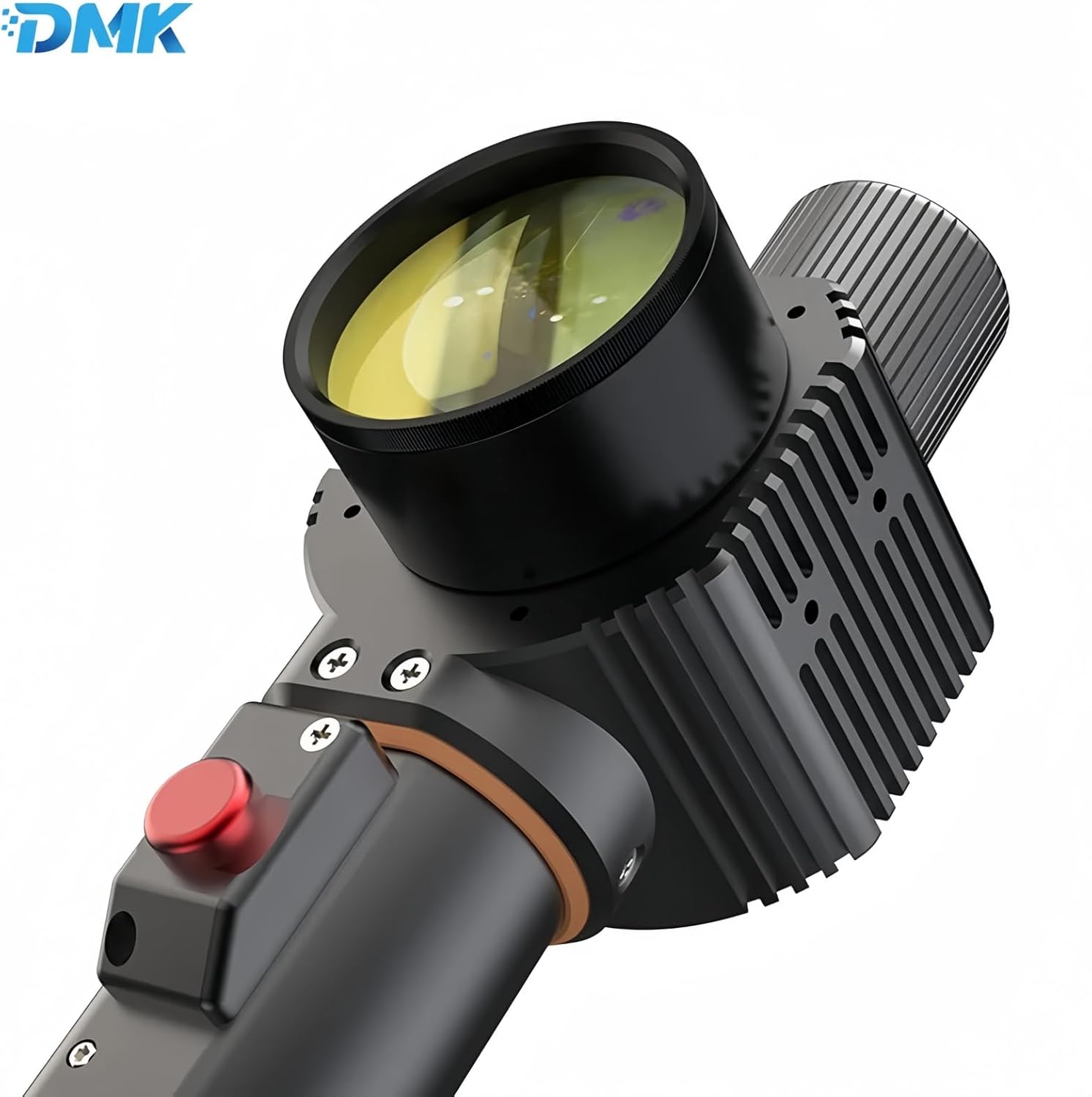
5.2-сүрөт: Детальдуу view of the cleaning head's front section, including the laser output lens and the red trigger button for activation.
6. Техникалык тейлөө
Regular maintenance ensures the longevity and optimal performance of your DHCP200 Handheld Laser Cleaning Head.
- Линзаны тазалоо: Periodically inspect the laser output lens for dust, debris, or residue. Clean gently with a lint-free cloth and appropriate optical cleaning solution. Never use abrasive materials.
- Кабелдик текшерүү: Regularly check all cables (fiber optic, control, power) for signs of wear, cuts, or damage. Replace damaged cables immediately.
- Турак жайды тазалоо: Keep the exterior housing of the cleaning head clean using a soft, dry cloth. Avoid using harsh chemicals or solvents.
- Сактагыч: When not in use, store the cleaning head in a clean, dry, and dust-free environment, preferably in its original packaging or a protective case.
- Кесиптик тейлөө: For internal components or complex issues, contact qualified service personnel. Do not attempt to disassemble the cleaning head yourself.

Сүрөт 6.1: Алдыңкы жана арткы views of the DHCP200 cleaning head, illustrating its overall structure for maintenance inspection.
7. Кыйынчылыктарды
Бул бөлүмдө сиз кездешиши мүмкүн болгон кеңири таралган көйгөйлөр каралат. Бул жерде көрсөтүлбөгөн көйгөйлөр боюнча техникалык колдоо кызматына кайрылыңыз.
| Көйгөй | Мүмкүн себеп | Чечим |
|---|---|---|
| Лазердик чыгаруу жок |
|
|
| Начар тазалоо көрсөткүчү |
|
|
| Control panel error message |
|
|
8. Техникалык шарттар
Key technical specifications for the DMK ZBTK DHCP200 Handheld Laser Cleaning Head:
- Модел: DHCP200
- Өндүрүүчү: DMK
- Технология: Dual-Axis Pulse
- Кубат булагы: Laser Cleaning Head (integrated with main laser machine)
- Камтылган компоненттер: Laser Cleaning Head
- Батареялар талап кылынат: Жок