
1. Киришүү
The Jesverty SPS-1560N is a high-performance, variable DC regulated bench power supply designed for precision applications. Featuring advanced encoder knobs for precise adjustments, a clear 4-digit LED display, and automatic Constant Voltage (C.V.) and Constant Current (C.C.) modes, this unit is ideal for electronic laboratories, DIY projects, and various testing scenarios. Its compact and lightweight design ensures portability and efficient use of workbench space.
2. Коопсуздук маалыматы
- Эскертүү: This model does NOT have a 115V/230V input selectable switch. The power cords and the AC input settings vary depending on the destination for the product at the factory-shipment. Ensure the correct input voltage is supplied for your region to prevent damage.
- Жерге туташтыргычты ар дайым туура жерге туташтыргычка туташтырыңыз.
- Электр менен камсыздоону нымдуу же ысык абалда иштетпеңизamp шарттар.
- Ашыкча ысып кетүүнүн алдын алуу үчүн аппараттын айланасында жетиштүү желдетүүнү камсыз кылыңыз.
- Do not attempt to open or modify the power supply. Refer all servicing to qualified personnel.
- Before connecting or disconnecting loads, ensure the output is turned off.
3. Пакеттин мазмуну
Төмөндө тизмеленген нерселердин баары пакетиңизге камтылганын текшериңиз:
- 1 x Jesverty SPS-N Unit
- 1 x Power Cord (specific to region)
- 1 x Instruction Manual
4. Продукт бүтүп калдыview
The Jesverty SPS-1560N DC Power Supply features a user-friendly interface with precise controls and clear displays.
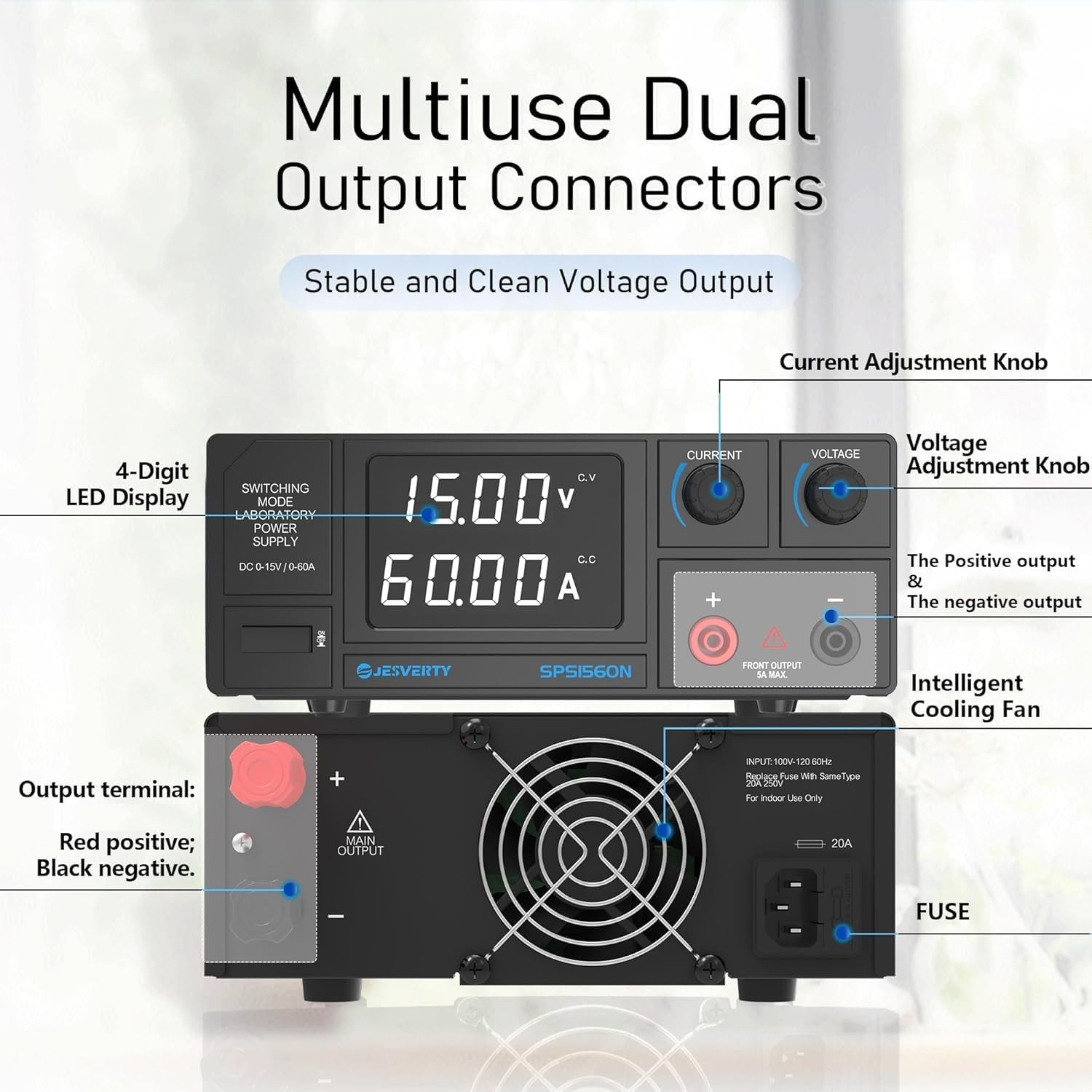
Сүрөт 1: Алдыңкы жана арткы панелдин үстүндөview
Алдыңкы панелдин өзгөчөлүктөрү:
- 4 орундуу LED дисплей: Чыныгы убактагы том көрсөтөтtage (V), current (A), and power (W) values with high resolution (up to 0.01V, 0.001A).
- Encoder Adjustment Knobs: Dedicated knobs for precise voltage and current adjustment. Pressing the knob allows switching between coarse and fine adjustment modes.
- Output Control Button: Чыгуучу кубаттуулукту КҮЙГҮЗҮҮ/ӨЧҮРҮҮ.
- USB-A and USB-C Output Terminals: Тышкы түзмөктөрдү кубаттоо үчүн.
- Positive (+) and Negative (-) Output Terminals: For connecting the load.
- Ground (GND) Terminal: Коопсуз жерге туташтыруу үчүн.
Арткы панелдин өзгөчөлүктөрү:
- AC киргизүү розеткасы: For connecting the regional power cord.
- Кубат которгучу: Main power ON/OFF switch for the unit.
- Акылдуу муздатуу желдеткичи: Натыйжалуу жылуулукту таркатуу үчүн температурасы көзөмөлдөнгөн желдеткич.
- Страховка кармагыч: Коргоочу сактагычты камтыйт.
5. Орнотуу
- Жайгашкан жери: Place the power supply on a stable, level surface with adequate ventilation. Ensure no obstructions block the cooling fan vents.
- Кубат туташуу: Connect the provided AC power cord to the AC input socket on the rear panel of the power supply and then to a suitable wall outlet.
- Баштапкы күйгүзүү: Flip the main power switch on the rear panel to the 'ON' position. The LED display on the front panel will illuminate.
- Чыгуу терминалдары: Connect your load to the positive (+) and negative (-) output terminals using appropriate test leads. For safety, ensure the output is OFF before connecting the load.
6. Иштөө нускамалары
6.1. Setting Voltage жана Current
The SPS-1560N utilizes encoder knobs for precise adjustment of output voltage жана ток.

Figure 2: Encoder Knob Adjustment
- Тtage Тууралоо: Rotate the 'Voltage' knob to adjust the desired output voltage. Press the knob to switch between coarse (whole number) and fine (decimal) adjustment modes. The resolution is 0.01V.
- Учурдагы тууралоо: Rotate the 'Current' knob to set the maximum output current limit. Press the knob to switch between coarse and fine adjustment modes. The resolution is 0.001A.
- Output ON/OFF: Каалаган томду койгондон кийинtage and current, press the 'Output' button to enable or disable the power output to the load.
6.2. Auto C.V. and C.C. Mode
Кубат булагы автоматтык түрдө туруктуу volt ортосунда которулатtage (C.V.) and Constant Current (C.C.) modes based on the load. The set voltage and current values act as the crossover point for mode switching.
- Constant Voltage (C.V.) Mode: When the load resistance is high, the output voltage remains constant at the set value, and the output current adjusts according to the load.
- Constant Current (C.C.) Mode: When the load resistance is low, the output current remains constant at the set limit, and the output voltage adjusts according to the load.
6.3. USB Output Terminals
The front panel includes USB-A and USB-C output terminals for convenient charging of compatible devices.
6.4. Батареяны кубаттоо функциясы
The power supply can be used for charging various battery types. Ensure correct voltage and current settings for the specific battery chemistry.

Figure 3: Battery Charging Application
- Маанилүү: Always set the current and voltage correctly according to the battery's specifications before initiating charging to prevent damage to the battery or the power supply.
7. Техникалык тейлөө
- Түзмөктү таза жана чаңсыз кармаңыз. Тазалоо үчүн жумшак, кургак чүпүрөк колдонуңуз.
- Ensure the ventilation openings are not blocked to allow proper airflow for the cooling fan.
- Store the power supply in a cool, dry environment when not in use.
8. Кыйынчылыктарды
- Кубат жок: Check the AC power cord connection, the main power switch on the rear, and the fuse.
- Чыгуу жок: Ensure the 'Output' button on the front panel is pressed to enable output. Check all connections to the load.
- Туура эмес окуулар: Verify that the test leads are properly connected and that the multimeter (if used for verification) is calibrated and set correctly.
- Ашыкча жүктөн коргоо: If the OCP (Over Current Protection) or OVP (Over Voltage Protection) indicator lights up, disconnect the load, reduce the set current/voltage, and then re-enable the output.
9. Техникалык шарттар

Сүрөт 4: Продукциянын өлчөмдөрү
| Өзгөчөлүк | Спецификация |
|---|---|
| Модель номери | SPS-1560N |
| Output Voltage Диапазон | 0-15V |
| Чыгуу токунун диапазону | 0-60A |
| Power Output | 900 Вт |
| Дисплей түрү | 4 цифралуу LED |
| Тtage Resolution | 0.01V |
| Учурдагы токтом | 0.001A |
| Башкаруу түрү | Encoder Knobs (Coarse & Fine) |
| Муздатуу | Температура көзөмөлдөнүүчү желдеткич |
| Көмөкчү жыйынтыктар | USB-A, USB-C |
| Өлчөмдөрү (болжол менен) | 11.4(D) x 3.5(W) x 8.3(H) inches |
| Салмагы (болжол менен) | 6.38 фунт (3.2 кг) |
| Материал | Металл |
| Туташтыргыч түрү | Banana Jack, AC Power Cord |
10. Кепилдик жана колдоо
Jesverty provides professional technical support for this product. Should you encounter any problems or have questions regarding your order or the product's operation, please feel free to contact Jesverty Customer Service via Amazon or email. Refer to your purchase documentation for specific warranty details.