
1. Киришүү
The BOYA V35 is a compact and easy-to-use 2.4GHz wireless microphone system designed for capturing clear, high-quality audio. It is ideal for content creators, journalists, and anyone needing a reliable wireless audio solution for cameras and camcorders with a 3.5mm input. This manual provides detailed instructions for setting up, operating, and maintaining your BOYA V35 system.
2. Кутуда эмне бар
Сураныч, пакеттин мазмунун текшерип, бардык буюмдар бар экенин текшериңиз:
- BY-V35 Transmitter (TX) x 2
- BY-V35 RX Receiver x 1
- BY-V35 Foam Windscreen x 2
- USB-C to USB-A Charging Cable x 1
- 3.5 мм TRS - TRS аудио кабели x 1
- Заряддоо кутусу x 1
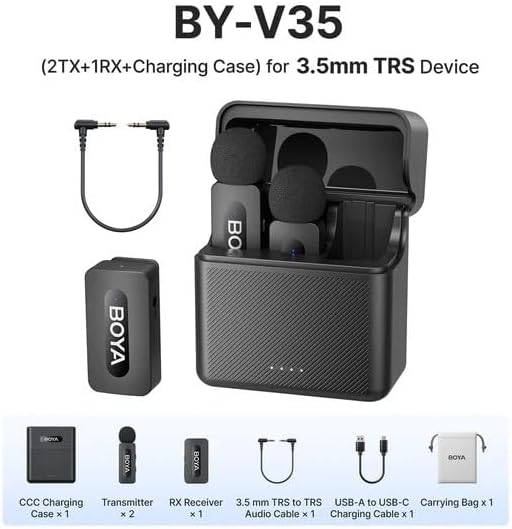
2.1-сүрөт: Diagram showing all components included in the BOYA V35 package, including two transmitters, one receiver, a charging case, foam windscreens, and cables.
3. Продукт бүтүп калдыview
3.1. Өткөргүч (TX)

3.1-сүрөт: Фронт view of the BY-V35 Transmitter with the foam windscreen attached, showing the BOYA logo and indicator light.

3.2-сүрөт: Side view of the BY-V35 Transmitter, illustrating the integrated clip for attachment to clothing and the foam windscreen.
The transmitter is a compact unit with an integrated microphone and clip. It features a power button, a status indicator light, and a USB-C charging port. The omnidirectional microphone is designed to capture sound from all directions.
3.2. Кабыл алуучу (RX)

3.3-сүрөт: Side view of the BY-V35 Receiver, showing the USB-C port, power button, and 3.5mm output jack.
The receiver connects to your recording device (camera, camcorder). It includes a 3.5mm TRS output jack, a power button, a status indicator light, and a USB-C charging port. The receiver is designed for easy connection and stable signal reception.
3.3. Заряддоо иши
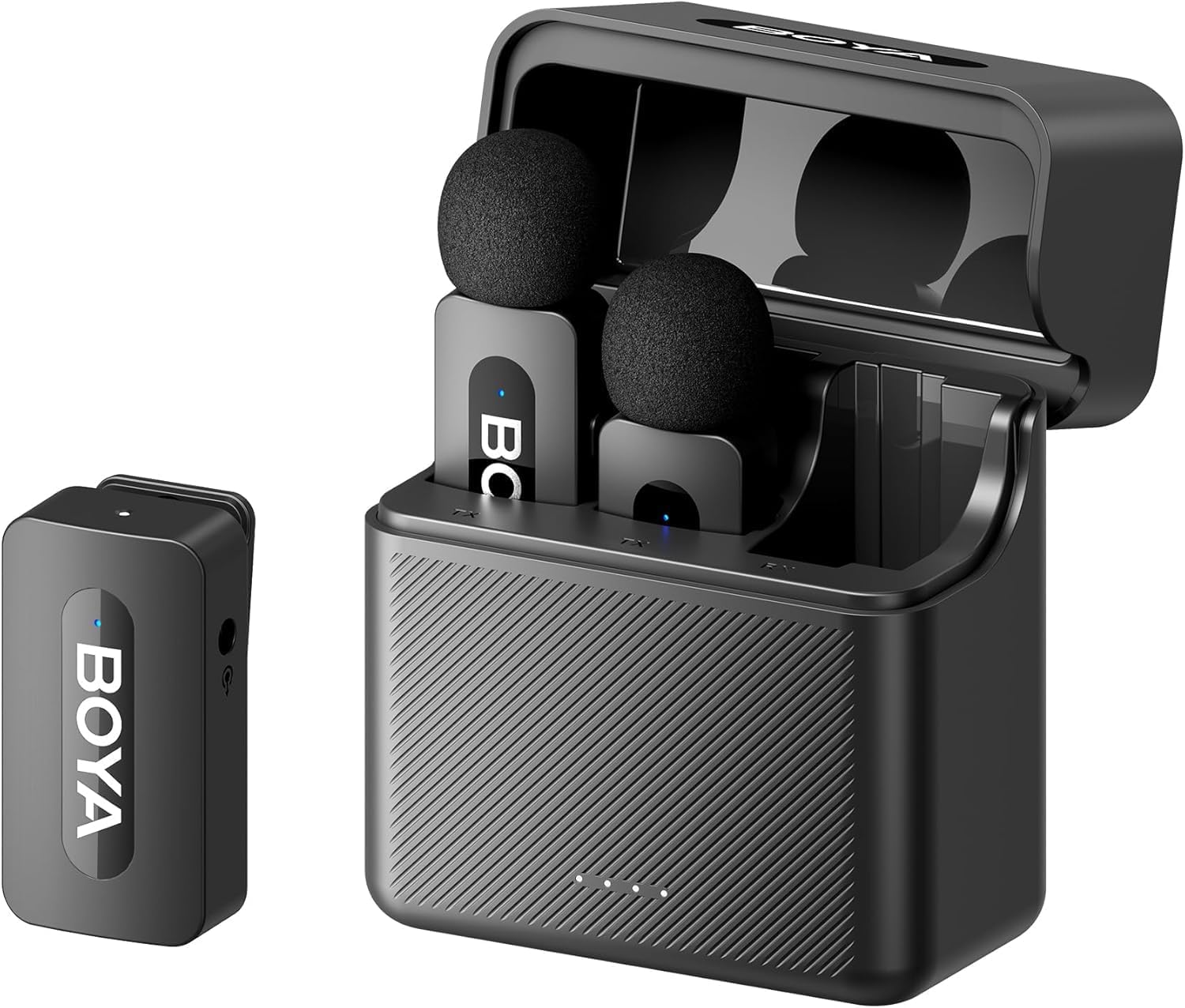
3.4-сүрөт: The complete BOYA V35 system, including the charging case, two transmitters, and one receiver, ready for storage or charging.
The charging case provides convenient storage and charging for both transmitters and the receiver. It has its own USB-C charging port and LED indicators to show the charging status of the case and the devices inside.
4. Орнотуу колдонмосу
4.1. Түзмөктөрдү заряддоо
- Өткөргүчтөрдү жана кабыл алгычтарды заряддоочу кутуга салыңыз.
- Connect the USB-C to USB-A charging cable to the charging case and a USB power adapter (not included).
- The LED indicators on the charging case will show the charging status. The device indicators will also light up during charging.
- Ensure all devices are fully charged before first use for optimal battery life.
4.2. Күйгүзүү жана жупташтыруу
- Press and hold the power button on both the transmitter(s) and the receiver for a few seconds until the indicator lights turn on.
- The devices will automatically attempt to pair. A solid blue light on both the transmitter and receiver indicates a successful connection. A blinking light indicates searching for a connection.
4.3. Жаздыруучу түзмөккө туташуу
- Connect one end of the 3.5mm TRS to TRS audio cable to the 3.5mm output jack on the BY-V35 receiver.
- Connect the other end of the 3.5mm TRS to TRS audio cable to the microphone input jack on your camera or camcorder.
- Ensure your recording device's audio input is set to external microphone if applicable.
4.4. Өткөргүчтү бекитүү
- Attach the foam windscreen to the transmitter's microphone to reduce wind noise and plosives.
- Use the integrated clip on the back of the transmitter to securely attach it to the speaker's clothing, ideally about 6-8 inches (15-20 cm) from the mouth.
5. Иштөө нускамалары
5.1. Күйгүзүү/өчүрүү
To power on or off the transmitter or receiver, press and hold the power button for approximately 3 seconds. The indicator light will illuminate or turn off accordingly.
5.2. Аудио жаздыруу
- Ensure the transmitter(s) and receiver are powered on and successfully paired (solid blue indicator light).
- Start recording on your connected camera or camcorder.
- Monitor the audio levels on your recording device to ensure proper sound capture.
5.3. Status Indicator Lights
- Катуу көк: Device is powered on and successfully paired.
- Көк түстөгү бүлбүлдөгөн: Device is powered on and searching for a connection.
- Катуу кызыл: Батарея аз.
- Blinking Red (while charging): Кубатталууда.
- Solid Green (while charging): Толугу менен заряддалган.
6. Техникалык тейлөө
6.1. Тазалоо
- Түзмөктөрдү жумшак, кургак чүпүрөк менен сүртүңүз.
- Катуу химиялык заттарды же абразивдүү тазалоочу каражаттарды колдонбоңуз.
- Ensure the foam windscreens are clean and free of debris. Replace if damaged.
6.2. Сактоо
- Store the BOYA V35 system in its charging case when not in use to protect it from dust and damage.
- Салкын, кургак жерде, түз күндүн нурунан жана экстремалдык температурадан алыс сактаңыз.
6.3. Батареяга кам көрүү
- Charge the devices regularly, even if not used frequently, to maintain battery health.
- Батареяларды узак убакыт бою толугу менен зарядсыздандырбаңыз.
7. Кыйынчылыктарды
| Көйгөй | Мүмкүн себеп | Чечим |
|---|---|---|
| Үн жок же үнү төмөн | Devices not powered on; Not paired; Incorrect cable connection; Recording device volume too low. | Ensure TX and RX are on and paired. Check 3.5mm cable connection. Increase recording device's input volume. |
| Poor sound quality (static, dropouts) | Interference; Out of range; Low battery; Damaged windscreen. | Move closer to the receiver. Charge devices. Replace windscreen. Avoid strong electromagnetic fields. |
| Түзмөктөр жупташкан жок | Devices too far apart; Interference; One device not powered on. | Ensure TX and RX are close to each other. Power cycle both devices. Check battery levels. |
| Заряддоочу куту түзмөктөрдү кубаттабайт | Charging case battery empty; Poor contact; Faulty cable. | Charge the charging case. Ensure devices are correctly seated. Try a different USB-C cable. |
8. Техникалык шарттар
| Өзгөчөлүк | Деталь |
|---|---|
| Бренд | БОЯ |
| Модель номери | BY-V35 |
| Байланыш технологиясы | зымсыз 2.4GHz |
| Туташтыргыч түрү | 3.5 мм Джек |
| Полярдык үлгү | Көп багыттуу |
| Жыштык диапазону | 20Гц-16кГц |
| Ызы-чуунун катышы | 80 дБ |
| Power Source | Батарея менен иштейт |
| Элемент Салмагы | 0.2 Kilograms (approximate, for entire kit) |
| Элементтин өлчөмдөрү | 6.1 x 2.2 x 3.4 inches (approximate, for entire kit) |
| Шайкеш түзмөктөр | Видеокамера, Фотоаппарат |
9. Кепилдик жана колдоо
Кепилдик жөнүндө маалымат жана техникалык колдоо алуу үчүн, расмий BOYA компаниясына кайрылыңыз webсайтына кириңиз же жергиликтүү дистрибьюторуңузга кайрылыңыз. Кепилдик боюнча дооматтар үчүн сатып алганыңызды тастыктаган документти сактап коюңуз.