
Introduction
Thank you for choosing the XGP X1 Motorcycle Helmet Speakers. This manual provides detailed instructions for the proper installation, operation, and maintenance of your new Bluetooth headset. Designed for motorcycle riders, the X1 offers high-quality audio, stable wireless connectivity, and essential features to enhance your riding experience. Please read this manual thoroughly before use to ensure optimal performance and safety.
Кутуда эмне бар
Сиздин пакетте бардык компоненттер бар экенин текшериңиз:
- X1 Main Unit
- 40mm Hi-fi Speaker (2)
- Boom микрофону
- Баскычтуу микрофон
- USB-C Cable
- Металл кронштейн
- 3M Sticker Bracket
- Динамик площадкалары
- User Manual

Figure 1: XGP X1 Product Package Contents
Продукт бүттүview
The XGP X1 is a state-of-the-art motorcycle helmet communication system designed for clarity, durability, and ease of use. Key features include:
- Өркүндөтүлгөн Bluetooth 5.3: Ensures faster data transmission, lower latency, and a broader transmission range for seamless connectivity.
- Узартылган батареянын иштөө мөөнөтү: An 800mAh battery provides up to 60 hours of music playback/phone calls and 360 hours of standby time on a 2-hour charge.
- IP67 суу өткөрбөйт рейтинги: Comprehensive sealing protects the unit from water ingress, allowing use in various weather conditions.
- Жогорку тактыктагы аудио: Equipped with 40mm Hi-fi speakers and professional tuning for clear, vibrant sound with deep bass and clear mids/highs.
- Dual Microphone Options: Includes both a boom microphone and a button microphone for compatibility with different helmet types.
- DSP/CVC Noise Cancellation: Effectively reduces environmental noise for clear voice communication.
- Үн жардамчысы интеграциясы: Double-click the power button to activate Siri or Google Assistant for navigation, music control, and calls.
- Эки телефон байланышы: Supports simultaneous connection to two mobile phones without re-pairing, allowing convenient switching.
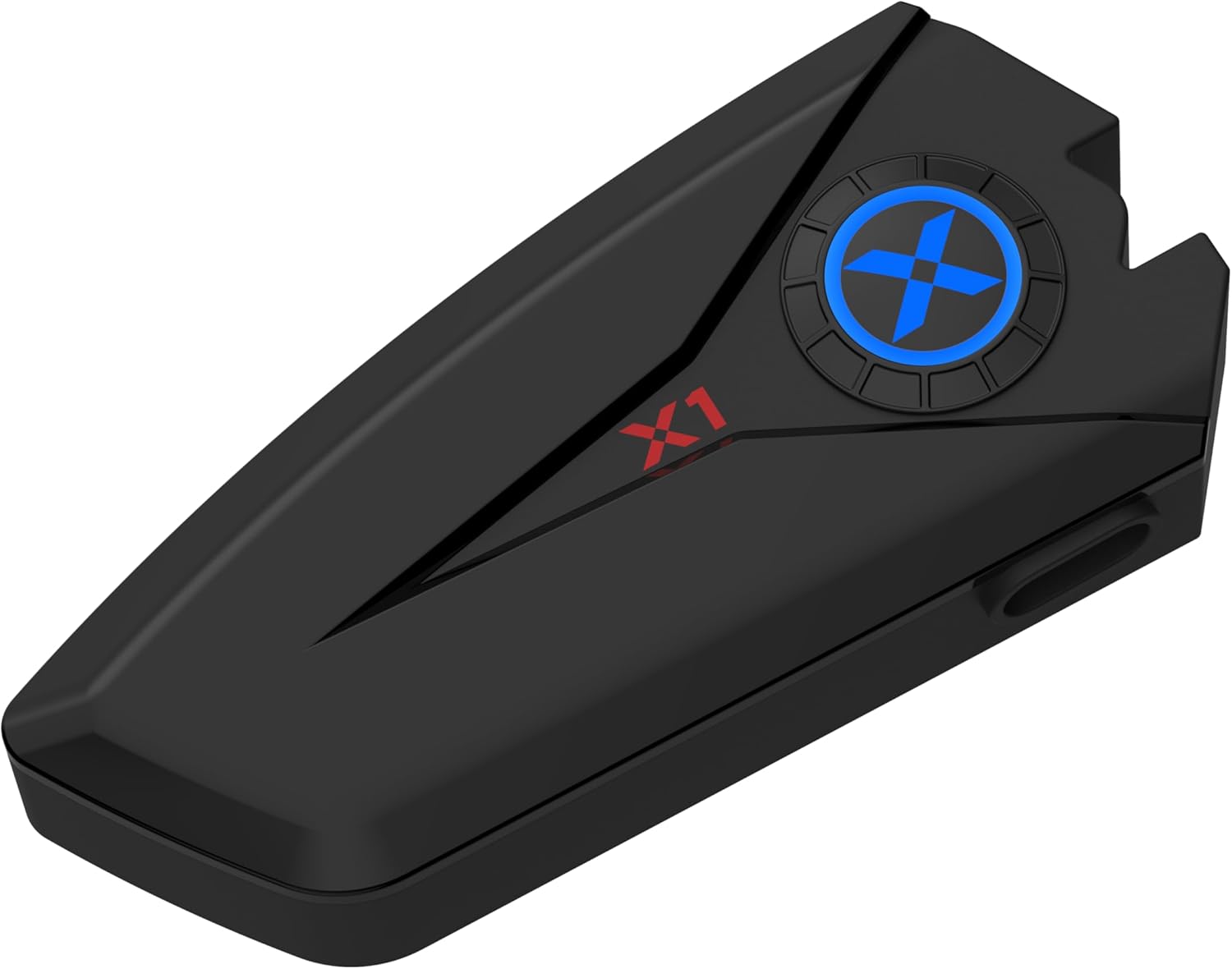
Figure 2: XGP X1 Main Unit

Figure 3: High-Capacity Bluetooth V5.3 Chip

Figure 4: 40mm Hi-Fi Stereo Sound Quality Components
Орнотуу жана орнотуу
The X1 is designed for broad helmet compatibility, offering two microphone types and two mounting bracket options to suit various helmet styles.
Choosing Your Microphone
- Бум микрофону: Ideal for open-face, modular, or flip-up helmets where the microphone needs to extend closer to your mouth.
- Баскычтуу микрофон: Suitable for full-face helmets where the microphone can be discreetly placed inside the chin bar.

Figure 5: Two Forms of Microphone
Башкы блокту орнотуу
Choose between the metal bracket or the 3M sticker bracket based on your helmet type and preference.
- Металл кашаа: Provides a secure, clamp-on attachment to the helmet shell.
- 3M Sticker Bracket: Offers a strong adhesive attachment for helmets where clamping is not feasible or preferred. Ensure the surface is clean and dry before applying.
Динамик орнотуу
The 40mm Hi-fi speakers attach inside the helmet using velcro pads. Position them directly over your ears for optimal sound quality. Use the included speaker pads for comfort and proper fit.

Figure 6: Great Helmet Compatibility
Иштөө нускамалары
Күйгүзүү/өчүрүү
- Күйгүзүү: Индикатор жарыгы күйгүчө кубат баскычын болжол менен 3 секунд басып туруңуз.
- Өчүрүү: Күйгүзүү баскычын болжол менен 5 секунд басып, индикатор өчкөнчө кармап туруңуз.
Bluetooth Жупташтыруу
- X1 өчүк экенин текшериңиз.
- Күйгүзүү баскычын индикатор жарыгы кызыл жана көк түстөр менен кезектешип күйүп-өчкөнгө чейин 5-7 секунд басып туруңуз, бул жупташтыруу режимин көрсөтөт.
- Уюлдук телефонуңузда Bluetooth'ду күйгүзүп, жеткиликтүү түзмөктөрдү издеңиз.
- Select "XGP X1" from the list of devices.
- Туташкандан кийин индикатор жарыгы катуу көк түскө айланат.
Connecting Two Mobile Phones
The X1 supports simultaneous connection to two mobile phones without the need for re-pairing. This is convenient for users with separate personal and work phones.
- Pair the first phone following the Bluetooth Pairing steps above.
- Once the first phone is connected, disable Bluetooth on the first phone temporarily.
- Put the X1 back into pairing mode (red and blue flashing).
- Экинчи телефонду жупташтырыңыз.
- Re-enable Bluetooth on the first phone. Both phones should now be connected to the X1.

Figure 7: Two Mobile Phones Connection
Чалууларды башкаруу
- Чакырууга жооп берүү: Кубат баскычын кыска басыңыз.
- Чакырууну аяктоо: Чалуу учурунда Кубат баскычын кыска басыңыз.
- Чакырууну четке кагуу: Кубат баскычын 2 секунд басып, кармап туруңуз.
- Auto-Answer: The X1 can be set to auto-answer incoming calls after 6 seconds. Refer to the user manual for specific settings if this feature is not enabled by default.

Figure 8: Auto-Answer Incoming Phone Call
Музыканы ойнотуу
- Ойнотуу/тындыруу: Кубат баскычын кыска басыңыз.
- Кийинки трек: Үндү жогорулатуу баскычын кыска басыңыз.
- Мурунку трек: Үндү азайтуу баскычын кыска басыңыз.
- Үндү көзөмөлдөө: Long press Volume Up or Volume Down buttons.
Үн жардамчысы
Activate your phone's voice assistant (Siri, Google Assistant) directly from the X1.
- Үн Жардамчысын жандыруу: Double-click the Power button. You can then issue commands for GPS navigation, music playback, making calls, and more.

9-сүрөт: Үн жардамчысынын функциясы
Заряддоо жана батареянын иштөө мөөнөтү
The X1 is equipped with an 800mAh battery, providing extensive usage time.
- Заряддоо убактысы: Берилген USB-C кабелин колдонуп, толук кубаттоо үчүн болжол менен 2 саат талап кылынат.
- Music Playback/Phone Call Time: 60 саатка чейин.
- Күтүү убактысы: 360 саатка чейин.
Connect the USB-C cable to the charging port on the X1 unit and a suitable USB power source (e.g., computer USB port, wall adapter). The indicator light will show charging status (refer to the full user manual for specific light indications).

10-сүрөт: Батареянын иштөө мөөнөтү жана заряддоо
Waterproofing (IP67)
The XGP X1 features an IP67 waterproof rating, meaning it is protected from dust and can withstand immersion in water up to 1 meter for 30 minutes. This design ensures reliable performance even in rainy conditions.
- Each component is carefully sealed to prevent water ingress.
- Allows you to focus on riding without concern for light rain or splashes.
While the device is waterproof, avoid prolonged submersion or exposure to high-pressure water jets to maintain its integrity.

11-сүрөт: IP67 суу өткөрбөйт
Техникалык тейлөө
To ensure the longevity and optimal performance of your XGP X1 headset, follow these maintenance guidelines:
- Тазалоо: Wipe the main unit and speakers with a soft, damp кездеме. Катуу химиялык заттарды же абразивдүү тазалагычтарды колдонбоңуз.
- Сактагыч: Узак мөөнөткө колдонулбаганда, аспапты кургак, салкын жерде, тике күндүн нурунан жана өтө температурадан алыс сактаңыз.
- Заряддоо: Charge the battery regularly, even if not in frequent use, to maintain battery health. Avoid fully discharging the battery for prolonged periods.
- Порт коргоо: Ensure the USB-C charging port cover is securely closed when not charging to maintain waterproofing.
- Микрофонго кам көрүү: Keep the microphone foam cover clean and free from debris to ensure clear voice pickup.
Проблемаларды чечүү
If you encounter issues with your XGP X1, please refer to the following common solutions:
| Көйгөй | Мүмкүн себеп | Чечим |
|---|---|---|
| Түзмөк күйбөйт | Аз батарея; Кубат баскычы жетишерлик көпкө басылган жок | Charge the device fully; Press and hold the Power button for 3 seconds. |
| Телефон менен жупташтыруу мүмкүн эмес | Device not in pairing mode; Bluetooth off on phone; Too many paired devices | Ensure device is flashing red/blue; Enable phone Bluetooth; Delete old Bluetooth connections on phone. |
| Динамиктерден үн жок | Volume too low; Speakers not connected properly; Phone volume low | Increase X1 volume; Check speaker connections; Increase phone volume. |
| Poor call quality/noise | Microphone position; Excessive wind noise; DSP/CVC not active | Adjust microphone closer to mouth; Ensure microphone foam is intact; DSP/CVC is automatic, but check for obstructions. |
| Батареянын иштөө мөөнөтү кыска | Батарея толук заряддалган эмес; Эски батарея | Ensure full 2-hour charge; Contact support if battery life significantly degrades over time. |
If the problem persists after trying these solutions, please contact XGP customer support for further assistance.
Техникалык шарттар
| Өзгөчөлүк | Деталь |
|---|---|
| Модель аты | XGP X1 |
| Байланыш технологиясы | Bluetooth 5.3 |
| Наушник уясы | C түрү |
| Батареянын иштөө мөөнөтү | 60 Hours (Music/Talk), 360 Hours (Standby) |
| Заряддоо убактысы | 2 саат |
| Сууга туруктуулук деңгээли | IP67 суу өткөрбөйт |
| Аудио драйвер түрү | Dynamic Driver (40mm Hi-fi Speaker) |
| Noise Control | Active Noise Cancellation (DSP/CVC) |
| Башкаруу ыкмасы | Үн, Баскыч |
| Шайкеш түзмөктөр | Мобилдик телефондор |
| Элемент Салмагы | 6.7 унция |
| Өндүрүүчү | XGP |
| Дата биринчи жеткиликтүү | 10-октябрь, 2024-жыл |
Кепилдик жана колдоо
XGP products are manufactured to high-quality standards. For information regarding warranty coverage, please refer to the warranty card included in your product packaging or visit the official XGP website. If you require technical assistance, troubleshooting beyond this manual, or have questions about your XGP X1, please contact XGP customer support through the contact information provided on our webсайт же сатып алуу платформаңыз.
Онлайн колдоо: Visit the XGP official website for FAQs, updated manuals, and contact forms.
Электрондук почта колдоо: Refer to your product packaging or the XGP webкардарларды тейлөө электрондук почта дареги үчүн сайт.