
JZAQ BT40
JZAQ BT40 Motorcycle Helmet Bluetooth Headset User Manual
Модел: BT40
Introduction
Thank you for choosing the JZAQ BT40 Motorcycle Helmet Bluetooth Headset. This manual provides detailed instructions for the proper installation, operation, and maintenance of your device. Please read this manual thoroughly before use to ensure optimal performance and safety.
Пакеттин мазмуну
Төмөндө тизмеленген нерселердин баары пакетиңизге камтылганын текшериңиз:
- 1 x Helmet Headset (BT40)
- 6 x Headphone VELCRO (Adhesive Pads)
- 1 x USB заряддоо кабели
- 1 x User Manual
- 2 x Noise Reducing Sponge Heads (Microphone Covers)

Image: The JZAQ BT40 Helmet Bluetooth Headset, including the main unit with speakers and microphone, USB charging cable, and various adhesive pads and microphone covers.
Техникалык шарттар
| Модель аты | BT40 |
| Bluetooth версиясы | V5.0+EDR |
| Bluetooth аралык | 10 метрге чейин (33 фут) |
| Батарея түрү | 3.7V/600mA литий батареясы |
| Заряддоо убактысы | Болжол менен 2 саат |
| Күтүү убактысы | 500 саатка чейин |
| Working Time (Playtime/Talk Time) | 90 саатка чейин |
| Суу каршылык | IP67 Deep Waterproof Technology |
| Headphone Thickness | 0.35 дюйм (болжол менен 9 мм) |
| Noise Control | DSP Noise Cancelling Technology |
| Шайкеш түзмөктөр | Smartphones, MP3 Players, GPS Devices |

Image: A diagram illustrating the dimensions of the headset's earpieces, speaker, microphone, and control unit, highlighting the 0.35-inch thickness of the earpieces.
Орнотуу жана орнотуу
Follow these steps to properly install the BT40 headset into your helmet:
- Prepare Earphones: Take the helmet headphones from the box. Attach the "Magic Tape" (Velcro adhesive pads) to the back of both earphones.
- Position Earphones: Remove the protective tape paper from the Velcro on the earphones. Carefully position and stick the earphones into the helmet's ear recesses on both sides. Ensure proper alignment before pressing firmly.
- Secure Headset: Once the Velcro is attached to the helmet, secure the headset earphones to these Velcro pads.
- Микрофондун жайгашуусу: Position the microphone arm so that the microphone is close to your mouth for clear communication.
- Акыркы текшерүү: Ensure all components are securely attached and comfortable within the helmet.
Маанилүү эскертүү: Before ordering, please check the inner size of your helmet to ensure a comfortable fit for the headset. The headset's ultra-thin design (0.35 inches) is suitable for most helmets without causing discomfort.

Image: The BT40 headset featuring its ultra-thin speakers, designed to fit comfortably within helmet ear spaces without squeezing the ears.

Image: A motorcycle helmet with the JZAQ BT40 headset microphone arm visible, demonstrating typical installation.
Иштөө нускамалары
Күйгүзүү/өчүрүү жана жупташтыруу
- Күйгүзүү: Press and hold the Power button (usually the middle button on the control unit) until the indicator light illuminates.
- Өчүрүү: Индикатор жарыгы өчкөнчө Кубат баскычын басып, кармап туруңуз.
- Жупташтыруу: When powered on for the first time or when entering pairing mode, the headset will automatically search for Bluetooth devices. On your smartphone or other Bluetooth-enabled device, search for "BT40" in the Bluetooth settings and select it to connect.
- Автоматтык туташуу: After initial pairing, the headset will automatically connect to the last paired device when powered on, if the device is within range.
Чалууларды башкаруу
- Чакырууга жооп берүү: The headset supports automatic answering of incoming calls.
- Чакырууну аяктоо: Press the Power button once to end an active call.
- Чакырууну четке кагуу: Press and hold the Power button for approximately 2 seconds to reject an incoming call.
Музыканы ойнотуу
- Ойнотуу/тындыруу: Press the Power button once to play or pause music.
- Көлөмү: Press the "+" button to increase volume.
- Үнүн азайтуу: Press the "-" button to decrease volume.
- Кийинки ыр: Press and hold the "+" button for approximately 2 seconds to skip to the next track.
- Мурунку ыр: Press and hold the "-" button for approximately 2 seconds to go to the previous track.
Үн жардамчысы
- Үн Жардамчысын жандыруу: Double-click the Power button to activate your smartphone's voice assistant (e.g., Siri, Google Assistant).

Сүрөт: деталдуу view of the headset's control unit, showing the volume up (+), power/play/pause, and volume down (-) buttons, along with the microphone.
Видео: Бүттүview of the JZAQ Motorcycle Helmet Bluetooth Headset BT40, demonstrating its components and basic features.
Техникалык тейлөө
- Тазалоо: Гарнитураны тазалоо үчүн жумшак, кургак чүпүрөктү колдонуңуз. Катуу химиялык заттарды же абразивдүү материалдарды колдонуудан алыс болуңуз.
- Суу таасири: While the headset is IP67 waterproof, prolonged submersion or exposure to high-pressure water jets should be avoided. Ensure the charging port cover is securely closed when not charging.
- Сактагыч: Гарнитураны күн нурунан жана экстремалдык температурадан алыс салкын, кургак жерде сактаңыз.
- Батареяга кам көрүү: Батареянын иштөө мөөнөтүн узартуу үчүн, бат-баттан батарейканы толук зарядсыздандырбаңыз. Гарнитураны узак убакыт бою колдонбосо дагы, дайыма заряддап туруңуз.
- Microphone Sponge: Replace the noise-reducing sponge head on the microphone if it becomes worn or damaged to maintain optimal voice clarity.
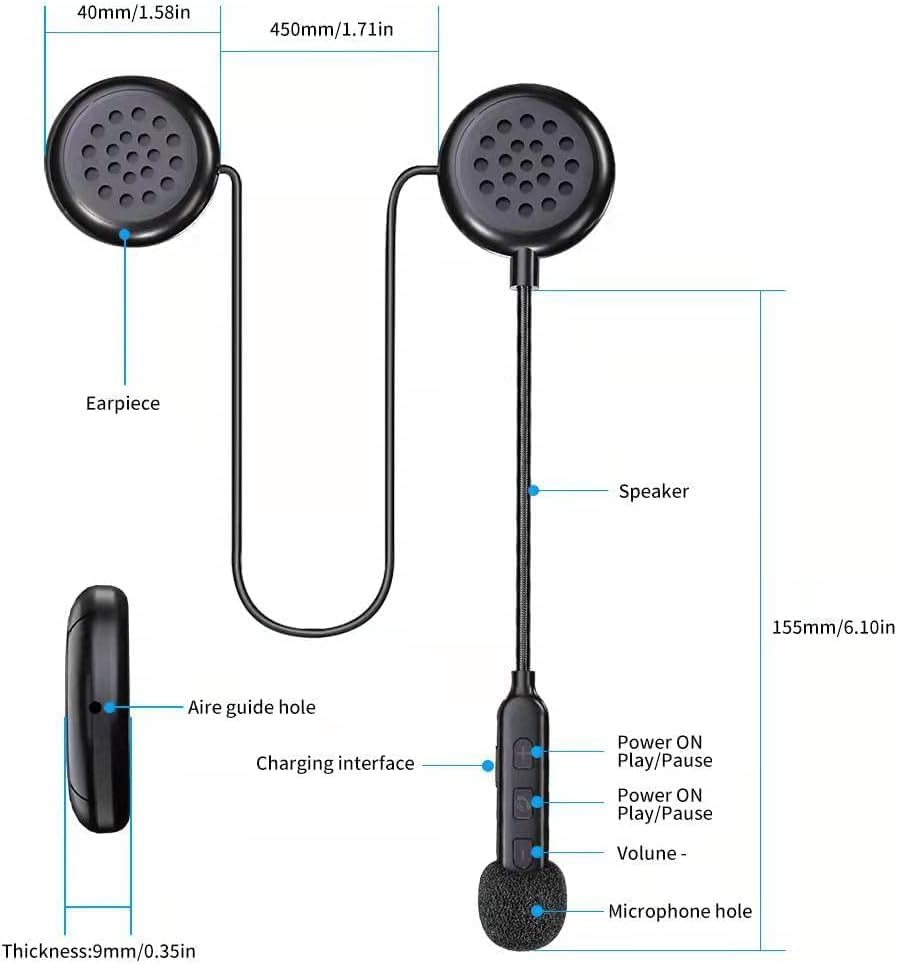
Image: The BT40 headset with water droplets, demonstrating its IP67 deep waterproof capability, suitable for use in rainy or snowy conditions.
Проблемаларды чечүү
| Көйгөй | Мүмкүн себеп | Чечим |
|---|---|---|
| Гарнитура күйбөйт. | Батарея аз. | Charge the headset for at least 2 hours using the provided USB cable. |
| Түзмөк менен жупташтыруу мүмкүн эмес. | Bluetooth is off on the device; headset is not in pairing mode; too far from device. | Ensure Bluetooth is enabled on your device. Make sure the headset is powered on and in pairing mode. Move the headset closer to the device (within 10 meters). Try restarting both devices. |
| Үн жок же үнү төмөн. | Volume too low on headset or connected device; improper connection. | Increase volume using the "+" button on the headset and on your connected device. Re-pair the headset with your device. |
| Microphone not picking up voice clearly. | Microphone not positioned correctly; damaged sponge cover. | Adjust the microphone arm so the microphone is close to your mouth. Replace the noise-reducing sponge head if it is worn. |
| үзгүлтүктүү байланыш. | кийлигишүү; аппарат өтө алыс; аз батарея. | Move away from sources of strong electromagnetic interference. Ensure the headset is within 10 meters of the connected device. Charge the headset. |
Кепилдик жана колдоо
For warranty information or technical support, please refer to the contact details provided with your purchase or visit the official JZAQ website. If you experience any dissatisfaction or issues, please contact customer service for assistance.
Байланыш: Please refer to your purchase documentation or the seller's information on the platform where you purchased the product.
Ask a question about this manual
Ask about setup, troubleshooting, compatibility, parts, safety, or missing instructions. Manuals+ will review the question and use this page’s manual context to help answer it.