
1. Киришүү
Сатып алганыңыз үчүн рахматasing the Audizio Genua DAB Radio. This manual provides essential information for the safe and efficient operation of your device. Please read it thoroughly before use and retain it for future reference. The Audizio Genua is a versatile DAB+/FM stereo radio featuring Bluetooth connectivity, USB playback, and an alarm function, designed for both home and portable use.
2. Коопсуздук маалыматы
- Кубат булагы: Берилген кубат адаптерин гана колдонуңуз. Көлөмүн текшериңизtage сиздин аймактын талаптарына дал келет.
- Суу жана ным: Аппаратты жамгырдын, нымдуулуктун же тамчылаган/чачыраган суюктуктардын таасирине дуушар кылбаңыз. Аппараттын үстүнө вазалар сыяктуу суюктуктар толтурулган буюмдарды койбоңуз.
- Вентиляция: Адекваттуу вентиляцияны камсыз кылыңыз. Вентиляция тешиктерин жаап албаңыз.
- Жылуулук: Аппаратты радиаторлор, жылуулук регистрлери, мештер же башка аппараттар (анын ичинде) сыяктуу жылуулук булактарынан алыс кармаңыз. ampкөтөргүчтөр) жылуулукту пайда кылуучу.
- Тазалоо: Кургак чүпүрөк менен гана тазалаңыз.
- Тейлөө: Бул продуктту өзүңүз тейлөөгө аракет кылбаңыз. Бардык тейлөөнү квалификациялуу тейлөө кызматкерлерине тапшырыңыз.
- Антенна: Do not bend or force the antenna.
3. Пакеттин мазмуну
Таңгактан чыгарганда бардык буюмдардын бар экенин жана жакшы абалда экенин текшериңиз:
- Audizio Genua DAB Radio
- Алыстан башкаруу
- Кубаттуу адаптер
- Quick Start Guide (language not guaranteed)
4. Продукт бүтүп калдыview
4.1 Алдыңкы панелди башкаруу жана дисплей

Сүрөт 4.1: Алдыңкы view of the Audizio Genua DAB Radio.
The front panel features a clear color TFT display, two speaker grilles, and an array of control buttons and a central rotary knob. The display shows station information, track details, time, and menu options. Buttons include Menu, Preset, Scan, Dimmer, Alarm, and playback controls (Play/Pause, Skip). The central knob is used for volume adjustment, tuning, and selection.
4.2 Арткы панелдин туташуулары
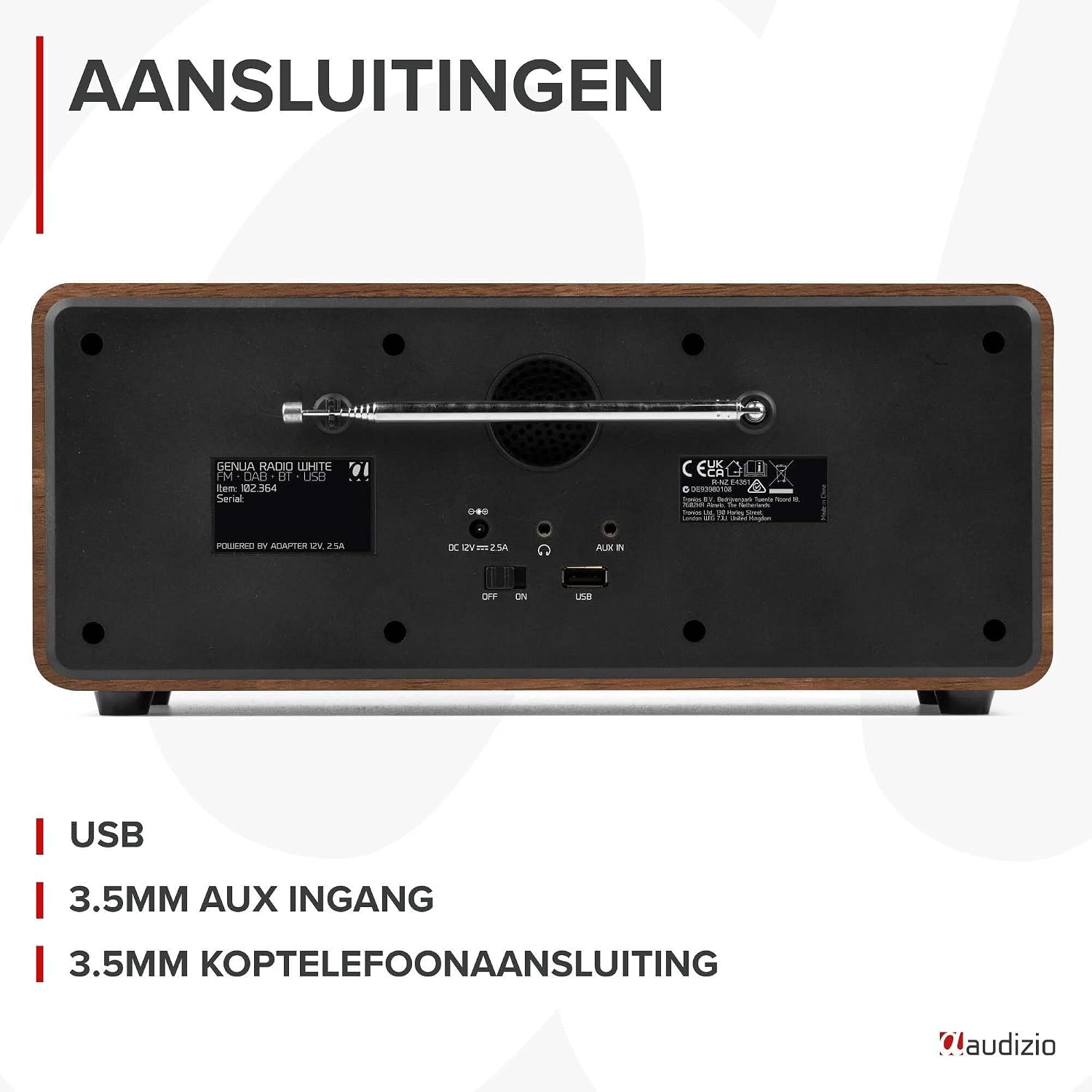
4.2-сүрөт: Арткы view of the Audizio Genua DAB Radio with connections.
The rear panel includes the telescopic antenna for radio reception, a USB port for media playback, a 3.5mm AUX input for external audio devices, a 3.5mm headphone output, a DC 12V power input, and a main power ON/OFF switch.
4.3 Алыстан башкаруу

Figure 4.3: Remote control for the Audizio Genua DAB Radio.
The included remote control provides full functionality, allowing you to power on/off, adjust volume, change modes, navigate menus, set alarms, and control playback from a distance.
5. Орнотуу
5.1 Кубат туташтыруу
- Connect the power adapter to the DC 12V input on the rear of the radio.
- Кубат адаптерин ылайыктуу розеткага сайыңыз.
- Flip the main power switch on the rear panel to the 'ON' position.
5.2 Антеннаны тууралоо
DAB+ жана FM радиолорун оптималдуу кабыл алуу үчүн телескопиялык антеннаны толугу менен сунуңуз. Эң жакшы сигнал сапаты үчүн анын абалын тууралаңыз.
5.3 Initial Setup and Auto Scan
- Upon first power-on, the radio may prompt you to perform an auto-scan for DAB+ stations. Select 'Yes' or press the 'Scan' button.
- The radio will scan for available DAB+ stations and store them. This process may take a few minutes.
- Скандоо аяктагандан кийин, радио биринчи жеткиликтүү станцияга туураланат.
6. Иштөө нускамалары
6.1 Режимди тандоо
Press the 'Mode' button on the remote control or the 'Menu' button on the unit to cycle through available modes: DAB+, FM, Bluetooth, USB, and AUX In.
6.2 DAB+ Радио операциясы
- DAB+ режимин тандаңыз.
- If no stations are found or you wish to rescan, press the 'Scan' button to perform a full scan.
- Use the 'Tune/Select' knob or the navigation buttons on the remote to browse through the list of available stations.
- Press the 'OK' button (on remote) or push the 'Tune/Select' knob to select a station.
- Алдын ала сакталган нерселерди сактоо: To store a favorite station, press and hold the 'Preset' button until the preset menu appears. Use the knob/navigation to select a preset number (1-30) and press 'OK' to confirm.
- Алдын ала орнотууларды эстөө: Briefly press the 'Preset' button, then use the knob/navigation to select the desired preset and press 'OK'.
6.3 FM радиосунун иштеши
- FM режимин тандаңыз.
- Авто сканерлөө: Жеткиликтүү FM станцияларын автоматтык түрдө издөө жана сактоо үчүн "Скандоо" баскычын басыңыз.
- Кол менен жөндөө: Use the 'Tune/Select' knob to manually tune to a specific frequency.
- Алдын ала сакталган нерселерди сактоо: Similar to DAB+ mode, press and hold 'Preset', select a number, and confirm.
- Алдын ала орнотууларды эстөө: Briefly press 'Preset', select the desired preset, and confirm.
6.4 Bluetooth байланышы
- Select Bluetooth mode. The display will show "Pairing" or "Waiting for connection".
- Смартфонуңузда же башка Bluetooth иштетилген түзмөгүңүздө Bluetooth'ду иштетиңиз жана жеткиликтүү түзмөктөрдү издеңиз.
- Select "Audizio Genua" from the list of devices.
- Once paired, the radio will confirm the connection, and you can start playing audio from your device.
6.5 USB ойнотуу
- MP3 камтыган USB флэш-дискти салыңыз fileарткы панелдеги USB портуна сайыңыз.
- Select USB mode. The radio will automatically detect the USB drive and begin playing the first compatible audio file.
- Use the playback control buttons (Play/Pause, Skip Forward/Backward) on the unit or remote to manage your music.
6.6 AUX киргизүү
- Connect an external audio device (e.g., MP3 player, smartphone) to the 3.5mm AUX IN port on the rear panel using an audio cable (not included).
- AUX режимин тандаңыз.
- Тышкы түзмөгүңүздөн ойнотууну жана үнүн башкарыңыз.
6.7 Ойготкуч жана Уйку таймери
- Ойготкуч орнотуу: Press the 'Alarm' button on the unit or remote. Follow the on-screen prompts to set Alarm 1 and Alarm 2, including time, source (DAB/FM/Buzzer), and volume.
- Чырым Function: Ойготкуч чырылдаганда, тындырууну иштетүү үчүн каалаган баскычты (Кубат баскычынан башка) басыңыз. Белгиленген убакыттан кийин ойготкуч кайрадан чырылдайт.
- Уйку таймери: Press the 'Sleep' button on the remote to set a sleep timer (e.g., 15, 30, 60 minutes). The radio will automatically turn off after the selected time.
6.8 Дисплейдин күңүрткүсү
Press the 'Dimmer' button on the unit or remote to adjust the brightness of the display. This is useful for different lighting conditions or for use in a bedroom.
7. Техникалык тейлөө
- Тазалоо: Радионун сыртын тазалоо үчүн жумшак, кургак чүпүрөктү колдонуңуз. Абразивдүү тазалоочу каражаттарды, момдорду же эриткичтерди колдонбоңуз.
- Антенна: Телескопиялык антеннаны бузуп албаш үчүн этияттык менен кармаңыз.
- Сактагыч: If storing the radio for an extended period, disconnect it from the power supply.
8. Кыйынчылыктарды
| Көйгөй | Мүмкүн себеп | Чечим |
|---|---|---|
| Күч жок | Power adapter not connected; Main power switch off | Ensure power adapter is securely connected and plugged in; Turn main power switch to 'ON' |
| Радио кабыл алуу начар (DAB+/FM) | Antenna not extended; Weak signal area; Interference | Fully extend and adjust the telescopic antenna; Try repositioning the radio; Move away from other electronic devices |
| Bluetooth жупташкан жок | Radio not in Bluetooth mode; Device not discoverable; Already paired with another device | Select Bluetooth mode on the radio; Ensure Bluetooth is enabled on your device and it's in pairing mode; Disconnect from other Bluetooth devices |
| USB ойнотуу иштебей жатат | USB флешкасы туура эмес салынган; шайкеш келбейт file format; USB drive corrupted | Ensure USB drive is fully inserted; Check if files are in MP3 format; Try a different USB drive |
| Үн жок | Үнү өтө төмөн; Үнсүз режим иштетилген; Туура эмес булак тандалып алынган | Increase volume; Check if mute is active; Ensure correct input source (DAB/FM/BT/USB/AUX) is selected |
9. Техникалык шарттар

Figure 9.1: Audizio Genua DAB Radio dimensions.
- Бренд: Аудизио
- Модель номери: Genua
- Түсү: Ак
- Өзгөчө өзгөчөлүгү: Bluetooth Connectivity, DAB+ Radio
- Байланыш технологиясы: Ax, Bluetooth, USB
- Продукциянын өлчөмдөрү (L x W x Y): 13.5 x 31 x 13.3 см
- Тюнер технологиясы: DAB+
- Стиль: Заманбап
- Кубат булагы: Электр зымдары
- Колдоого алынган радио тилкелери: FM, DAB+
- Шайкеш түзмөктөр: Smartphone, Tablet, Laptop, MP3 Player, Headphones, Speaker
- Тtage: 220 вольт
- Динамиктин максималдуу кубаттуулугу: 50 Ватт
- Батареялардын саны: 1 Non-standard battery (Type of battery required)
- Экран түрү: TFT
- Элемент Салмагы: 2.25 килограмм
10. Кепилдик жана колдоо
This product is covered by a standard manufacturer's warranty. For detailed warranty terms and conditions, please refer to the documentation provided at the time of purchase or contact your retailer. For technical support or service inquiries, please contact the Audizio customer support team through their official webсайт же сатып алуу пункту.