
KOFIRE UG-06
KOFIRE UG-06 зымсыз оюн гарнитурасынын инструкциясы
Модел: УГ-06 | Бренд: KOFIRE
Introduction
Thank you for choosing the KOFIRE UG-06 Wireless Gaming Headset. This manual provides detailed instructions for setup, operation, and maintenance to ensure you get the best experience from your new headset. The UG-06 is designed to deliver superior audio performance and comfort for gaming, work, and entertainment across multiple platforms.
Кутуда эмне бар
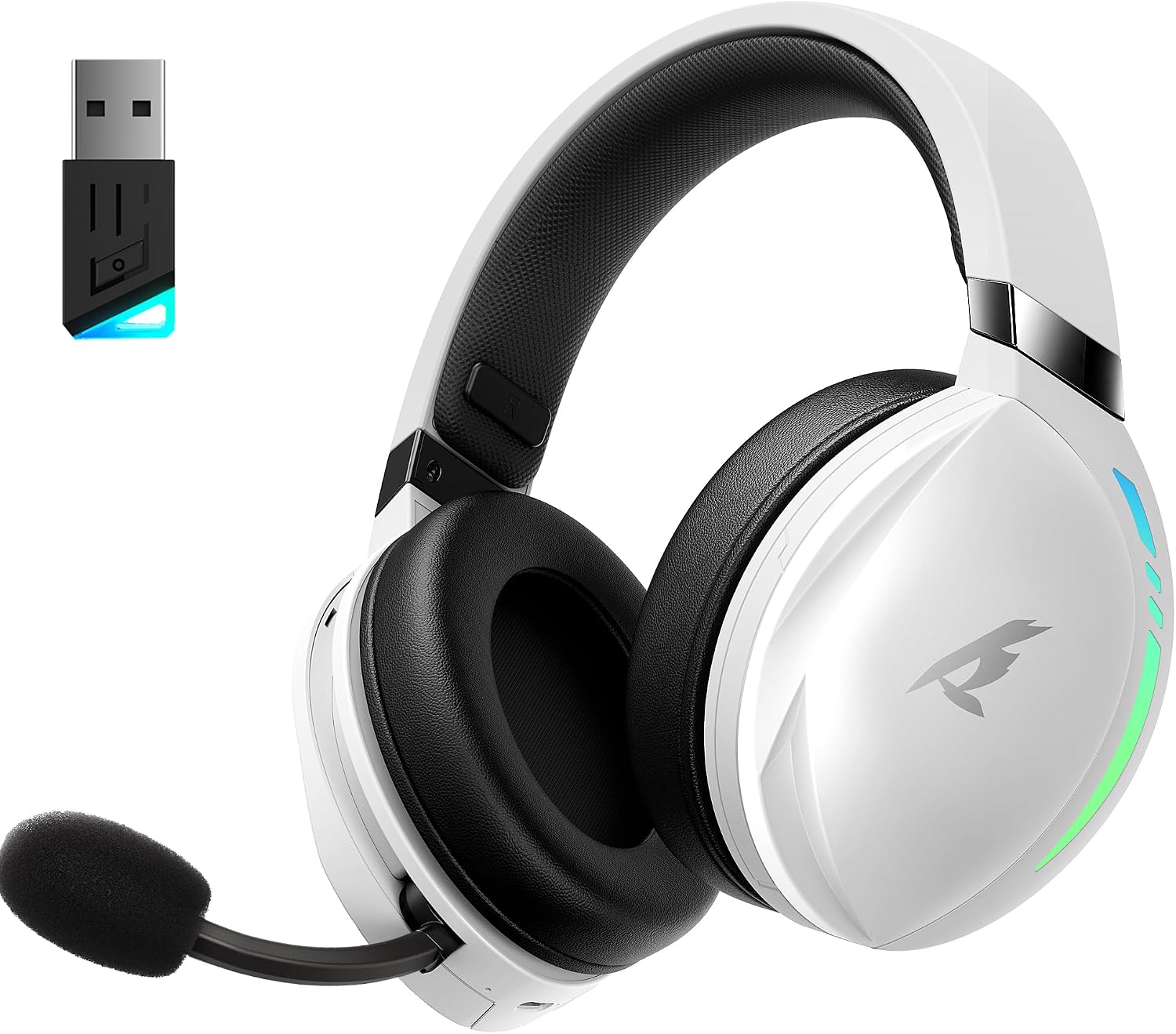
The KOFIRE UG-06 Wireless Gaming Headset in white and black, shown with its USB dongle.
- 1 x KOFIRE UG-06 Wireless Gaming Headset
- 1 x USB Dongle (2.4GHz Wireless Receiver)
- 1 x 0.8m TYPE-C Charging Cable
- 1 x Foam Mic Cover
- 1 x 3.5 мм аудио кабель
- 1 х Колдонуучунун колдонмосу (бул документ)
Продукт бүттүview жана Негизги өзгөчөлүктөрү

A user wearing the headset, illustrating the immersive 3D spatial audio experience.

Жакын план view of the retractable, hidden noise-canceling microphone.
- 50MM Driver & 3D Stereo Sound: Equipped with powerful 50mm drivers for excellent 3D stereo effects and high-fidelity sound, ensuring you hear every detail for an immersive gaming experience.
- 2.4Ghz Wireless Connection & Bluetooth 5.4: Advanced 2.4Ghz wireless technology and Bluetooth 5.4 provide a seamless and stable connection with ultra-low latency (15ms). Easily switch between Bluetooth and 2.4G dongle mode by triple-clicking the power button.
- Unmatched Comfort & Telescopic Noise Cancelling Mic: Ergonomic design with oversized, soft protein leather earmuffs for pressure reduction and effective noise isolation. The adjustable headband ensures a personalized fit. The noise-canceling microphone with a sponge cap blocks 80% of background noise, and its retractable design offers convenience.
- Extended Playtime & Cool RGB Design: Enjoy up to 65 hours of continuous play in music/video modes (lights off) or 40 hours with 2.4Ghz gaming. Dynamic breathing RGB lights enhance the gaming atmosphere. Note: RGB lighting doubles power consumption.
- Ар тараптуу шайкештик: Supports three connection modes: lossless 2.4GHz USB dongle, Bluetooth 5.4, and 3.5mm wired connection. Compatible with PS4, PS5, PC, Switch, Mac, Phone, and tablet.

The headset demonstrating its compatibility with multiple gaming platforms and devices.
Орнотуу нускамалары
1. Баштапкы заряддоо
Before first use, fully charge your headset using the provided USB Type-C charging cable. Connect the Type-C end to the headset's charging port and the USB-A end to a compatible power source (e.g., computer USB port, USB wall adapter). The charging indicator light will show charging status.
2. Connecting via 2.4GHz USB Dongle (Recommended for Gaming)
- Insert the 2.4GHz USB dongle into an available USB port on your device (PS4, PS5, PC, Mac, Switch).
- Power on the headset by pressing and holding the Power button until you hear a confirmation tone or see the indicator light.
- The headset should automatically pair with the dongle. A solid indicator light on both the headset and dongle typically signifies a successful connection.
- Гарнитура системаңыздын үн жөндөөлөрүндө аудио чыгаруу жана киргизүү түзмөгү катары тандалганын текшериңиз.
3. Bluetooth 5.4 аркылуу туташуу
- With the headset powered on, triple-click the Power button to switch to Bluetooth mode. The indicator light will flash, indicating pairing mode.
- On your device (phone, tablet, PC), go to Bluetooth settings and search for "KOFIRE UG-06" (or similar).
- Select the headset to pair. Once connected, the indicator light will become solid.
4. Connecting via 3.5mm Wired Connection
- 3.5 мм аудио кабелдин бир учун гарнитуранын 3.5 мм портуна туташтырыңыз.
- Экинчи учун түзмөгүңүздөгү 3.5 мм аудио уячасына туташтырыңыз.
- The headset will operate in passive mode, drawing no power from its internal battery.
Иштөө нускамалары
Гарнитураны башкаруу

Деталдаштырылган view of the control buttons and volume wheel on the headset's earcup.

Гарнитура showcasing its dynamic breathing RGB lighting feature.
- Күйгүзүү/өчүрүү: Кубат баскычын 3 секунд басып, кармап туруңуз.
- Үндү көзөмөлдөө: Use the scroll wheel on the earcup to adjust the volume up or down.
- Микрофондун үнүн басуу/ачуу: Press the dedicated Mute button on the earcup to toggle the microphone on or off.
- Которуу режими: Triple-click the Power button to switch between 2.4GHz wireless and Bluetooth modes.
- RGB жарыктандыруу: Press the RGB button to cycle through lighting effects or turn them off. Note that turning off RGB lights extends battery life.
- Микрофонду колдонуу: Pull the telescopic microphone down when speaking. Ensure the foam mic cover is in place to reduce plosives and background noise. Push the microphone back into the earcup when not in use.
Техникалык тейлөө
- Тазалоо: Гарнитураны тазалоо үчүн жумшак, кургак чүпүрөк колдонуңуз. Катуу химиялык заттардан же абразивдүү материалдардан алыс болуңуз.
- Сактагыч: Гарнитураны күн нурунан жана экстремалдык температурадан алыс салкын, кургак жерде сактаңыз.
- Батареяга кам көрүү: Батареянын иштөө мөөнөтүн узартуу үчүн, гарнитураны бат-баттан толук зарядсыздандырбаңыз. Дайыма колдонулбаса да, аны дайыма заряддаңыз.
- Микрофонго кам көрүү: Handle the retractable microphone gently to prevent damage.
Проблемаларды чечүү
| Маселе | Чечим |
|---|---|
| No sound/microphone not working (2.4GHz) |
|
| Bluetooth жупташуу көйгөйлөрү |
|
| Батареянын иштөө мөөнөтү кыска |
|
| Sound quality issues (wired mode) |
|
Техникалык шарттар
| Өзгөчөлүк | Деталь |
|---|---|
| Модель аты | УГ-06 |
| Байланыш технологиясы | 2.4 ГГц зымсыз, Bluetooth 5.4, 3.5 мм зымдуу |
| Аудио драйверинин өлчөмү | 50 миллиметр |
| Батареянын иштөө мөөнөтү | Up to 65 Hours (music/video, lights off), 40 Hours (2.4Ghz gaming) |
| Заряддоо убактысы | 3 саат |
| Аудио кечигүү | 15 Миллисекунд |
| Noise Control | Sound Isolation, ENC Noise Canceling Mic |
| Шайкеш түзмөктөр | PS4, PS5, PC, Switch, Mac, Phone, Tablet |
| Материал | Leather, Plastic, Polycarbonate (PC), Soft Memory Sponge Cushions |
| Элемент Салмагы | 1.19 фунт |
| Продукциянын өлчөмдөрү | 7.5 x 1 x 7.9 дюйм |
Кепилдик жана колдоо
KOFIRE provides a reliable 24-hour online service to ensure customer satisfaction. For any issues, questions, or support needs, please contact KOFIRE customer service through the retailer's platform or the official KOFIRE webсайт.
Please refer to your purchase documentation for specific warranty details and duration.
Ask a question about this manual
Ask about setup, troubleshooting, compatibility, parts, safety, or missing instructions. Manuals+ will review the question and use this page’s manual context to help answer it.